Welcome to Transbot SE repository
3.Keyboard control
3. Keyboard control
Function package path: ~/transbot_ws/src/transbot_ctrl
Start low-level control
jetson motherboard/Raspberry Pi 4B
xxxxxxxxxxroslaunch transbot_bringup bringup.launchRaspberry Pi 5
Before running, please confirm that the large program has been permanently closed
Enter docker
Note: If there is a terminal that automatically starts docker, or there is a docker terminal that has been opened, you can directly enter the docker terminal to run the command, and there is no need to manually start docker
Start docker manually
xxxxxxxxxx./run_docker.sh
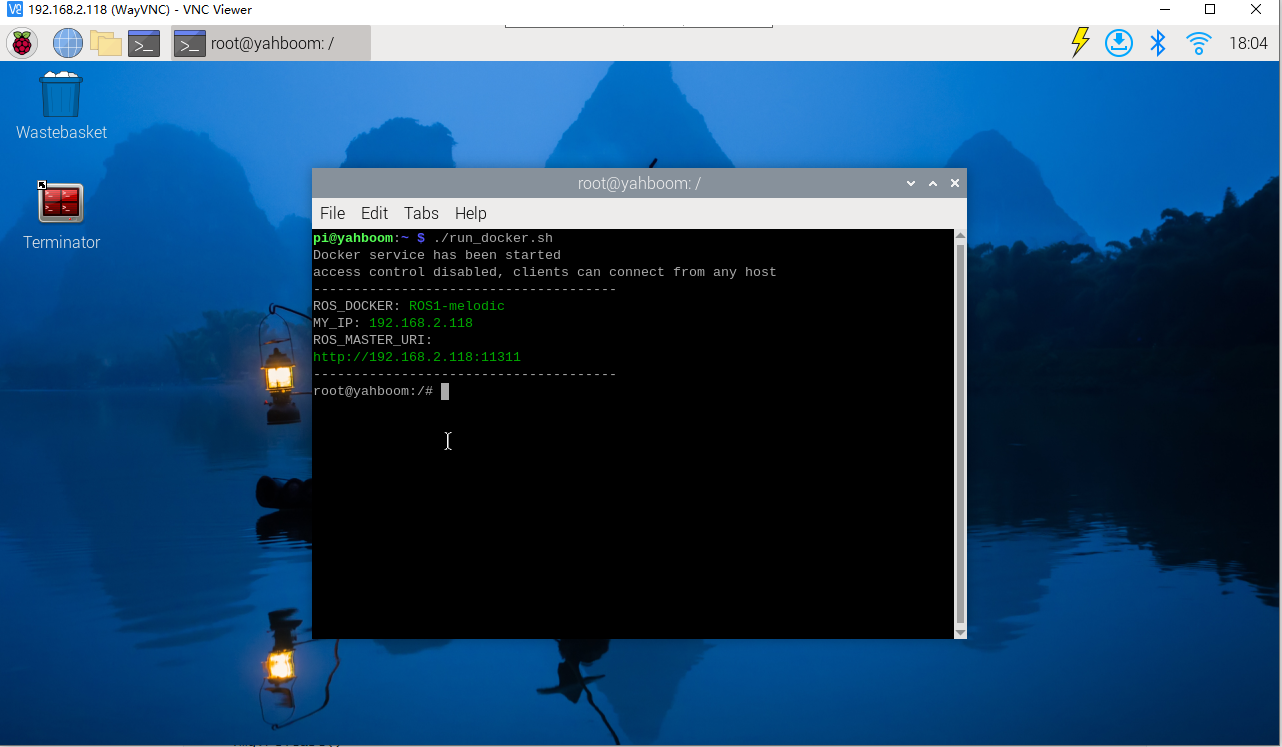
xxxxxxxxxxroslaunch transbot_bringup bringup.launch
3.1, teleop_twist_keyboard.py
Wiki: http://wiki.ros.org/teleop_twist_keyboard
Source code: https://github.com/ros-teleop/teleop_twist_keyboard
This function package can be installed directly into the system. The factory image of the car has been installed, no need to reinstall it
Install
jetson motherboard/Raspberry Pi
xxxxxxxxxxsudo apt-get install ros-melodic-teleop-twist-keyboardRaspberry Pi 5
Enter the same docker from multiple terminals
Keep the program of the previous docker terminal running and open a new terminal
Enter the following command
xxxxxxxxxxdocker ps
Enter the same docker and use the following 18870bc3dc00 to modify the ID displayed on the actual terminal.
xxxxxxxxxxdocker exec -it 18870bc3dc00 /bin/bash
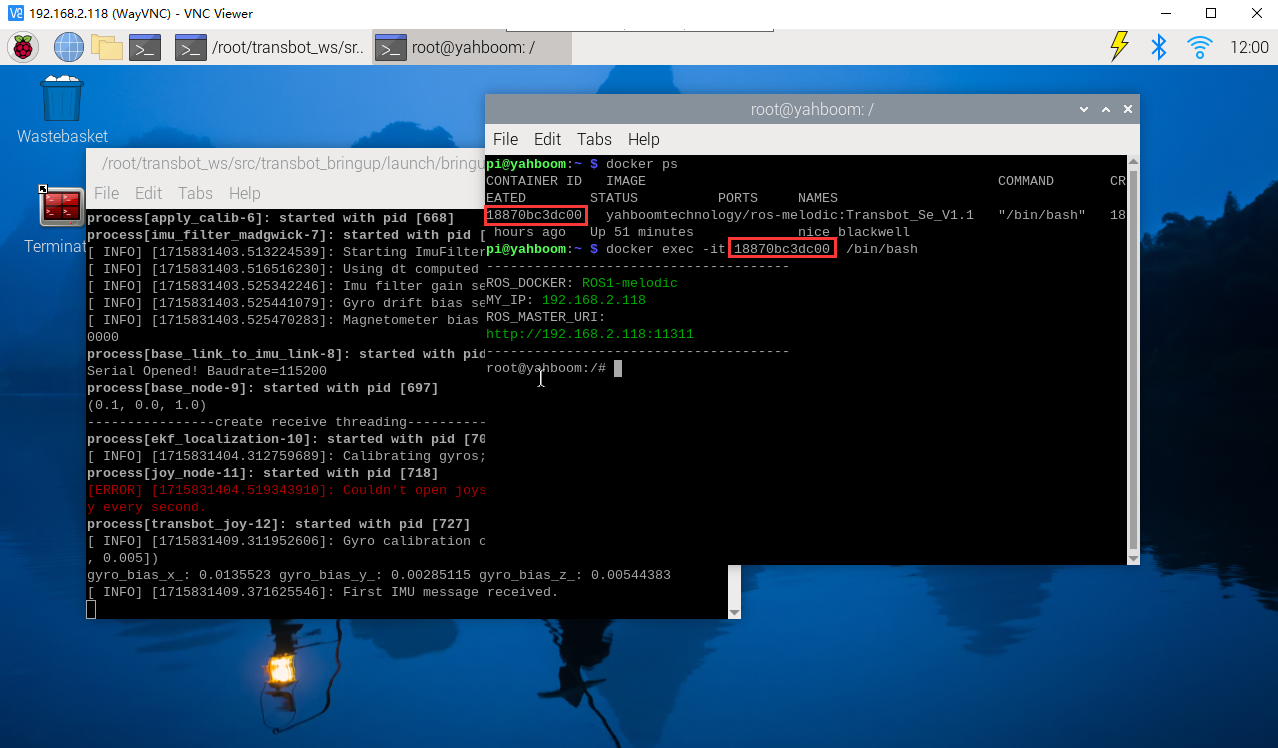
xxxxxxxxxxsudo apt-get install ros-melodic-teleop-twist-keyboard
run
jetson motherboard/Raspberry Pi 4B
xxxxxxxxxxrosrun teleop_twist_keyboard teleop_twist_keyboard.pyRaspberry Pi 5
Enter the same docker from multiple terminals
Keep the program of the previous docker terminal running and open a new terminal
Enter the following command
xxxxxxxxxxdocker ps
Enter the same docker and use the following 18870bc3dc00 to modify the ID displayed on the actual terminal.
xxxxxxxxxxdocker exec -it 18870bc3dc00 /bin/bash
xxxxxxxxxxrosrun teleop_twist_keyboard teleop_twist_keyboard.py
- control
| Button | Car [linear, angular] | Button | Car [linear, angular] |
|---|---|---|---|
| [i] or [I] | [linear, 0] | [u] or [U] | [linear, angular] |
| [,] | [-linear, 0] | [o] or [O] | [linear, - angular] |
| [j] or [J] | [0, angular] | [m] or [M] | [- linear, - angular] |
| [l] or [L] | [0, - angular] | [.] | [- linear, angular] |
| Button | Speed change | Button | Speed change |
| [q] | Linear speed and angular speed are both increased by 10% | [z] | Linear speed and angular speed are both reduced by 10% |
| [w] | Only the linear speed increases by 10% | [x] | Only the linear speed decreases by 10% |
| [e] | Only the angular velocity increases by 10% | [c] | Only the angular velocity decreases by 10% |
In addition to the above keys, any key stops movement. [Ctrl]+[c] to exit.
jetson motherboard/Raspberry Pi 4B
xxxxxxxxxxrqt_graphRaspberry Pi 5
Enter the same docker from multiple terminals
Keep the program of the previous docker terminal running and open a new terminal
Enter the following command
xxxxxxxxxxdocker ps
Enter the same docker and use the following 18870bc3dc00 to modify the ID displayed on the actual terminal.
xxxxxxxxxxdocker exec -it 18870bc3dc00 /bin/bash
xxxxxxxxxxrqt_graph
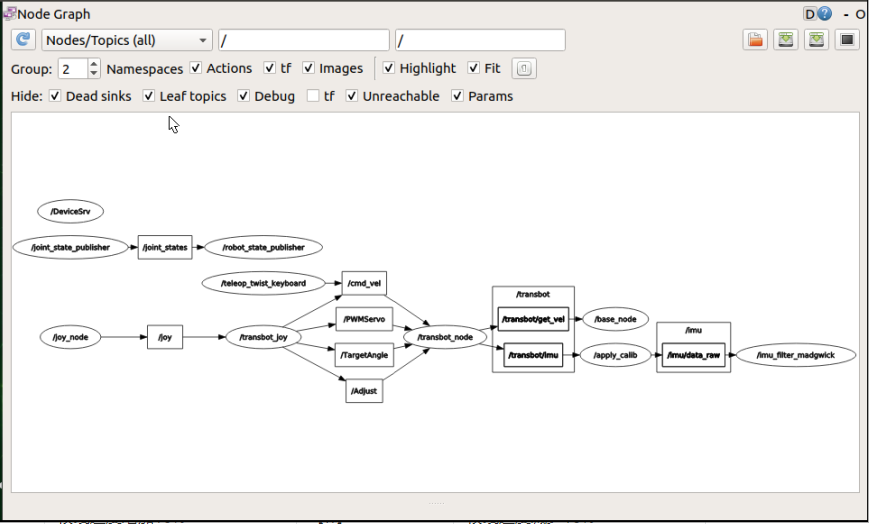 The node [teleop_twist_keyboard] publishes a message to the topic [/cmd_vel] and is subscribed by the node [/transbot_node].
3.2, transbot_keyboard.py
Note: Button control method is the same as above
Start mode
jetson motherboard/Raspberry Pi 4B
xxxxxxxxxxrosrun transbot_ctrl transbot_keyboard.pyroslaunch transbot_ctrl transbot_keyboard.launch
Raspberry Pi 5
Enter the same docker from multiple terminals
Keep the program of the previous docker terminal running and open a new terminal
Enter the following command
xxxxxxxxxxdocker ps
Enter the same docker and use the following 18870bc3dc00 to modify the ID displayed on the actual terminal.
xxxxxxxxxxdocker exec -it 18870bc3dc00 /bin/bash
xxxxxxxxxxrosrun transbot_ctrl transbot_keyboard.pyroslaunch transbot_ctrl transbot_keyboard.launch
Code analysis
Mainly used select module, termios module and tty module
xxxxxxxxxximport sys, select, termios, tty- The select module is mainly used for socket communication, seeing changes in file descriptions, and completing work in a non-blocking manner.
- The termios module provides an interface for IO controlled POSIX calls for tty
- The tty module is mainly used to change the mode of the file descriptor fd
Get current key information
xxxxxxxxxxdef getKey(): #tty.setraw(): Change the file descriptor fd mode to raw; fileno(): Return an integer file descriptor (fd) tty.setraw(sys.stdin.fileno()) # select(): Directly call the IO interface of the operating system; monitor all file handles with the fileno() method rlist, _, _ = select.select([sys.stdin], [], [], 0.1) # Read a byte input stream if rlist: key = sys.stdin.read(1) else: key = '' #tcsetattr sets the tty attribute of the file descriptor fd from the attribute termios.tcsetattr(sys.stdin, termios.TCSADRAIN, settings) return keyGet speed limit
xxxxxxxxxx linear_limit = rospy.get_param('~linear_limit', 0.45) angular_limit = rospy.get_param('~angular_limit', 2.0)control flow
# Get current key information key = getKey() # Determine whether the key string is in the mobile dictionary if key in moveBindings.keys(): x = moveBindings[key][0] th = moveBindings[key][1]