Welcome to Raspberry Pi 5 repository
8. Raspberry PI PCIe connector
8. Raspberry PI PCIe connector
PCIe interface
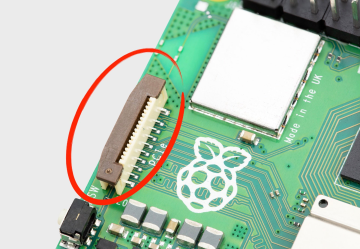
Raspberry Pi 5 has an FPC connector on the right-hand side of the board. This connector breaks out PCIe Gen 2.0 x1 interface for fast peripherals.
NOTE:An M.2 HAT which provides an M.2 connector to allow the use of NVMe drives is still in prototype, and has not yet been released.
Enabling PCIe
By default the PCIe connector is not enabled. To enable it you should add the following option into /boot/firmware/config.txt and reboot:
# Enable the PCIe External connector.dtparam=pciex1
A more memorable alias for pciex1 exists, so you can alternatively add dtparam=nvme to the /boot/firmware/config.txt file.
NOTE:Enumeration of PCIe devices behind a switch is not currently supported.
PCIe Gen 3.0
The connection is certified for Gen 2.0 speeds (5 GT/sec), but you can force it to Gen 3.0 (10 GT/sec) if you add the following lines to your /boot/firmware/config.txt.
x# Enable the PCIe external connectordtparam=pciex1# Force Gen 3.0 speedsdtparam=pciex1_gen=3
The Raspberry Pi 5 is not certified for Gen 3.0 speeds, and connections to PCIe devices at these speeds may be unstable.
You should then reboot your Raspberry Pi for these settings to take effect.