yahboom
HomeLearn
Solution
Blog
Online Store
About Us
EN/中文
Raspbot V2📖
1.About Raspbot V2
  • 1. First trial
  • 2. Expansion board interface distribution
  • 3. About battery and charging
  • 4. Install servo PTZ
  • 5.Servo Gimbal Installation
  • 6. Important Notes (Read Before Starting)
2.Assembly
  • Installation Video
3.Car basic course
  • 0. Preparation before development
  • 1.Buzzer control
  • 2.Key reading
  • 3.RGB control
  • 4.Servo control (PTZ control)
  • 5.Motor control
  • 6.Printing ultrasonic data
  • 7.Tracking module status printing
  • 8.IR control key value printing
4.Car motion control course
  • 0.Mecanum wheel motion principle
  • 1.Car vertical movement
  • 2.Car diagonal movement
  • 3.Car sideways movement
  • 4.Car rotation movement
  • 5.Car patrol
5.Car advanced courses
  • 1.Infrared patrol car
  • 2.Ultrasonic avoid
  • 3.Ultrasonic follow
  • 4.Infrared tracking+ ultrasonic avoid
  • 5.Restricting
  • 6.Infrared remote control car
6.OpenCV courses
A. Getting Started with OpenCV
  • 1. Introduction to OpenCV
  • 2.OpenCV image reading and display
  • 3. OpenCV image writing
  • 4. OpenCV Image Quality
  • 5.OpenCV pixel operations
B. OpenCV geometric transformation
  • 1. Image scaling
  • 2. Image cutting
  • 3. Image translation
  • 4. Image mirroring
  • 5. Affine Transformation
  • 6. Image Rotation
  • 7. Perspective Transformation
C. OpenCV image processing and text line drawing
  • 1. Grayscale processing
  • 2. Image Binarization
  • 3. Edge Detection
  • 4. Line drawing
  • 5. Rectangle and circle drawing
  • 6. Text and image drawing
D. Image beautification
  • 1. Color Image Histogram
  • 2. Histogram Equalization
  • 3. Image repair
  • 4. Brightness enhancement
  • 5. Smooth and whiten
  • 6. Gaussian mean filtering
  • 7. Median Filter
E. Machine Learning
  • 1. KNN
  • 2. SVM
7.AI vision recognition course
  • 1.Camera driver tutorial
  • 2.Color recognition
  • 3.HSV value test
  • 4.Object Recognition
  • 5.QR code recognition
  • 6.Face recognition
  • 7.License Plate Recognition
  • 8. Human Pose Estimation
  • 9. Target detection
  • 10.yolov5-lite
  • 11. Gesture Recognition
  • 12. Face Detection
  • 13. Face effects
  • 14. 3D Object Recognition
  • 15. Paintbrush
  • 16. Finger control
8.AI vision interaction module
  • 1. Color tracking
  • 2. Color follows
  • 3. QR code recognition to control movement
  • 4. Face tracking
  • 5. Face following
  • 6. Visual tracking
  • 7. Garbage identification
  • 8. Track map Autopilot(purchased separately)
  • 9. Gesture following
9.Voice control basic course(For Superior Kit)new
  • 1.Voice control car movement
  • 2.Voice control RGB light
  • 3.Voice control color recognition
  • 4.Voice control autonomous driving
  • 5.Voice control car tracking
10.AI large model knowledge(For Superior Kit)new
  • 1.AI large model types and principles
  • 2.RAG retrieval enhancement and model training samples
  • 3.Embodied intelligent robot system architecture
  • 4.Embodied intelligent functions core source code
  • 5.Configure AI large model(Required)
11.AI Large Model Development(For Superior Kit & Reference)new
  • 1.Register a model service provider account
  • 2. Configuring API-KEY(Optional)
  • 3. Introduction to Dify
  • 4. Basic Dify Features
  • 5. Deploy the RAG knowledge base
  • 6. AI Large Model Development - chatbot
  • 7. RAG knowledge base + chatbot
  • 8. AI agent workflow
  • 9. Custom wake-up response
  • 10. Core module testing tools
12.AI large basic course(For Superior Kit)new
  • 1.Free conversation
  • 2.Text-to-picture
  • 3.Scene description
  • 4.Video description
  • 5.Intelligent action choreography
  • 6.Dual-model agent application
13.ROS2-Robot chassis control course
  • 1. Robot information release
  • 2. Robot keyboard control
  • 3. URDF Model
14.ROS2-OpenCV course
  • 1.ROS+Opencv application
  • 2. AR Vision
  • 3. Mediapipe fun gameplay
  • 4. Gesture control car movement
  • 5. Gesture control car actions
  • 6. Palm control car movement
  • 7. Palm control servo PTZ
  • 8. Visual tracking
  • 9. AprilTag code recognition
  • 10. AprilTag tag code tracking
  • 11. AprilTag tag code follow
15.Development environment course
  • 1. Introduction to Raspberry Pi 5
  • 2. Image writing and backup
  • 3. Start the Raspberry Pi 5
  • 4. Remote Access
  • 5. Remote file transfer
  • 6. Common Linux commands and use of vim editor
  • 7. Install Raspbot V2 driver library
  • 8. Jupyter Lab environment construction
  • 9. Jupyter Lab plugin installation
  • 10. Basic use of Jupyter Widgets
16.Raspberry Pi basic settings
  • 1.Update and upgrade the operating system
  • 2. Introduction to raspi-config tool
  • 3. config.txt file description
  • 4. Network Configuration
  • 5. Set display resolution and rotation
  • 6. Set screen sleep
  • 7. Get real-time temperature of RPi
  • 8. Play audio and video
  • 9. Use USB Camera
  • 10.Use MIPI camera
17.Docker course
  • 1. Overview and installation
  • 2. Common commands
  • 3. Understand and publish images
  • 4. Docker data processing
  • 5. Enter docker container
18.ROS2 basic course
  • 1. Introduction to ROS2
  • 2.ROS2 install Humble
  • 3. ROS2 development environment
  • 4. ROS2 workspace
  • 5. ROS2 function package
  • 6. ROS2 node
  • 7.ROS2 topic communication
  • 8. ROS2 service communication
  • 9. ROS2 action communication
  • 10. ROS2 custom interface message
  • 11. ROS2 parameter service case
  • 12. ROS2 meta-function package
  • 13. ROS2 distributed communication
  • 14. ROS2 DDS
  • 15. ROS2 time related API
  • 16. ROS2 common command tools
  • 17. ROS2 rviz2 use
  • 18. ROS2 rqt toolbox
  • 19. ROS2 Launch startup file configuration
  • 20. ROS2 recording and playback tool
  • 21. ROS2 URDF model
  • 22. ROS2 Gazebo simulation platform
  • 23.ROS2 TF2 coordinate transformation
Download
  • APP(iOS/Android)
  • Code
  • System_File
  • Instruction Manual
  • Hardware_Info
  • 3D_Model_File
  • ROS2_Basic_VM
Download ZIP

Welcome to Raspbot V2 repository

当製品の日本語版マニュアル資料は、こちらからご取得ください。

0.Mecanum wheel motion principle

Mecanum Wheel Movement Principle

Mecanum Wheel Movement PrincipleStructure of Mecanum WheelMotion state analysisMecanum wheel analysisWheel AWheel BAnalysis of the motion state of the carMotion decompositionForward/BackwardLeft/Right PanFront/Back PanRotate in PlaceStopNotes

The Mecanum Wheel is a specially designed wheel, which is mostly used in scientific research, teaching, robot competitions and other scenarios. Its movement mode is very cool, including forward movement, lateral movement, oblique movement, rotation and their combination.

Structure of Mecanum Wheel

The Mecanum Wheel (hereinafter referred to as the Mecanum Wheel) is composed of a hub and a roller around the hub. The roller is a small driven roller without power. The angle between the axis of the Mecanum Wheel roller and the axis of the hub is 45 degrees, and there are two types of wheels A and B that are mirror images of each other, or they are called left-handed wheels and right-handed wheels.
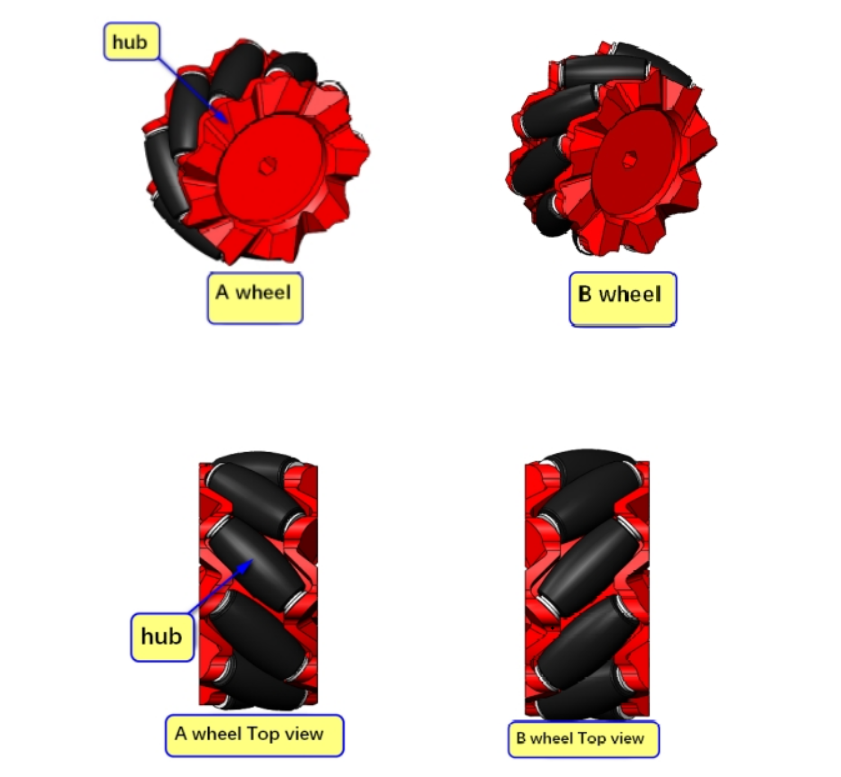
image-20240601181000356

Motion state analysis

Mecanum wheel analysis

Take the front of the trolley as the positive direction, and agree that the direction of the wheel moving forward is the motor forward rotation, and the direction of the wheel moving backward is the motor reverse rotation.

​x
The rollers on the outer periphery of the Mecanum wheel are in contact with the ground. When the Mecanum wheel rotates around the hub shaft, the rollers will generate friction with the ground. We can decompose the ground friction along the directions perpendicular and parallel to the roller axis.

Among them, the component perpendicular to the roller axis belongs to rolling friction, which causes the roller to rotate and is an invalid motion;
The component parallel to the roller axis belongs to static friction, which causes the roller to move relative to the ground, thereby driving the entire Mecanum wheel to move along the roller axis.

Wheel A

xxxxxxxxxx
The actual direction of movement needs to be determined based on the part of the wheel that contacts the ground

Forward: The actual movement is diagonally to the right front

Backward: The actual movement is diagonally to the left rear
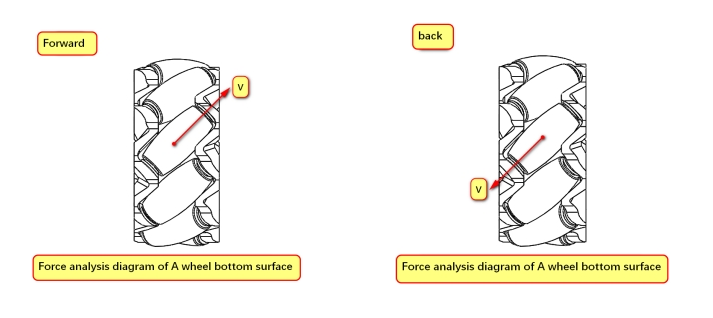
image-20240601181827293

Wheel B

xxxxxxxxxx
The actual direction of movement needs to be determined based on the part of the wheel that contacts the ground

Forward: The actual movement is diagonally to the left front

Backward: The actual movement is diagonally to the right rear
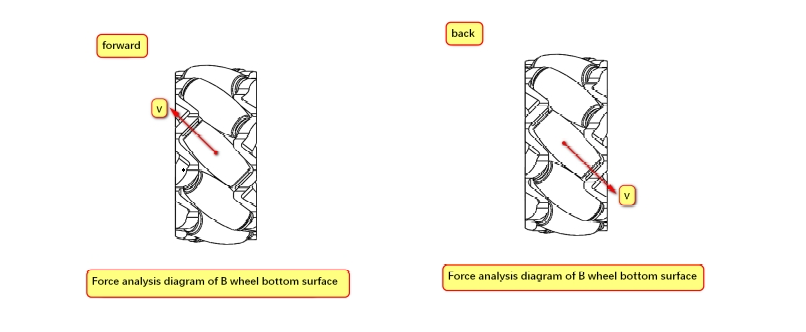
image-20240601181932874

Analysis of the motion state of the car

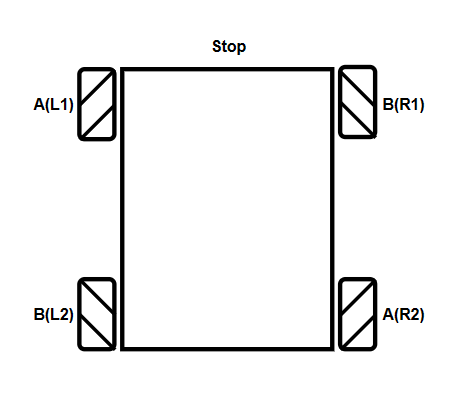
The actual distribution of the Mecanum wheel of our car is ABBA type. The actual installation can refer to the top view in the picture for installation. The stick shape of the Mecanum wheel in the top view is "X-shaped".

xxxxxxxxxx
For motion analysis, it is necessary to refer to the contact part of the Mecanum wheel with the ground for analysis!
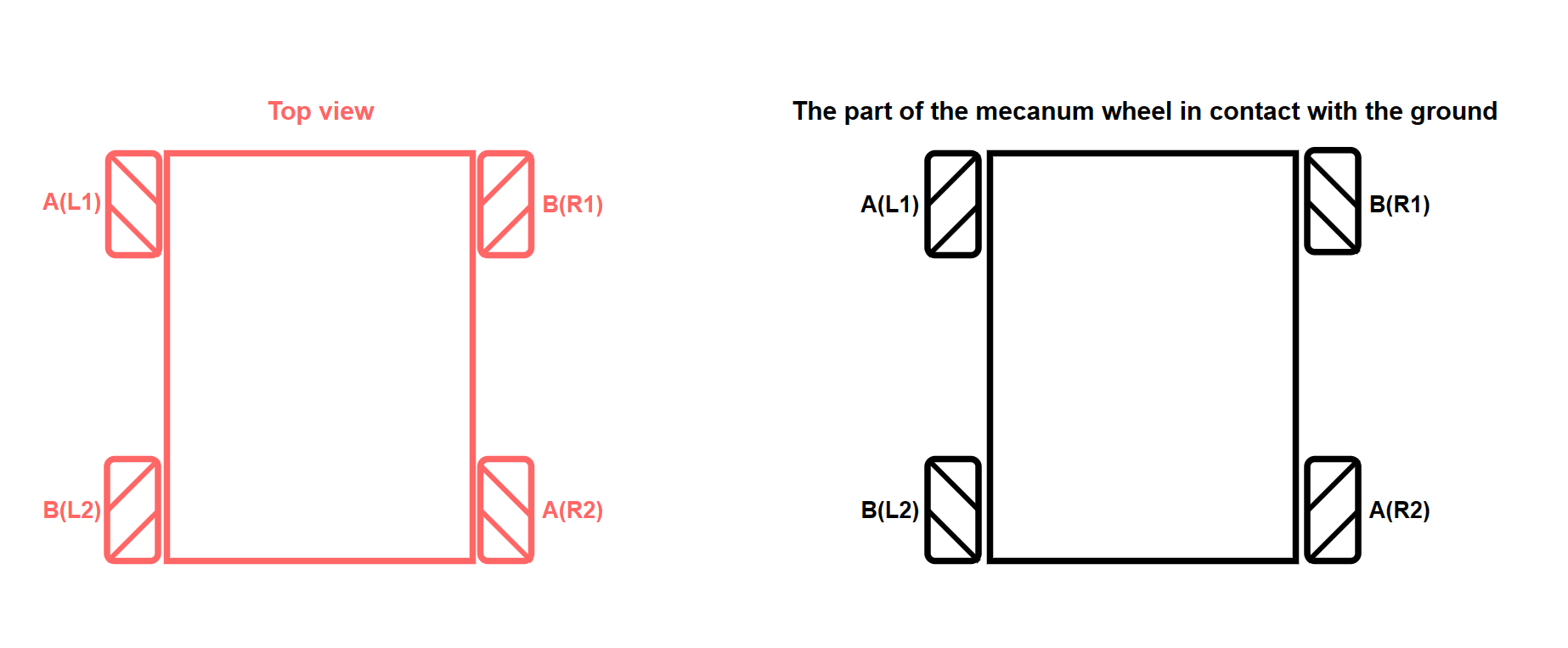
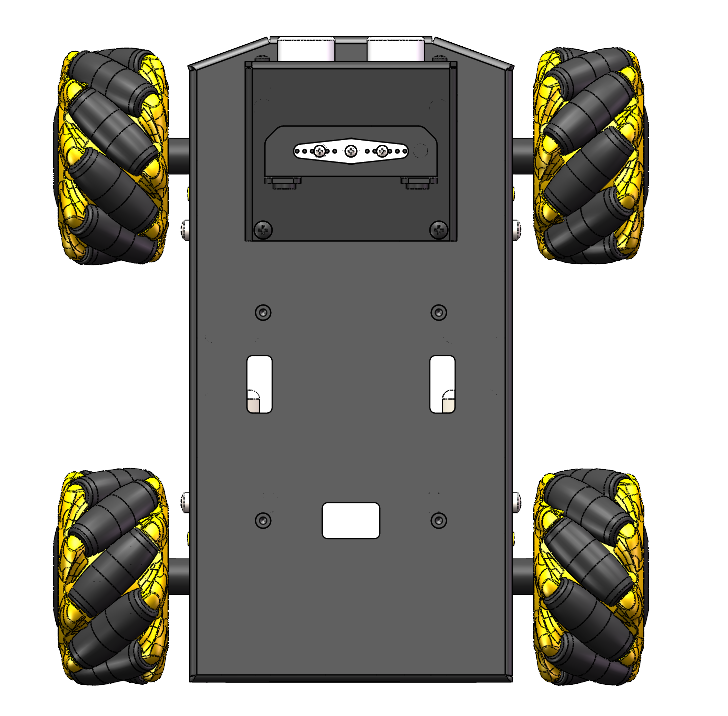
image-20240601212415142

1ae495e7cbf3f8b4d3d454e282c5ba7e

Motion decomposition

The following figure demonstrates the speed decomposition of the car's forward state.

xxxxxxxxxx
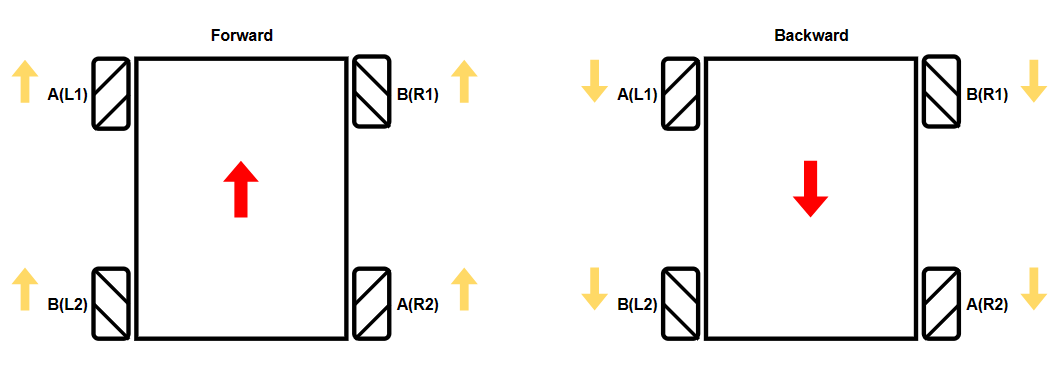
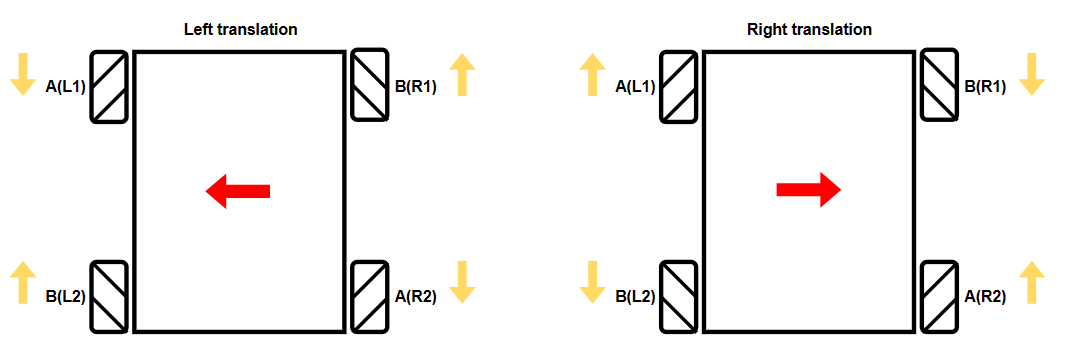
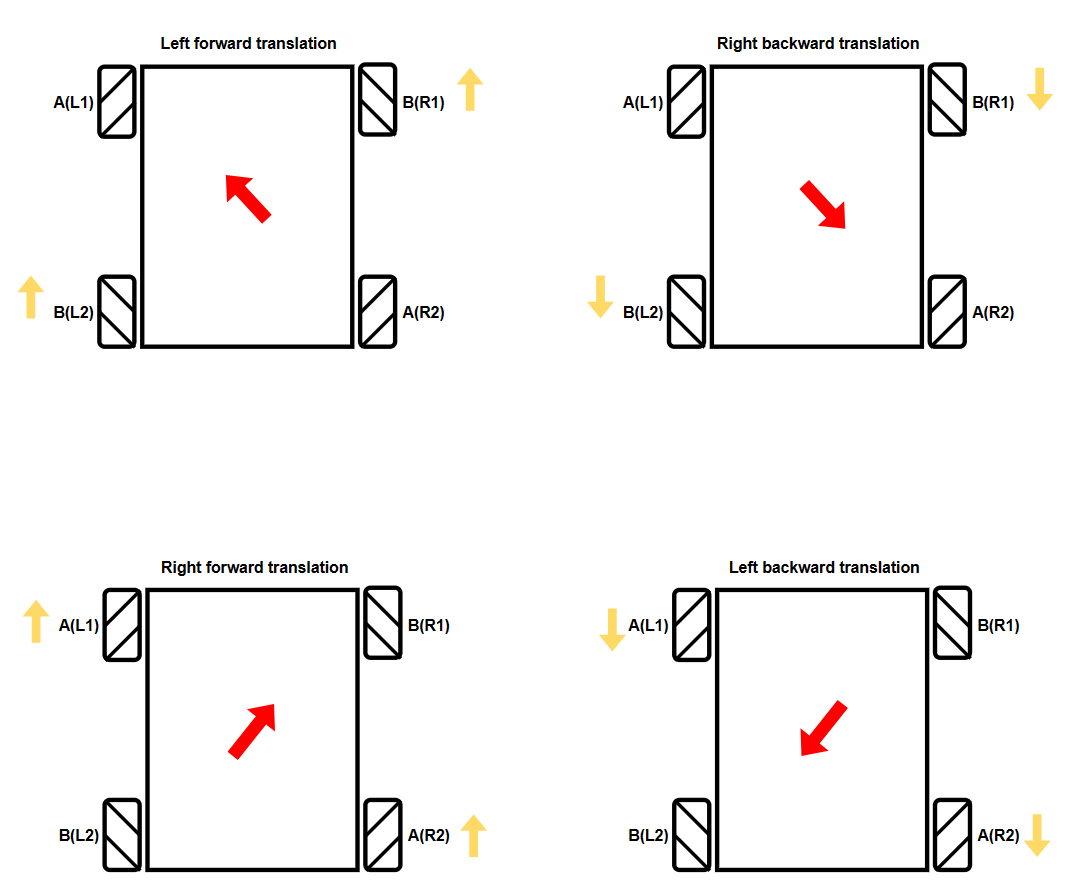
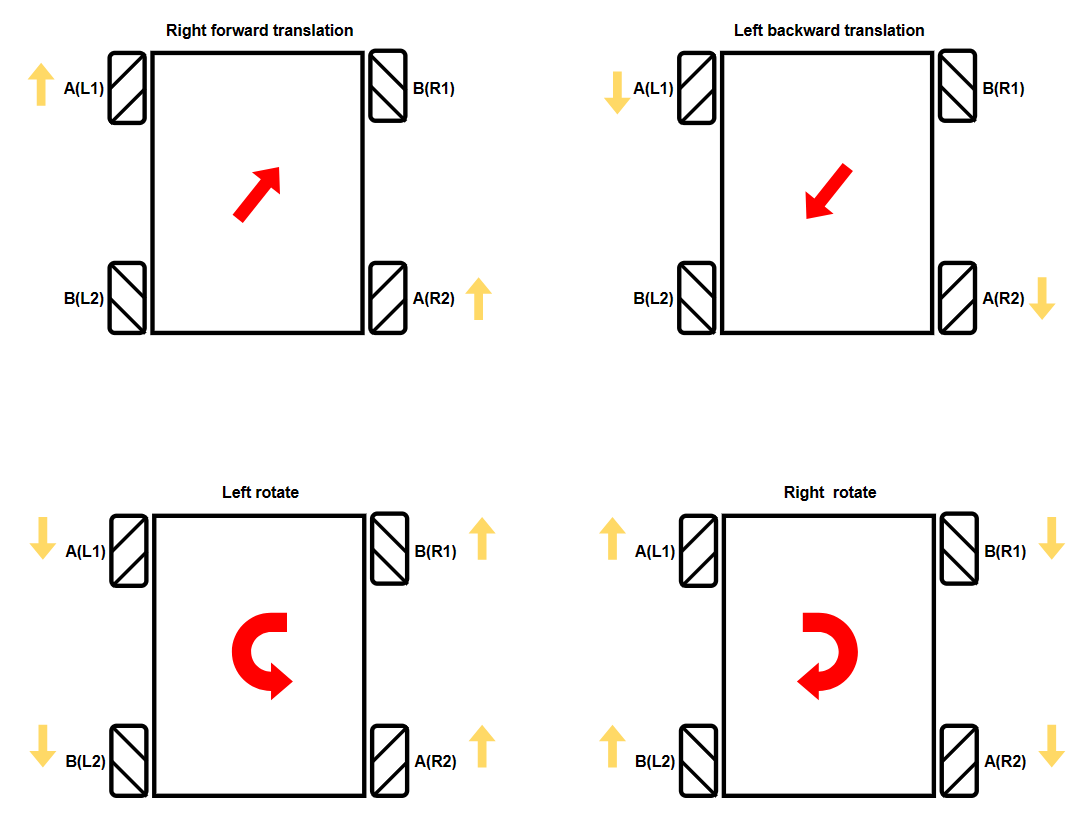
Yellow arrow: motor rotation direction (upward means forward - motor forward rotation, downward means backward - motor reverse rotation)
Red arrow: actual movement direction of the car
Green arrow: speed decomposition direction (where the dotted arrow is the speed component after offset, and the red arrow is the actual speed component)
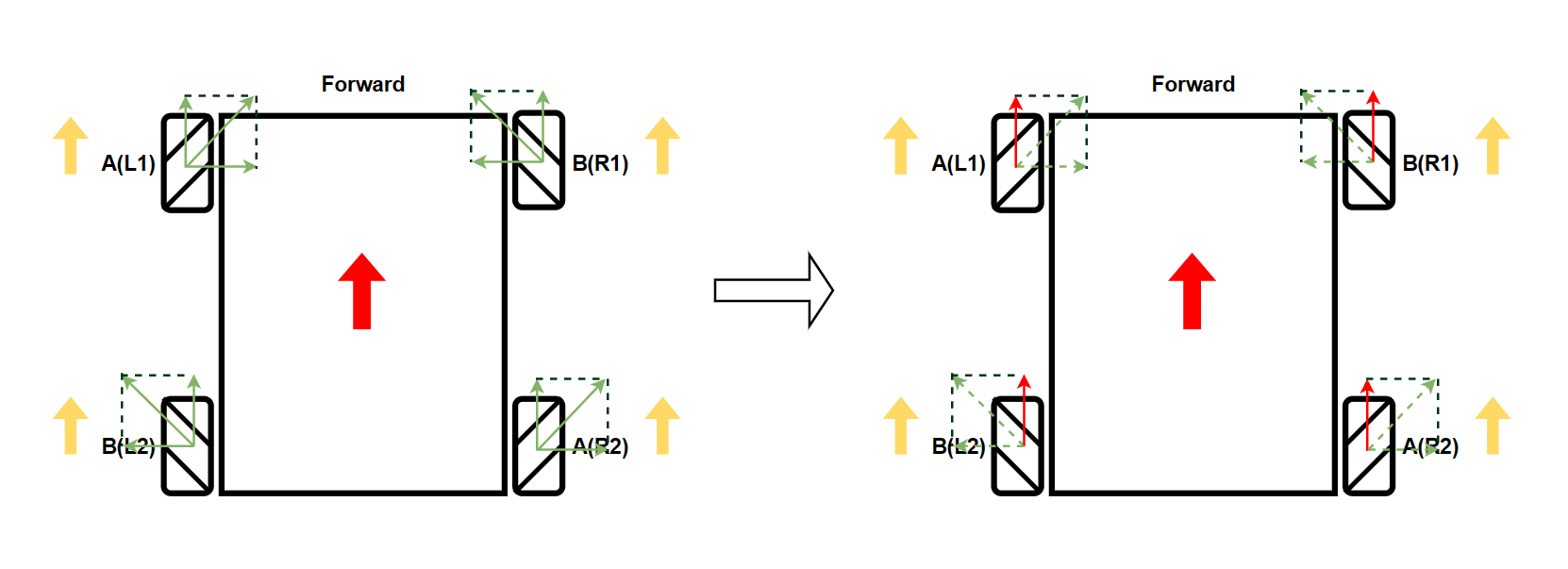
image-20240601224541285

The movement state in the table is analyzed when the speeds of the four motors are consistent and the ground is flat: + represents forward rotation, - represents reverse rotation, and 0 represents no speed.

Movement StatusL1L2R1R2
Forward++++
Backward----
Left Translation-++-
Right Translation+--+
Left Front0++0
Left Rear-00-
Right Front+00+
Right Rear0--0
Counterclockwise Rotation (Left Rotation)--++
Clockwise Rotation (Right Rotation)++--
Stop0000

Forward/Backward

image-20240601214943620

Left/Right Pan

image-20240601214953730

Front/Back Pan

image-20240601220135635

Rotate in Place

image-20240601221327005

Stop

image-20240601221525404

Notes

Due to the influence of factors such as structure, resistance and friction during the actual movement of the car, some movement states are not particularly ideal.

The TTL motor equipped with our Robduino car cannot perform PID speed regulation, so some movement states are not particularly ideal
IR control key value printing
Car vertical movement

COMPANY

  • About us
  • Team Style
  • Blog

LEARNING & EXPLORATION

  • Tutorials
  • Edge AI hardware
  • Educational robots
  • Embedded intelligent hardware

WHERE TO BUY

  • Yahboom Online Store
  • Amazon
  • Alibaba
  • AliExpress
  • Mercado

TECHNOLOGY SUPPORT

  • Email: support@yahboom.com

BE A DISTRIBUTOR

  • Email: sales@yahboom.com
QR Code

Copyright © 2017-2026 Yahboom. All Rights Reserved.

EN/中文