Welcome to Raspbot V2 repository
当製品の日本語版マニュアル資料は、こちらからご取得ください。
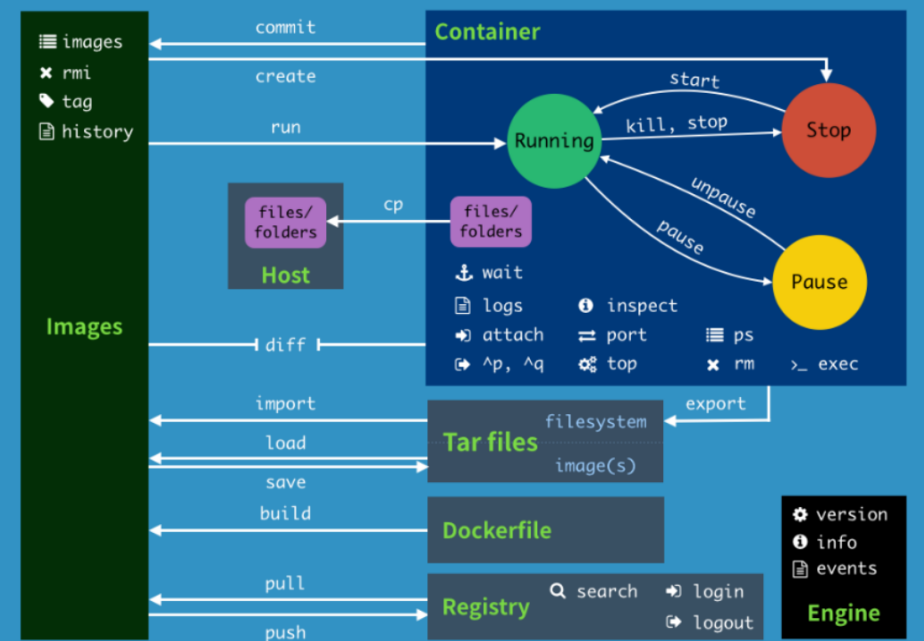
2. Common commands
2. Common commands for docker image containers
2. Common commands for docker image containers2.1. Do not use sudo command2.2, Help command2.3, Image command2.4. Container command2.5, other commonly used commands2.6 Command Summary
2.1. Do not use sudo command
Usually, you need to add the prefix sudo to operate the docker command, as follows:
sudo docker version
However, after adding the docker user group, you do not need to add the sudo prefix. How to add the docker user group (run the command in the host running docker):
xxxxxxxxxxsudo groupadd docker # Add docker user groupsudo gpasswd -a $USER docker # Add the current user to the docker user group, where $USER can be automatically resolved to the currently logged in usernewgrp docker # Update the docker user group
After adding the above command, use the [docker images] command to test. If there is no error, it means that the sudo command can no longer be used. If the following error is reported:
xxxxxxxxxxpi@yahboom:~$ docker imagesWARNING: Error loading config file: /home/pi/.docker/config.json: open /home/pi/.docker/config.json: permission denied
Then execute the following command in the host to solve it:
xxxxxxxxxxsudo chown "$USER":"$USER" /home/"$USER"/.docker -Rsudo chmod g+rwx "/home/$USER/.docker" -R
2.2, Help command
xxxxxxxxxxdocker info # Display Docker system information, including the number of images and containers. 。docker --help # Help
2.3, Image command
1, docker pull download image
xxxxxxxxxx# Download imagepi@yahboom:~$ docker pull ubuntuUsing default tag: latest # No tag, default is latestlatest: Pulling from library/ubuntucd741b12a7ea: Pull complete # Layered downloadDigest: sha256:67211c14fa74f070d27cc59d69a7fa9aeff8e28ea118ef3babc295a0428a6d21Status: Downloaded newer image for ubuntu:latestdocker.io/library/ubuntu:latest # Real location
2, docker images list images
x# List the images on the local host pi@yahboom:~$ docker images REPOSITORY TAG IMAGE ID CREATED SIZE yahboomtechnology/ros-foxy 3.4.0 49581aa78b6b About an hour ago 24.3GB yahboomtechnology/ros-foxy 3.3.9 cefb5ac2ca02 3 days ago 20.5GB yahboomtechnology/ros-f oxy 3.3.8 49996806c64a 4 days ago 20.5GB yahboomtechnology/ros-foxy 3.3.7 8989b8860d17 4 days ago 17.1GB yahboomtechnology/ros-foxy 3.3.6 326531363d6e 5 days ago 16.1GB hello-world latest 46331d942d63 13 months ago 9.14kB# ExplanationREPOSITORY The repository source of the imageTAG The tag of the imageIMAGE ID The ID of the imageCREATED The image creation timeSIZE The image size# The same repository source can have multiple TAGs, representing different versions of this repository source. We use REPOSITORY: TAG to define different images. If you do not define the tag version of the image, docker will use the lastest image by default!# Optional-a: List all local images-q: Display image ID only--digests: Display image summary information
- docker search Search image
xxxxxxxxxx# Search imagepi@yahboom:~$ docker search ros2NAME DESCRIPTION STARS OFFICIAL AUTOMATEDosrf/ros2 **Experimental** Docker Images for ROS2 deve… 60 [OK]tiryoh/ros2-desktop-vnc A Docker image to provide HTML5 VNC interfac… 11althack/ros2 An assortment of development containers for … 7tiryoh/ros2 unofficial ROS2 image 6athackst/ros2 [Deprecated-> use althack/ros2] 5uobflightlabstarling/starling-mavros2 ROS2 version of MAVROS 2theosakamg7/ros2_java_docker Image base 1 [OK]# docker search The name of a certain image corresponds to the image in the DockerHub repository# Optional--filter=stars=50: List images with a collection count not less than the specified value.
- docker rmi delete image
xxxxxxxxxx# Delete imagedocker rmi -f image id # Delete a singledocker rmi -f image name: tag image name: tag # Delete multipledocker rmi -f $(docker images -qa) # Delete all
2.4. Container command
- docker run runs the image to start the container
xxxxxxxxxx# Commanddocker run [OPTIONS] IMAGE [COMMAND][ARG...]# Common parameter description--name="Name" # Assign a name to the container-d # Run the container in the background and return the container id!-i # Run the container in interactive mode, used with -t-t # Reassign a terminal to the container, usually used with -i-P # Random port mapping (uppercase)-p # Specify port mapping (summary), generally there are four ways to writeip:hostPort:containerPortip::containerPorthostPort:containerPort (common)containerPort#testpi@yahboom:~$ docker imagesREPOSITORY TAG IMAGE ID CREATED SIZEyahboomtechnology/ros-foxy 3.4.0 49581aa78b6b 2 hours ago 24.3GByahboomtechnology/ros-foxy 3.3.9 cefb5ac2ca02 3 days ago 20.5GByahboomtechnology/ros-foxy 3.3.8 49996806c64a 4 days ago 20.5GByahboomtechnology/ros-foxy 3.3.7 8989b8860d17 4 days ago 17.1GByahboomtechnology/ros-foxy 3.3.6 326531363d6e 5 days ago 16.1GBubuntu latest bab8ce5c00ca 6 weeks ago 69.2MBhello-world latest 46331d942d63 13 months ago 9.14kB#Use ubuntu to start the container in interactive mode and execute the /bin/bash command in the container!pi@yahboom:~$ docker run -it ubuntu:latest /bin/bashroot@c54bf9efae47:/# lsbin boot dev etc home lib media mnt opt proc root run sbin srv sys tmp usr varroot@c54bf9efae47:/# exit # Use exit to exit the container and return to the hostexitpi@yahboom:~$
- docker ps lists all running containers
xxxxxxxxxx# Commanddocker ps [OPTIONS]# Common parameter description-a # List all currently running containers + historically run containers-l # Display the most recently created container-n=? # Display the most recently created n containers-q # Silent mode, only display the container number.#Testpi@yahboom:~$ docker ps -aCONTAINER ID IMAGE COMMAND CREATED STATUS PORTS NAMESc54bf9efae47 ubuntu:latest "/bin/bash" 2 hours ago Up 4 seconds funny_hugle3b9c01839579 hello-world "/hello" 3 hours ago Exited (0) 3 hours ago jovial_brown
- Exit the container
xxxxxxxxxxexit # Stop the container and exitctrl+P+Q # Do not stop the container and exit
- Enter the running container from multiple terminals
xxxxxxxxxx# Command 1docker exec -it container id bashShell# Testpi@yahboom:~$ docker ps -aCONTAINER ID IMAGE COMMAND CREATED STATUS PORTS NAMESc54bf9efae47 ubuntu:latest "/bin/bash" 2 hours ago Up 4 seconds funny_hugle3b9c01839579 hello-world "/hello" 3 hours ago Exited (0) 3 hours ago jovial_brownpi@yahboom:~$ docker exec -it c5 /bin/bash # The container ID can be abbreviated as long as it can uniquely identify the containerroot@c54bf9efae47:/## Command 2docker attach container ID# Testpi@yahboom:~$ docker ps -aCONTAINER ID IMAGE COMMAND CREATED STATUS PORTS NAMESc54bf9efae47 ubuntu:latest "/bin/bash" 2 hours ago Up 35 seconds funny_hugle3b9c01839579 hello-world "/hello" 3 hours ago Exited (0) 3 hours ago jovial_brownpi@yahboom:~$ docker attach c5 # The container ID can be abbreviated as long as it can uniquely identify the containerroot@c54bf9efae47:/## Difference# exec opens a new terminal in the container and can start a new process# attach directly enters the terminal of the container start command and does not start a new process
- Start and stop containers
xxxxxxxxxxdocker start (container id or container name) # Start the containerdocker restart (container id or container name) # Restart the containerdocker stop (container id or container name) # Stop the containerdocker kill (container id or container name) # Force stop the container
- Delete the container
xxxxxxxxxxdocker rm container id # Delete the specified containerdocker rm -f $(docker ps -a -q) # Delete all containersdocker ps -a -q|xargs docker rm # Delete all containers
2.5, other commonly used commands
- View the process information running in the container, supporting ps command parameters.
xxxxxxxxxx# Commanddocker top container id# Testpi@yahboom:~$ docker ps -aCONTAINER ID IMAGE COMMAND CREATED STATUS PORTS NAMESc54bf9efae47 ubuntu:latest "/bin/bash" 2 hours ago Up 2 minutes funny_hugle3b9c01839579 hello-world "/hello" 3 hours ago Exited (0) 3 hours ago jovial_brownpi@yahboom:~$ docker top c5UID PID PPID C STIME TTY TIME CMDroot 9667 9647 0 14:20 pts/0 00:00:00 /bin/bash
- View the metadata of the container/image
xxxxxxxxxx# commanddocker inspect Container id# Test to view container metadatapi@yahboom:~$ docker ps -aCONTAINER ID IMAGE COMMAND CREATED STATUS PORTS NAMESc54bf9efae47 ubuntu:latest "/bin/bash" 2 hours ago Up 4 minutes funny_hugle3b9c01839579 hello-world "/hello" 3 hours ago Exited (0) 3 hours ago jovial_brownpi@yahboom:~$ docker inspect c54bf9efae47[{# The complete ID, the container ID above, is the first few digits of the intercepted ID"Id": "c54bf9efae471071391202a8718b346d9af76cb1ff17741e206280603d6f0056","Created": "2023-04-24T04:19:46.232822024Z","Path": "/bin/bash","Args": [],"State": {"Status": "running","Running": true,"Paused": false,"Restarting": false,"OOMKilled": false,"Dead": false,"Pid": 9667,"ExitCode": 0,"Error": "","StartedAt": "2023-04-24T06:20:58.508213216Z","FinishedAt": "2023-04-24T06:19:45.096483592Z"},。。。。# Test and view image metadatapi@yahboom:~$ docker imagesREPOSITORY TAG IMAGE ID CREATED SIZEubuntu latest bab8ce5c00ca 6 weeks ago 69.2MBhello-world latest 46331d942d63 13 months ago 9.14kBpi@yahboom:~$ docker inspect bab8ce5c00ca[{"Id": "sha256:bab8ce5c00ca3ef91e0d3eb4c6e6d6ec7cffa9574c447fd8d54a8d96e7c1c80e","RepoTags": ["ubuntu:latest"],"RepoDigests": ["ubuntu@sha256:67211c14fa74f070d27cc59d69a7fa9aeff8e28ea118ef3babc295a0428a6d21"],"Parent": "","Comment": "","Created": "2023-03-08T04:32:41.063980445Z","Container": "094fd0c521be8c84d81524e4a5e814e88a2839899c56f654484d32d171c7195b","ContainerConfig": {"Hostname": "094fd0c521be",............."Labels": {"org.opencontainers.image.ref.name": "ubuntu","org.opencontainers.image.version": "22.04"}},"DockerVersion": "20.10.12","Author": "","Config": {"Hostname": "",........."Labels": {"org.opencontainers.image.ref.name": "ubuntu","org.opencontainers.image.version": "22.04"}},"Architecture": "arm64","Variant": "v8","Os": "linux","Size": 69212233,"VirtualSize": 69212233,"GraphDriver": {"Data": {"MergedDir": "/var/lib/docker/overlay2/8418b919a02d38a64ab86060969b37b435977e9bbdeb6b0840d4eb698280e796/merged","UpperDir": "/var/lib/docker/overlay2/8418b919a02d38a64ab86060969b37b435977e9bbdeb6b0840d4eb698280e796/diff","WorkDir": "/var/lib/docker/overlay2/8418b919a02d38a64ab86060969b37b435977e9bbdeb6b0840d4eb698280e796/work"},"Name": "overlay2"},"RootFS": {"Type": "layers","Layers": ["sha256:874b048c963ab55b06939c39d59303fb975d323822a4ea48a02ac8dc635ea371"]},"Metadata": {"LastTagTime": "0001-01-01T00:00:00Z"}}]
2.6 Command Summary