Welcome to Raspbot V2 repository
当製品の日本語版マニュアル資料は、こちらからご取得ください。
2. Image Binarization
2. Image Binarization
2.1 Core idea of binarization
Set a threshold value, and the value greater than the threshold value is 0 (black) or 255 (white), so that the image is called a black and white image. The threshold value can be fixed or adaptive. The adaptive threshold value is generally a comparison between a pixel at a point and the average value of the pixels in the region with this point as the middle order or the weighted sum of the Gaussian distribution, in which a difference value can be set or not.
OpenCV provides a threshold function: cv2.threshold (src, threshold, maxValue, thresholdType)
Parameter meaning:
src: original image
threshold: current threshold
maxVal: maximum threshold value, generally 255
thresholdType: threshold type, generally has the following values
enum ThresholdTypes { THRESH_BINARY = 0, #The grayscale value of pixels greater than the threshold is set to maxValue (such as the maximum grayscale value of 8-bit is 255), and the grayscale value of pixels less than the threshold is set to 0. THRESH_BINARY_INV = 1, #The grayscale value of pixels greater than the threshold is set to 0, and those less than the threshold are set to maxValue. THRESH_TRUNC = 2, #The grayscale value of pixels greater than the threshold is set to 0, and those less than the threshold are set to maxValue. THRESH_TOZERO = 3, #No change is made to the grayscale value of pixels less than the threshold, and all grayscale values of pixels greater than the threshold are changed to 0. THRESH_TOZERO_INV = 4 #No change is made to the grayscale value of pixels greater than the threshold, and all grayscale values of pixels less than the threshold are changed to 0. }
Return value:
retval: The same as the parameter thresh
dst: Result image
Note: Before binarization, we need to grayscale the color image to obtain a grayscale image.
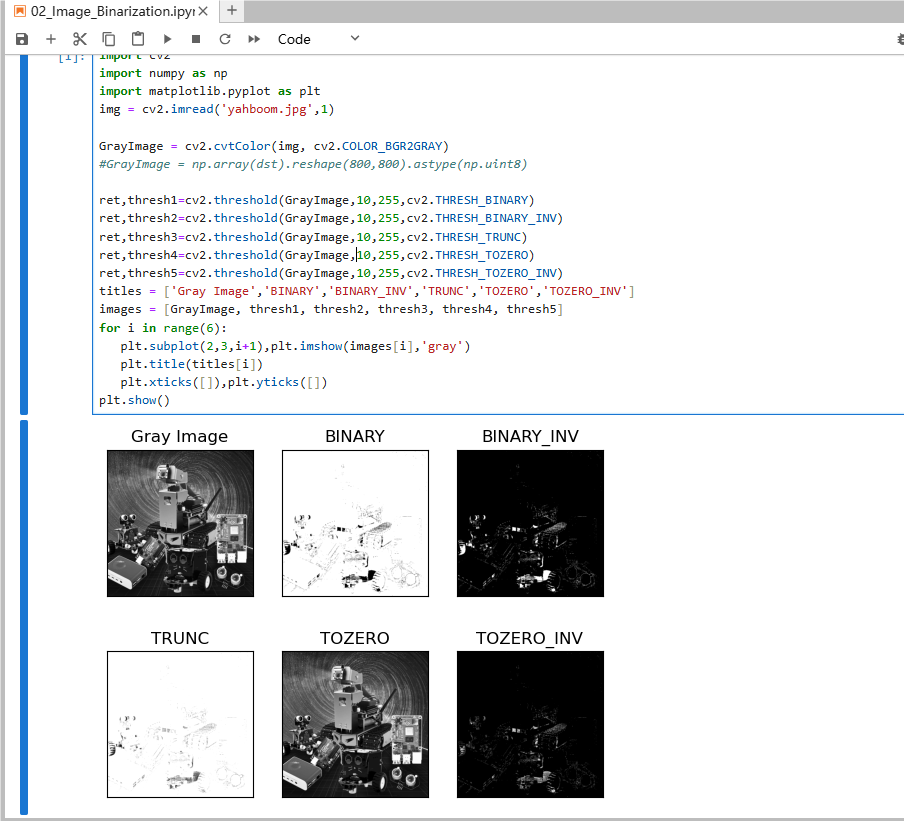
2.2 Actual effect display
Source code path:
/home/pi/project_demo/06.Open_source_cv_fundamentals_course/C.Image_Processing_Text_Drawing/02_Image_Binarization.ipynb
ximport cv2import numpy as npimport matplotlib.pyplot as pltimg = cv2.imread('yahboom.jpg',1)
GrayImage = cv2.cvtColor(img, cv2.COLOR_BGR2GRAY)#GrayImage = np.array(dst).reshape(800,800).astype(np.uint8)
ret,thresh1=cv2.threshold(GrayImage,10,255,cv2.THRESH_BINARY) ret,thresh2=cv2.threshold(GrayImage,10,255,cv2.THRESH_BINARY_INV) ret,thresh3=cv2.threshold(GrayImage,10,255,cv2.THRESH_TRUNC) ret,thresh4=cv2.threshold(GrayImage,10,255,cv2.THRESH_TOZERO) ret,thresh5=cv2.threshold(GrayImage,10,255,cv2.THRESH_TOZERO_INV) titles = ['Gray Image','BINARY','BINARY_INV','TRUNC','TOZERO','TOZERO_INV'] images = [GrayImage, thresh1, thresh2, thresh3, thresh4, thresh5] for i in range(6): plt.subplot(2,3,i+1),plt.imshow(images[i],'gray') plt.title(titles[i]) plt.xticks([]),plt.yticks([]) plt.show()