Welcome to Raspbot V2 repository
当製品の日本語版マニュアル資料は、こちらからご取得ください。
6.Infrared remote control car
6.Infrared remote control car
6.Infrared remote control car1. Learning objectives2. Experimental preparation3. Implementation principle4. Code analysis5. Experimental results
1. Learning objectives
Control the car with an infrared remote control
2. Experimental preparation
- The car wiring has been installed and installed correctly
- Infrared remote control
3. Implementation principle
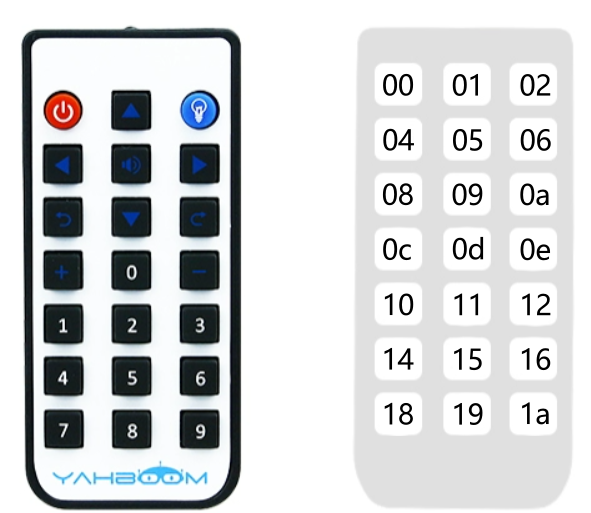
Control the car to perform different functions by receiving different key values sent by the infrared remote control.
4. Code analysis
Source code path:
/home/pi/project_demo/05.Comprehensive_gameplay/5.ir_controlled_miniature_car.ipynb
x#!/usr/bin/python3# -*- coding: UTF-8 -*-import syssys.path.append('/home/pi/project_demo/lib')sys.path.append('/home/pi/software/oled_yahboom/')#Import Mecanum car driver library, oled libraryfrom McLumk_Wheel_Sports import *from yahboom_oled import *import time, math
# Create an oled objectoled = Yahboom_OLED(debug=False)# Infrared data corresponding to infrared key valueir_values ••= {'Power': '0x0','RGB_Light': '0x2','Buzzer': '0x5','CarForward': '0x1', 'CarBackward': '0x9', 'CarLeft': '0x4', 'CarRight': '0x6', 'CarLeftSpin': '0x8', 'CarRightSpin': '0xa', 'Add': '0xc', 'Sub': '0xe', 'Number_0': '0xd', 'Number_1': '0x10', 'Number_2 ': '0x11', 'Number_3': '0x12', 'Number_4': '0x14', 'Number_5': '0x15', 'Number_6': '0x16', 'Number_7': '0x18','Number_8': '0x19','Number_9': '0x1a'}# Get infrared valuedef get_ir_value():# Read the value of infrared remote controldata = bot.read_data_array(0x0c, 1)data2h=hex(data[0])return data2h
# Control buzzerbuzzer_flag = False # Buzzer flagdef control_buzzer(flag):if(flag):bot.Ctrl_BEEP_Switch(1)elif(flag==False):bot.Ctrl_BEEP_Switch(0)
# Control RGB lightscolors = [0, 1, 2, 3, 4, 5, 6, 7] # Red, Green, Blue, Yellow, Purple, Cyan, White, Off current_color = 0 # Current color index def change_rgb_light(color): global current_color current_color=color if(current_color==7): bot.Ctrl_WQ2812_ALL(0,0) else : bot.Ctrl_WQ2812_ALL(1, colors [current_color]) if(current_color==0):color_str='color:red' if(current_color==1):color_str='color:green' if(current_color==2):color_str='color:blue' if(current_color==3):color_str='color:yellow' if(current_color==4):color_str='color:purple' if(current_color==5):color_str='color:indigo' if(current_color==6):color_str='color:white' if(current_color==7):color_str='color:off' current_color = (current_color + 1) % len(colors) return color_str # Infrared remote control car speed=50 color_str='color:off' speed_str='speed:50' global ir_value ir_value ='0xff' def ir_control(ir_value,value_temp): global buzzer_flag,speed,color_str,speed_str if ir_value == ir_values['CarForward']: move_forward(speed) elif ir_value == ir_values['CarBackward']: move_backward(speed) elif ir_value == ir_values['CarLeft']: move_left(speed) elif ir_value == ir_values['CarRight']: move_right(speed) elif ir_value == ir_values['CarLeftSpin']: rotate_left(speed) elif ir_value == ir_values['CarRightSpin']: rotate_right(speed) if(ir_value!=value_temp):#Short press dog if ir_value == ir_values['Power']: stop_robot() bot.Ctrl_WQ2812_ALL(0,0) elif ir_value == ir_values['RGB_Light']: # Control RGB light changes color_str=change_rgb_light(current_color) elif ir_value == ir_values['Buzzer']: buzzer_flag = not buzzer_flag # Set the flag control_buzzer(buzzer_flag) elif ir_value == ir_values['Add']: speed += 15 if (speed > 200):speed=200 elif ir_value == ir_values['Sub']: speed -= 15 if(speed < 50):speed = 50 elif ir_value in [ir_values['Number_0'], ir_values['Number_1'], ir_values['Number_2'], ir_values['Number_3'], ir_values['Number_4'], ir_values['Number_5'], ir_values['Number_6'], ir_values['Number_7'], ir_values['Number_8'],ir_values['Number_9']]:# Handling number keys# process_number_key(ir_value)passelif(ir_value=='0xff'):stop_robot()speed_str=f'speed:{speed}'oled.clear()oled.add_line(color_str, 1)oled.add_line(speed_str, 2)oled.add_line(ir_value, 3)oled.refresh()# Main Loopif __name__ == '__main__':try:# Turn on infrared remote control receptionbot.Ctrl_IR_Switch(1)oled.init_oled_process() # Initialize oled processoled.clear() oled.add_line(color_str, 1) oled.add_line(speed_str, 2) oled.add_line(ir_value, 3) oled.refresh() while True: value_temp = ir_value ir_value = get_ir_value() ir_control(ir_value,value_temp) except KeyboardInterrupt: # Restore basic data display on screen os.system(" 3 /home/pi/software/oled_yahboom/yahboom_oled.py &") bot.Ctrl_IR_Switch(0) bot.Ctrl_WQ2812_ALL(0,0) stop_robot()
5. Experimental results
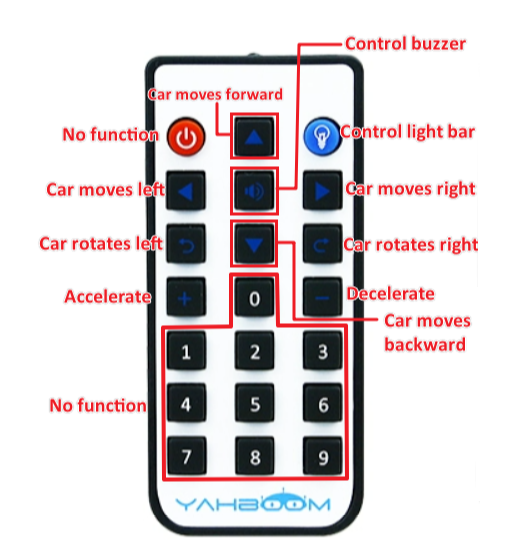
We put the car on the ground. Point the infrared remote control at the car, and we can control the car by pressing different buttons.