Welcome to Raspbot V2 repository
当製品の日本語版マニュアル資料は、こちらからご取得ください。
6. Text and image drawing
6. Text and image drawing
6.1. Drawing text and images
cv2.putText(img, str, origin, font, size, color, thickness)
The parameters are: image, added text, upper left corner coordinates (integer), font, font size, color, font thickness.
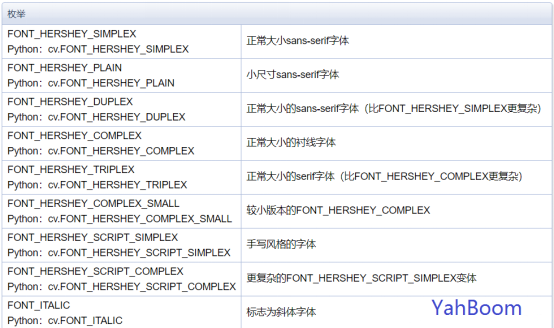
The font types are as follows:
6.2. Actual effect display
Source code path:
/home/pi/project_demo/06.Open_source_cv_fundamentals_course/C.Image_Processing_Text_Drawing/06_Text_on_Image_Drawing.ipynb
ximport cv2 import numpy as np
img = cv2.imread('yahboom.jpg',1)font = cv2.FONT_HERSHEY_SIMPLEX
cv2.rectangle(img,(200,100),(500,400),(0,255,0),3)# 1 dst 2 文字内容 3 坐标 4 5 字体大小 6 color 7 粗细 8 line type 1 dst 2 text content 3 coordinates 4 5 font size 6 color 7 thickness 8 line typecv2.putText(img,'Yahboom',(250,50),font,1,(200,200,0),2,cv2.LINE_AA)# cv2.imshow('src',img)# cv2.waitKey(0)xxxxxxxxxximport matplotlib.pyplot as plt
dst = cv2.cvtColor(img, cv2.COLOR_BGR2RGB)plt.imshow(dst)plt.show()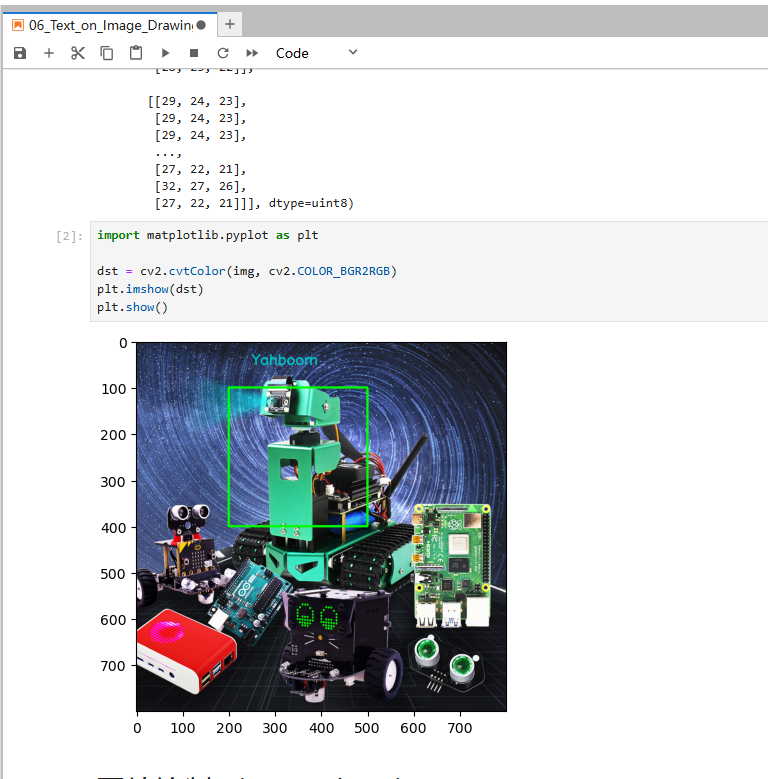
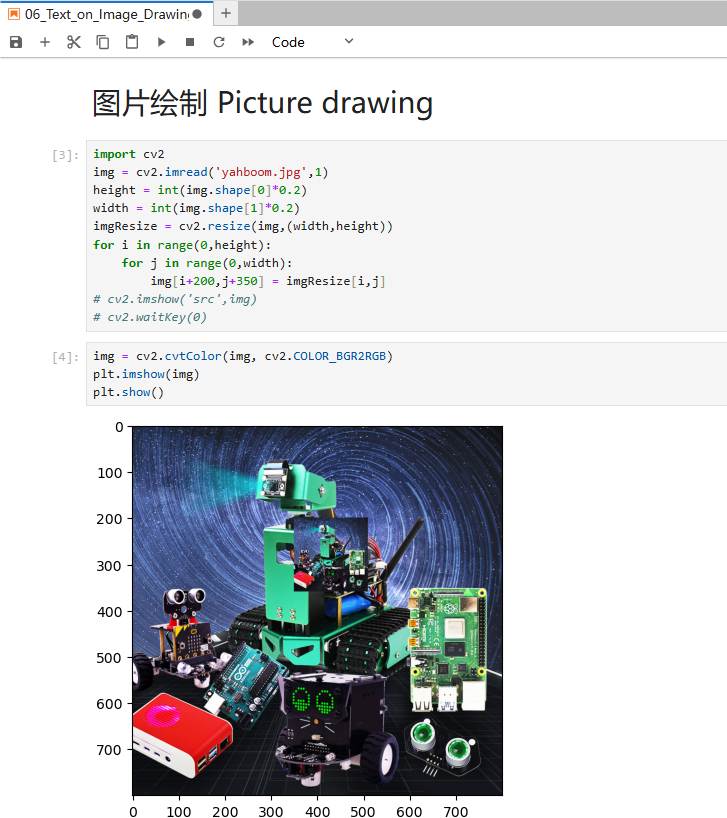
xxxxxxxxxximport cv2 img = cv2.imread('yahboom.jpg',1)height = int(img.shape[0]*0.2)width = int(img.shape[1]*0.2)imgResize = cv2.resize(img,(width,height))for i in range(0,height): for j in range(0,width): img[i+200,j+350] = imgResize[i,j]# cv2.imshow('src',img)# cv2.waitKey(0)xxxxxxxxxximg = cv2.cvtColor(img, cv2.COLOR_BGR2RGB)plt.imshow(img)plt.show()