Welcome to Raspbot V2 repository
当製品の日本語版マニュアル資料は、こちらからご取得ください。
1.Free conversation
Free Conversation
Free ConversationExperiment ObjectiveExperimental StepsExperimental ResultsMain Source Code AnalysisOverall Flowchart
Experiment Objective
Understand and master the basic conversational features of the AI model, interact with the smart car through verbal conversation, and enable the smart car to solve the desired problem.
Experimental Steps
- Observe the IP address of the OLED screen and log in to the remote desktop via VNC.
- Follow the prerequisite configuration instructions to complete the Tongyi Qianwen key for the Chinese version and the OpenRouter key for the English version.
- Open a new terminal and run the following command:
xxxxxxxxxxcd /home/pi/project_demo/09.AI_Big_Model/xxxxxxxxxx#Startup command for the Chinese versionpython3 Free_QA/chatgpt_main.pyxxxxxxxxxx#Startup command for the English versionpython3 Free_QA/chatgpt_main_en.py- Wake up the car using the wake-up phrase "Hi, Yahboom" (for international users).
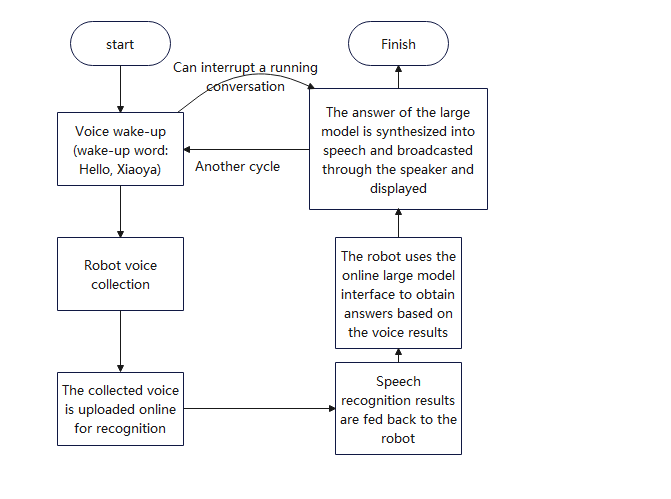
- After successfully waking up, the car will respond with a honking sound. After waiting for about half a second, you can then state the problem you want the car to help you solve.
- After the robot recognizes your voice, wait a few seconds for relevant information to be displayed on the terminal interface and speaker. You can also terminate the current conversation by using the wake-up word.
- This concludes the conversation. To start a new one, repeat steps 4-6.
Experimental Results
- Waiting for wake-up

- Upon successful wake-up, a green-boxed message will appear, allowing you to ask your question.
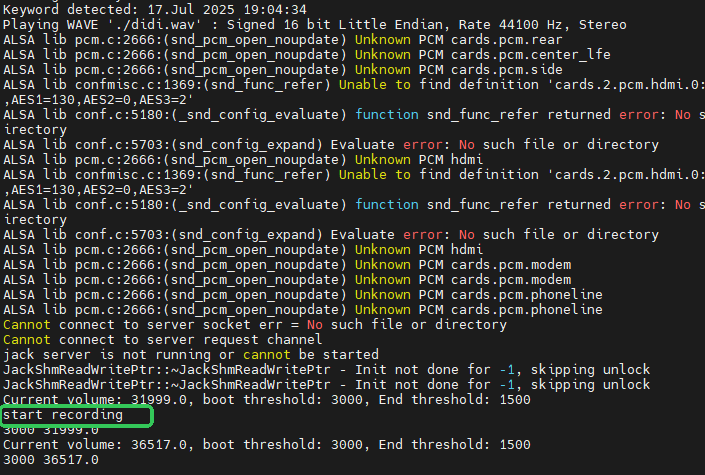
- Wait for a while, and the terminal will print out the question and answer.

Main Source Code Analysis
xxxxxxxxxxdef Speak_Vioce(): global response if TTS_IAT_Tongyi: tonyi_tts(response) else: Xinghou_speaktts(response)def main(): while True: if detect_keyword(): os.system("pkill mplayer") time.sleep(.2) start_recording() time.sleep(1) if TTS_IAT_Tongyi: content = rec_wav_music_Tongyi() else: content = rec_wav_music() if content != "": print("Q:"+content) #re = Ultra_gpt(content) # chinese re =tongyi_QA_Model(content) print("A:"+re) try: response = re tts_thread = threading.Thread(target=Speak_Vioce) tts_thread.daemon = True tts_thread.start() except: pass if content == 0: break time.sleep(0.1) detect_keyword: Wake-up function handler start_recording: Recording function handler
Chinese version-specific options: rec_wav_music_Tongyi: Tongyi Qianwen voice recognition rec_wav_music: iFlytek Spark voice recognition You can choose either voice recognition mode. You can enable or disable it in the API_KEY.py file. When TTS_IAT_Tongyi=True, either Tongyi Qianwen voice recognition or iFlytek Spark voice recognition is enabled. tonyi_tts: Tongyi Qianwen speech synthesis Xinghou_speaktts: iFlytek Xinghuo speech synthesis You can choose between two speech synthesis options. You can enable or disable them in the API_KEY.py file. When TTS_IAT_Tongyi=True, either Tongyi Qianwen speech synthesis or iFlytek Xinghuo speech synthesis is enabled.
English Version Speech recognition and synthesis use the iFlytek Spark API by default. You don't need to specify the iFlytek Spark API in API_KEY.py; simply fill in the openAI_KEY key.
Modifying the recording duration, start threshold, and end threshold
- In the terminal, enter:
xxxxxxxxxxcd /home/pi/project_demo/09.AI_Big_Model/nano audio.py- Find the source code shown below.

- start_threshold: The threshold for starting recording when sound is detected (reduced to 5000 in quiet environments and increased to 150000+ in noisy environments).
- end_threshold: The threshold for stopping recording when sound is detected. A recommended value is 30-50% of start_threshold.
- endlast: The number of times to stop recording. Here, 15 is used. For example, Recording will automatically terminate if 15 consecutive sound values meet the stop threshold.
- max_record_time: Recording duration, set to 5 here. Note: start_threshold > end_threshold. This is a required rule, and its value can be determined based on the environment.
- Directory Structure of the Main Files for this Experiment
xxxxxxxxxx├── chatgpt_main_en.py #Main Entry Point for the English Version├── chatgpt_main.py #Main Entry Point for the Chinese Version├── tongyi_api.py #Tongyi Qianwen Language Model API (If you want to change to another model, you can modify this file)├── tongyi_speak_iat.py #Tongyi Qianwen Speech Recognition├── tongyi_tts.py #Tongyi Qianwen Speech Synthesis├── xinghou_speak_iat.py #iFlytek Spark Speech Recognition└── xinghou_tts.py #iFlytek Spark Speech Synthesis
Overall Flowchart