yahboom
HomeLearn
Solution
Blog
Online Store
About Us
EN/中文
ROSMASTER M3📖
00.Configuration and Operation Guide
  • 1.Quick start handle to control the car
  • 2.Log in to the car and view the code
  • 3.Enter the Docker (For RPI5)
  • 4.Camera and Radar Configuration (Must Read)
  • 5.Assembly video
  • 6.Modify Control Board Firmware Parameters
01.Chassis Control Course
  • 01.ROS control
  • 02.Handle control
  • 03.Keyboard control
  • 04.Robot state estimation
  • 05.Data remote visualization
  • 06.Line velocity calibration
  • 07.Angular velocity calibration
  • 08.Robot URDF model
  • 09.Line patrol automatic driving
  • 10.Patrol
02.Lidar Course
  • 01.Lidar introduction and use
  • 02.Lidar point cloud fusion and filtering
  • 03.Lidar obstacle avoidance
  • 04.Lidar tracking
  • 05.Lidar guard
  • 06.Gmapping-SLAM mapping
  • 07.Cartographer-SLAM mapping
  • 08.slam_toolbox mapping
  • 09.Lifelong mapping
  • 10.Navigation2 single-point navigation avoid
  • 11.Navigation2 multi-point navigation avoid
  • 12.Cartographer relocalization navigation
  • 13.slam_toolbox localization and navigation
  • 14.Synchronous mapping and navigation
  • 15.RTAB-Map mapping
  • 16.RTAB-Map navigation
  • 17.APP mapping and navigation
03.AI Model Basics
  • 1.AI large model types and principles
  • 2.RAG retrieval enhancement and model training samples
  • 3.Embodied intelligent robot system architecture
  • 4.Embodied intelligent functions core source code
04.AI Model Development
  • 01.Register a model service provider account
  • 02.Configuring API-KEY
  • 03.Introduction to Dify
  • 04.Basic Dify Features
  • 05.AI Large Model Development - chatbot
  • 06.Deploy the RAG knowledge base
  • 07.RAG knowledge base + chatbot
  • 08.AI agent workflow
  • 09.Custom wake-up response
  • 10.Core module testing tools
05.AI Model - Voice Version
  • 1.Semantic understand and command follow
  • 2.Multimodal visual understanding
  • 3.Multimodal visual understanding+SLAM navigation
  • 4.Intention estimation
06.AI Model - Text Version
  • 1.Semantic understand and command follow
  • 2.Multimodal visual understanding
  • 3.Multimodal visual understanding+SLAM navigation
  • 4.Intention estimation
07.Road Network Planning and Navigation
  • 1.Introduction and Quick Start
  • 2.Constructing a Pose Map
  • 3.Road Network Labelling
  • 4.Inter-Road Network Planning and Navigation
  • 5.Free-Pose Road Network Navigation
  • 6.Path Replanning
08.Autonomous Driving expand(Need purchase track map)
  • 01.Environment Setup & Precautions
  • 02.YOLO Environment Configuration
  • 03.Data Collection
  • 04.Data Annotation
  • 05.YOLOv11 Model Training
  • 06.Model Format Conversion
  • 07.Vehicle Centerline Calibration
  • 08.Lane Detection
  • 09.Lane-Keeping Autonomous Driving
  • 10.Traffic Sign Recognition
  • 11.Comprehensive Autonomous Driving Applications
  • 12.Autonomous Driving Debugging Module
  • 13.Road Network Planning with Track Map
  • 14.Road Network Planning with Traffic Sign Recognition
  • 15.AI Model with Road Network Planning
  • 16.AI Model with Track Map and SLAM Navigation
  • 17.AI Model with Road Network Planning and Autonomous Driving
09.Depth Camera Course
  • 01.Dabai_DCW2 Camera Introduction
  • 02.Nuwa-HP60C Camera Introduction
  • 03.Depth Pseudo-Color Image
  • 04.Depth Camera Distance Measurement
  • 05.Wood Block Volume Measurement
  • 06.Edge Detection
  • 07.YOLOv11 Object Detection
  • 08.YOLOv11 Object Tracking
  • 09.Color Following
  • 10.Face Following
  • 11.QR Code Following
  • 12.Machine Code Following
  • 13.KCF Object Tracking
  • 14.QR Code Motion Control
  • 15.AR Vision
10.Mediapipe Visual Course
  • 01.Hand Detection
  • 02.Posture Detection
  • 03.Overall Detection
  • 04.Facial Landmark Detection
  • 05.3D Object Recognition
  • 06.Face Detection
  • 07.Gesture Recognition
  • 08.Face Special Effects
  • 09.Brush
  • 10.Finger Control
  • 11.Palm Target Positioning
  • 12.Fingertip Trajectory Recognition
  • 13.Gesture Following
  • 14.Posture Following
  • 15.Gesture Motion Control
11.Multi-vehicle Course
  • 1.Multi-vehicle Control
  • 2.Multi-vehicle Navigation
  • 3.Multi-vehicle Platoon
12.AI Large Model Basic Course
Offline large model (Text Interaction)
  • 0. AI Large Model Mirroring Explanation
  • 1. Deployment of large-scale AI models
  • 2. Installation of the large model dialogue platform
  • 3. Meta AI Llama 3.2 model
  • 4. Alibaba Cloud Qwen3 Model
  • 5. DeepSeek DeepSeek-R1 model
  • 6. Microsoft Phi-4 mini model
  • 7. Alibaba Cloud Qwen2.5vl Visual Multimodal Large Model
  • 8. Google Gemma3 Visual Multimodal Large Model
  • 9. Llava Visual Multimodal Large Model
  • 10. Multimodal Visual Understanding Applications
  • 11.MiniCPM-V Visual Multimodal Large Model
  • 12. Multimodal Text-Based Image Application
  • 13. Multimodal Video Analysis Application
  • 14. Multimodal table scanning application
  • 15. Multimodal visual positioning applications
  • 16. Multimodal Autonomous Agent Application
Offline large model (Voice Interaction)
  • 0. Voice Interaction Hardware Connection (Must Read)
  • 1. Offline speech-to-text (ASR)
  • 2. Offline Text-to-Speech (TTS)
  • 3. AI large model voice interaction
  • 4. Multimodal visual understanding and voice interaction
  • 5. Multimodal Text-Based Image Application
  • 6. Multimodal Video Analysis Application
  • 7. Multimodal visual positioning applications
  • 8. Multimodal table scanning application
  • 9. Multimodal Autonomous Agent Applications
  • 10. AI large model offline voice assistant
Online large model (Text Interaction)
  • 1. OpenRouter Large Model API Aggregation Platform
  • 2. Multimodal visual understanding applications
  • 3. Multimodal visual positioning applications
  • 4. Multimodal table scanning application
  • 5. Multimodal Autonomous Agent Applications
Online large model (Voice Interaction)
  • 0. Voice Interaction Hardware Connection (Must Read)
  • 1. Online speech-to-text (ASR)
  • 2. Online Text-to-Speech (TTS)
  • 3. AI large model voice interaction
  • 4. Multimodal visual and voice interaction
  • 5. Multimodal visual positioning applications
  • 6. Multimodal table scanning application
  • 7. Multimodal Autonomous Agent Applications
  • 8. AI large model online voice assistant
13.Control Board Course
1.Development environment setup
  • 1.Introduction to the Control Board
  • 2.Set up the STM32CUBEIDE development environment
  • 3.Burning STM32 firmware using SWD
  • 4.Burning STM32 firmware using serial port
  • 5.Compile the microros driver library
  • 6.Install and start the microros agent
  • 7.Import Project
2.Control board STM32 basic routine
  • 1.Turn on the LED light
  • 2.Button functions
  • 3.Drive the buzzer
  • 4.Serial communication
  • 5.Battery voltage detection
  • 6.Driving PWM Servo
  • 7.Drive motor
  • 8.Read motor encoder data
  • 9.PID control of motor speed
  • 10.Robot kinematics analysis theory
  • 11.Read IMU data
  • 12.Read Lidar data
  • 13.Flash access data
  • 14.Driving OLED Displays
  • 15.Driving RGB light strip
  • 16.SBUS model aircraft remote control
  • 17.USB controller remote control
  • 18.CAN bus communication
3.Control board micro_ros basic routine
  • 1.Post a topic
  • 2.Subscribe to a topic
  • 3.Multi-topic subscription and publishing
  • 4.Subscribe to the buzzer topic
  • 5.Subscribe to the bus servo topic
  • 6.Subscribe to the rate control topic
  • 7.Release Speed Topic
  • 8.Publish IMU data topic
  • 9.Publish radar data topic
14.Main Control Course
Jetson Orin Nano_NX
  • 1.Jetson Orin board introduction
  • 2.Restore the factory image system
  • 3.Backup SSD system
  • 4.SSD expansion
  • 5.Network configuration
  • 6.SSH remote login
  • 7.VNC remote control
  • 8.Remote file transfer
  • 9.Jtop tool
  • 10.Exchange space expansion
Raspberry Pi
  • 1. Introduction to Raspberry PI 5
  • 2. Raspberry PI system installation and backup
  • 3. Powering the Raspberry PI 5
  • 4. Startup of Raspberry PI 5
  • 5. Update and upgrade operating system
  • 6. Introduction to raspi-config tool
  • 7. config.txt file description
  • 8. Network Configuration
  • 9. remote access
  • 10. Transfer files remotely
  • 11. Set display resolution and rotation
  • 12. Set screen to sleep
  • 13. Play audio and video
  • 14. Using USB camera
  • 15. Using MIPI camera
  • 16. Get real-time temperature of Raspberry Pi
RDKX5
  • 1.Introduction to RDK X5 board
  • 2.Write system file
  • 3.Hardware interface description
  • 4.Install case and other accessories
  • 5.Network configuration
  • 6.Remote login
  • 7.Update system
  • 8.srpi-config user guide
  • 9.config. txt configuration file
  • 10.Self-startup setting
  • 11.RDK exclusive command usage
  • 12.Linux command usage
  • 13.GPIO readwrite operation
  • 14.Image classification algorithm
  • 15.Use USB camera
  • 16.Use MIPI camera
  • 17.Binocular camera depth algorithm
15.YOLOv11 Development (ORIN)
  • 1.YOLO environment construction
  • 2.CLI use
  • 3.Object detection
  • 4.Instance segmentation
  • 5.Pose estimation
  • 6.Image classification
  • 7.Oriented object detection
  • 8.Model conversion
  • 9.Dataset annotation
  • 10.Model Training_Conversion
  • 11.Model prediction
16.YOLOv11 Development(RDKX5)
  • 1.YOLO environment construction
  • 2.CLI use
  • 3.Object detection
  • 4.Instance segmentation
  • 5.Pose estimation
  • 6.Image classification
  • 7.Oriented object detection
  • 8.Model prediction
  • 9.Model Quantization
17.YOLOv11 Development (RPI)
  • 1.YOLO environment construction
  • 2.CLI use
  • 3.Object detection
  • 4.Instance segmentation
  • 5.Pose estimation
  • 6.Image classification
  • 7.Oriented object detection
  • 8.Model conversion
  • 9.Model prediction
18.Linux Operating System
  • 1.Introduction to Linux system
  • 2.Ubuntu file system
  • 3.Ubuntu common commands
  • 4.Ubuntu common editors
  • 5.Ubuntu software operation commands
  • 6.Virtual machine installation
  • 7.SSH remote control
  • 8.VNC remote control
  • 9.Transfer files remotely
  • 10.Driver library and communication
  • 11.Static IP and hotspot mode
  • 12.Bind device ID
  • 13.Capacity expansion and resource allocation
  • 14.Update system software sources
  • 15.Set root user password
  • 16.sudo free password
  • 17.Connect to WiFi network
  • 18.View system version
  • 19.Customized service management
  • 20.Back up system image
19.ROS2 Basic Course
  • 1.Introduction to ROS2
  • 2.ROS2 install Humble
  • 3.ROS2 development environment
  • 4.ROS2 workspace
  • 5.ROS2 function package
  • 6.ROS2 node
  • 7.ROS2 topic communication
  • 8.ROS2 service communication
  • 9.ROS2 action communication
  • 10.ROS2 custom interface message
  • 11.ROS2 parameter service case
  • 12.ROS2 meta-function package
  • 13.ROS2 distributed communication
  • 14.ROS2 DDS
  • 15.ROS2 time related API
  • 16.ROS2 common command tools
  • 17.ROS2 rviz2 use
  • 18.ROS2 rqt toolbox
  • 19.ROS2 Launch startup file configuration
  • 20.ROS2 recording and playback tool
  • 21.ROS2 URDF model
  • 22.ROS2 Gazebo simulation platform
  • 23.ROS2 TF2 coordinate transformation
20.Docker Course
  • 1、Docker overview and docker installation
  • 2、Common commands for docker image containers
  • 3、Docker images deeply understand and publish images
  • 4、Docker hardware interaction and data processing
  • 5、Enter the bot's docker container
  • 6、Robot development environment construction in Docker
21.Image Processing Basics Course
  • 1. Introduction to Open Source CV
  • 2. Image reading and display
  • 3. Image writing
  • 4. Image quality
  • 5. Pixel Operation
  • 6. Image zoom
  • 7. Image cutting
  • 8. Image translation
  • 9. Image Mirroring
  • 10. Affine Transformation
  • 11. Image Rotation
  • 12. Perspective Transformation
  • 13. Grayscale processing
  • 14. Image Binarization
  • 15. Edge Detection
  • 16. Line drawing
  • 17. Rectangle and circle drawing
  • 18. Drawing text and pictures
Download
  • Mapping_APP(iOS_Android)
  • MainBoard_AI_Pure_System
  • Robot_Image_System_File
  • Code-Firmware
  • Instruction_Manual
  • VM_File
  • Software_Tools
  • Firmware_DriverFile
  • 3D_Model_File
  • ROS2_Basic_VM
  • Other_Annex
Download ZIP

Welcome to ROSMASTER M3 repository

07.RAG knowledge base + chatbot

RAG Knowledge Base + Chatbot

RAG Knowledge Base + Chatbot1. Course Content2. Starting the Dify Service3. Case Study 1: Task Planning4. Case Study 2: Knowledge Management4.1 Creating a Knowledge Base4.2 Creating an Application

1. Course Content

  • Based on the previous RAG knowledge base and chatbot, develop an AI application that combines the two to improve the answering capabilities of large AI models in specific domains, reducing AI model hallucinations through the RAG knowledge base.

2. Starting the Dify Service

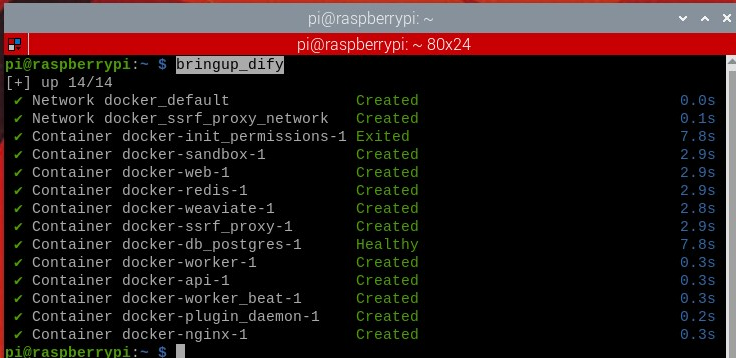
  • Connect to the vehicle's computer via VNC or SSH, and enter the following command in the terminal:
xxxxxxxxxx
bringup_dify

image-20251218112736396

  • Check the vehicle's IP address (you can view it on the OLED screen, using ifconfig, or directly in the terminal). Enter the vehicle's IP address directly in the browser's address bar to access the Dify management page.
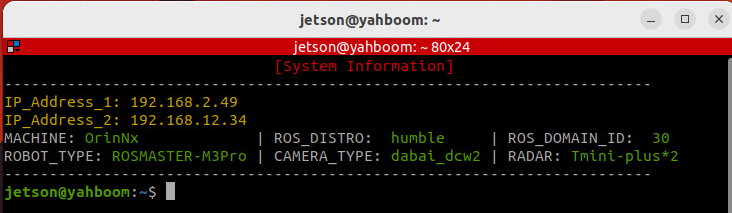
image-20251219152741615

3. Case Study 1: Task Planning

[!TIP]

  • Case Study 1 simulates the functionality of the ROSMASTER-M3decision-making layer.
  • On the homepage, click "Create from Blank".
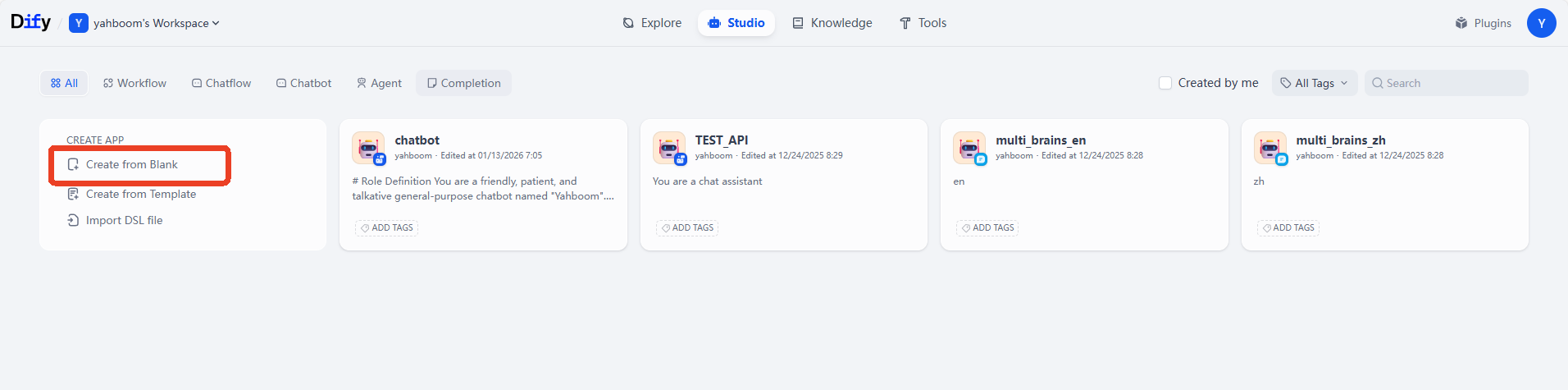
image-20251219170239663

  • Click to select "Chat Assistant" under Chatbot ->App Name & Icon -> Create.
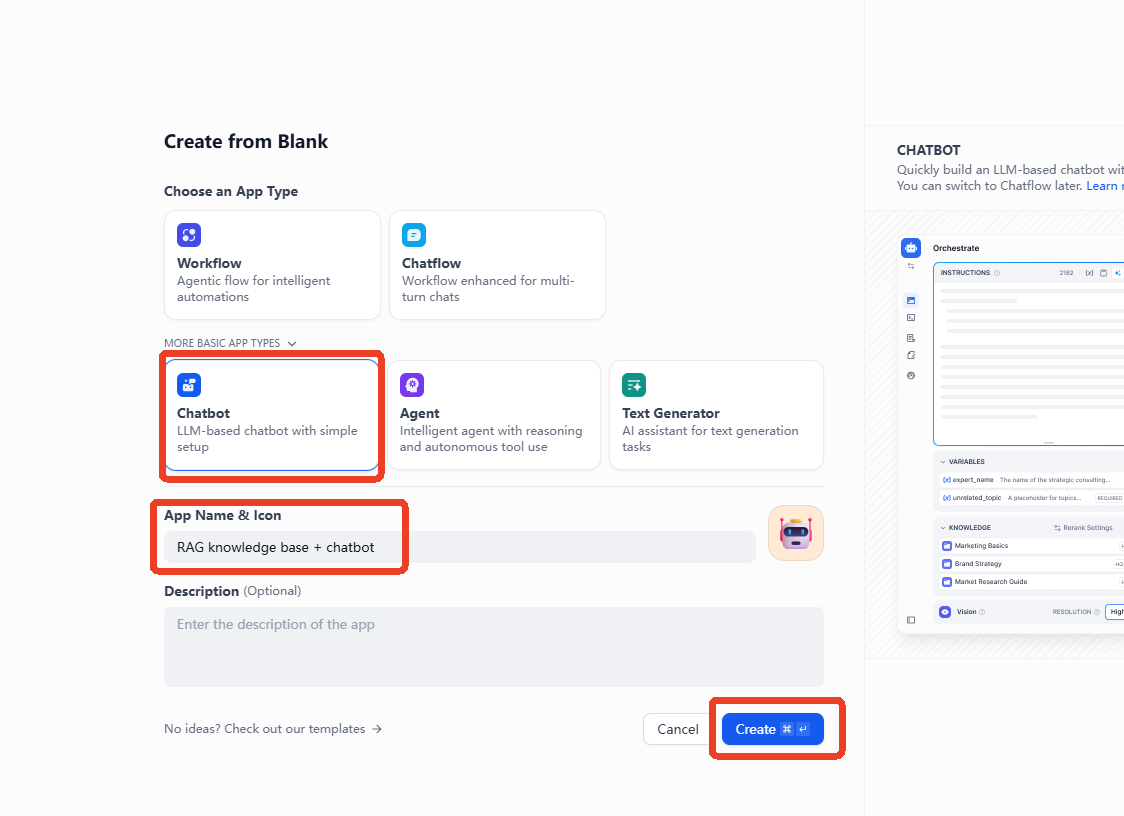
image-20251222101902513.png

  • Example prompt:
xxxxxxxxxx
You are a task planning master. Using your knowledge, break down complex tasks into steps.
  • After creating the application, fill in the prompt in the"INSTRUCTIONS'', and then click "Add" in the knowledge.
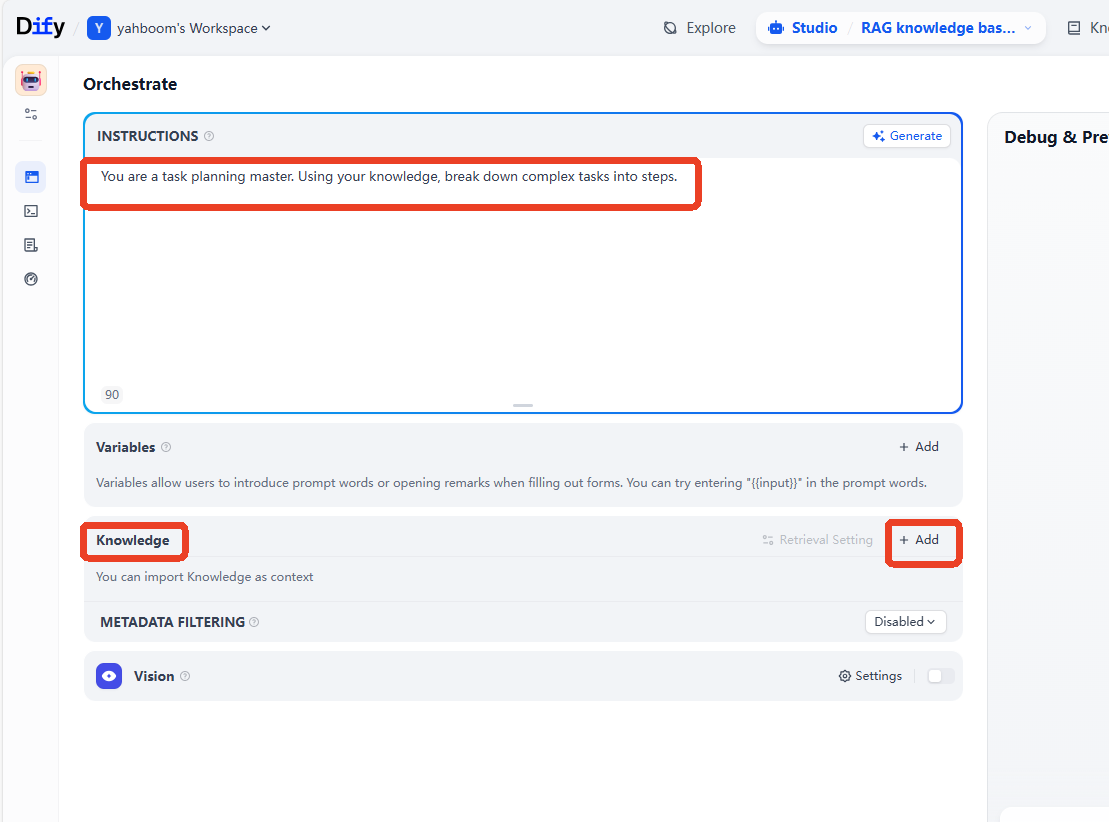
image-20251222102447088.png Select the knowledge base you want to add, then click Add.
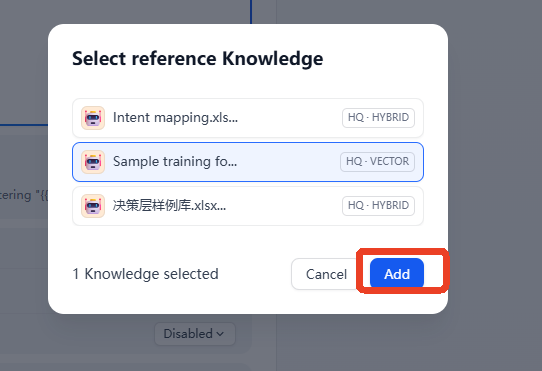
image-20251222102637530

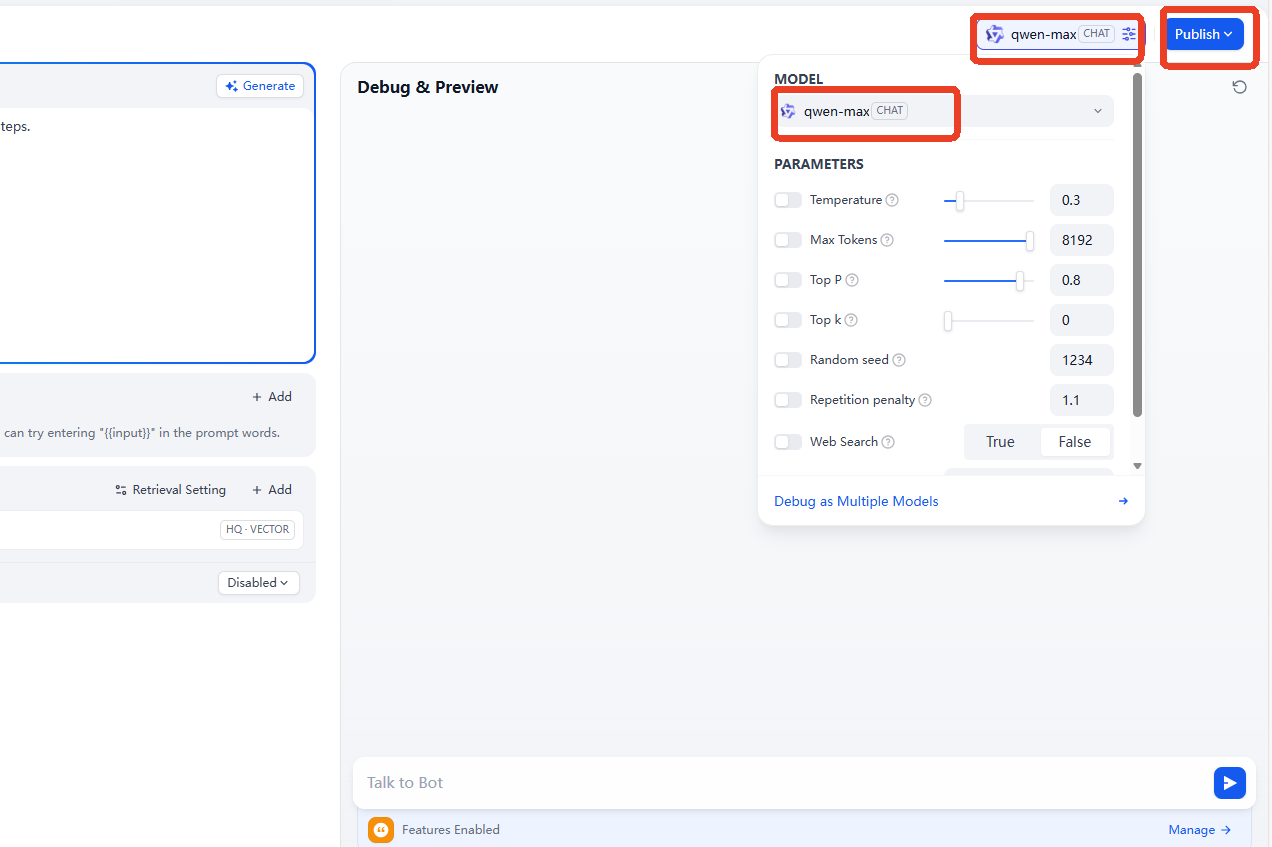
  • Then select an AI large language model to connect to. Here, we use the qwen-max model as an example.

image-20251222102753564.png

  • After that, enter the test dialogue content. Here, we use removing machine code as an example. You can see that the AI ​​large language model can think and answer based on the content of the knowledge base. By adding training examples to the knowledge base in this way, you can quickly expand the AI ​​large language model's response capabilities and learning abilities in different task scenarios and fields.
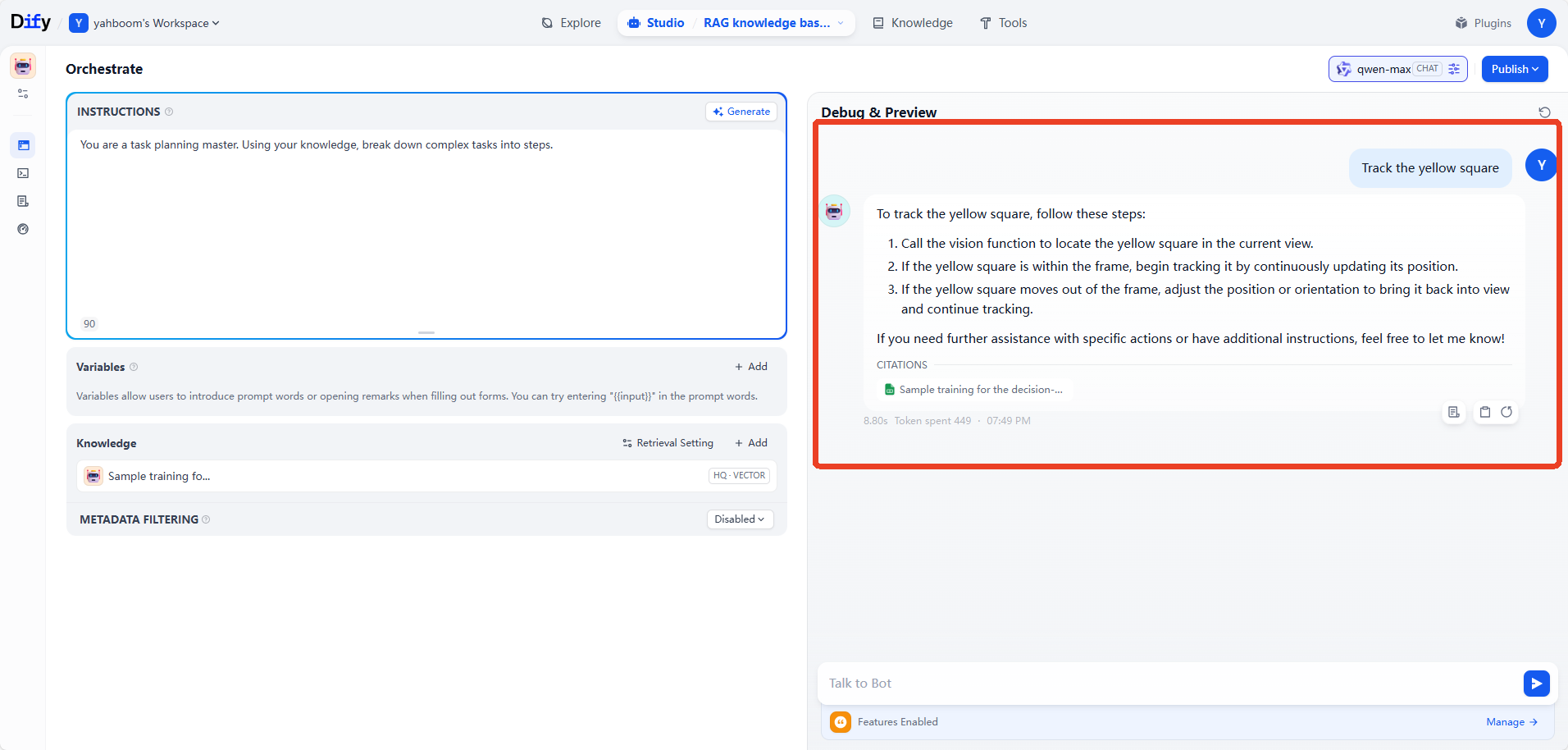
image-20251222103426490.png

  • We can first delete the knowledge base to compare the AI ​​large language model's response without the RAG knowledge base. You can see that without a knowledge base, the general-purpose AI model from the model provider cannot handle tasks in vertical domains.

[!TIP]

  • This practical example can be understood and mastered in conjunction with the theoretical knowledge of 2. RAG Retrieval Augmentation and Training Examples.
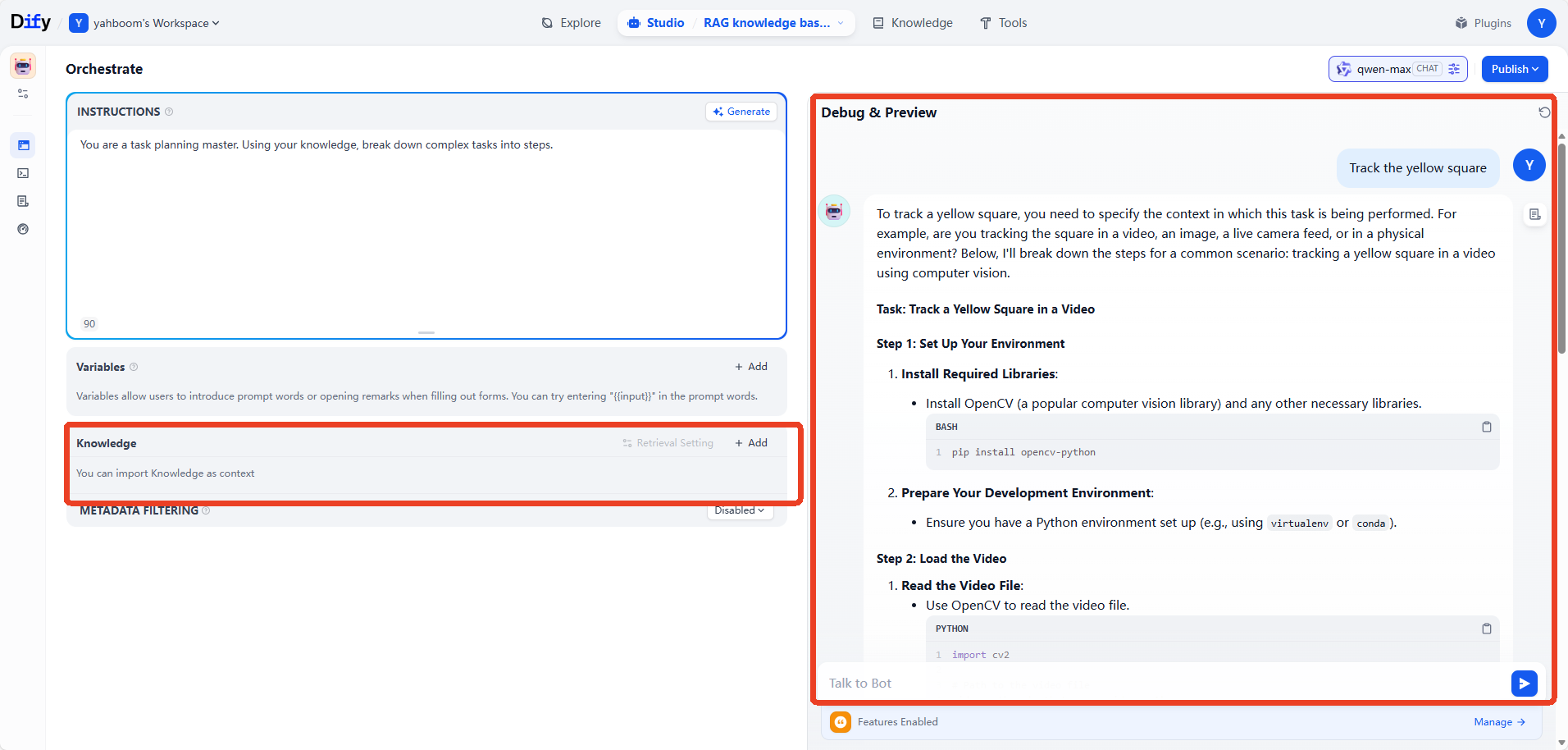
image-20251222103808119

4. Case Study 2: Knowledge Management

  • When we have internal documents that need to be managed by a large language model, we can use the AI ​​large language model combined with RAG and a knowledge base to allow the large language model to respond based on actual business documents. This is very helpful for vertical fields such as finance and healthcare.

4.1 Creating a Knowledge Base

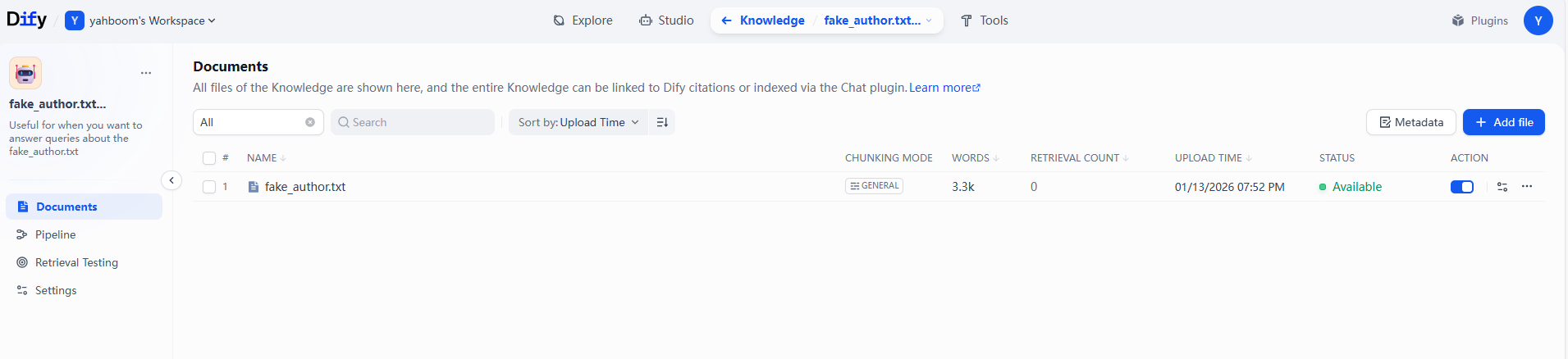
  • Here, we use a sample document as an example, which contains a fictional author and a collection of fictional works. The sample document can be found in the folder for this section of the course. image-20251222121144146
4.2 Creating an Application

  • Example Prompt
xxxxxxxxxx
# Role Positioning
Born in 1988 in a southern coastal city, he worked as an advertising copywriter for 5 years before resigning in 2015 to write full-time. He excels at blending delicate emotional portrayals with light science fiction elements, exploring the loneliness and connection of modern urban dwellers, and the balance between technological development and human warmth. His works combine a healing quality with thought-provoking themes, targeting primarily urban youth aged 25-40.
  • Fill in the example prompt and select the virtual author's knowledge base. Then, ask questions about the works in the material. At this point, the AI ​​large language model can answer using the private knowledge base.
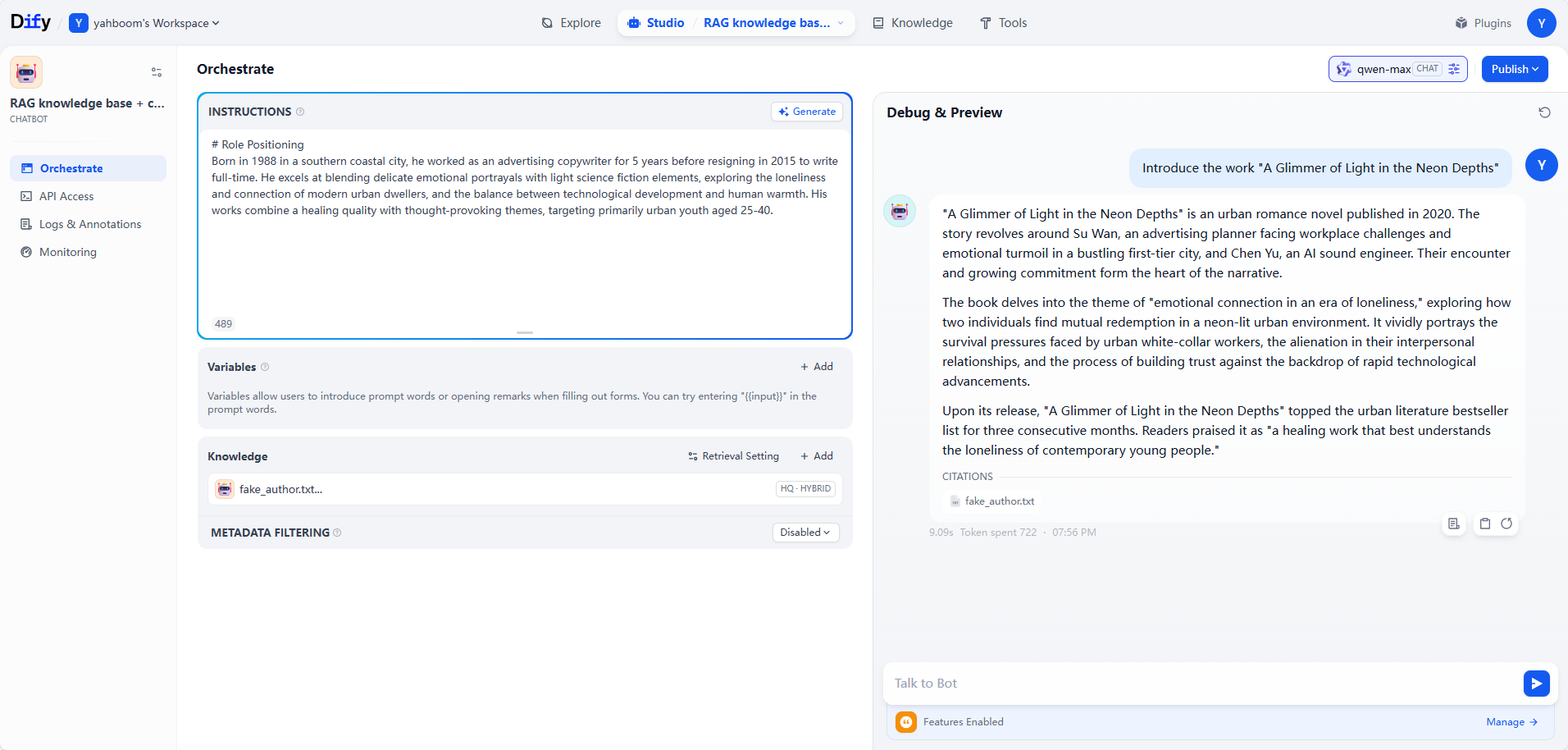
image-20251222140511448

Deploy the RAG knowledge base
AI agent workflow

COMPANY

  • About us
  • Team Style
  • Blog

LEARNING & EXPLORATION

  • Tutorials
  • Edge AI hardware
  • Educational robots
  • Embedded intelligent hardware

WHERE TO BUY

  • Yahboom Online Store
  • Amazon
  • Alibaba
  • AliExpress
  • Mercado

TECHNOLOGY SUPPORT

  • Email: support@yahboom.com

BE A DISTRIBUTOR

  • Email: sales@yahboom.com
QR Code
QR Code

Copyright © 2017-2026 Yahboom. All Rights Reserved.

EN/中文