Welcome to ROSMASTER M3 repository
11.Palm Target Positioning
Palm Target Positioning
1. Course Content
This course implements obtaining color images and using the mediapipe framework to detect palms and output palm coordinates.
2. Program Startup
For Raspberry Pi 5 users, if the ROS container is not started, you need to start the container first,
xxxxxxxxxxbringup_m3Open a terminal inside the container,
xxxxxxxxxxexec_m3- Run program in terminal
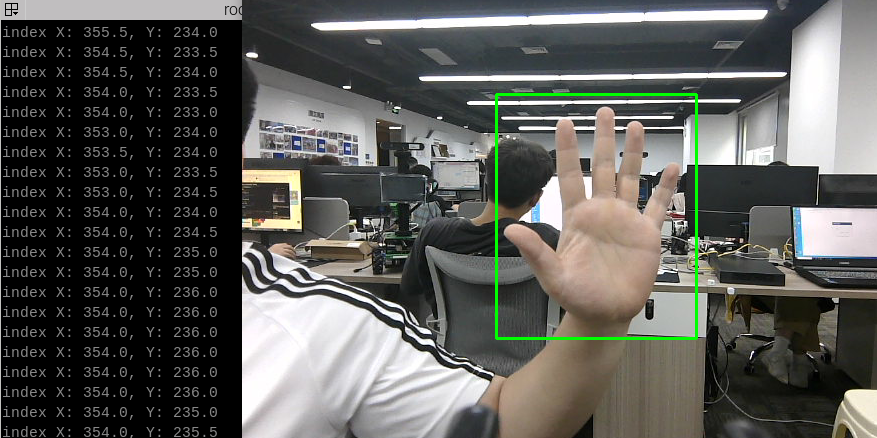
xxxxxxxxxxros2 launch m3_bringup mediapipe_demo.launch.py demo:=FindHandAfter the program starts, as shown in the figure below, when a palm is detected, it will be framed in green in the image, and the palm center coordinates will be output in the terminal.
3. Core Code Analysis
Program code path:
xxxxxxxxxx~/yahboomM3_ws/code_ws/src/m3_common_demo/m3_common_demo/mediapipe/10_FindHand.pyImport the required library files,
xxxxxxxxxximport rclpyfrom rclpy.node import Nodefrom M3Pro_demo.media_library import *import cv2 as cvimport numpy as npimport timeimport osimport threadingfrom cv_bridge import CvBridgefrom sensor_msgs.msg import Imagefrom arm_msgs.msg import ArmJointsimport cv2Initialize data and define publishers and subscribers,
xxxxxxxxxxdef __init__(self,name, mode=False, maxHands=2, detectorCon=0.5, trackCon=0.5): super().__init__(name) #Call the media_library library to create an object of the HandDetector class self.hand_detector = HandDetector() #create a publisher self.rgb_bridge = CvBridge() #Define the subscriber for color image topic self.sub_rgb = self.create_subscription(Image,"/camera/color/image_raw",self.get_RGBImageCallBack,1)Color image callback function,
xxxxxxxxxxdef get_RGBImageCallBack(self,msg): #Use CvBridge to convert color image message data to image data rgb_image = self.rgb_bridge.imgmsg_to_cv2(msg, "bgr8") #Pass the obtained image to the process function for palm detection frame = self.process(rgb_image) key = cv2.waitKey(1) cv.imshow('dist', frame)process function,
xxxxxxxxxxdef process(self, frame): #Call the object's method to perform palm detection, returning the detected image as well as lmList list and bbox list frame, lmList, bbox = self.hand_detector.findHands(frame) self.hand_detector.draw = True #If the lmList list is not empty, it means a palm was detected if len(lmList) != 0: hand = self.hand_detector.fingersUp(lmList) #Get the xy coordinates of the palm, bbox stores the xy coordinates of the top-left and bottom-right corners of the palm indexX = (bbox[0] + bbox[2]) / 2 indexY = (bbox[1] + bbox[3]) / 2 print("index X: %.1f, Y: %.1f" % (indexX, indexY)) return frameRegarding the definition of the Medipipe recognition class, it can be found in the media_library.py library. The location of this library is in the m3_common_demo package with the following path:
xxxxxxxxxx~/yahboomM3_ws/code_ws/src/m3_common_demo/m3_common_demo/mediapipe/media_library.pyWhen needed, you can pass parameters into it. For example, we define the following functions in the HandDetector class:
- findHands: Find palms
- fingersUp: Fingers extended upward
- ThumbTOforefinger: Detect the angle between thumb and index finger
- get_gesture: Detect gestures