Welcome to ROSMASTER M3 repository
05.3D Object Recognition
3D Object Recognition
1. Content Description
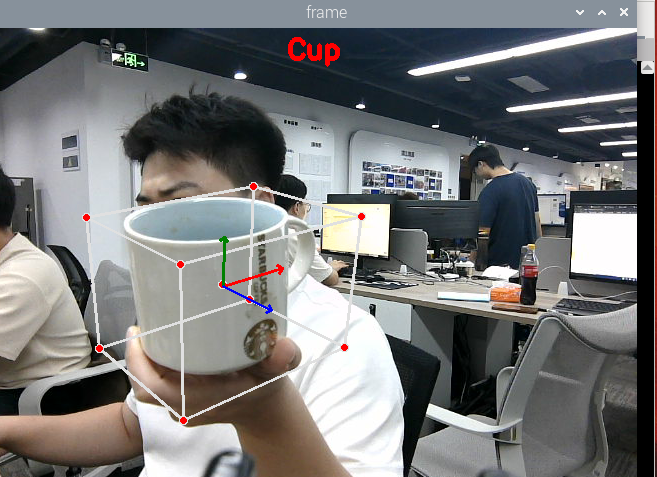
This course implements the functionality of obtaining color images and using the mediapipe framework to recognize 3D objects (the example only shows four types: mug, shoe, chair, and camera).
2. Program Startup
- Run command in the car terminal:
xxxxxxxxxxros2 launch m3_bringup depthcam_demo.launch.py demo:=ObjectionAfter the program runs, the default recognition is for Shoe. You can press the F key to switch the recognized object. As shown in the figure below, a mug is recognized:
3. Core Code Analysis
Program code path:
xxxxxxxxxx~/yahboomM3_ws/code_ws/src/m3_common_demo/m3_common_demo/mediapipe/07_Objection.py
Import the required library files,
xxxxxxxxxximport mediapipe as mpimport cv2 as cvimport timeimport rclpyfrom rclpy.node import Nodefrom sensor_msgs.msg import Imagefrom cv_bridge import CvBridgeimport osimport numpy as npInitialize data and define publishers and subscribers,
xxxxxxxxxxdef __init__(self, staticMode=False, maxObjects=5, minDetectionCon=0.5, minTrackingCon=0.99): super().__init__('Objection') self.staticMode = staticMode self.maxObjects = maxObjects self.minDetectionCon = minDetectionCon self.minTrackingCon = minTrackingCon self.index = 0 self.modelNames = ['Shoe', 'Chair', 'Cup', 'Camera'] #Use the class in the mediapipe library to define a 3D detection object self.mpObjection = mp.solutions.Objection self.mpDraw = mp.solutions.drawing_utils self.mpObjection = self.mpObjection.Objection( self.staticMode, self.maxObjects, self.minDetectionCon, self.minTrackingCon, self.modelNames[self.index]) self.bridge = CvBridge() #Define the subscriber for color image topic camera_type = os.getenv('CAMERA_TYPE', 'usb') topic_name = '/ascamera_hp60c/camera_publisher/rgb0/image' if camera_type == 'nuwa' else '/usb_cam/image_raw' self.subscription = self.create_subscription( Image, topic_name, self.image_callback, 10)Color image callback function,
xxxxxxxxxxdef image_callback(self, msg): frame = self.bridge.imgmsg_to_cv2(msg, desired_encoding='bgr8') action = cv2.waitKey(1) #Press F key to switch recognized objects if action == ord('f') or action == ord('F') : self.configUP() frame = self.findObjection(frame) cv.imshow('Objection', frame)configUP function for switching recognized objects, selects self.modelNames by modifying the value of self.index, self.modelNames options are ['Shoe', 'Chair', 'Cup', 'Camera']
xxxxxxxxxxdef configUP(self): self.index += 1 if self.index>=4:self.index=0 self.mpObjection = self.mpObjection.Objection( self.staticMode, self.maxObjects, self.minDetectionCon, self.minTrackingCon, self.modelNames[self.index])findObjection object recognition function,
xxxxxxxxxxdef findObjection(self, frame): cv.putText(frame, self.modelNames[self.index], (int(frame.shape[1] / 2) - 30, 30), cv.FONT_HERSHEY_SIMPLEX, 0.9, (0, 0, 255), 3) #Convert the color space of the input image from BGR to RGB for subsequent image processing img_RGB = cv.cvtColor(frame, cv.COLOR_BGR2RGB) #Call the process function in the mediapipe library for image processing. In init, the self.pose object was created and initialized results = self.mpObjection.process(img_RGB) #Check if target object is recognized if results.detected_objects: for id, detection in enumerate(results.detected_objects): #Draw coordinate system for the recognized target object on the image self.mpDraw.draw_landmarks(frame, detection.landmarks_2d, self.mpObjection.BOX_CONNECTIONS) self.mpDraw.draw_axis(frame, detection.rotation, detection.translation) return frame