Welcome to ROSMASTER M3 repository
14.Posture Following
Posture Following
Posture Following1. Course Content2. Running Examples2.1 Startup Commands2.2. Dynamic Parameter Adjustment3. Core Code
1. Course Content
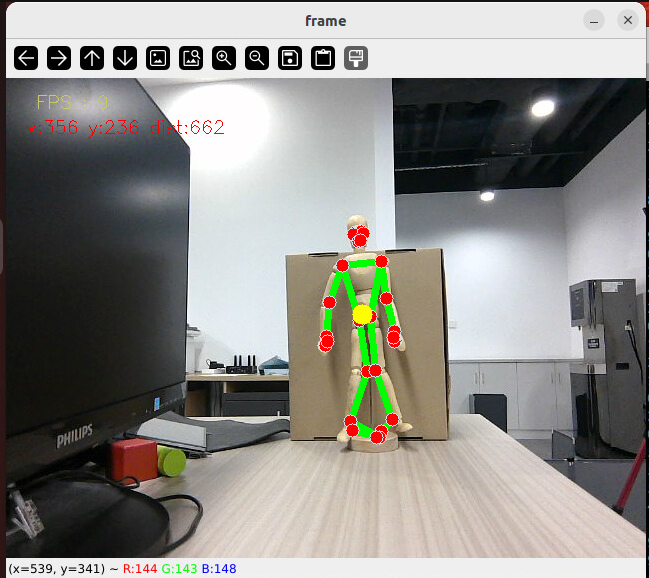
- Run example programs to automatically detect human body pose key points in the image. The car will lock onto the detected human body center position (average of all key points) and maintain a 1.2-meter distance for following movement, keeping it in the center of the image.
2. Running Examples
2.1 Startup Commands
For Raspberry Pi 5 users, if the ROS container is not started, you need to start the container first,
xxxxxxxxxxbringup_m3Open a terminal inside the container,
xxxxxxxxxxexec_m3xxxxxxxxxxros2 launch m3_bringup mediapipe_demo.launch.py demo:=poseTrackerAfter the program starts, the following screen will appear. When a human body is detected, it will automatically mark the key points and calculate the center position of all average points, and the car will start following.
2.2. Dynamic Parameter Adjustment
Enter in terminal:
xxxxxxxxxxros2 run rqt_reconfigure rqt_reconfigure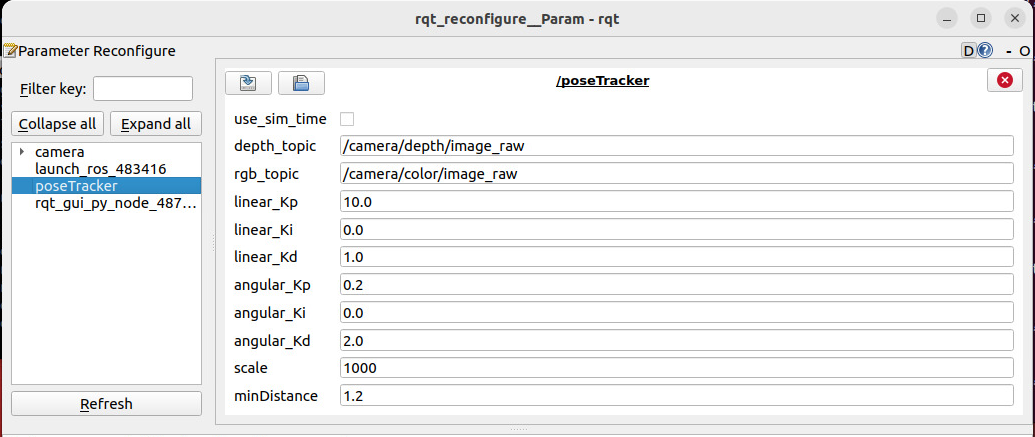
After modifying parameters, click on the blank area of the GUI to write the parameter values. Note that it will only take effect for the current startup. For permanent effect, the parameters need to be modified in the source code.
Parameter Analysis:
【linear_Kp】, 【linear_Ki】, 【linear_Kd】: Linear velocity PID control during car following.
【angular_Kp】, 【angular_Ki】, 【angular_Kd】: Angular velocity PID control during car following.
【minDistance】: Following distance, always maintain this distance.
【scale】: PID proportional scaling.
3. Core Code
- poseFollow.py source code path:
xxxxxxxxxx~/yahboomM3_ws/code_ws/src/m3_common_demo/m3_common_demo/mediapipe/13_poseFollow.pyMainly completes human body pose detection and following. Based on the detected pose key point coordinates and the depth distance from the human body pose center to the car, it calculates the angle the car needs to turn and the forward speed, and publishes control turning angle and motor speed data to the car.
- media_common.py source code path:
xxxxxxxxxx~/yahboomM3_ws/code_ws/src/m3_common_demo/m3_common_demo/mediapipe/media_common.pyThis is a gesture and pose recognition system based on MediaPipe.
PoseDetector class:
- Human body pose estimation and key point detection
- Can return 3D coordinates of 33 body key points
- Calculate the bounding box area of the detection region
depth_poseFollow.py program mainly has the following functions:
- Initialize pose detector
- Subscribe to depth topic to get images
- Detect pose key points in images
- Calculate pose center coordinates and publish
- Use PID algorithm to calculate servo angles, forward speed and publish control commands
Some core code is as follows:
xxxxxxxxxx#Initialize pose detection objectself.pose_detector = PoseDetector()#距离计算 #Distance calculationpoints = [ (int(self.cy), int(self.cx)), #Center point (int(self.cy +1), int(self.cx +1)), #Bottom right offset point (int(self.cy - 1), int(self.cx - 1)) #Top left offset point ]valid_depths = []for y, x in points: depth_val = depth_image_info[y][x] if depth_val != 0: valid_depths.append(depth_val)if valid_depths: dist = int(sum(valid_depths) / len(valid_depths))else: dist = 0#Following running programif dist > 0.2: self.execute(center_x,dist) #Calculate the movement speed and turning angle using the PID algorithm based on the x and y values# Calculate the movement speed and turning angle using the PID algorithm based on the x and y valuesdef execute(self, rgb_img, action): #PID calculation deviation linear_x = self.linear_pid.compute(dist, self.minDist) angular_z = self.angular_pid.compute(point_x,320) #The car is in the parking area and the speed is 0 if abs(dist - self.minDist) < 30: linear_x = 0 if abs(point_x - 320.0) < 30: angular_z = 0 twist = Twist() ... #Publish the calculated speed information self.pub_cmdVel.publish(twist)