Welcome to ROSMASTER M3 repository
01.Hand Detection
Hand Detection
1. Course Content
- Run example programs, use the mediapipe framework to detect hand joint points
2. Program Startup
For Raspberry Pi 5 users, if the ROS container is not started, you need to start the container first,
xxxxxxxxxxbringup_m3Open a terminal inside the container,
xxxxxxxxxxexec_m3- Run hand detection command in terminal
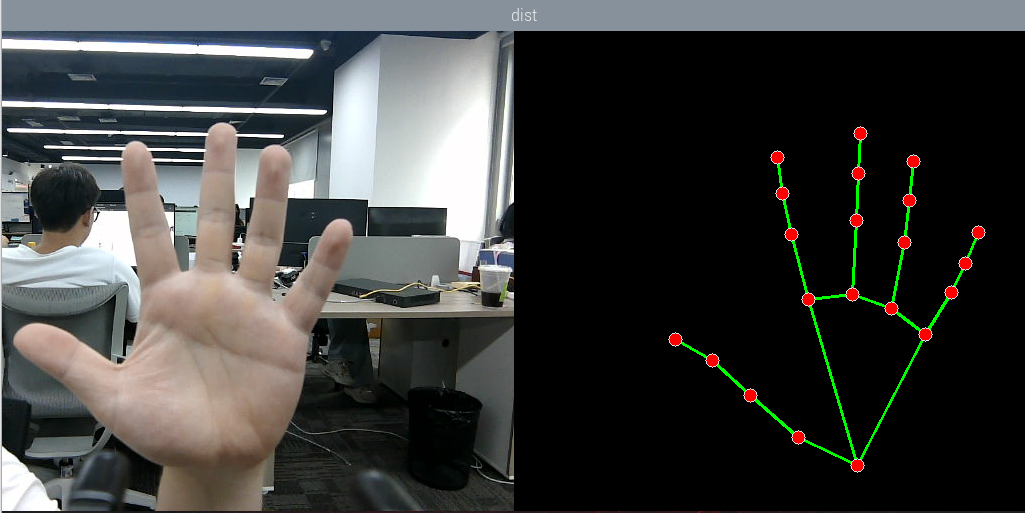
xxxxxxxxxxros2 launch m3_bringup mediapipe_demo.launch.py demo:=HandDetectorAfter the program runs, as shown in the figure below, the detected hand joint points will be displayed on the right side of the image
3. Source Code Analysis
- Program code path:
xxxxxxxxxx~/yahboomM3_ws/code_ws/src/m3_common_demo/m3_common_demo/mediapipe/01_HandDetector.py
xxxxxxxxxximport rclpyfrom rclpy.node import Nodeimport mediapipe as mpimport cv2 as cvimport numpy as npimport timeimport osfrom cv_bridge import CvBridgefrom sensor_msgs.msg import Imagefrom arm_msgs.msg import ArmJointsimport cv2- Initialize data and define publishers and subscribers
xxxxxxxxxx def __init__(self,name, mode=False, maxHands=2, detectorCon=0.5, trackCon=0.5): super().__init__(name) #Parameter declaration and acquisition self.declare_parameter('rgb_topic','/ascamera_hp60c/camera_publisher/rgb0/image') rgb_topic=self.get_parameter("rgb_topic").get_parameter_value().string_value self.qos_profile = QoSProfile( reliability=QoSReliabilityPolicy.BEST_EFFORT, history=QoSHistoryPolicy.KEEP_LAST, depth=1 ) self.pTime=0 self.mpHand = mp.solutions.hands self.mpDraw = mp.solutions.drawing_utils self.hands = self.mpHand.Hands( static_image_mode=mode, max_num_hands=maxHands, min_detection_confidence=detectorCon, min_tracking_confidence=trackCon) self.lmDrawSpec = mp.solutions.drawing_utils.DrawingSpec(color=(0, 0, 255), thickness=-1, circle_radius=6) self.drawSpec = mp.solutions.drawing_utils.DrawingSpec(color=(0, 255, 0), thickness=2, circle_radius=2) #create a publisher self.rgb_bridge = CvBridge() self.sub_rgb = self.create_subscription(Image,rgb_topic,self.get_RGBImageCallBack,self.qos_profile)- Color image callback function
x def get_RGBImageCallBack(self,msg): rgb_image = self.rgb_bridge.imgmsg_to_cv2(msg, "bgr8") frame, img = self.pubHandsPoint(rgb_image, draw=False) dist = self.frame_combine(frame, img) cTime = time.time() if self.pTime == 0: fps = 0 else: fps = 1 / (cTime - self.pTime) self.pTime = cTime text = "FPS : " + str(int(fps)) cv.putText(dist, text, (20, 30), cv.FONT_HERSHEY_SIMPLEX, 0.9, (0, 0, 255), 1) key = cv2.waitKey(1) cv.imshow('dist', dist)pubHandsPoint function:
xxxxxxxxxx def pubHandsPoint(self, frame, draw=True): img = np.zeros(frame.shape, np.uint8) img_RGB = cv.cvtColor(frame, cv.COLOR_BGR2RGB) self.results = self.hands.process(img_RGB) if self.results.multi_hand_landmarks: for i in range(len(self.results.multi_hand_landmarks)): if draw: self.mpDraw.draw_landmarks(frame, self.results.multi_hand_landmarks[i], self.mpHand.HAND_CONNECTIONS, self.lmDrawSpec, self.drawSpec) self.mpDraw.draw_landmarks(img, self.results.multi_hand_landmarks[i], self.mpHand.HAND_CONNECTIONS, self.lmDrawSpec, self.drawSpec)frame_combine image merging function:
def frame_combine(slef,frame, src): #Check if the image is 3-channel, i.e., RGB image if len(frame.shape) == 3: #Get the size of the two images and stitch them together frameH, frameW = frame.shape[:2] srcH, srcW = src.shape[:2] dst = np.zeros((max(frameH, srcH), frameW + srcW, 3), np.uint8) dst[:, :frameW] = frame[:, :] dst[:, frameW:] = src[:, :] else: src = cv.cvtColor(src, cv.COLOR_BGR2GRAY) frameH, frameW = frame.shape[:2] imgH, imgW = src.shape[:2] dst = np.zeros((frameH, frameW + imgW), np.uint8) dst[:, :frameW] = frame[:, :] dst[:, frameW:] = src[:, :] return dst