Welcome to ESP32 Core Board repository
4. PSRAM External Memory Experiment
PSRAM External Memory Experiment
PSRAM External Memory Experiment1. PSRAM Overview2. Core Concepts2.1 ESP32-S3 Memory Classification2.2 heap_caps API Core Functions2.3 Memory Allocation Strategy2.4 Timer-Driven vs Task-Driven3. ESP32-S3 PSRAM Hardware Specifications4. Project Architecture and Flow5. Hardware Dependencies6. Source Code Details6.1 Data Structure Definition6.2 mem_poll_callback() — Timer Callback6.3 app_main() — Entry Point7. Operation Flow7.1 Build and Flash Process7.2 Normal Output8. FAQ
1. PSRAM Overview
PSRAM (Pseudo Static RAM) is an external expansion memory combining DRAM high density and SRAM ease of use. ESP32-S3 connects off-chip PSRAM through Octal SPI interface, providing additional megabytes of RAM space for the MCU.
Typical use cases:
| Scenario | Description |
|---|---|
| Image Processing | Camera frame buffer (QVGA ~ 150KB/frame) |
| Audio Processing | Audio acquisition buffer, MP3 decoding |
| Display Buffer | TFT LCD frame buffer (320×240×16b ≈ 150KB) |
| Large Data Cache | JSON parsing, web data, sensor logs |
| AI / ML Inference | TensorFlow Lite Micro model weights and intermediate tensors |
This project uses heap_caps API to poll and print memory usage of 4 memory types every second, helping developers understand the allocation status of various memory types on the board.
2. Core Concepts
2.1 ESP32-S3 Memory Classification
ESP32-S3's memory is divided into multiple types by physical location and access characteristics, queried through MALLOC_CAP_* flags:
| Memory Type | heap_caps Flag | Description |
|---|---|---|
| Internal DRAM | MALLOC_CAP_INTERNAL \| MALLOC_CAP_8BIT | On-chip 512KB SRAM, fastest, byte-addressable |
| PSRAM (SPIRAM) | MALLOC_CAP_SPIRAM | Off-chip Octal PSRAM, large capacity (2MB/8MB), slightly slower |
| DEFAULT | MALLOC_CAP_DEFAULT | System default allocation strategy (internal first, use PSRAM when insufficient) |
| IRAM 8-bit | MALLOC_CAP_IRAM_8BIT | Byte-addressable portion of internal instruction RAM |
2.2 heap_caps API Core Functions
size_t heap_caps_get_total_size(uint32_t caps); // Total sizesize_t heap_caps_get_free_size(uint32_t caps); // Free size// Largest free blocksize_t heap_caps_get_largest_free_block(uint32_t caps);Largest free block reflects memory fragmentation degree. When this value is much smaller than
free_size, large allocation may fail even if total free is sufficient.
2.3 Memory Allocation Strategy
When calling malloc() (equivalent to heap_caps_malloc(size, MALLOC_CAP_DEFAULT)), system allocates by priority:
Prefer internal DRAM
Use PSRAM when internal DRAM is insufficient
Return
NULLwhen neither is available
Use
heap_caps_malloc(size, MALLOC_CAP_SPIRAM)to force allocation on PSRAM;MALLOC_CAP_INTERNALfor forced internal RAM.
2.4 Timer-Driven vs Task-Driven
| Method | Implementation | Use Case |
|---|---|---|
| FreeRTOS Task + vTaskDelay | Independent stack, can call blocking API | Complex periodic tasks |
| esp_timer callback (this example) | Lightweight, no independent stack | Simple polling, log printing |
Timer callback runs in interrupt context, cannot call blocking APIs (such as
vTaskDelay,printflarge buffer), butESP_LOGIand other log macros are safe.
3. ESP32-S3 PSRAM Hardware Specifications
| Feature | Parameter |
|---|---|
| Interface Type | Octal SPI (8-wire) |
| Max Frequency | 80 MHz (DTR mode) |
| Typical Capacity | 2 MB / 8 MB (depending on board model) |
| Mapping Method | CPU can directly access through Cache (shares with Flash) |
| Enable Configuration | menuconfig → CONFIG_SPIRAM=y |
| Internal SRAM | 512 KB (about 320 KB available for user) |
Note: PSRAM must be enabled in menuconfig first (
CONFIG_SPIRAM=y), otherwiseMALLOC_CAP_SPIRAMcorresponds to 0 bytes.
4. Project Architecture and Flow
xxxxxxxxxxapp_main()├─ ESP_LOGI() Print startup title├─ heap_caps_get_total_size() Detect if PSRAM exists├─ for(4 types) ESP_LOGI() Print initial Total/Free/LargestFree├─ esp_timer_create() Create 1Hz periodic timer└─ esp_timer_start_periodic() Start timer│└─ mem_poll_callback() Triggers once per second (interrupt context)├─ heap_caps_get_total_size() Total capacity├─ heap_caps_get_free_size() Free capacity├─ Calculate used = total - free Used amount├─ heap_caps_get_largest_free_block() Max block├─ ESP_LOGI() Print [type] four metrics└─ current_idx = (idx+1) % 4 Switch to next type
Polling order: SPIRAM → INTERNAL → DEFAULT → IRAM_8BIT → SPIRAM ... (cycle, 1 type/second)
5. Hardware Dependencies
Hardware Connection: None. All memory is on-chip/on-board, no external wiring required.
Required Components: esp_heap_caps, esp_timer, FreeRTOS
How to Enable PSRAM?
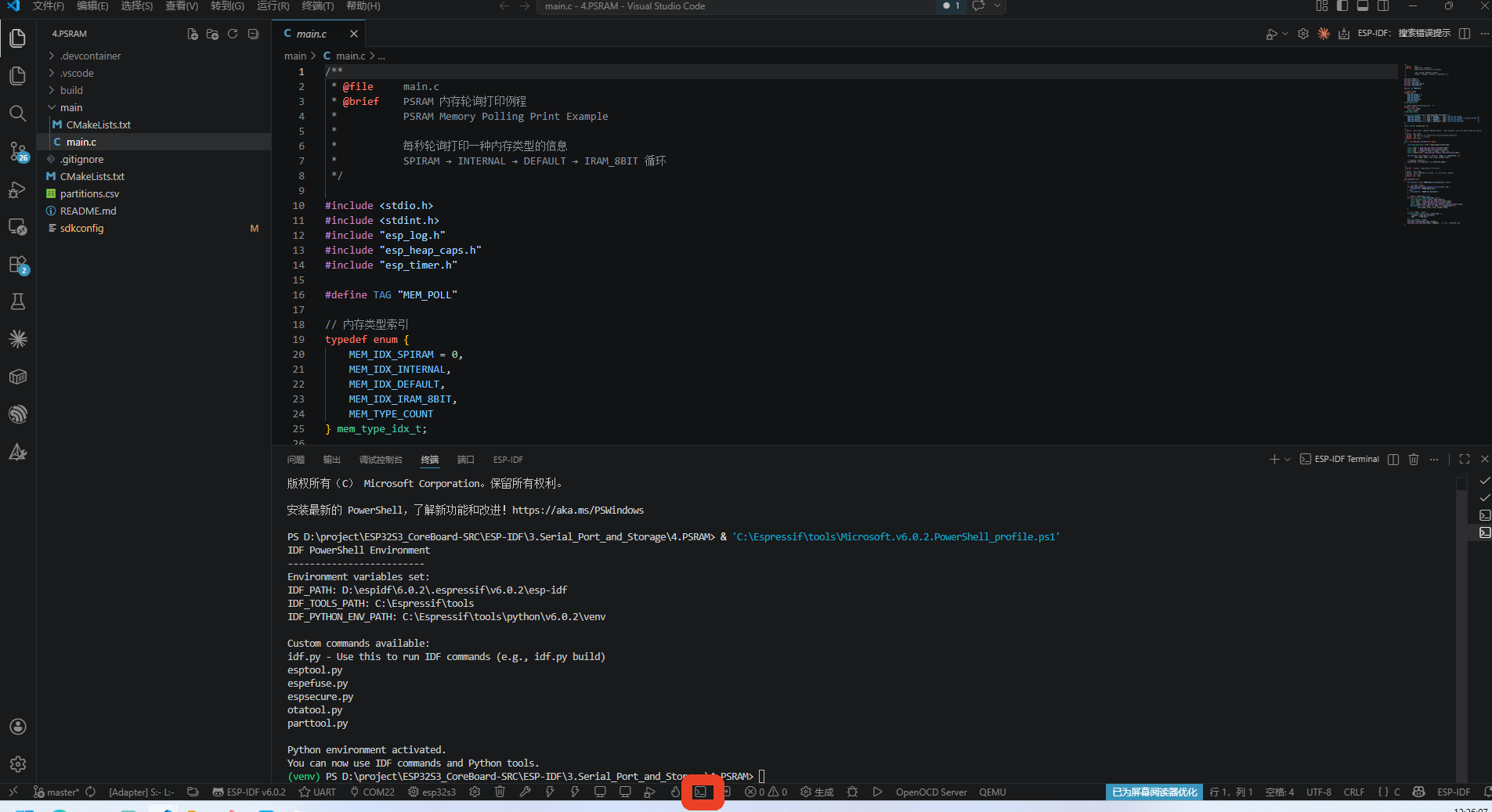
1.Open ESP-IDF Terminal:
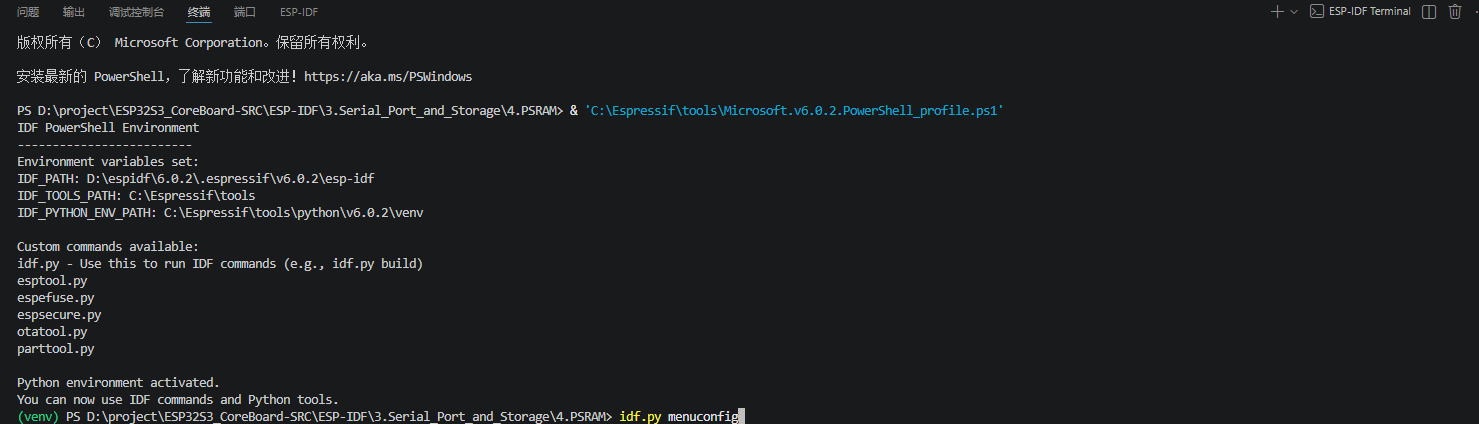
2.Enter Settings Menu Command:
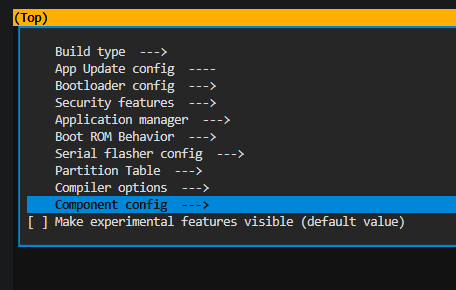
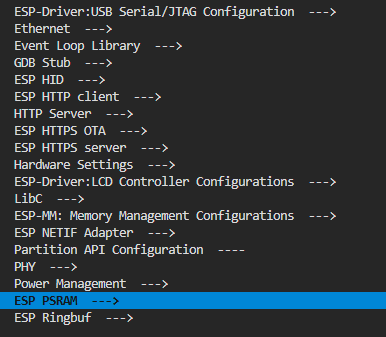
3.Wait for Popup, Navigate: Component config→ESP PSRAM→Select "Support for external, SPI-connected RAM"
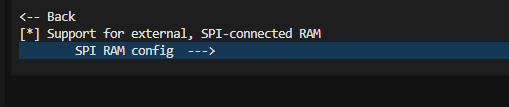
4.Continue to: SPI RAM config→Mode(QUAD/OCT) of SPI RAM chip in use (Octal Mode PSRAM)
.png)
5.Select Octal Mode PSRAM
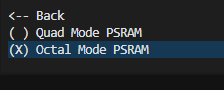
6.Save with "S" key, Exit with "Q" key
menuconfig Required Options:
| Macro | Value | Description |
|---|---|---|
CONFIG_SPIRAM | y | Must enable, otherwise PSRAM unavailable |
6. Source Code Details
6.1 Data Structure Definition
Organize 4 memory type names and heap_caps flags into a lookup table structure. Timer callback uses current_idx to poll by index:
This code defines a memory type information table, storing names and corresponding heap_caps flags for SPIRAM, INTERNAL, DEFAULT, and IRAM_8BIT. The timer callback only needs to use current_idx as index to query which memory type to query this time, making code cleaner and easier to extend.
x// Memory type enumtypedef enum { MEM_IDX_SPIRAM = 0, // Index 0: PSRAM MEM_IDX_INTERNAL, // Index 1: Internal SRAM // Index 2: Default allocation pool MEM_IDX_DEFAULT, // Index 3: Internal instruction RAM MEM_IDX_IRAM_8BIT, MEM_TYPE_COUNT // Total count (4)} mem_type_idx_t;
// Memory type info struct: name + heap_caps flagstypedef struct { const char *name; // Memory type name uint32_t caps; // heap_caps query flags} mem_type_info_t;
// Lookup by indexstatic const mem_type_info_t mem_types[MEM_TYPE_COUNT] = { [MEM_IDX_SPIRAM] = { .name = "SPIRAM", .caps = MALLOC_CAP_SPIRAM }, [MEM_IDX_INTERNAL] = { .name = "INTERNAL", .caps = MALLOC_CAP_INTERNAL | MALLOC_CAP_8BIT }, [MEM_IDX_DEFAULT] = { .name = "DEFAULT", .caps = MALLOC_CAP_DEFAULT }, [MEM_IDX_IRAM_8BIT] = { .name = "IRAM_8BIT",.caps = MALLOC_CAP_IRAM_8BIT },};
// Current polling index, +1 per second, wraps at 4static uint8_t current_idx = 0;6.2 mem_poll_callback() — Timer Callback
This function is the timer's "heartbeat" callback, triggered once per second by hardware timer. Each trigger uses current_idx to query which memory type to query, calls heap_caps_get_* series API to get that memory's total, free, used, and largest contiguous block, prints to serial, then increments index to point to next type. This way only one memory type is polled per second, 4 seconds complete one round, cycle repeats.
xxxxxxxxxx/** * @brief  Timer callback: print one memory type info per second * * @param   arg  Unused */static void mem_poll_callback(void *arg){    // Lookup current type    const mem_type_info_t *info = &mem_types[current_idx];
    // Query four metrics of this memory type    // Total size    size_t total        = heap_caps_get_total_size(info->caps);    // Free size    size_t free         = heap_caps_get_free_size(info->caps);    // Used = total - free    size_t used         = (total >= free) ? (total - free) : 0;    // Largest free block    size_t largest_free = heap_caps_get_largest_free_block(info->caps);
    ESP_LOGI(TAG, "[%s] Total: %u  Free: %u  Used: %u  LargestFree: %u",             info->name, total, free, used, largest_free);
    // Index+1, round-robin 4 types    current_idx = (current_idx + 1) % MEM_TYPE_COUNT;}
Four metrics: Total (total capacity of this type), Free (remaining free), Used (used), LargestFree (largest contiguous free block).
LargestFreedecreasing indicates increasing memory fragmentation.
6.3 app_main() — Entry Point
app_main is the main function executed after program starts. It first checks if PSRAM hardware exists and prints the result, then prints initial snapshot of 4 memory types (total, free, largest block), finally creates a 1Hz (once per second) hardware timer. After timer starts, mem_poll_callback will be automatically called every second, and main function finishes execution.
xxxxxxxxxx/** * @brief  Application entry point */void app_main(void){    ESP_LOGI(TAG, "===== PSRAM Memory Polling Start =====");
    // Check if PSRAM is available: total > 0 means PSRAM exists and is enabled    if (heap_caps_get_total_size(MALLOC_CAP_SPIRAM) > 0) {        ESP_LOGI(TAG, "PSRAM detected");    } else {        // PSRAM not found        ESP_LOGW(TAG, "PSRAM not detected");    }
    // Print 4 memory type snapshots    for (int i = 0; i < MEM_TYPE_COUNT; i++) {        const mem_type_info_t *info = &mem_types[i];        // Total size        size_t total        = heap_caps_get_total_size(info->caps);        // Free size        size_t free         = heap_caps_get_free_size(info->caps);        // Largest free block        size_t largest_free = heap_caps_get_largest_free_block(info->caps);        ESP_LOGI(TAG, "[%s] Total: %u  Free: %u  LargestFree: %u",                 info->name, total, free, largest_free);    }
    // Create 1Hz periodic timer, auto-calls mem_poll_callback every second    const esp_timer_create_args_t timer_args = {        // Callback function pointer        .callback = &mem_poll_callback,        // Timer name (for debugging)        .name     = "mem_poll",    };    esp_timer_handle_t timer;    // Create timer    esp_timer_create(&timer_args, &timer);    // Start, 1s period = 1,000,000 microseconds    esp_timer_start_periodic(timer, 1000000);}
7. Operation Flow
7.1 Build and Flash Process
For detailed flash process: 1. Before Development → 3. Build and Flash
7.2 Normal Output
After power-on, first print initial snapshot of all 4 memory types, then poll one per second:
xxxxxxxxxxI (1263) MEM_POLL: ===== PSRAM Memory Polling Start =====I (1264) MEM_POLL: PSRAM detectedI (1265) MEM_POLL: [SPIRAM] Total: 2097152 Free: 2096736 LargestFree: 2096736I (1266) MEM_POLL: [INTERNAL] Total: 327680 Free: 289456 LargestFree: 262144I (1267) MEM_POLL: [DEFAULT] Total: 2424832 Free: 2386592 LargestFree: 2096736I (1268) MEM_POLL: [IRAM_8BIT] Total: 327680 Free: 289456 LargestFree: 262144I (2268) MEM_POLL: [SPIRAM] Total: 2097152 Free: 2096736 Used: 416 LargestFree: 2096736I (3268) MEM_POLL: [INTERNAL] Total: 327680 Free: 289456 Used: 38224 LargestFree: 262144I (4268) MEM_POLL: [DEFAULT] Total: 2424832 Free: 2386592 Used: 38240 LargestFree: 2096736I (5268) MEM_POLL: [IRAM_8BIT] Total: 327680 Free: 289456 Used: 38224 LargestFree: 262144
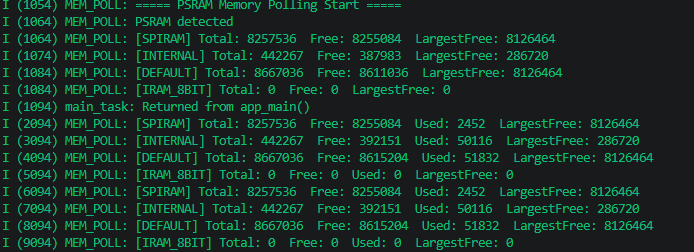
Key verification points:
PSRAM detectedconfirms PSRAM enabled successfullyDEFAULT = INTERNAL + SPIRAM(about 2.4MB), meaning default allocation pool contains both memory typesLargestFreeclose toFreeindicates memory fragmentation is controllable after system startup
8. FAQ
| Symptom | Cause | Solution |
|---|---|---|
| PSRAM Total = 0 | CONFIG_SPIRAM not enabled | menuconfig → Component config → ESP PSRAM → Support for external, SPI-connected RAM → y |
| PSRAM Total = 0 (menuconfig enabled) | Board has no PSRAM hardware / Octal PSRAM mode doesn't match actual chip | Confirm if board has PSRAM, check Octal PSRAM mode configuration |
heap_caps_malloc returns NULL | Target memory type free insufficient / severe fragmentation | Check LargestFree, if much smaller than Free means early allocation needed or reduce long-term holds |
| DEFAULT total not equal to INTERNAL+SPIRAM | System reserves some internal RAM for Wi-Fi/BT protocol stack | Normal phenomenon, MALLOC_CAP_DEFAULT may exclude DMA reservation area, etc. |
| Calling blocking API in timer callback causes exception | Timer callback runs in interrupt context | Callback can only call ESP_LOGI and other non-blocking APIs, complex tasks use FreeRTOS Task |