Welcome to ESP32 Core Board repository
5. Free Chat
5. Free Chat
5. Free Chat1. Dialogue Interaction Flow2. Wake Word InteractionWake DeviceInterrupt Dialogue3. Button Interaction4. Voice Commands Available During Dialogue5. Common TroubleshootingAppendix A · Hardware Pin Quick ReferenceAppendix B · Reference Resources
1. Dialogue Interaction Flow
Each dialogue of AI Xiaozhi follows this lifecycle:
┌──────────┐│ IDLE │ Device idle, waiting for wake-up│ Idle standby │ LED breathing light / Display shows default expression└────┬─────┘│ Hear "Hi,Andy" (offline wake word detection)▼┌──────────┐│LISTENING │ Device enters audio pickup state│ Listening │ LED lights up / Screen shows "Listening..."└────┬─────┘│ VAD detects speech end / User manually stops▼┌──────────┐│CONNECTING│ Send recording data, wait for AI reply│ Thinking │ Screen shows "Other party is speaking..." / animation└────┬─────┘│ Server returns TTS audio▼┌──────────┐│SPEAKING │ Play AI reply voice│ Speaking │ LED bounces with speech / Screen shows reply text└────┬─────┘│ Playback complete▼┌──────────┐│ IDLE │ Return to idle, wait for next wake-up└──────────┘
Three Listening Modes:
| Mode | Behavior | Applicable Scenario |
|---|---|---|
AutoStop (default) | Auto-detect speech end, auto-send after 1.5s silence | Daily conversation |
ManualStop | User manually presses button to end recording | Long recording / noisy environment |
Realtime | Real-time streaming transmission (requires AEC) | Ultra-low latency scenarios |
2. Wake Word Interaction
Wake Device
Speak the default wake word "Hi,Andy" (or your custom wake word) toward the device; the device will:
Sound feedback: Emit a short "ding" sound
Visual feedback: LED lights up / screen shows listening status
State switch: Enter
Listeningstate, start recording
x// Woken from idleI (18912) Application: Wake word detected: Hi,Andy (state: 0)I (18914) StateMachine: State: idle -> listening// User finished speaking, VAD detects silence, auto-sendI (315705) Application: >> How is the weather today.I (315723) StateMachine: State: listening -> speaking// Server returns TTS voice17:00:22.776 -> I (316266) Application: << % get_weather...17:00:23.778 -> I (317294) Application: << It's sunny and warm in Shenzhen today,17:00:26.224 -> I (319720) Application: << with a temperature of 33°C. It feels like 36°C, so it's a bit humid.17:00:31.884 -> I (325374) SystemInfo: free sram: 86003 minimal sram: 7727917:00:32.620 -> I (326139) Application: << The wind is from the southeast at a gentle breeze.17:00:35.990 -> I (329499) Application: << Perfect weather for a sunny day!// Return to idle after playbackI (41580) StateMachine: State: speaking -> idle
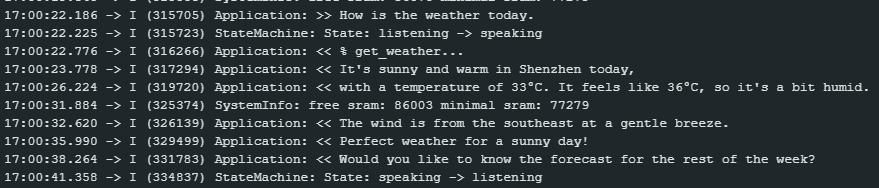
Interrupt Dialogue
During AI broadcast, you can interrupt it anytime by speaking the wake word:
// Wake from idle, enter listeningI (13524) Application: Wake word detected: Hi,Andy (state: 0)I (13540) StateMachine: State: idle -> listening// User speaks → server repliesI (15057) Application: >> Hi,Andy.I (15060) StateMachine: State: listening -> speakingI (15060) Application: << Hi, hello!I (16888) Application: << What can I help you with today?// Return to idle after playbackI (16900) StateMachine: State: speaking -> idle// Wake again, interrupted during broadcastI (28000) Application: Wake word detected: Hi,Andy (state: 0)I (28002) StateMachine: State: idle -> listeningI (82904) Application: >> Tell me a story.I (82944) StateMachine: State: listening -> speakingI (83511) Application: << Oh, totally!I (84956) Application: << Once upon a time, in a cozy little village,I (87664) Application: << there was a tiny blue bird who loved to sing. Every morning, he’d fly to the tallest tree and belt out a cheerful tune.// User speaks wake word to interrupt playbackI (41356) Application: Wake word detected: Hi,Andy (state: 6)I (41357) Application: Abort speakingI (41359) StateMachine: State: speaking -> listening
The interrupt function is implemented through
kAbortReasonWakeWordDetectedmechanism—immediately stop playback queue and clear audio buffer after wake word is detected.

3. Button Interaction
| Button | Current State | Behavior After Press |
|---|---|---|
| BOOT (GPIO0) | Idle / Playing (IDLE / SPEAKING) | Enter listening mode, same as saying "Hi,Andy" |
| BOOT (GPIO0) | Listening (LISTENING) | Exit listening, return to idle standby |
| BOOT (GPIO0) | Starting (kDeviceStateStarting) | Enter Wi-Fi provisioning mode |
| RST | Any state | Hardware reset |
4. Voice Commands Available During Dialogue
In addition to free chat, Xiaozhi also provides some built-in commands through MCP tools:
| Voice Command Example | MCP Tool | Effect |
|---|---|---|
| "Set volume to 50%" | set_volume | Adjust playback volume |
| "What's your name" | LLM directly answers | "I'm Xiaozhi, your AI assistant" |
| "Tell a joke" | LLM directly answers | Tell a joke |
| "What time is it now" | NTP sync | Broadcast current time |
5. Common Troubleshooting
| Phenomenon | Cause | Troubleshooting Steps |
|---|---|---|
| No response when saying wake word | Wake word model not loaded | Check serial logs for "ESP-SR initialized" |
| Echo/feedback after wake-up | Speaker sound entering MIC | Enable AEC (CONFIG_USE_DEVICE_AEC) or lower volume |
| Dialogue stuck at "Thinking" | Server not responding / timeout | Check network status, view server logs |
| Incomplete reply voice | TTS output truncated | Check network latency, consider using faster TTS model |
| Inaccurate speech recognition | Large ambient noise / dialect | Move closer to MIC, reduce ambient noise, check ASR model configuration |
| Device frequently disconnects | Wi-Fi signal weak | Move closer to router, or configure Wi-Fi reconnection strategy |
| Reboot caused by insufficient PSRAM | Memory leak or insufficient resources | Check heap memory usage, close unnecessary features |
| Playback sound choppy | Insufficient audio buffer | Increase MAX_PLAYBACK_TASKS_IN_QUEUE |
Login to xiaozhi.me console → Dialogue Records, you can view complete ASR text, LLM reply, and TTS text for each dialogue, convenient for locating issues.
Appendix A · Hardware Pin Quick Reference
| Pin | Macro | Function |
|---|---|---|
| GPIO15 | AUDIO_I2S_GPIO_MCLK | I2S MCLK |
| GPIO18 | AUDIO_I2S_GPIO_WS | I2S WS |
| GPIO16 | AUDIO_I2S_GPIO_BCLK | I2S BCLK |
| GPIO17 | AUDIO_I2S_GPIO_DIN | I2S DIN (MIC) |
| GPIO8 | AUDIO_I2S_GPIO_DOUT | I2S DOUT (SPK) |
| GPIO41 | AUDIO_CODEC_I2C_SDA_PIN | ES8311 I2C SDA |
| GPIO42 | AUDIO_CODEC_I2C_SCL_PIN | ES8311 I2C SCL |
| GPIO7 | AUDIO_CODEC_PA_PIN | NS4150 PA enable |
| GPIO48 | BUILTIN_LED_GPIO | WS2812 RGB LED |
| GPIO0 | BOOT_BUTTON_GPIO | BOOT button |
Appendix B · Reference Resources
| Resource | Link |
|---|---|
| AI Xiaozhi GitHub Repository | 78/xiaozhi-esp32 |
| Official Server Console | xiaozhi.me |
| Xiaozhi Encyclopedia | Feishu Docs |
| Beginner Flash Tutorial | Feishu Docs |
| Python Server | xinnan-tech/xiaozhi-esp32-server |
| Java Server | joey-zhou/xiaozhi-esp32-server-java |
| Golang Server | AnimeAIChat/xiaozhi-server-go |
| Assets Online Generator | 78/xiaozhi-assets-generator |
| ESP-SR Speech Recognition | espressif/esp-sr |
| Video Tutorial (BiliBili) | Install Camera for Xiaozhi |