Welcome to ESP32 Core Board repository
6. USB Emulated Mass Storage Experiment
USB Emulated Mass Storage Experiment
USB Emulated Mass Storage Experiment1. USB MSC Overview2. Core Concepts2.1 Storage Layer Stack Architecture2.2 Dual-End Mount Switching2.3 TinyUSB Introduction2.4 USB Descriptors3. ESP32-S3 USB Hardware Specifications4. Project Architecture and Flow4.1 Detailed Startup Flow4.2 Partition Table (partitions.csv)4.2.1 menuconfig Configuration FlowOpen menuconfig① Partition Table② TinyUSB — MSC Mass Storage Class③ Wear-Leveling — Wear Leveling④ FAT Filesystem — Long Filename⑤ Bootloader Log Level (Compact Output)⑥ System Default Log Level (Compact Output)Save and Exit4.3 USB Component Dependency ManagementDependency Chain DiagramFile Details5. Hardware Dependencies6. Source Code Details6.1 USB Descriptor Configuration6.2 Preset File Writing6.3 usb_msc_init_storage() — Storage Initialization6.4 usb_msc_mount_usb() — Switch to USB Side6.5 app_main() — Entry Point7. Operation Flow7.1 Build and Flash Process7.2 Normal Usage7.3 Edge Cases8. FAQ
1. USB MSC Overview
USB MSC (Mass Storage Class) is a device class in the USB standard protocol that allows MCU to emulate a USB flash drive when connected to PC. PC can read and write files on Flash through file manager without installing any drivers (FAT file system).
Typical use cases:
| Scenario | Description |
|---|---|
| Data Logger | Sensor data stored as CSV, unplug USB and plug into PC to read |
| Firmware Upgrade | Drag firmware file into USB drive, MCU auto-identifies and upgrades on power-on |
| Configuration File Management | User edits device parameter files through PC, eliminating need for dedicated upper computer |
| Audio/Image Acquisition | Acquisition data directly written to mass storage, exported later |
This project emulates ESP32-S3's SPI Flash partition as a USB flash drive. After inserting USB cable, PC recognizes it as a USB drive (containing welcome.txt preset file).
2. Core Concepts
2.1 Storage Layer Stack Architecture
From bottom Flash to PC-visible file system, data passes through multiple layers of abstraction:
PC File Manager↑ USB MSC Protocol (Bulk-Only Transport)↑ FAT File System (FatFs)↑ Wear-Leveling↑ SPI Flash Partition (storage partition, 1MB)
| Layer | Responsibility |
|---|---|
| SPI Flash Partition | Physical storage medium, 1 FAT type partition (storage) |
| Wear-Leveling | Maps logical sectors to Flash physical addresses,均衡擦写次数, extends Flash lifespan |
| FAT (FatFs) | File system abstraction, provides fopen/fwrite/fread and other standard C file interfaces |
| USB MSC (TinyUSB) | Implements USB MSC protocol stack, handles PC-side SCSI commands (read/write/capacity query, etc.) |
2.2 Dual-End Mount Switching
Storage partition can only be accessed by one end at any given time — firmware side (APP) or USB side (PC), switched through mount point:
x[APP Side] [USB Side]Firmware via fopen("/data/xxx") PC via file managerRead/write FAT partition Read/write USB drive┌─────────┐ switch ┌─────────┐│ APP │ ───────────→ │ USB ││ mount │ │ mount │└─────────┘ └─────────┘
This project first mounts to APP side on startup to write
welcome.txt, then switches to USB side for PC recognition.
2.3 TinyUSB Introduction
TinyUSB is an open-source embedded USB protocol stack, integrated into ESP-IDF through esp_tinyusb component. It provides implementations of multiple USB device classes including MSC, CDC, HID, MIDI, etc.
2.4 USB Descriptors
Each USB device must provide a set of descriptors to the host, telling "what device I am and how to communicate":
| Descriptor | Description | This Example Value |
|---|---|---|
| Device Descriptor | VID/PID/device type | VID=0x303A (Espressif), PID=0x4002 |
| Configuration Descriptor | Number of interfaces, power mode | 1 MSC interface, Bus-powered 100mA |
| Interface Descriptor | Interface type (MSC) | Bulk-Only Transport, 1×OUT + 1×IN |
| String Descriptor | Manufacturer/product name/serial | "Espressif" / "ESP32-S3 USB MSC" |
3. ESP32-S3 USB Hardware Specifications
| Feature | Parameter |
|---|---|
| USB Interface | Native USB OTG (Full-Speed, 12 Mbps) |
| USB Pins | D- = GPIO19, D+ = GPIO20 |
| Internal PHY | Integrated USB transceiver, no external PHY chip needed |
| Power Mode | Bus-powered (powered from USB bus) |
| TinyUSB Version | 2.17.0 (via IDF component manager) |
Must use native USB port (GPIO19/20). The other UART-USB serial on the board is only for flashing and log output, cannot be used for MSC.
4. Project Architecture and Flow
xxxxxxxxxxmain.c (Application Layer)├─ nvs_flash_init() TinyUSB PHY config depends on NVS├─ usb_msc_init_storage() SPI Flash → FAT → USB driver└─ usb_msc_mount_usb() Switch to USB side, PC recognizes USB drivecomponents/USB_MSC/ (Component Layer)├─ usb_msc.h Public API├─ usb_msc.c Specific implementation│ ├─ wl_mount() Mount Wear-Leveling│ ├─ tinyusb_msc_new_storage_spiflash() Create MSC storage│ ├─ write_preset_files() Write welcome.txt│ └─ tinyusb_driver_install() Install TinyUSB driver└─ CMakeLists.txt esp_partition + wear_levelling + esp_tinyusb
4.1 Detailed Startup Flow
xxxxxxxxxx[Power On]↓① nvs_flash_init() Initialize NVS (TinyUSB PHY config needs NVS)↓② usb_msc_init_storage()├─ esp_partition_find_first() Find storage data partition├─ wl_mount() Mount Wear-Leveling├─ tinyusb_msc_new_storage_spiflash() Create MSC storage handle (auto FAT format)├─ tinyusb_msc_storage_mount(APP) First mount to APP side├─ fopen("/data/welcome.txt", "w") Write preset file│ fprintf("Welcome to Yahboom...")│ fclose()└─ tinyusb_driver_install() Install TinyUSB device driver↓③ usb_msc_mount_usb()tinyusb_msc_storage_mount(USB) Switch to USB side↓④ while(1) vTaskDelay(5000) Idle loop (MSC handled by TinyUSB background task)
4.2 Partition Table (partitions.csv)
xxxxxxxxxx# Name, Type, SubType, Offset, Size, Flagsnvs, data, nvs, 0x9000, 0x6000,phy_init, data, phy, 0xf000, 0x1000,factory, app, factory, 0x10000, 1M,storage, data, fat, , 1M,
storagepartition type isdata, fat, size 1MB. TinyUSB MSC depends on this partition as virtual USB drive's storage space.
4.2.1 menuconfig Configuration Flow
menuconfig is a graphical configuration tool provided by ESP-IDF, allowing you to modify project settings, component options, and partition tables without directly editing code. Configuration items and their menuconfig paths for this project are as follows (system auto-generated defaults not listed).
Operation tips: ↑↓ move cursor, Space check/switch options, Enter enter submenu/edit text, Q exit current layer (top-level Q pops save prompt, Y save and exit / N discard), S save without exiting, ? view help.
Open menuconfig
Execute in project root directory (reference: 3. Serial Communication and Storage System → 4. PSRAM External Memory Experiment → PSRAM External Memory Experiment):
xxxxxxxxxxidf.py menuconfigWait for terminal to load configuration items (first open takes about 5-10 seconds to compile mconf tool).
① Partition Table
xxxxxxxxxxTop ▸ Partition Table└─ Partition Table ──────────────────→ (X) Custom partition table CSV└─ (partitions.csv) Custom partition CSV file
| # | Operation | Description |
|---|---|---|
| 1 | Enter Partition Table → select Partition Table, Space to switch to (X) Custom partition table CSV | Enable custom partition table |
| 2 | Enter (custom_partitions.csv) Custom partition CSV file, press Enter to edit, change to partitions.csv | Point to project's partition CSV file |
Other partition table options (
Offset = 0x8000,MD5 checksum, etc.) keep system defaults.
② TinyUSB — MSC Mass Storage Class
xxxxxxxxxxTop ▸ Component config└─ TinyUSB Stack└─ Mass Storage Class (MSC)└─ [*] Enable MSC└─ (4096) MSC FIFO Buffer Size (Bytes)
| # | Operation | Description |
|---|---|---|
| 1 | Component config → TinyUSB Stack → Mass Storage Class (MSC) → check [*] Enable MSC | Enable MSC class driver |
| 2 | Enter (1024) MSC FIFO Buffer Size, change to 4096 | Increase buffer for better throughput |
Other TinyUSB options keep defaults:
Debug Level = 0, descriptors use Espressif default VID/PID, CDC/HID/DFU and other unused functions automatically disabled.
③ Wear-Leveling — Wear Leveling
xxxxxxxxxxTop ▸ Component config└─ Wear Leveling└─ Wear Leveling Sector Size ──→ (X) 512B└─ Wear Leveling Sector Mode ──→ (X) Performance mode
| # | Operation | Description |
|---|---|---|
| 1 | Component config → Wear Leveling → select Wear Leveling Sector Size, Space to switch to (X) 512B | 512 byte sector matches FAT standard |
| 2 | Select Wear Leveling Sector Mode, Space to switch to (X) Performance mode | Prioritize speed over safety |
④ FAT Filesystem — Long Filename
xxxxxxxxxxTop ▸ Component config└─ FAT Filesystem support└─ Long filename support ──→ (X) Long filename in heap
| # | Operation | Description |
|---|---|---|
| 1 | Component config → FAT Filesystem support → select Long filename support, Space to switch to (X) Long filename in heap | Enable LFN, allocate from heap |
After enabling this, PC can create Chinese/ultra-long filenames in USB drive, not limited by FAT 8.3 naming.
⑤ Bootloader Log Level (Compact Output)
xxxxxxxxxxTop ▸ Bootloader config└─ Bootloader log verbosity ──→ (X) Error
| # | Operation | Description |
|---|---|---|
| 1 | Bootloader config → Bootloader log verbosity, Space to switch to (X) Error | Only Error-level logs during boot, suppress partition/flash/image noise |
⑥ System Default Log Level (Compact Output)
xxxxxxxxxxTop ▸ Component config└─ Log output└─ Default log verbosity ──→ (X) Warning
| # | Operation | Description |
|---|---|---|
| 1 | Component config → Log output → Default log verbosity, Space to switch to (X) Warning | Only Warning+ globally, suppress PSRAM/heap/flash init INFO noise |
Code has already raised this project's two tags back to INFO via
esp_log_level_set("main", ESP_LOG_INFO)andesp_log_level_set("usb_msc", ESP_LOG_INFO), only this project's logs output normally, other system noise stays silent.
Save and Exit
Press Q → Y in sequence to save and exit, menuconfig auto-updates sdkconfig file.
Configuration Quick Reference (can also preset via sdkconfig.defaults to avoid repeated configuration):
| Configuration Item | Value | Menu | Description |
|---|---|---|---|
PARTITION_TABLE_CUSTOM | y | Partition Table | Enable custom partition table |
PARTITION_TABLE_CUSTOM_FILENAME | "partitions.csv" | Partition Table | Custom partition table filename |
TINYUSB_MSC_ENABLED | y | TinyUSB → MSC | Enable MSC mass storage class |
TINYUSB_MSC_BUFSIZE | 4096 | TinyUSB → MSC | MSC buffer size |
WL_SECTOR_SIZE_512 | y | Wear Leveling | 512 byte sector mode |
WL_SECTOR_MODE_PERF | y | Wear Leveling | Performance priority mode |
FATFS_LFN_HEAP | y | FAT Filesystem | Long filename heap allocation |
BOOTLOADER_LOG_LEVEL | 1 (Error) | Bootloader config | Boot log only Error level |
LOG_DEFAULT_LEVEL | 2 (Warning) | Log output | Global log only Warning |
4.3 USB Component Dependency Management
ESP-IDF manages dependencies through two mechanisms: IDF Component Manager (idf_component.yml) downloads third-party components from Espressif registry, CMake REQUIRES handles inter-module compilation linking. The complete dependency chain for this project:
Dependency Chain Diagram
xxxxxxxxxxmain/idf_component.yml ← Declare third-party component esp_tinyusb (from registry)│▼esp_tinyusb (ESP-IDF Component Manager auto-downloads)│▼components/USB_MSC/CMakeLists.txtREQUIRES: esp_partition, wear_levelling, esp_tinyusb ← Component layer dependencies│▼main/CMakeLists.txtPRIV_REQUIRES: nvs_flash, USB_MSC ← Application layer dependencies│▼CMakeLists.txt (root) ← project(USB_msc), loads components
File Details
① main/idf_component.yml — Third-party Component Declaration (For detailed third-party library installation process: 2. Basic Peripherals → 10. RGB LED Effects)
When idf_component.yml exists in project directory, ESP-IDF build system automatically downloads specified dependency components before compilation:
xxxxxxxxxxdependencies espressif/esp_tinyusb version"^2.0.1~1"| Field | Description |
|---|---|
espressif/esp_tinyusb | Namespace/component name, from Espressif component registry |
version: "^2.0.1~1" | Version constraint: compatible with 2.0.1 and above but not lower than 2.0.1 patch version |
esp_tinyusbitself depends onespressif/tinyusb(TinyUSB core library), these transitive dependencies are auto-parsed by component manager and recorded independencies.lock.
② components/USB_MSC/CMakeLists.txt — Component Dependency Declaration
REQUIRES keyword tells CMake this component needs to link which IDF components:
xxxxxxxxxxidf_component_register( SRCS "usb_msc.c" INCLUDE_DIRS "." REQUIRES esp_partition # Partition table lookup (find storage partition) wear_levelling # Flash wear leveling layer esp_tinyusb # USB MSC protocol stack)③ main/CMakeLists.txt — Application Layer Dependency Declaration
PRIV_REQUIRES declares private dependencies only used by main component itself (not passed to other components depending on main):
xxxxxxxxxxidf_component_register( SRCS "main.c" INCLUDE_DIRS "." PRIV_REQUIRES nvs_flash USB_MSC)| Dependency | Purpose |
|---|---|
nvs_flash | Non-volatile storage, TinyUSB internal PHY config depends on it |
USB_MSC | Local component, provides usb_msc_init_storage() / usb_msc_mount_usb() |
④ dependencies.lock — Dependency Lock File
Auto-generated by component manager, records resolved exact versions and transitive dependencies, ensuring team members or CI build reproducibility. This project locks versions to esp_tinyusb 2.2.0 + tinyusb 0.19.0.
5. Hardware Dependencies
Hardware Connection:
| Port | Description |
|---|---|
| USB OTG port (GPIO19 D- / GPIO20 D+) | Native USB port, recognized as USB drive after plugging into PC |
| UART-USB port | Flashing + serial log (not involved in MSC function) |
Required Components:
| Component | Purpose |
|---|---|
esp_tinyusb | USB MSC protocol stack (IDF Component Manager idf_component.yml) |
esp_partition | Partition table lookup |
wear_levelling | Flash wear leveling |
nvs_flash | TinyUSB PHY config depends on |
FreeRTOS | Task scheduling |
sdkconfig Key Options (sdkconfig.defaults):
| Configuration Item | Value | Description |
|---|---|---|
TINYUSB_MSC_ENABLED | y | Enable MSC class driver |
TINYUSB_MSC_BUFSIZE | 4096 | MSC buffer size |
PARTITION_TABLE_CUSTOM | y | Use custom partition table |
WL_SECTOR_SIZE_512 | y | 512 byte sector mode |
WL_SECTOR_MODE_PERF | y | Performance priority mode |
FATFS_LFN_HEAP | y | Long filename heap allocation |
6. Source Code Details
6.1 USB Descriptor Configuration
The following code defines USB device's "identity information" — including device descriptor (VID/PID), configuration descriptor (MSC interface declaration), and string descriptors (manufacturer/product name), core data structure for PC recognizing the device as USB drive.
xxxxxxxxxxstatic tusb_desc_device_t descriptor_config = {    .bLength = sizeof(descriptor_config),    .bDescriptorType = TUSB_DESC_DEVICE,    .bcdUSB = 0x0200,                              // USB 2.0    // Composite device    .bDeviceClass = TUSB_CLASS_MISC,    .bDeviceSubClass = MISC_SUBCLASS_COMMON,    .bDeviceProtocol = MISC_PROTOCOL_IAD,    .bMaxPacketSize0 = CFG_TUD_ENDPOINT0_SIZE,    .idVendor = 0x303A,    .idProduct = 0x4002,    .bcdDevice = 0x100,    // Index to manufacturer string    .iManufacturer = 0x01,    // Index to product string    .iProduct = 0x02,    // Index to serial string    .iSerialNumber = 0x03,    .bNumConfigurations = 0x01                     // 1 configuration};
// Full-speed configuration descriptor: 1 configuration + 1 MSC interface (BOT, 1×OUT + 1×IN, 64B)static uint8_t const msc_fs_configuration_desc[] = {    TUD_CONFIG_DESCRIPTOR(1, ITF_NUM_TOTAL, 0, TUSB_DESC_TOTAL_LEN,                          TUSB_DESC_CONFIG_ATT_REMOTE_WAKEUP, 100),    TUD_MSC_DESCRIPTOR(ITF_NUM_MSC, 0, 0x01, 0x81, 64),};
// String descriptors: [LANGID, Vendor, Product, Serial, MSC IF]static char const *string_desc_arr[] = {    (const char[]) { 0x09, 0x04 },  // Language ID: English    "Espressif",                     // Manufacturer    "ESP32-S3 USB MSC",             // Product name    "123456",                        // Serial number    "USB MSC",                       // Interface name};
6.2 Preset File Writing
This function is called after storage is mounted to APP side and before switching to USB side. It writes initial files to partition. When user opens USB drive on PC for the first time, they can see welcome.txt, serving as function verification and brand display.
Before switching to USB side, write welcome.txt with APP side permissions, so PC shows it when opening USB drive for the first time:
xxxxxxxxxxstatic void write_preset_files(void){ // Open welcome.txt for writing FILE *fp = fopen(USB_MSC_BASE_PATH "/welcome.txt", "w"); if (fp) { // Write welcome header fprintf(fp, "================================================\n"); fprintf(fp, " Welcome to Yahboom USB Mass Storage Demo!\n"); fprintf(fp, "================================================\n\n"); // Write device info fprintf(fp, "This USB flash drive is emulated by:\n"); fprintf(fp, " Board: ESP32-S3\n"); fprintf(fp, " Company: Yahboom Intelligent Technology Co., Ltd.\n"); fprintf(fp, " Example: USB MSC (Mass Storage Class)\n\n"); // Write storage & stack info fprintf(fp, "Storage medium: onboard SPI Flash with FAT file system\n"); fprintf(fp, "USB stack: TinyUSB v2.17.0\n\n"); // Write feature list fprintf(fp, "Key Features:\n"); fprintf(fp, " - Plug-and-play, no driver needed\n"); fprintf(fp, " - Wear-levelling for flash longevity\n"); fprintf(fp, " - USB 2.0 Full-Speed (12 Mbps)\n\n"); // Write website info & footer fprintf(fp, "For more information, visit:\n"); fprintf(fp, " www.yahboom.com\n\n"); fprintf(fp, "Enjoy exploring the ESP32-S3 with Yahboom!\n"); fprintf(fp, "================================================\n"); // Close file, ensure data flush to Flash fclose(fp); // Preset file created ESP_LOGI(TAG, "created welcome.txt"); }}6.3 usb_msc_init_storage() — Storage Initialization
This function is the core initialization entry for the entire USB MSC function. It sequentially completes partition lookup, Wear-Leveling mount, MSC storage handle creation, callback registration, APP side mount, preset file writing, and driver installation — seven operations in strict order.
xxxxxxxxxxvoid usb_msc_init_storage(void){    // ① Find FAT data partition    const esp_partition_t *data_part = esp_partition_find_first(        ESP_PARTITION_TYPE_DATA, ESP_PARTITION_SUBTYPE_DATA_FAT, NULL);    assert(data_part);
    // ② Mount Wear-Leveling    wl_mount(data_part, &s_wl_handle);
    // ③ Create MSC storage handle (auto format FAT)    tinyusb_msc_storage_config_t storage_cfg = {        .mount_point = TINYUSB_MSC_STORAGE_MOUNT_USB,        .fat_fs = {            .base_path = NULL,            .config.max_files = 5,            .format_flags = 0,        },        .medium.wl_handle = s_wl_handle,    };    tinyusb_msc_new_storage_spiflash(&storage_cfg, &s_storage_hdl);
    // ④ Register callback (monitor mount point changes)    tinyusb_msc_set_storage_callback(storage_mount_changed_cb, NULL);
    // ⑤ Mount to APP side (for firmware to write preset files)    tinyusb_msc_set_storage_mount_point(s_storage_hdl, TINYUSB_MSC_STORAGE_MOUNT_APP);
    // ⑥ Write preset files    write_preset_files();
    // ⑦ Install TinyUSB device driver    tinyusb_config_t tusb_cfg = TINYUSB_DEFAULT_CONFIG();    tusb_cfg.descriptor.device = &descriptor_config;    tusb_cfg.descriptor.full_speed_config = msc_fs_configuration_desc;    tusb_cfg.descriptor.string = string_desc_arr;    tusb_cfg.descriptor.string_count = sizeof(string_desc_arr) / sizeof(string_desc_arr[0]);    tinyusb_driver_install(&tusb_cfg);
    ESP_LOGI(TAG, "USB MSC storage init done (APP side)");}
6.4 usb_msc_mount_usb() — Switch to USB Side
This function switches storage mount point from APP side to USB side. After switching, PC can access storage partition via USB MSC protocol, showing as removable disk in file manager.
xxxxxxxxxxvoid usb_msc_mount_usb(void){ // Switch storage mount point to USB side, PC can recognize as USB drive tinyusb_msc_set_storage_mount_point(s_storage_hdl, TINYUSB_MSC_STORAGE_MOUNT_USB); ESP_LOGI(TAG, "storage switched to USB side, PC can see flash drive");}6.5 app_main() — Entry Point
Application main entry, responsible for initializing NVS, starting USB MSC storage, switching to USB side for PC recognition, finally entering idle loop. All USB MSC communication (SCSI command processing, data read/write) is automatically handled by TinyUSB internal background task, no intervention needed in main loop.
xxxxxxxxxxvoid app_main(void){    /* ① Initialize NVS — TinyUSB internal PHY config depends on NVS     *    Init NVS — TinyUSB internal PHY config depends on NVS     */    esp_err_t ret = nvs_flash_init();    if (ret == ESP_ERR_NVS_NO_FREE_PAGES ||        ret == ESP_ERR_NVS_NEW_VERSION_FOUND) {        nvs_flash_erase();        nvs_flash_init();    }
    /* Restore our tag log levels: CONFIG_LOG_DEFAULT_LEVEL=2 suppresses global INFO,     * here we raise main and usb_msc back to INFO, other system noise stays at Warning     * Restore our tags to INFO; system noise stays at Warning level */    esp_log_level_set("main", ESP_LOG_INFO);    esp_log_level_set("usb_msc", ESP_LOG_INFO);
    /* ② Initialize USB MSC storage (Wear-Leveling + FAT + descriptors + driver + preset files)     *    Init USB MSC storage (WL + FAT + descriptors + driver + preset files)     */    // Initializing USB MSC...    ESP_LOGI(TAG, "initializing USB MSC...");    usb_msc_init_storage();
    /* ③ Switch storage from APP side to USB side, PC can recognize as USB drive     *    Switch storage from APP to USB, PC recognizes as flash drive     */    ESP_LOGI(TAG, "switching storage to USB (PC will see a flash drive)");    // Storage switched to USB    usb_msc_mount_usb();
    ESP_LOGI(TAG, "ready — plug in the USB cable"); // Initialization complete, please plug in USB cable
    /* ④ Idle — all MSC operations handled by TinyUSB task in background     *    Idle — all MSC operations handled by TinyUSB task in background */    while (1) {        vTaskDelay(pdMS_TO_TICKS(5000));            // 5000 ms = 5 s    }}
Main task enters idle loop after initialization complete. All USB MSC communication (SCSI command processing, data read/write) is automatically handled by TinyUSB's internal background task.
7. Operation Flow
7.1 Build and Flash Process
For detailed flash process: 1. Before Development → 3. Build and Flash
7.2 Normal Usage
After flashing completes, serial port prints
xxxxxxxxxxI (1263) main: initializing USB MSC...I (1567) usb_msc: created welcome.txtI (1568) usb_msc: USB MSC storage init done (APP side)I (1569) main: switching storage to USB (PC will see a flash drive)I (1570) usb_msc: storage mount point: USBI (1570) usb_msc: storage switched to USB side, PC can see flash driveI (1571) main: ready — plug in the USB cable
Connect ESP32-S3's USB OTG port (native USB, not UART-USB) to PC.
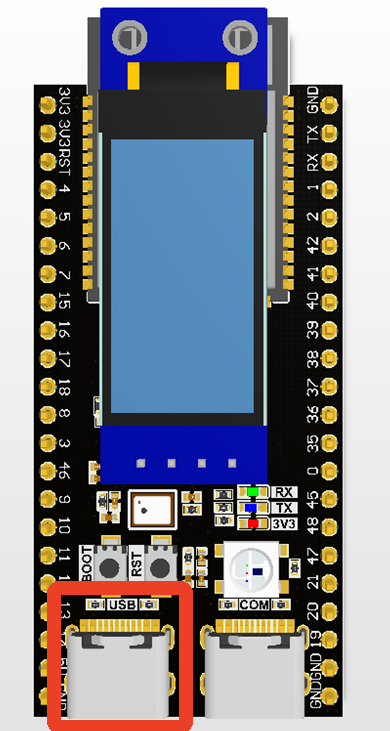
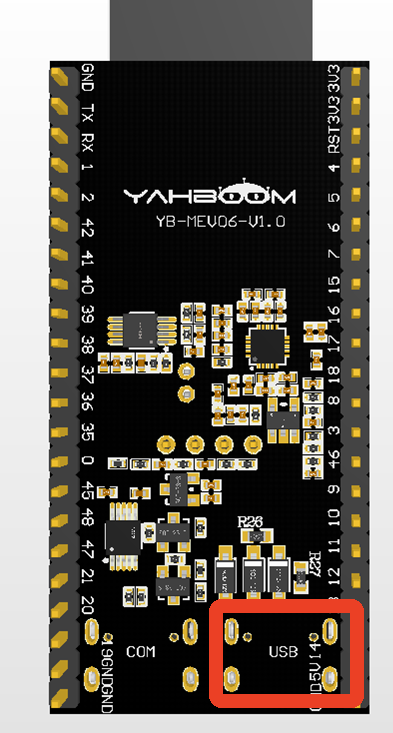
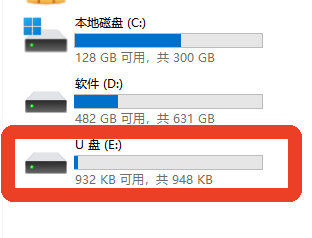
PC automatically recognizes as a USB drive (about 1MB FAT format).
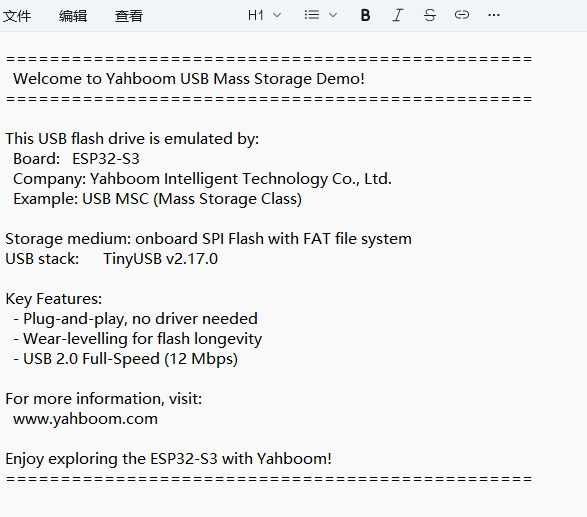
Open USB drive, you can see the preset
welcome.txtfile.

You can freely read/write files and create folders, just like a regular USB drive.
7.3 Edge Cases
USB cable not plugged in: Program initializes normally but not recognized by PC, log shows
ready — plug in the USB cable.USB drive full: PC prompts disk full (1MB capacity), need to delete some files before writing more.
Read/write interruption: Flash's Wear-Leveling layer ensures power failure won't damage FAT file system structure.
8. FAQ
| Symptom | Cause | Solution |
|---|---|---|
| PC doesn't recognize USB drive | Wrong USB port / USB cable power-only without data | Must use ESP32-S3's native USB OTG port (GPIO19/20), check USB cable supports data transmission |
| PC prompts "needs formatting" | FAT file system corrupted / first use not initialized correctly | Let PC execute quick format to FAT, or erase Flash and re-flash |
| USB drive shows 0 bytes | storage partition not configured correctly | Check if storage partition exists in partitions.csv, size > 0 |
Build failed tinyusb.h not found | esp_tinyusb component not installed | Add idf_component.yml in project root declaring esp_tinyusb dependency |
assert(data_part) triggered | storage partition doesn't exist in partition table | Check partitions.csv is correct, confirm PARTITION_TABLE_CUSTOM=y |
| Firmware-written files not visible on PC | Not switched to USB side / not fclose after writing | Ensure usb_msc_mount_usb() called after write_preset_files() |
| Writing large file fails | USB drive capacity only 1MB / Flash free insufficient | Increase storage partition size in partitions.csv (ensure no overlap with other partitions) |