Welcome to ESP32 Core Board repository
9. HTTP Client Experiment
HTTP Client Experiment
HTTP Client Experiment1. HTTP Overview2. Core Concepts2.1 HTTP Request-Response Model2.2 HTTP Methods2.3 HTTP Status Codes2.4 esp_http_client Event-Driven Model3. Project Architecture and Flow4. Hardware Dependencies5. Source Code Analysis — HTTP Client5.1 http_client_event_cb() — HTTP Event Callback5.2 http_get_request() — GET Request6. Operation Flow6.1 Build and Flash Flow6.2 Testing HTTP Client7.4 Normal Log — HTTP Client7. Common Problems
1. HTTP Overview
HTTP is the "passport" for IoT devices to integrate into the Web ecosystem—mastering HTTP communication allows ESP32 to access any API on the internet like a browser, and also turn itself into a Web server for direct device control via webpages from phones or computers. Whether doing remote sensor data reporting, weather fetching, OTA firmware upgrades, or building smart home web control panels, HTTP is the most versatile choice. This tutorial covers the client GET request routine, teaching core HTTP communication skills on ESP32.
HTTP (HyperText Transfer Protocol) is the most widely used application layer protocol on the internet. It is based on TCP and uses a request-response model: client sends GET request, server returns status code + data.
| Feature | HTTP | Bare TCP/UDP |
|---|---|---|
| Protocol layer | Application layer (based on TCP) | Transport layer |
| Data format | Standard Headers + Body | Custom |
| Status code | 200/404/500 etc. standard semantics | None |
| Cross-platform compatibility | Browser/curl/HTTP libraries for all languages | Need custom parsing |
| Applicable scenarios | Web API, file download, RESTful | Custom protocols, extreme performance scenarios |
This project contains both HTTP client and server routines: the client gets webpage data via GET request; the server provides RESTful API on port 80.
2. Core Concepts
2.1 HTTP Request-Response Model
┌─── HTTP Client (ESP32) ────────────┐ ┌─── HTTP Server ───────────────────┐│ │ │ ││ GET /index.html HTTP/1.1 │───→│ Parse request → route to handler ││ Host: example.com │ │ ↓ ││ │ │ Execute handler logic ││ │ │ ↓ ││ HTTP/1.1 200 OK │←───│ Return status code + Headers + Body││ Content-Type: text/html │ │ ││ Content-Length: 125 │ │ ││ │ │ ││ <html>...</html> │ │ │└───────────────────────────────────┘ └──────────────────────────────────┘
2.2 HTTP Methods
| Method | Semantics | Request Body | Typical Use |
|---|---|---|---|
| GET | Get resource | None | Query data, get webpage |
2.3 HTTP Status Codes
| Status Code | Semantics | Description |
|---|---|---|
| 200 | OK | Request successful |
| 206 | Partial Content | Range request for partial content (OTA firmware download) |
| 301 | Moved Permanently | Permanent redirect |
| 404 | Not Found | Requested resource does not exist |
| 500 | Internal Server Error | Server internal error |
2.4 esp_http_client Event-Driven Model
ESP-IDF's HTTP client uses event callback mechanism. Key events:
| Event | Trigger | Callback Parameters |
|---|---|---|
HTTP_EVENT_ON_CONNECTED | TCP connection established | — |
HTTP_EVENT_ON_DATA | Response data chunk received | data + data_len |
HTTP_EVENT_ON_FINISH | Request completed | — |
HTTP_EVENT_ERROR | Request error | — |
3. Project Architecture and Flow
xxxxxxxxxxapp_main()└─ xTaskCreate(vHttpClientTask, stack=8KB, prio=5)└─ vHttpClientTask():├─ wifi_init() ← WiFi connect + wait for IP└─ http_get_request()├─ esp_http_client_init() ← Configure URL + event callback + timeout├─ esp_http_client_set_method(HTTP_METHOD_GET)├─ esp_http_client_perform() ← Execute request (internally handles 301/302 redirect)│ └─ Event callback: HTTP_EVENT_ON_DATA → printf chunk by chunk├─ esp_http_client_get_status_code() ← Print status code└─ esp_http_client_cleanup() ← Free resources
4. Hardware Dependencies
Hardware Connection: No external wiring, WiFi wireless communication
Client required components:
esp_http_client,esp_wifi,esp_netif,esp_event,nvs_flashServer required components:
esp_http_server(instead ofesp_http_client), others same as above
5. Source Code Analysis — HTTP Client
Full source: Source Code → ESP-IDF → 5.Network_Protocol → 6.HTTP → HTTP_Client
5.1 http_client_event_cb() — HTTP Event Callback
http_client_event_cb() is the "message center" for HTTP requests—connected to server, received data, request completed, error—all thrown via events. You only need to write corresponding handling logic for each event. HTTP_EVENT_ON_DATA is critical—the server's response may come in multiple packages, this callback triggers for each chunk, so directly printf chunk by chunk.
xxxxxxxxxxstatic esp_err_t http_client_event_cb(esp_http_client_event_t *evt){ switch (evt->event_id) { case HTTP_EVENT_ERROR: ESP_LOGE(TAG, "HTTP request error"); break; case HTTP_EVENT_ON_CONNECTED: ESP_LOGI(TAG, "HTTP server connected"); break; case HTTP_EVENT_ON_DATA: printf("%.*s\n", evt->data_len, (char *)evt->data); break; case HTTP_EVENT_ON_FINISH: ESP_LOGI(TAG, "HTTP request complete"); break; default: break; } return ESP_OK;}5.2 http_get_request() — GET Request
http_get_request() is the standard flow for making a GET request: configure URL and event callback → set to GET method → execute request → check status code. esp_http_client_perform() is synchronous—after calling, internally handles TCP connection, sends request, receives response, handles redirects, returns when entire request is complete. Finally cleanup() releases client resources, preventing memory leaks.
xxxxxxxxxxstatic void http_get_request(void){ esp_http_client_config_t http_cfg = {0}; esp_http_client_handle_t http_client; esp_err_t ret; // Target URL http_cfg.url = HTTP_URL; // Bind event callback http_cfg.event_handler = http_client_event_cb; // 5s timeout http_cfg.timeout_ms = 5000; // Init HTTP client http_client = esp_http_client_init(&http_cfg); if (http_client == NULL) { ESP_LOGE(TAG, "HTTP client init failed"); vTaskDelete(NULL); } // Set GET method esp_http_client_set_method(http_client, HTTP_METHOD_GET); // Perform request ret = esp_http_client_perform(http_client); if (ret == ESP_OK) { // Print status code ESP_LOGI(TAG, "HTTP status code: %d", esp_http_client_get_status_code(http_client)); } // Cleanup client esp_http_client_cleanup(http_client);}6. Operation Flow
6.1 Build and Flash Flow
ESP-IDF Flash Flow: See ESP-IDF → 1. Before Development → 3. Build and Flash.
6.2 Testing HTTP Client
Ensure ESP32 WiFi can connect normally (can ping external network).
Flash HTTP_Client to ESP32. Serial will print HTTP response data and status code.
7.4 Normal Log — HTTP Client
xxxxxxxxxxI (393) HTTP-CLIENT: ======== HTTP CLIENT TEST ========I (583) HTTP-CLIENT: Waiting for WiFi connection...I (1723) HTTP-CLIENT: Got IP: 192.168.11.181I (1723) HTTP-CLIENT: WiFi connected successfully!I (1723) HTTP-CLIENT: ---------- Initiate a GET request ----------I (1983) HTTP-CLIENT: HTTP server connected... (HTTP response body, printed chunk by chunk via printf)I (2333) HTTP-CLIENT: HTTP request completeI (2343) HTTP-CLIENT: HTTP status code: 200I (2343) HTTP-CLIENT: ======== HTTP CLIENT TEST DONE ========
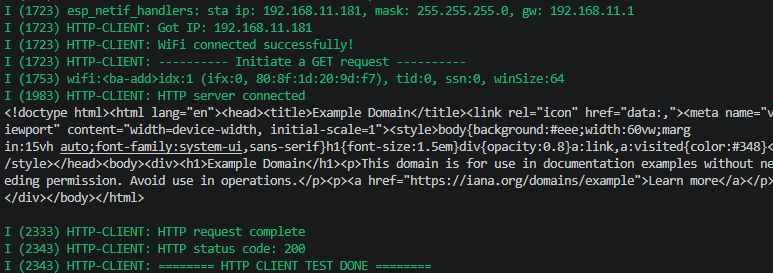
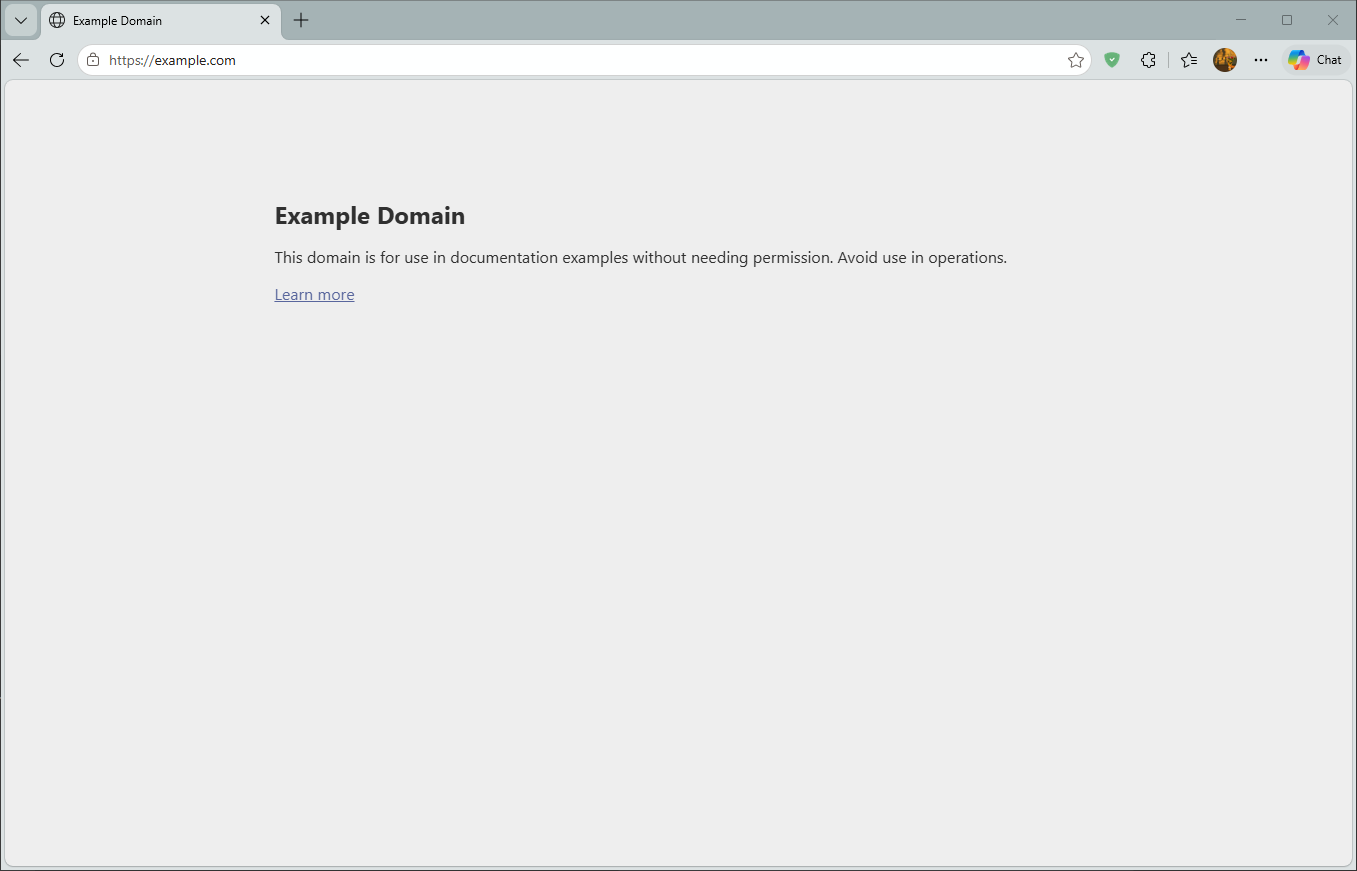
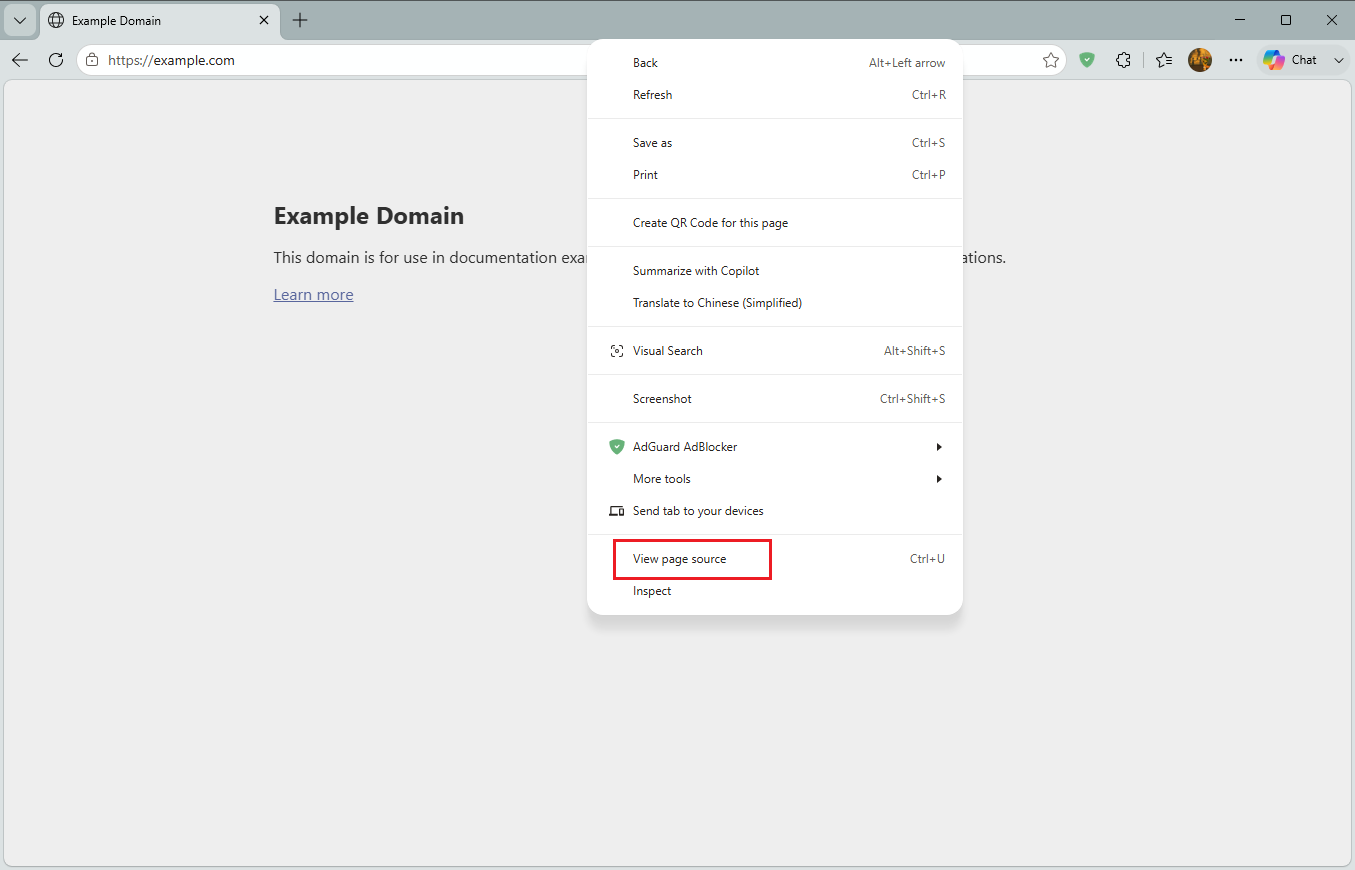
The white text printed in the middle of serial is the HTML content returned by http://example.com. Visit this URL in browser, right-click → View Page Source (or Ctrl+U), compare with serial output: if consistent, GET request successful.

7. Common Problems
| Symptom | Cause | Solution |
|---|---|---|
HTTP client HTTP request error | URL unreachable or DNS resolution failed | Ensure ESP32 can access external network; or use IP address instead of domain name |
esp_http_client_init() returns NULL | URL format error | Check HTTP_URL starts with http:// |
| Postman/browser accessing ESP32 no response | Not on same LAN / firewall blocked | Ensure PC and ESP32 are on same router |
httpd_start() failed | Port 80 in use | Use port like 8080 |
| Content-Type incorrect causing client parsing failure | httpd_resp_set_type() not called | Must set "application/json" when returning JSON |