Welcome to ESP32 Core Board repository
5. Print Storage
Print Storage Information Experiment
Print Storage Information Experiment1. Experiment Overview2. Core Concepts2.1 ESP32 Flash Partition Structure2.2 Partition Types and Subtypes2.3 Filesystem Space Calculation2.4 Core API3. Hardware Dependencies3.1 ESP32-S3 Hardware Features4. Project Architecture and Flow4.1 File Architecture4.2 API Compatibility Layer Design5. Source Code Details5.1 Entry main.py5.2 Byte Formatting (_fmt)5.3 Flash Chip Information (flash_info)5.4 Partition Table Printing (partition_table)5.5 Filesystem Usage (fs_usage)5.6 REPL Shortcut Aliases6. Operation Procedure6.1 File Upload and Running6.2 Expected Behavior6.3 Serial Output Example6.4 Interpreting the Output6.5 REPL Shortcut Commands7. Common Issues
1. Experiment Overview
The ESP32-S3 Flash is divided into multiple logical partitions (firmware, NVS, filesystem, etc.), each with its own purpose and size. This experiment writes a Flash partition and filesystem inspection tool that prints storage information from three dimensions:
- Flash chip physical parameters — total capacity
- Partition table — name, type, offset, and size of each partition
- Filesystem — mount point, used/free space, usage percentage
This is a basic tool for debugging the storage layout in embedded development — confirm the partition configuration before flashing and monitor the remaining space during runtime.
Typical application scenarios:
| Application | Example |
|---|---|
| Firmware development | Confirm whether the factory/ota partition sizes are sufficient |
| Storage planning | Evaluate the remaining app data storage space |
| Troubleshooting | Investigate "insufficient space" errors (ENOSPC) |
| OTA upgrade | Confirm the ota_0/ota_1 partitions exist and are large enough |
2. Core Concepts
2.1 ESP32 Flash Partition Structure
ESP32-S3 Flash (typically 16MB)┌──────────────┐ 0x000000│ bootloader │├──────────────┤ 0x008000│ partition │ ← This tool reads this table│ table │├──────────────┤│ nvs │ Wi-Fi configuration storage├──────────────┤│ otadata │ OTA status├──────────────┤│ factory │ MicroPython firmware├──────────────┤│ vfs │ Filesystem (FAT/LittleFS)│ ( / ) │ ← Location of open/read/write operations└──────────────┘ Flash end
Each partition entry contains 5 attributes: Name, Type (APP/DATA), SubType (factory/nvs/spiffs...), Offset (start address), Size.
2.2 Partition Types and Subtypes
| Type | Meaning | Common SubTypes |
|---|---|---|
| APP (0x00) | Firmware partition | factory, ota_0 ~ ota_15 |
| DATA (0x01) | Data partition | nvs, nvs_keys, phy, spiffs, littlefs, fat |
2.3 Filesystem Space Calculation
xxxxxxxxxximport osst = os.statvfs("/")bs = st[0] # Block sizetb = st[2] # Total blocksfb = st[3] # Free blockstotal = bs * tbfree = bs * fbused = total - freepct = used / total * 1002.4 Core API
ximport esp32# Total flash chip capacityesp32.flash_size() # → byte count# Partition tablefrom esp32 import Partitionfor p in Partition.find(): # Iterate over all partitions t, s, off, sz, label = p.info() # (Type, SubType, Offset, Size, Name)3. Hardware Dependencies
This experiment only reads the internal Flash information of the ESP32-S3, no external hardware required.
3.1 ESP32-S3 Hardware Features
| Feature | Description |
|---|---|
| Total Flash capacity | Usually 8MB or 16MB (query with esp32.flash_size()) |
| Filesystem partition | The factory MicroPython firmware mounts the remaining Flash space as FAT/LittleFS at path / |
| Filesystem capacity | Total Flash minus firmware/partition-table usage, usually several MB (query with os.statvfs('/')) |
4. Project Architecture and Flow
4.1 File Architecture
xxxxxxxxxx5. PRINTF_FLASH/├── partition_print.py # Core library (3 print functions + REPL shortcut aliases)└── main.py # Entry
xxxxxxxxxxRunning flow:main.py├─ partition_print.flash_info() → Flash chip size├─ partition_print.partition_table() → Partition table (name+type+offset+size)└─ partition_print.fs_usage() → Filesystem mount point and usageREPL interaction:>>> pft() = partition_table() # Partition table only>>> pfs() = fs_usage() # Filesystem only>>> pfa() = all() # All three
4.2 API Compatibility Layer Design
partition_print.py has a built-in _part_info(p) compatible with old and new MicroPython Partition APIs:
- Prefer the
p.info()tuple (standard API in MicroPython v1.20+) - Fall back to probing attributes one by one (
p.addr/p.offset/p.size/p.label) - Fill missing fields with default values
5. Source Code Details
Complete source code: 5.Source Collection → MicroPython → 3.Serial Communication and Storage System → 5. PRINTF_FLASH
5.1 Entry main.py
xxxxxxxxxxfrom Print_partitions import partition_print as ppif __name__ == "__main__": # Sequential: flash → partitions → filesystem print("\n===== MicroPython Flash Partition & Storage Info =====\n") pp.flash_info() print() pp.partition_table() print() pp.fs_usage()5.2 Byte Formatting (_fmt)
xxxxxxxxxxdef _fmt(n): """Byte count -> human-readable string (B / KB / MB)""" if n < 1024: return "{} B".format(n) if n < 1048576: return "{:.2f} KB".format(n / 1024) return "{:.2f} MB".format(n / 1048576)5.3 Flash Chip Information (flash_info)
x
def flash_info(): """Print flash chip physical parameters""" print("=" * 52) print(" Flash Chip Info") print("=" * 52) sz_fn = None try: import esp32 sz_fn = esp32.flash_size # esp32 module except Exception: try: import esp sz_fn = esp.flash_size # esp module (fallback) except Exception: pass if sz_fn: print(" Size: {:.2f} MB".format(sz_fn() / 1048576)) else: print(" (esp/esp32 module not available)") # Non-ESP platform print("=" * 52)5.4 Partition Table Printing (partition_table)
xxxxxxxxxx# Subtype code -> name_SUB = {0x00:"factory", 0x10:"ota_0", ..., 0x20:"nvs", 0x80:"spiffs", ...}_TYPE = {0x00: "APP", 0x01: "DATA"} # Type code -> namedef partition_table(): """Print the ESP32 flash partition table""" # Load the partition class Part = None try: from esp32 import Partition; Part = Partition except: try: from esp import Partition; Part = Partition except: print("[!] Partition class not found"); return entries = list(Part.find()) # Fetch all entries # Table header print(" {:<12} {:<6} {:<12} {:<12} {:<12}".format( "Name", "Type", "SubType", "Offset", "Size")) # Print each row total = 0 for p in entries: t, s, off, sz, label = _part_info(p) # The compatibility layer extracts the 5-tuple total += sz print(" {:<12} {:<6} {:<12} 0x{:08x} {}".format( label, _TYPE[t], _SUB[s], off, _fmt(sz))) # Summary print(" Total: {}".format(_fmt(total))) print(" Flash: {}".format(_fmt(esp32.flash_size())))5.5 Filesystem Usage (fs_usage)
xxxxxxxxxxdef fs_usage(): """Print filesystem mount points & usage statistics""" paths = ["/", "/flash"] if sys.platform == "esp32" else ["/"] for mp in paths: try: st = os.statvfs(mp) # Get the VFS stats except OSError: continue bs, _, tb, fb = st[0], st[1], st[2], st[3] # bs=block_size, tb=total_blocks, fb=free_blocks total = bs * tb free = bs * fb used = total - free pct = (used * 100.0 / total) if total else 0 print(" {:<12} {:<12} {:<12} {:<12} {:>5.1f}% FAT/LFS".format( mp, _fmt(total), _fmt(used), _fmt(free), pct))5.6 REPL Shortcut Aliases
xxxxxxxxxxpft = partition_table # pft() = Print Flash Tablepfs = fs_usage # pfs() = Print File Storagepfa = all # pfa() = Print Flash All6. Operation Procedure
6.1 File Upload and Running
Thonny IDE operation steps: See MicroPython → 1. Before Development → 3.Thonny IDE.
- Create the
Print_partitionsdirectory on the ESP32-S3 - Upload
partition_print.pyto that directory For the file upload process, refer to:MicroPython->33. Serial Communication and Storage System->2. I2C_OLED Display Experiment->I2C_OLED Display Experiment - Run
main.py(or a soft reset will run it automatically)
6.2 Expected Behavior
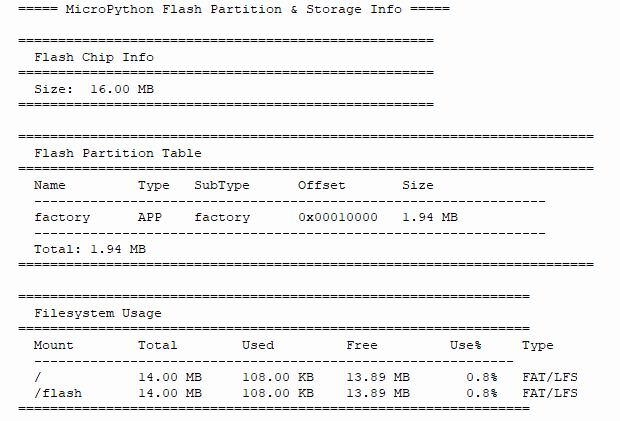
After running, three tables are printed in sequence: Flash chip capacity, partition table, and filesystem usage. The output confirms key information such as the firmware partition size and the remaining storage space.
6.3 Serial Output Example
xxxxxxxxxx===== MicroPython Flash Partition & Storage Info =========================================================Flash Chip Info====================================================Size: 16.00 MB============================================================================================================================Flash Partition Table========================================================================Name Type SubType Offset Size----------------------------------------------------------------factory APP factory 0x00010000 1.94 MB----------------------------------------------------------------Total: 1.94 MB========================================================================================================================================Filesystem Usage================================================================Mount Total Used Free Use% Type------------------------------------------------------------/ 14.00 MB 108.00 KB 13.89 MB 0.8% FAT/LFS/flash 14.00 MB 108.00 KB 13.89 MB 0.8% FAT/LFS================================================================
6.4 Interpreting the Output
| Output item | Meaning |
|---|---|
Flash Chip Info → Size: 16.00 MB | Total Flash chip capacity |
factory APP ... 1.94 MB | MicroPython firmware partition size |
Filesystem / → Free: 13.89 MB | Remaining free space |
6.5 REPL Shortcut Commands
xxxxxxxxxx>>> from Print_partitions import partition_print as pp>>> pp.pft() # Partition table only>>> pp.pfs() # Filesystem only>>> pp.pfa() # All three7. Common Issues
| Symptom | Cause | Solution |
|---|---|---|
ImportError: no module named 'esp32' | The firmware was not compiled with the esp32 module | Confirm you are using the official ESP32 MicroPython firmware |
Partition.find() returns empty | Old API or corrupted partition table | Try from esp import Partition (ESP8266 only) |
| The filesystem shows 0% used but is actually full | Files not closed properly | Use os.statvfs("/") to check the real remaining space |
The Name column is empty or garbled | The partition has no label | Normal — partitions such as otadata usually have no label and display as part_xx |