Welcome to ESP32 Core Board repository
14. Bluetooth Slave Mode
Bluetooth Slave Mode
Bluetooth Slave Mode1. BLE Overview2. Core Concepts2.1 GAP — Generic Access Profile2.2 GATT — Generic Attribute Profile2.3 Notify and Write2.4 NimBLE Protocol Stack3. ESP32-S3 BLE Hardware Features4. Project Architecture and Flow5. Hardware Dependencies6. Source Code Analysis6.1 Header Files and Macro Configuration6.2 app_main() — Entry Point6.3 ble_slave_init() — Initialization6.4 on_sync() — Sync Callback and start_advertising()6.5 gap_event_cb() — GAP Event Callback6.6 GATT Service Definition — Service Table Structure6.7 gatt_svr_access_cb() — Write Buffer Accumulation6.8 notify_data() — Notification Send6.9 vNotifyTask() — Periodic Notification Task7. Operation Flow7.1 Build and Flash Flow7.2 Testing Method 1: With ESP32 Master7.3 Testing Method 2: With Phone Bluetooth Debugging Assistant7.4 Normal Communication Log (Dual-Board Test)7.5 Edge Cases8. Common Problems
1. BLE Overview
BLE (Bluetooth Low Energy) is a short-range wireless communication protocol designed for low power consumption and low bandwidth scenarios. Compared to classic Bluetooth, BLE connects faster (millisecond level) and consumes less power (coin battery can run for months).
Importance of BLE Slave tutorial: BLE slave (Peripheral) is the most common role form for IoT devices—sensor nodes, wearable devices, smart home peripherals, etc. Most scenarios run as slave. Mastering slave programming means being able to build smart devices discoverable and connectable by phones, tablets, or gateways—this is the core capability of embedded BLE development.
Typical application scenarios: Temperature/humidity sensors periodically report ambient data, smart door locks receive unlock commands from phones, heart rate belts continuously push health data, electronic tags receive price updates.
BLE role system:
| Role | GAP Name | Responsibilities |
|---|---|---|
| Slave | Peripheral | Advertises its presence, accepts connections, provides GATT service for master access |
| Master | Central | Actively scans nearby devices, initiates connections, discovers services and characteristics, reads/writes data |
This project implements BLE Peripheral (Slave), advertises with device name
"ESP-IDF", provides custom GATT service0xFFF0, supports notification reporting (0xFFF1) and write receiving (0xFFF2).
2. Core Concepts
2.1 GAP — Generic Access Profile
GAP (Generic Access Profile) defines how BLE devices are scanned and connected.
GAP operations involved in this slave:
| Operation | API | Description |
|---|---|---|
| Advertising | ble_gap_adv_start() | Periodically sends advertising packets, containing device name and service UUID |
| Connection response | gap_event_cb() | Accepts master connection request, updates connection handle |
| Disconnection re-advertise | gap_event_cb() | Detects disconnection then automatically restarts advertising |
Advertising data composition:
Advertising Packet├─ Flags: BLE_HS_ADV_F_DISC_GEN | BLE_HS_ADV_F_BREDR_UNSUP│ General discoverable mode + Classic Bluetooth not supported├─ Name: "ESP-IDF" (Complete)│ Complete device name, master filters by this└─ Service UUID: 0xFFF0 (Complete)Custom service, master can filter devices by this UUID during scan
2.2 GATT — Generic Attribute Profile
GATT (Generic Attribute Profile) defines how BLE devices organize data.
This project's custom GATT service architecture:
xxxxxxxxxxService: 0xFFF0 (Custom primary service)├─ Characteristic: 0xFFF1│ Property: NOTIFY (slave proactively notifies master, no master request needed)│ Direction: Slave → Master│ Content: "Hello from ESP32 Slave [counter]"│└─ Characteristic: 0xFFF2Property: WRITE (receives data sent by master)Direction: Master → SlaveContent: "Hello from ESP32 Master"
2.3 Notify and Write
| Operation | Initiator | Target | Confirmed | Typical Scenario |
|---|---|---|---|---|
| Notify | Slave → Master | 0xFFF1 | No confirmation needed | Sensor data reporting, heartbeat counting |
| Write | Master → Slave | 0xFFF2 | Link layer confirmation needed | Control command delivery, parameter configuration |
In this project, slave sends incrementing count notification via 0xFFF1 every 6 seconds; master sends fixed message via 0xFFF2 every 5 seconds. Both operations are asynchronous and independent, non-blocking to each other.
2.4 NimBLE Protocol Stack
ESP32-S3 uses Apache NimBLE as BLE Host protocol stack, running in independent FreeRTOS task vNimbleHostTask, driving all BLE operations through nimble_port_run() event loop. Compared to Bluedroid, NimBLE has smaller code size (~32KB ROM) and lower memory usage (~4.5KB RAM).
3. ESP32-S3 BLE Hardware Features
| Feature | Parameter |
|---|---|
| Wireless standard | BLE 5.0 |
| Max TX power | +20 dBm |
| RX sensitivity | -97 dBm (1Mbps mode) |
| Max MTU | 251 bytes (this project negotiates 256 upper limit) |
| Antenna | Onboard PCB antenna |
| Advertising interval | Protocol stack default (~100ms) |
| Protocol stack | NimBLE (Apache open source) |
BLE and WiFi share 2.4GHz RF front-end, both can coexist via time division.
4. Project Architecture and Flow
xapp_main()├─ nvs_flash_init() ← Init NVS flash (stores pairing/bonding info)└─ ble_slave_init() ← BLE Slave overall initialization├─ nimble_port_init() Init NimBLE protocol stack├─ ble_hs_cfg callback config Register sync/reset/register callbacks├─ ble_svc_gap_device_name_set() Set advertising device name "ESP-IDF"├─ ble_svc_gap_init() GAP service init├─ ble_svc_gatt_init() GATT service init├─ ble_att_set_preferred_mtu(256) Set max transmission unit├─ xTimerCreate(flush) Create write buffer flush timer├─ ble_gatt_register_svcs() Register GATT service table│ ├─ ble_gatts_count_cfg() Count validate│ └─ ble_gatts_add_svcs() Add to protocol stack├─ xTaskCreate(vNotifyTask) Create periodic notification task└─ nimble_port_freertos_init() Start NimBLE host task└─ on_sync()└─ start_advertising() ← Start BLE advertisinggap_event_cb() ← GAP event callback├─ BLE_GAP_EVENT_CONNECT Master connected → record handle → MTU negotiate├─ BLE_GAP_EVENT_MTU MTU negotiation complete└─ BLE_GAP_EVENT_DISCONNECT Disconnected → flush buffer → start_advertising()gatt_svr_access_cb() ← GATT access callbackHandles master's write to 0xFFF2 → buffer → flush timer → printvNotifyTask() ← Periodic notification taskwhile(1):├─ vTaskDelay(6000ms) Every 6 second period├─ snprintf() generate "Hello from ESP32 Slave [N]"└─ notify_data() → ble_gattc_notify_custom() Send via 0xFFF1
5. Hardware Dependencies
Hardware Connection: No external wiring, using ESP32-S3 onboard PCB antenna for BLE wireless communication.
Required components: nvs_flash, bt (NimBLE), FreeRTOS, esp_log
Companion device: Need another ESP32-S3 running BLE Master routine as Central to scan and connect to this slave.
6. Source Code Analysis
Full source: Source Code → ESP-IDF → 5.Network_Protocol → 9.BLE → BLE_Slave
6.1 Header Files and Macro Configuration
Slave macros are symmetric with Master: two UUIDs (0xFFF1 notify, 0xFFF2 write), NOTIFY_INTERVAL_MS controls notification interval of 6 seconds, FLUSH_TIMEOUT_MS controls write buffer flush timeout of 50ms. g_connected marks connection status; notification task silently waits when not connected.
xxxxxxxxxx
// Service UUID// Notify characteristic UUID// Write characteristic UUID// Notify interval (ms)// Flush timeout (ms)
// Global state variables// Notify val handlestatic uint16_t g_notify_val_hdl;// Write val handlestatic uint16_t g_write_val_hdl;// Write data bufferstatic uint8_t g_write_data[512];// Accumulated lenstatic uint16_t g_accum_len;// Current connection handlestatic uint16_t g_conn_hdl;// Connected flagstatic bool g_connected;// Flush timerstatic TimerHandle_t g_flush_timer;6.2 app_main() — Entry Point
Init NVS flash to store BLE pairing info, then call ble_slave_init() to one-click start slave. If NVS partition abnormal, erase and retry.
xxxxxxxxxxvoid app_main(void){    // Init NVS flash    esp_err_t ret = nvs_flash_init();    if (ret == ESP_ERR_NVS_NO_FREE_PAGES ||        ret == ESP_ERR_NVS_NEW_VERSION_FOUND) {        ESP_ERROR_CHECK(nvs_flash_erase());        ESP_ERROR_CHECK(nvs_flash_init());    }
    // Start BLE Slave    ble_slave_init();}
6.3 ble_slave_init() — Initialization
ble_slave_init() in order: init NimBLE protocol stack → register host callbacks → init GAP/GATT basic services → create write buffer timer → register custom GATT service → create notification task → start host event loop. ble_gatt_register_svcs() is a slave-specific step—need to define GATT service table locally for master to discover.
xxxxxxxxxxvoid ble_slave_init(void){    int ret;
    // 1. Init NimBLE stack    ESP_ERROR_CHECK(nimble_port_init());
    // 2. Register callbacks    ble_hs_cfg.reset_cb = on_reset;    // Sync callback → start adv    ble_hs_cfg.sync_cb  = on_sync;    // Register callback → log    ble_hs_cfg.gatts_register_cb = gatt_svr_register_cb;    // Store status callback    ble_hs_cfg.store_status_cb   = ble_store_util_status_rr;
    // 3. Init GAP/GATT basic services    ble_svc_gap_device_name_set(DEVICE_NAME);    ble_svc_gap_init();    ble_svc_gatt_init();    // Set preferred MTU    ble_att_set_preferred_mtu(256);
    // 4. Create flush timer 50ms    g_flush_timer = xTimerCreate("flush", pdMS_TO_TICKS(FLUSH_TIMEOUT_MS),                                 pdFALSE, NULL, flush_timer_cb);
    // 5. Register custom GATT service    ret = ble_gatt_register_svcs();    if (ret != 0) {        ESP_LOGE(TAG, "ble_gatt_register_svcs failed; rc=%d", ret);        return;    }
    // 6. Create notification task    ble_gatt_start_notify_task();
    // 7. Launch host loop    nimble_port_freertos_init(vNimbleHostTask);}
6.4 on_sync() — Sync Callback and start_advertising()
After protocol stack syncs, on_sync() is automatically called, which calls start_advertising() internally to start advertising. Advertising contains general discoverable flag, complete device name "ESP-IDF", service UUID 0xFFF0. BLE_HS_FOREVER means continuous advertising without stopping.
xxxxxxxxxxstatic void on_sync(void){    ESP_LOGI(TAG, "NimBLE host ready");    // Start advertising    start_advertising();}
void start_advertising(void){    struct ble_gap_adv_params adv_params;    struct ble_hs_adv_fields fields;    int rc;
    memset(&fields, 0, sizeof(fields));    // General discoverable, no BR/EDR    fields.flags = BLE_HS_ADV_F_DISC_GEN | BLE_HS_ADV_F_BREDR_UNSUP;    // Device name    fields.name = (uint8_t *)DEVICE_NAME;    fields.name_len = strlen(DEVICE_NAME);    // Complete name    fields.name_is_complete = 1;    // Service UUID    fields.uuids16 = (ble_uuid16_t[]) { BLE_UUID16_INIT(BLE_SVC_UUID) };    fields.num_uuids16 = 1;    fields.uuids16_is_complete = 1;
    // Set adv fields    rc = ble_gap_adv_set_fields(&fields);    if (rc != 0) {        ESP_LOGE(TAG, "ble_gap_adv_set_fields failed; rc=%d", rc);        return;    }
    uint8_t own_addr_type;    // Infer addr type    rc = ble_hs_id_infer_auto(0, &own_addr_type);    if (rc != 0) {        ESP_LOGE(TAG, "ble_hs_id_infer_auto failed; rc=%d", rc);        return;    }
    memset(&adv_params, 0, sizeof(adv_params));    // Undirected    adv_params.conn_mode = BLE_GAP_CONN_MODE_UND;    // General discovery    adv_params.disc_mode = BLE_GAP_DISC_MODE_GEN;
    // Continuous advertising    rc = ble_gap_adv_start(own_addr_type, NULL, BLE_HS_FOREVER,                           &adv_params, gap_event_cb, NULL);    if (rc != 0) {        ESP_LOGE(TAG, "ble_gap_adv_start failed; rc=%d", rc);        return;    }
    ESP_LOGI(TAG, "Advertising as \"%s\" ...", DEVICE_NAME);}
6.5 gap_event_cb() — GAP Event Callback
Slave GAP callback handles three events: connection established (record handle, mark connected, negotiate MTU), MTU negotiation complete, disconnection (flush buffer, reset state, automatically re-advertise).
xxxxxxxxxxint gap_event_cb(struct ble_gap_event *event, void *arg){ switch (event->type) { // Connection event case BLE_GAP_EVENT_CONNECT: if (event->connect.status == 0) { // Save conn handle g_conn_hdl = event->connect.conn_handle; // Set connected g_connected = true; ESP_LOGI(TAG, "Connected (conn_handle=%d)", g_conn_hdl); // Exchange MTU ble_gattc_exchange_mtu(g_conn_hdl, NULL, NULL); } else { ESP_LOGE(TAG, "Connection failed (status=%d)", event->connect.status); } return 0; case BLE_GAP_EVENT_MTU: ESP_LOGI(TAG, "MTU negotiated: %d", event->mtu.value); return 0; // Disconnect event case BLE_GAP_EVENT_DISCONNECT: ESP_LOGI(TAG, "Disconnected (reason=%d), restarting advertising...", event->disconnect.reason); // Flush buffer if (g_accum_len > 0) flush_timer_cb(NULL); g_conn_hdl = 0; // Clear connected g_connected = false; // Re-advertise start_advertising(); return 0; default: return 0; }}6.6 GATT Service Definition — Service Table Structure
GATT service defined via C struct array gatt_svr_svcs[]: primary service 0xFFF0 with two characteristics—0xFFF1 (NOTIFY, slave push) and 0xFFF2 (WRITE, master write). Each characteristic declares properties via flags, val_handle is auto-filled by NimBLE after registration, access_cb is unified access entry. Service registration first ble_gatts_count_cfg() validates table legality, then ble_gatts_add_svcs() registers to protocol stack.
xxxxxxxxxxstatic const struct ble_gatt_svc_def gatt_svr_svcs[] = {    {        // Primary service        .type = BLE_GATT_SVC_TYPE_PRIMARY,        .uuid = &((ble_uuid16_t) BLE_UUID16_INIT(BLE_SVC_UUID)).u,        .characteristics = (struct ble_gatt_chr_def[]) {            {                // 0xFFF1: Notify characteristic                .uuid = &((ble_uuid16_t)                           BLE_UUID16_INIT(BLE_NOTIFY_CHR_UUID)).u,                // Access callback                .access_cb = gatt_svr_access_cb,                // Notify property                .flags = BLE_GATT_CHR_F_NOTIFY,                // Value handle ptr                .val_handle = &g_notify_val_hdl,            },            {                // 0xFFF2: Write characteristic                .uuid = &((ble_uuid16_t)                           BLE_UUID16_INIT(BLE_WRITE_CHR_UUID)).u,                // Access callback                .access_cb = gatt_svr_access_cb,                // Write property                .flags = BLE_GATT_CHR_F_WRITE,                // Value handle ptr                .val_handle = &g_write_val_hdl,            },            // Chr table end            { 0, }        },    },    // Svc table end    { 0, }};

int ble_gatt_register_svcs(void){    // Count validate    int rc = ble_gatts_count_cfg(gatt_svr_svcs);    if (rc != 0) {        ESP_LOGE(TAG, "ble_gatts_count_cfg failed; rc=%d", rc);        return rc;    }    // Add services    rc = ble_gatts_add_svcs(gatt_svr_svcs);    if (rc != 0) {        ESP_LOGE(TAG, "ble_gatts_add_svcs failed; rc=%d", rc);        return rc;    }    return 0;}
6.7 gatt_svr_access_cb() — Write Buffer Accumulation
gatt_svr_access_cb() is the slave's only GATT access entry. This project only handles write operations to 0xFFF2. Each master write appends data to g_write_data[512] buffer and resets 50ms timer; if no new data arrives within 50ms, flush_timer_cb() prints the complete message at once. Buffer flushes forced when near capacity to prevent overflow.
xxxxxxxxxxstatic int gatt_svr_access_cb(uint16_t conn_handle, uint16_t attr_handle,                              struct ble_gatt_access_ctxt *ctxt, void *arg){    // Not write attr    if (attr_handle != g_write_val_hdl)        return BLE_ATT_ERR_UNLIKELY;    // Not write op    if (ctxt->op != BLE_GATT_ACCESS_OP_WRITE_CHR) return 0;
    // Write data length    uint16_t om_len = OS_MBUF_PKTLEN(ctxt->om);    // About to overflow    if (g_accum_len + om_len > sizeof(g_write_data) - 1) {        ESP_LOGW(TAG, "Buffer overflow (%d+%d), flushing",                 g_accum_len, om_len);        flush_timer_cb(NULL);    }    uint16_t copied;    // Copy mbuf data to buffer    int rc = ble_hs_mbuf_to_flat(ctxt->om, g_write_data + g_accum_len,                                 sizeof(g_write_data) - g_accum_len - 1,                                 &copied);    if (rc != 0) return BLE_ATT_ERR_UNLIKELY;    // Update accum len    g_accum_len += copied;    // Reset timer    xTimerReset(g_flush_timer, 0);    return 0;}
void flush_timer_cb(TimerHandle_t timer){    // No data    if (g_accum_len == 0) return;    // Add '\0'    g_write_data[g_accum_len] = '\0';    // Print complete message    ESP_LOGI(TAG, "Master(%d bytes): %s", g_accum_len, g_write_data);    // Reset len    g_accum_len = 0;}
6.8 notify_data() — Notification Send
Returns directly if not connected or handle invalid. Calls ble_hs_mbuf_from_flat() to encapsulate data as NimBLE internal mbuf format, then ble_gattc_notify_custom() pushes to master via 0xFFF1 characteristic. Notification doesn't need master acknowledgment, suitable for periodic sensor data reporting. For reliable transmission, can change characteristic flags to BLE_GATT_CHR_F_INDICATE (Indicate mode, master confirms after receiving).
xxxxxxxxxxvoid notify_data(const char *data, size_t len){    // Guard check    if (!g_connected || g_notify_val_hdl == 0) return;
    // To mbuf    struct os_mbuf *om = ble_hs_mbuf_from_flat(data, len);    if (om == NULL) {        ESP_LOGE(TAG, "Failed to allocate mbuf for notification");        return;    }    // Send notify    int rc = ble_gattc_notify_custom(g_conn_hdl, g_notify_val_hdl, om);    if (rc != 0) {        ESP_LOGE(TAG, "Notification failed; rc=%d", rc);    }}
6.9 vNotifyTask() — Periodic Notification Task
vNotifyTask is an independent background task running in infinite loop. Every 6 seconds uses snprintf to assemble "Hello from ESP32 Slave [N]" (N is incrementing counter), then sends via notify_data(). g_connected condition ensures when not connected, only silently incrementing counter, no data sent.
xxxxxxxxxxstatic void vNotifyTask(void *param){ // Counter uint32_t counter = 0; char buf[64]; while (1) { // 6s notify interval vTaskDelay(pdMS_TO_TICKS(NOTIFY_INTERVAL_MS)); // Connected and handle valid if (g_connected && g_notify_val_hdl != 0) { // Build notification message int len = snprintf(buf, sizeof(buf), "Hello from ESP32 Slave [%lu]", // Increment counter (unsigned long)counter++); // Send notification notify_data(buf, len); ESP_LOGI(TAG, "Slave: %s", buf); } }}
snprintfusesunsigned longtype cast forcounterto ensure on 32-bit platformsuint32_tmatches%luformatting, avoiding compiler warnings.
7. Operation Flow
7.1 Build and Flash Flow
ESP-IDF Flash Flow: See ESP-IDF → 1. Before Development → 3. Build and Flash.
Two ways to test slave: ① Companion another ESP32-S3 flashed with BLE Master routine for dual-device communication (section 7.2); ② Companion phone Bluetooth debugging assistant App for independent testing (section 7.3).
7.2 Testing Method 1: With ESP32 Master
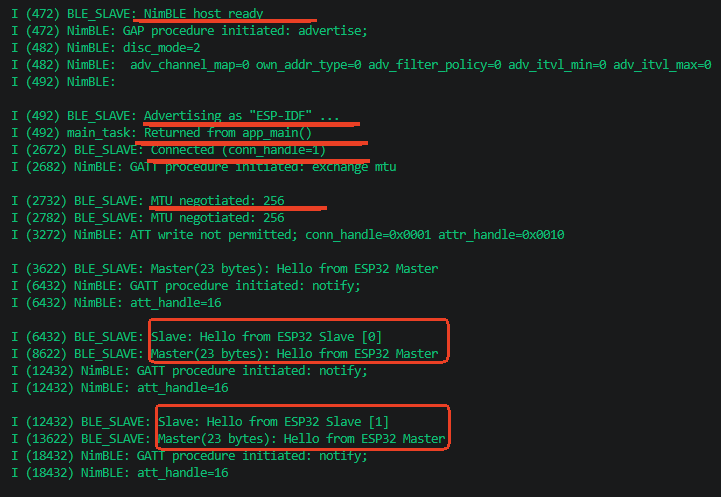
Power on Slave board, serial outputs
Advertising as "ESP-IDF" ...indicating advertising started.Power on Master board, Master scans and automatically connects to
ESP-IDF.Slave serial outputs
Connected (conn_handle=1)andMTU negotiated: 256, indicating connection established.Wait ~6 seconds, Slave serial outputs
Slave: Hello from ESP32 Slave [0], indicating notification sent successfully.Wait ~5 seconds, Slave serial outputs
Master(23 bytes): Hello from ESP32 Master, indicating received master write data.Both message types output alternately and independently, proving bidirectional data channel works.
7.3 Testing Method 2: With Phone Bluetooth Debugging Assistant
Besides ESP32 dual-device testing, can also use phone Bluetooth debugging assistant App to connect to slave and read/write data. Suitable for having only one development board or wanting quick verification of BLE communication.
Common Apps: nRF Connect for Mobile (recommended, most full-featured), LightBlue, EFR Connect, BLE Scanner, all free.
Steps:
Power on Slave board, serial outputs
Advertising as "ESP-IDF" ...indicating advertising started.

Open phone Bluetooth debugging assistant App, scan for nearby devices, find device named
ESP-IDF.
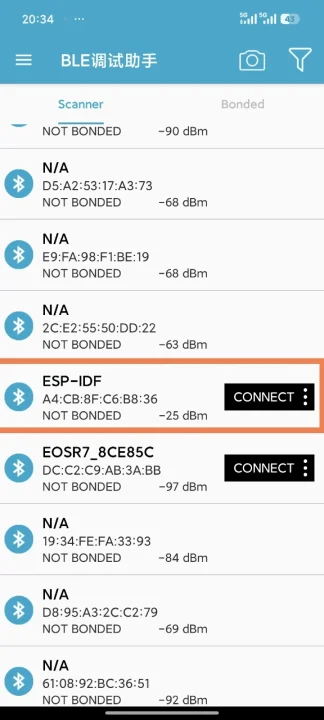
Click connect. Slave serial outputs
ConnectedandMTU negotiated: 256.In App, find service
0xFFF0, expand to see two characteristics:0xFFF1 (NOTIFY): Click "Enable Notify"/"Start Notification", thereafter every 6 seconds App receives a push of
Hello from ESP32 Slave [N].
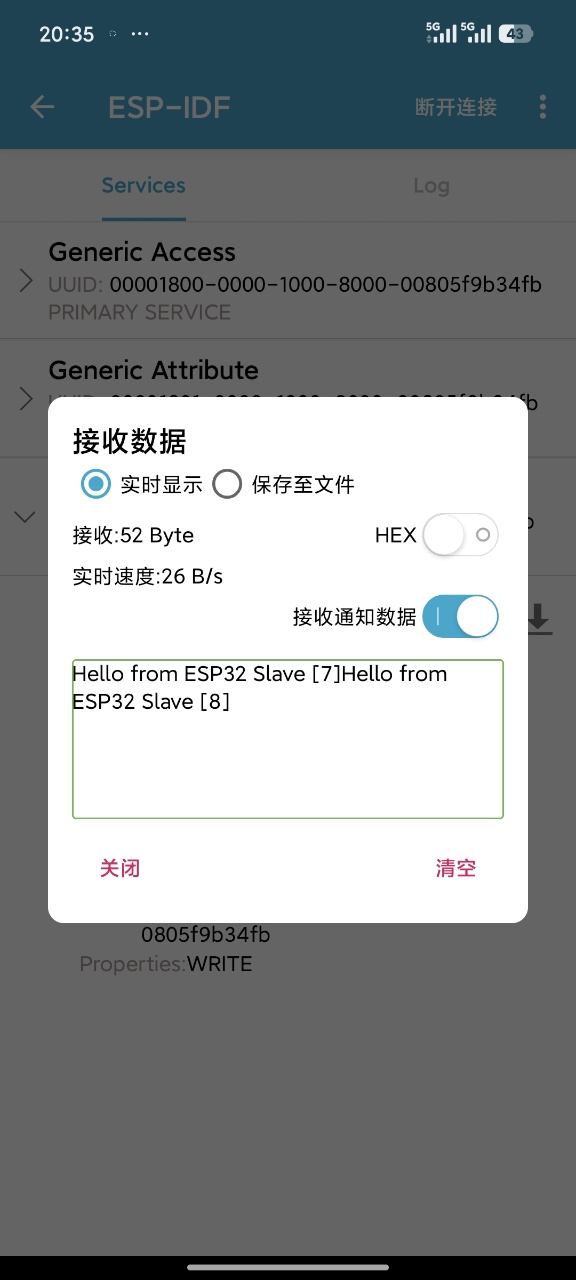
0xFFF2 (WRITE): Click "Write", enter any text (e.g.
"Hello from Phone") and send. Slave serial printsMaster(N bytes): Hello from Phone.

Slave serial output (phone connected):
xxxxxxxxxxI (452) BLE_SLAVE: NimBLE host readyI (492) BLE_SLAVE: Advertising as "ESP-IDF" ...I (492) main_task: Returned from app_main()I (2672) BLE_SLAVE: Connected (conn_handle=1)I (2732) BLE_SLAVE: MTU negotiated: 256I (6432) BLE_SLAVE: Slave: Hello from ESP32 Slave [0]I (8000) BLE_SLAVE: Master(18 bytes): Hello from PhoneI (12432) BLE_SLAVE: Slave: Hello from ESP32 Slave [1]
In nRF Connect, after enabling Notify, characteristic value area continuously updates notification content; Write operation requires manually entering data and clicking send.
7.4 Normal Communication Log (Dual-Board Test)
| Field | Example | Meaning |
|---|---|---|
I | I | INFO level log |
BLE_SLAVE | BLE_SLAVE | Log tag |
Slave: | Slave: | Notification proactively sent by slave |
Master(N bytes): | Master: | Data from master write |
Hello from ESP32 Slave [0] | Notification content | Incrementing count message |
xxxxxxxxxxI (452) BLE_SLAVE: NimBLE host readyI (492) BLE_SLAVE: Advertising as "ESP-IDF" ...I (492) main_task: Returned from app_main()I (2672) BLE_SLAVE: Connected (conn_handle=1)I (2732) BLE_SLAVE: MTU negotiated: 256I (3272) NimBLE: ATT write not permitted; conn_handle=1 attr_handle=0x0010I (3622) BLE_SLAVE: Master(23 bytes): Hello from ESP32 MasterI (6432) BLE_SLAVE: Slave: Hello from ESP32 Slave [0]I (8622) BLE_SLAVE: Master(23 bytes): Hello from ESP32 MasterI (12432) BLE_SLAVE: Slave: Hello from ESP32 Slave [1]I (13622) BLE_SLAVE: Master(23 bytes): Hello from ESP32 Master
About
ATT write not permitted: This NimBLE underlying error appears on the 3rd line of slave log.attr_handle=0x0010is the value handle of 0xFFF1 notify characteristic—this characteristic only declaresBLE_GATT_CHR_F_NOTIFYproperty, not allowing external writes. When master enables CCCD during GATT discovery phase, should actually write to CCCD descriptor handle, but NimBLE protocol stack in callback chain first tries to do a write verification on the notify characteristic value handle; slave rejects based on property, then protocol stack internally corrects routing to the correct descriptor handle, not affecting subsequent functionality. SubsequentMaster(23 bytes)goes through 0xFFF2 write characteristic handle (property includesBLE_GATT_CHR_F_WRITE), received normally.
7.5 Edge Cases
Slave runs standalone (not connected): Continuously advertises,
g_connected=false, notification task silently increments counter without sending data.Master disconnects: Slave receives
BLE_GAP_EVENT_DISCONNECTthen automatically resets state and re-advertises, no reset needed.Write buffer not flushed when Master disconnects:
gap_event_cb()actively callsflush_timer_cb(NULL)during disconnection handling to clear, avoiding residual data from previous connection.Master writes rapidly causing buffer overflow:
gatt_svr_access_cb()checks capacity before appending; if about to overflow, forces flush then receives new data.
8. Common Problems
| Symptom | Cause | Solution |
|---|---|---|
| Bluetooth init fails | NVS partition corrupted or insufficient space | IDE flash with "Erase flash" checked, or manually idf.py erase-flash |
| Slave advertises but Master can't find it | Device name mismatch / advertising didn't start successfully | Confirm DEVICE_NAME is "ESP-IDF", Master side TARGET_DEVICE_NAME matches |
| Slave notification send fails | Not connected / g_notify_val_hdl is 0 | Confirm GATT service registered successfully, characteristic flags include BLE_GATT_CHR_F_NOTIFY |
| Master writes but Slave doesn't receive | g_write_val_hdl is 0 / CCCD not configured | Confirm 0xFFF2 characteristic flags include BLE_GATT_CHR_F_WRITE |
| Disconnects immediately after connection | MTU negotiation failed / connection parameters incompatible | Ensure two devices are within 5 meters, no strong electromagnetic interference |
ble_gatts_count_cfg returns error | Service table structure definition illegal (UUID/NULL terminator missing) | Confirm service table ends with {0,}, characteristic table ends with {0,} |
| Write buffer accumulation doesn't print | Timer not started / timeout too long | Confirm g_flush_timer created successfully and FLUSH_TIMEOUT_MS=50 |
Advertising start fails rc=12 | BLE controller not enabled | menuconfig ensure CONFIG_BT_ENABLED=y, CONFIG_BTDM_CTRL_MODE_BLE_ONLY=y |