Welcome to ROSMASTER M1 repository
2.Multimodal visual understand
Multimodal Visual Understand (Text Version)
Multimodal Visual Understand (Text Version)1. Course Content2. Preparation2.1 Content Description3. Running the Example3.1 Starting the Program3.2 Test Examples3.2.1 Example 13.2.2 Example 24. Source Code Analysisaction_service.pymodel_service.py
1. Course Content
- Learn to use the robot's visual understanding capabilities
- Study new key source code
2. Preparation
2.1 Content Description
This course uses the Jetson Orin NANO as an example. For Raspberry Pi and Jetson Nano boards, you need to open a terminal on the computer and enter the command to enter the Docker container. Once inside the Docker container, enter the commands mentioned in this course in the terminal. For instructions on entering the Docker container from the computer, refer to [01. Robot Configuration and Operation Guide] -- [5.Enter Docker (For JETSON Nano and RPi 5)]. For RDK X5 and Orin boards, simply open a terminal and enter the commands mentioned in this course.
📝 This example uses model:"qwen/qwen2.5-vl-72b-instruct:free","qwen-vl-latest"
⚠️ The responses from the large model may not be exactly the same for the same test command and may differ slightly from the screenshots in the tutorial. To increase or decrease the diversity of the large model's responses, refer to the section on configuring the decision-making large model parameters in the [04.AI Large Model Development] -- [5.Deploy the RAG knowledge base] .
3. Running the Example
3.1 Starting the Program
Open the host terminal and start the Dify environment:
xxxxxxxxxxsh ~/bringup_dify.sh
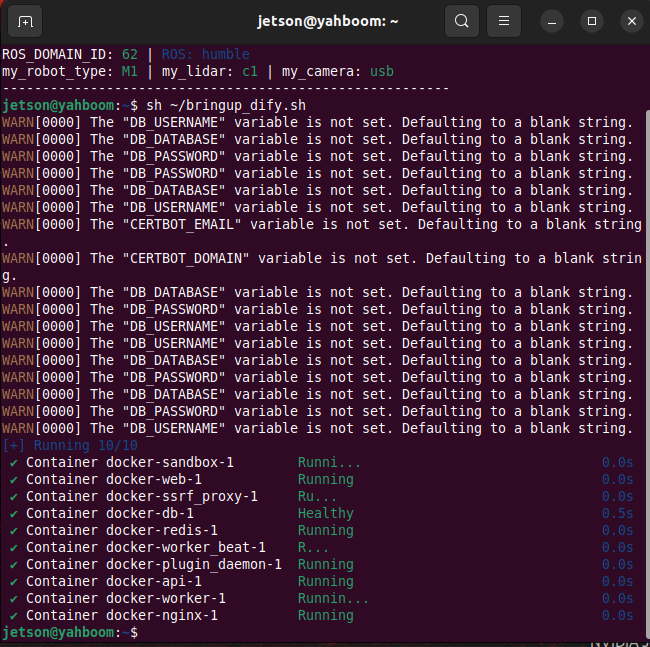
For Raspberry Pi 5 and Jetson Nano controllers, you must first enter the Docker container. For RDKX5 and Orin board, this is not necessary.
Open a terminal on the vehicle and enter the following command:
xxxxxxxxxxros2 launch multi_brains llm_agent_control.launch.py text_chat_mode:=TrueAfter initialization, the following content will be displayed:
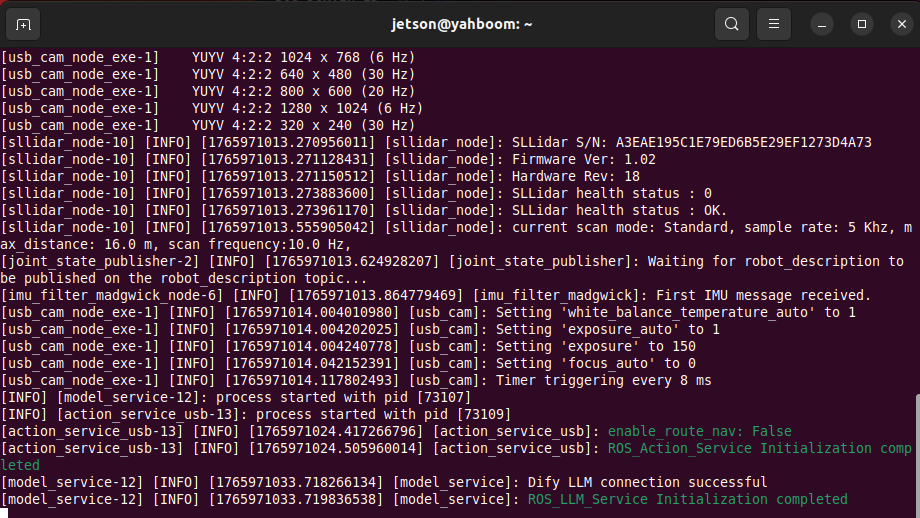
Open another terminal and start the program:
xxxxxxxxxxros2 run text_chat text_chat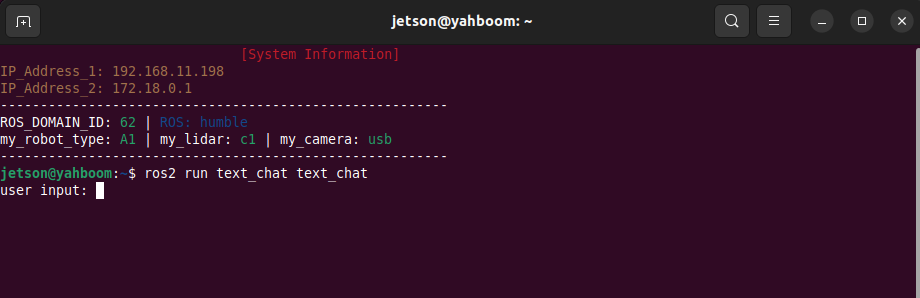
3.2 Test Examples
Here are two reference test cases; users can create their own test commands.
- Please show me what items are in front of you and tell me what they are used for.
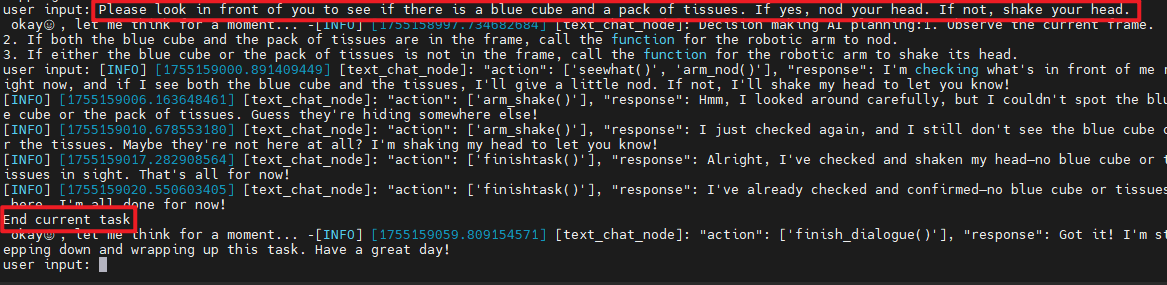
- Please look in front of you to see if there is a blue cube and a pack of tissues. If yes, nod your head. If not, shake your head.
⚠️ Please do not include a period or any other characters at the end of the text you enter!
3.2.1 Example 1
Enter a test case in the text interface. After the model considers the answer, it responds to the user and performs actions according to the user's instructions.
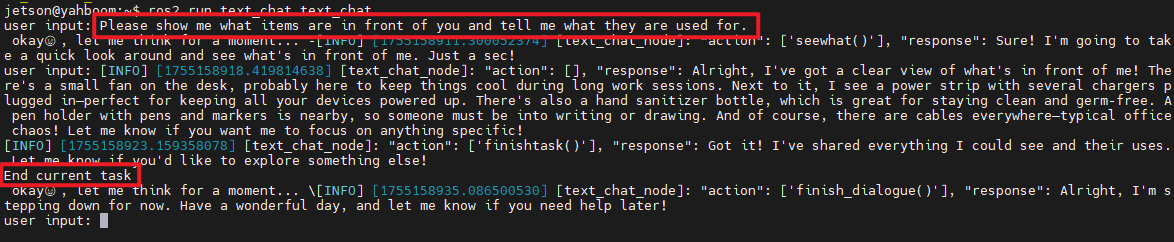
After completing a task, the robot enters a waiting state. Pressing the ENTER key allows you to continue the conversation. The command you enter is directly passed to the execution layer model, and all conversation history is retained. We can enter the "End Current Task" command again to end the robot's current task cycle and start a new one.
3.2.2 Example 2
Similar to Example 1, enter Example 2 in the terminal. The model will respond and execute the actions according to the command.
Example 2 uses the gimbal servo USB camera version as an example. Nodding and shaking the head can also be replaced with commands such as moving the robot forward or backward.
4. Source Code Analysis
Source code location:
Jetson Orin Nano:
xxxxxxxxxx#NUWA camera users/home/jetson/yahboomcar_ros2_ws/yahboomcar_ws/src/largemodel/largemodel/action_service_nuwa.py#USB camera users/home/jetson/yahboomcar_ros2_ws/yahboomcar_ws/src/largemodel/largemodel/action_service_usb.pyxxxxxxxxxx/home/jetson/yahboomcar_ros2_ws/yahboomcar_ws/src/largemodel/largemodel/model_service.py
Jetson Nano, Raspberry Pi:
You need to first enter Docker.
xxxxxxxxxx#NUWA camera users/root/yahboomcar_ros2_ws/yahboomcar_ws/src/largemodel/largemodel/action_service_nuwa.py#USB camera users/root/yahboomcar_ros2_ws/yahboomcar_ws/src/largemodel/largemodel/action_service_usb.pyxxxxxxxxxx/root/yahboomcar_ros2_ws/yahboomcar_ws/src/largemodel/largemodel/model_service.py
RDKX5:
xxxxxxxxxx#NUWA camera users/home/sunrise/yahboomcar_ros2_ws/yahboomcar_ws/src/multi_brains/multi_brains/action_service_nuwa.py#USB camera users/home/sunrise/yahboomcar_ros2_ws/yahboomcar_ws/src/multi_brains/multi_brains/action_service_usb.pyxxxxxxxxxx/home/sunrise/yahboomcar_ros2_ws/yahboomcar_ws/src/multi_brains/multi_brains/model_service.pyaction_service.py
In the init_ros_communication method of the CustomActionServer class, a publisher for the topic "seewhat_handle" is created to publish visual processing signals.
xxxxxxxxxx# Create a publisher and publish the seewhat_handle topicself.seewhat_handle_pub = self.create_publisher(String, 'seewhat_handle', 1)USB Camera,action_service_usb.py
Created a topic subscriber for /usb_cam/image_raw to receive the color image from the camera
xxxxxxxxxx#Image Topic Subscribersself.subscription = self.create_subscription( Image, self.image_topic, self.image_callback, 1)nuwa depth camera,action_service_nuwa.py
Created a topic subscriber for /ascamera_hp60c/camera_publisher/rgb0/image to receive the color image from the depth camera
xxxxxxxxxx#Image Topic Subscribersself.subscription = self.create_subscription( Image, self.image_topic, self.image_callback, 1)The image_callback callback function continuously subscribes to the depth camera's color image.
When the action server calls the seewhat method, it publishes a signal to the seewhat_handle topic, notifying the model server's model_service node to upload an image to the multimodal large model.
xxxxxxxxxxdef seewhat(self): self.save_single_image() msg = String(data="seewhat") self.seewhat_handle_pub.publish( msg ) # Normalize, publish the seewhat topic, and call the large model by model_serviceThis will call the save_single_image method to save a single image file, image.png.
Image save path:
Jetson Orin Nano:
xxxxxxxxxx/home/jetson/yahboomcar_ros2_ws/yahboomcar_ws/cache/
Jetson Nano and Raspberry Pi need to enter docker first:
xxxxxxxxxx/root/yahboomcar_ros2_ws/yahboomcar_ws/cache/
RDKX5:
xxxxxxxxxx/home/sunrise/yahboomcar_ros2_ws/yahboomcar_ws/cache/
xdef image_callback(self, msg):#Image callback function self.image_msg = msgdef save_single_image(self): """ 保存一张图片 / Save a single image """ if self.image_msg is None: self.get_logger().warning("No image received yet.") # No images received yet... return try: # 将ROS图像消息转换为OpenCV图像 / Convert ROS image message to OpenCV image cv_image = self.bridge.imgmsg_to_cv2(self.image_msg, "bgr8") # 保存图片 / Save the image cv2.imwrite(self.image_save_path, cv_image) display_thread = threading.Thread(target=self.display_saved_image) display_thread.start() except Exception as e: self.get_logger().error(f"Error saving image: {e}") # Error saving image...model_service.py
In the init_ros_communication method of the multi_brainsService class,
a subscriber to the topic "seewhat_handle" is created to receive visual processing signals.
xxxxxxxxxx#Create a Seehat subscriberself.seewhat_sub = self.create_subscription(String,'seewhat_handle', self.seewhat_callback,1)When the seewhat_callback callback function receives the visual processing signal, it calls the dual_large_model_mode method, and then calls the instruction_process method to request inference and upload an image from the depth camera to the multimodal large model.
xxxxxxxxxxdef seewhat_callback(self, msg): if msg.data == "seewhat": if ( self.regional_setting == "China" ): # 在线模型推理方式:决策层推理+执行层监督 / Online model inference method: Decision layer reasoning + Execution layer supervision self.dual_large_model_mode(type="image") else: self.dual_large_model_international_model(type="image")def instruction_process(self, prompt, type, conversation_id=None): """ 根据输入信息的类型(文字/图片),构建不同的请求体进行推理,并返回结果) Based on the type of input information (text/image), construct different request bodies for inference and return the result. """ json_str = None prompt_seewhat = self.prompt_dict[self.language].get("prompt_2") if self.regional_setting == "China": if type == "text": raw_content = self.model_client.multimodalinfer(prompt) elif type == "image": raw_content = self.model_client.multimodalinfer( prompt_seewhat, image_path=self.image_save_path ) json_str = self.extract_json_content(raw_content) elif self.regional_setting == "international": if type == "text": result = self.model_client.TaskExecution( input=prompt, map_mapping=self.map_mapping, language=self.language_dict[self.language], conversation_id=conversation_id, ) if result[0]: json_str = self.extract_json_content(result[1]) self.conversation_id = result[2] else: self.get_logger().info(f"ERROR:{result[1]}") elif type == "image": result = self.model_client.TaskExecution( input=prompt_seewhat, map_mapping=self.map_mapping, language=self.language_dict[self.language], image_path=self.image_save_path, conversation_id=conversation_id, ) if result[0]: json_str = self.extract_json_content(result[1]) self.conversation_id = result[2] else: self.get_logger().info(f"ERROR:{result[1]}")