Welcome to ROSMASTER M1 repository
1.Hand detection
Hand detection
1. Content Description
This course implements color image acquisition and hand joint detection using the mediapipe framework. This section requires entering commands in a terminal. The terminal you open depends on your board type. This lesson uses the Raspberry Pi as an example.
For Raspberry Pi and Jetson-Nano boards, you need to open a terminal on the host computer and enter the command to enter the Docker container. Once inside the Docker container, enter the commands mentioned in this lesson in the terminal. For instructions on entering the Docker container from the host computer, refer to [01. Robot Configuration and Operation Guide] -- [4.Enter Docker (For JETSON Nano and RPi 5)].
For RDKX5 and Orin boards, simply open a terminal and enter the commands mentioned in this lesson.
2. Program Startup
For Raspberry Pi and Jetson-Nano boards, you need to enter the Docker container first. For RDKX5 and Orin controllers, this is not necessary.
Enter the Docker container (see [Docker course] --- [4. Docker Startup Script] for steps).
All the following commands must be executed within the same Docker container (see [Docker course] --- [3. Docker Submission and Multi-Terminal Access] for steps).
First, enter the following command in the terminal to start the camera.
xxxxxxxxxx#usb cameraros2 launch usb_cam camera.launch.py#nuwa cameraros2 launch ascamera hp60c.launch.pyAfter successfully starting the camera, open another terminal and enter the following command to start the hand detection program.
xxxxxxxxxxros2 run yahboomcar_mediapipe 01_HandDetectorAfter running the program, the following image appears. The detected hand joints are displayed on the right side of the image.
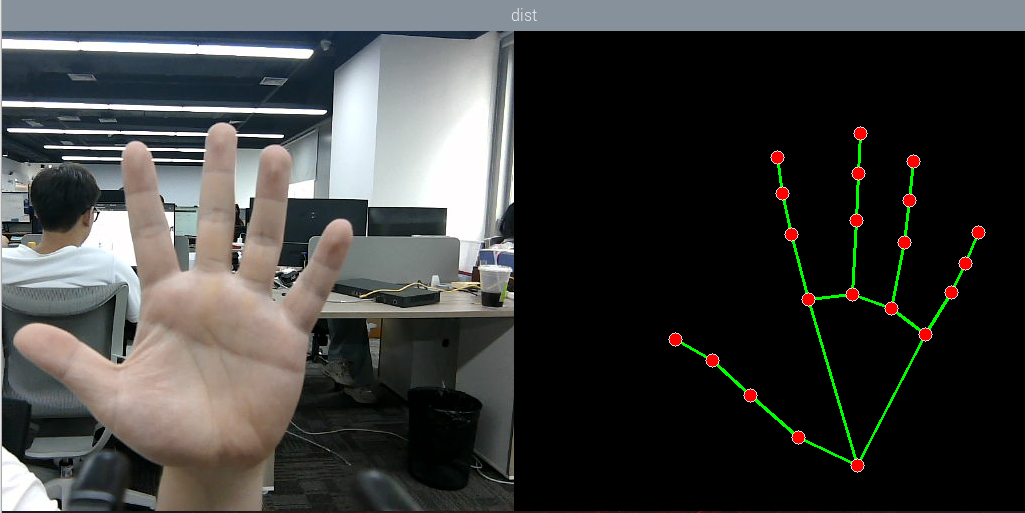
3. Core Code Analysis
Program Code Path:
Raspberry Pi 5 and Jetson Nano Board
The program code is running in Docker. The path in Docker is
/root/yahboomcar_ros2_ws/yahboomcar_ws/src/yahboomcar_mediapipe/yahboomcar_mediapipe/01_HandDetector.pyOrin board
The program code path is
/home/jetson/yahboomcar_ros2_ws/yahboomcar_ws/src/yahboomcar_mediapipe/yahboomcar_mediapipe/01_HandDetector.pyRDK X5
The program code path is
/home/sunrise/yahboomcar_ros2_ws/yahboomcar_ws/src/yahboomcar_mediapipe/yahboomcar_mediapipe/01_HandDetector.py
Import the required library files.
xxxxxxxxxximport rclpyfrom rclpy.node import Nodeimport mediapipe as mpimport cv2 as cvimport numpy as npimport timeimport osfrom cv_bridge import CvBridgefrom sensor_msgs.msg import Imagefrom arm_msgs.msg import ArmJointsimport cv2Initialize data and define publishers and subscribers,
xxxxxxxxxxdef __init__(self): super().__init__('hand_detector') self.mpHand = mp.solutions.hands self.mpDraw = mp.solutions.drawing_utils self.hands = self.mpHand.Hands( static_image_mode=False, max_num_hands=2, min_detection_confidence=0.5, min_tracking_confidence=0.5 ) self.bridge = CvBridge() self.publisher_ = self.create_publisher(PointArray, '/mediapipe/points', 10) self.lmDrawSpec = mp.solutions.drawing_utils.DrawingSpec(color=(0, 0, 255), thickness=-1, circle_radius=6) self.drawSpec = mp.solutions.drawing_utils.DrawingSpec(color=(0, 255, 0), thickness=2, circle_radius=2) # Define subscribers for the color image topic camera_type = os.getenv('CAMERA_TYPE', 'usb') topic_name = '/ascamera_hp60c/camera_publisher/rgb0/image' if camera_type == 'nuwa' else '/usb_cam/image_raw' self.subscription = self.create_subscription( Image, topic_name, self.image_callback, 10)Color image callback function,
xxxxxxxxxxdef image_callback(self, msg): # Use CvBridge to convert color image message data into image data frame = self.bridge.imgmsg_to_cv2(msg, desired_encoding='bgr8') # Put the obtained image into the defined pubHandsPoint function, draw=False means not to draw the joint points on the original color image frame, img = self.pubHandsPoint(frame, draw=True) combined = self.frame_combine(frame, img) cv.imshow('HandDetector', combined)pubHandsPoint function,
xxxxxxxxxxdef pubHandsPoint(self, frame, draw=True): #Create a new image based on the size of the image passed in. The image data type is uint8 img = np.zeros(frame.shape, np.uint8) #Convert the color space of the incoming image from BGR to RGB to facilitate subsequent image processing img_RGB = cv.cvtColor(frame, cv.COLOR_BGR2RGB) #Call the process function in the mediapipe library to process the image. During init, the self.hands object is created and initialized. self.results = self.hands.process(img_RGB) #Determine whether self.results.multi_hand_landmarks exists, that is, whether the palm is recognized if self.results.multi_hand_landmarks: #Traverse the palm list and get the information of each point for i in range(len(self.results.multi_hand_landmarks)): if draw: self.mpDraw.draw_landmarks(frame, self.results.multi_hand_landmarks[i], self.mpHand.HAND_CONNECTIONS, self.lmDrawSpec, self.drawSpec) #On the blank image created previously, connect each joint point self.mpDraw.draw_landmarks(img, self.results.multi_hand_landmarks[i], self.mpHand.HAND_CONNECTIONS, self.lmDrawSpec, self.drawSpec) return frame, imgframe_combine merge image function,
def frame_combine(slef,frame, src): #Determine whether the image is a 3-channel, that is, RGB image if len(frame.shape) == 3: #Get the size of two images and stitch them together frameH, frameW = frame.shape[:2] srcH, srcW = src.shape[:2] dst = np.zeros((max(frameH, srcH), frameW + srcW, 3), np.uint8) dst[:, :frameW] = frame[:, :] dst[:, frameW:] = src[:, :] else: src = cv.cvtColor(src, cv.COLOR_BGR2GRAY) frameH, frameW = frame.shape[:2] imgH, imgW = src.shape[:2] dst = np.zeros((frameH, frameW + imgW), np.uint8) dst[:, :frameW] = frame[:, :] dst[:, frameW:] = src[:, :] return dst