Welcome to ROSMASTER M1 repository
16.Gesture motion control
Gesture control of the car's basic movements
1. Program Functionality
For Raspberry Pi and Jetson-Nano boards, you need to open a terminal on the host computer and enter the command to enter the Docker container. Once inside the Docker container, enter the commands mentioned in this lesson in the terminal. For instructions on entering the Docker container from the host computer, refer to [01. Robot Configuration and Operation Guide] -- [4.Enter Docker (For JETSON Nano and RPi 5)].
For RDKX5 and Orin boards, simply open a terminal and enter the commands mentioned in this lesson.
Once the function is enabled, the camera captures images and recognizes gestures to control the robot's movement.
| Gesture | Action |
|---|---|
| Gesture "5" | Car moves forward |
| Gesture "1" | Car moves right |
| Gesture "2" | Car stops |
| Gesture "3" | Car moves backward |
| Gesture "4" | Car moves left |
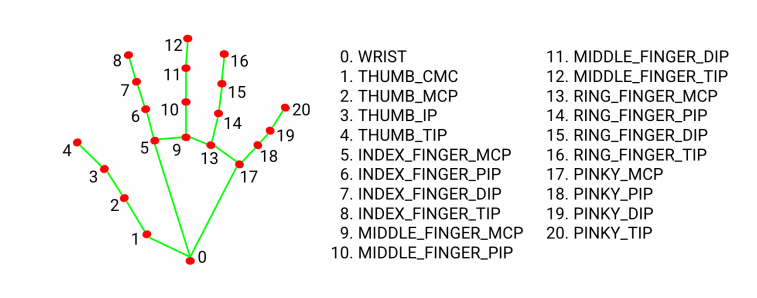
MediaPipe Hands infers the 3D coordinates of 21 hand joints from a single frame
2. Program Code Reference Path
For Raspberry Pi and Jetson-Nano boards, you need to enter the Docker container first. For RDKX5 and Orin controllers, this is not necessary.
Enter the Docker container (see [Docker course] --- [4. Docker Startup Script] for steps).
All the following commands must be executed within the same Docker container (see [Docker course] --- [3. Docker Submission and Multi-Terminal Access] for steps).
After entering the Docker container, the source code for this function is located at:
xxxxxxxxxx~/yahboomcar_ros2_ws/yahboomcar_ws/src/yahboomcar_astra/yahboomcar_astra
3. Program Startup
3.1. Startup Command
First, enter the following command in the terminal to start the camera:
xxxxxxxxxx#usb cameraros2 launch usb_cam camera.launch.py#nuwa cameraros2 launch ascamera hp60c.launch.pyAfter successfully starting the camera, open another terminal and enter the following command:
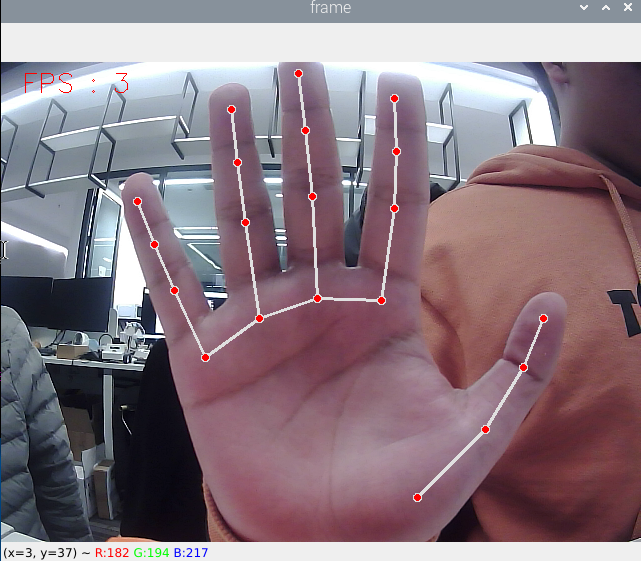
xxxxxxxxxx#chassis driverros2 launch yahboomcar_bringup yahboomcar_bringup_M1_launch.py#QR code controlros2 run yahboomcar_astra HandCtrlEnable this function and place your hand in front of the camera. The image will depict the shape of your finger. Once the program recognizes the gesture, it will send the speed to the chassis, thereby controlling the car's movement.
4. Core Code
4.1. HandCtrl.py
Importing Key Libraries
xxxxxxxxxxfrom yahboomcar_mediapipe.media_library import * #This library contains functions for detecting hands and obtaining gesturesGetting Finger Data
xxxxxxxxxxframe, lmList, _ = self.hand_detector.findHands(frame)fingers = self.hand_detector.fingersUp(lmList)sum(fingers)fingers[]As you can see, the hand is first detected, the value of lmList is obtained, and then passed to the fingersUp function. The fingersUp function is used to detect which fingers are extended. The value of an extended finger is 1. The specific code here can also be seen in the media_library.py function, which has a detailed explanation. In fact, it is actually to determine the xy value of the finger joint to determine when it is extended. The sum(fingers) function is used to count the number of extended fingers. fingers[] can be used to enumerate fingers. For example, the index finger is represented by fingers[1].
Release speed to chassis
self.media_ros.pub_vel(x,y,z) #This function is also in media_library.py