Welcome to ROSMASTER M1 repository
10.Gesture recognition
Gesture Recognition
1. Content Description
MediaPipe is an open-source data stream processing framework developed by Google for machine learning applications. It is a graph-based data processing pipeline used to build applications that consume a variety of data sources, such as video, audio, sensor data, and any time series data.
MediaPipe is cross-platform and can run on embedded platforms (such as Jetson Nano), mobile devices (iOS and Android), workstations, and servers, and supports mobile GPU acceleration. MediaPipe provides a cross-platform, customizable ML solution for real-time and streaming media.
The core framework of MediaPipe is implemented in C++, with support for languages such as Java and Objective C. Key concepts in MediaPipe include packets, streams, calculators, graphs, and subgraphs.
MediaPipe Features:
- End-to-end acceleration: Built-in fast ML inference and processing accelerates even on commodity hardware.
- Build once, deploy anywhere: A unified solution for Android, iOS, desktop/cloud, web, and IoT.
- Ready-to-use solution: A cutting-edge ML solution that demonstrates the full capabilities of the framework.
- Free and open source: The framework and solution are licensed under Apache 2.0 and are fully extensible and customizable.
Gesture recognition is designed for right-hand use and accurately recognizes gestures when specific conditions are met. Recognizable gestures include: Zero, One, Two, Three, Four, Five, Six, Seven, Eight, Ok, Rock, Thumb_up (like), Thumb_down (thumbs down), Heart_single (heart gesture)—a total of 14 categories.
This section requires entering commands in a terminal. The terminal you choose depends on your board type. This lesson uses the Raspberry Pi as an example.
For Raspberry Pi and Jetson-Nano boards, you need to open a terminal on the host computer and enter the command to enter the Docker container. Once inside the Docker container, enter the commands mentioned in this lesson in the terminal. For instructions on entering the Docker container from the host computer, refer to [01. Robot Configuration and Operation Guide] -- [4.Enter Docker (For JETSON Nano and RPi 5)].
For RDKX5 and Orin boards, simply open a terminal and enter the commands mentioned in this lesson.
2. Program Startup
For Raspberry Pi and Jetson-Nano boards, you need to enter the Docker container first. For RDKX5 and Orin controllers, this is not necessary.
Enter the Docker container (see [Docker course] --- [4. Docker Startup Script] for steps).
All the following commands must be executed within the same Docker container (see [Docker course] --- [3. Docker Submission and Multi-Terminal Access] for steps).
First, enter the following command in the terminal to start the camera.
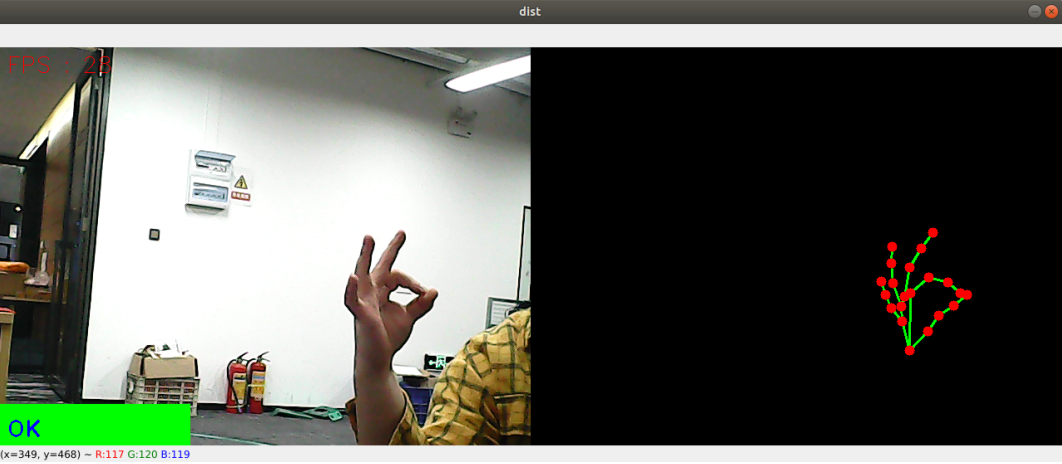
#usb cameraros2 launch usb_cam camera.launch.py#nuwa cameraros2 launch ascamera hp60c.launch.pyAfter successfully starting the camera, open another terminal and enter the following command to start the gesture recognition program.
xxxxxxxxxxros2 run yahboomcar_mediapipe 10_GestureRecognition
3. Core Code Analysis
Program Code Path:
Raspberry Pi 5 and Jetson Nano Board
The program code is running in Docker. The path in Docker is
/root/yahboomcar_ros2_ws/yahboomcar_ws/src/yahboomcar_mediapipe/yahboomcar_mediapipe/10_GestureRecognition.pyOrin board
The program code path is
/home/jetson/yahboomcar_ros2_ws/yahboomcar_ws/src/yahboomcar_mediapipe/yahboomcar_mediapipe/10_GestureRecognition.pyRDK X5
The program code path is
/home/sunrise/yahboomcar_ros2_ws/yahboomcar_ws/src/yahboomcar_mediapipe/yahboomcar_mediapipe/10_GestureRecognition.py
pubHandsPoint function
xxxxxxxxxxdef pubHandsPoint(self, frame, draw=True): """检测手部关键点并返回可视化结果 \ Detect hand key points and return visualization results Args: frame: 输入BGR图像 \ Input BGR image draw: 是否在原图绘制关键点(默认True) \ Whether to draw key points in the original image (default True) Returns: tuple: (带标记的原图, 纯关键点图像 \ Original image with markers, pure keypoint image) """ img = np.zeros(frame.shape, np.uint8) # Create a blank canvas img_RGB = cv.cvtColor(frame, cv.COLOR_BGR2RGB) # Convert color space self.results = self.hands.process(img_RGB) # MediaPipe Processing if self.results.multi_hand_landmarks: # When a hand is detected for hand_landmarks in self.results.multi_hand_landmarks: if draw: # Draw on the original image self.mpDraw.draw_landmarks( frame, hand_landmarks, self.mpHand.HAND_CONNECTIONS, self.lmDrawSpec, self.drawSpec) # Key point skeleton in blank picture self.mpDraw.draw_landmarks( img, hand_landmarks, self.mpHand.HAND_CONNECTIONS, self.lmDrawSpec, self.drawSpec) return frame, imgframe_combine function
xxxxxxxxxxdef frame_combine(self, frame, src): """水平拼接两个图像 \ Horizontally stitch two images Args: frame: 左侧图像 \ Left image src: 右侧图像 \ Right image Returns: numpy.ndarray: 拼接后的图像 \ Stitched image """ if len(frame.shape) == 3: # Color image processing h, w = frame.shape[:2] dst = np.zeros((h, w*2, 3), np.uint8) dst[:, :w] = frame dst[:, w:] = src else: # Grayscale image processing h, w = frame.shape[:2] dst = np.zeros((h, w*2), np.uint8) dst[:, :w] = frame dst[:, w:] = src return dstimage_callback function
xxxxxxxxxxdef image_callback(self, msg): """ROS图像订阅回调函数 \ ROS image subscription callback function Args: msg: sensor_msgs/Image 类型的ROS消息 \ ROS message of sensor_msgs/Image type """ frame = self.bridge.imgmsg_to_cv2(msg, 'bgr8') # ROS to OpenCV frame, img = self.pubHandsPoint(frame) # Keypoint detection combined = self.frame_combine(frame, img) # Image stitching cv.imshow('HandDetector', combined) # Display results cv.waitKey(1) # Refresh display