Welcome to ROSMASTER M1 repository
13. Comprehensive application
Comprehensive application
1. Course Content
Note: This program runs on a sandbox map; you will need to adjust the program for your personal map.
This tutorial uses the factory-installed road sign and lane recognition models, moving them center on a sandbox map. Upon recognizing a road sign, it performs the corresponding road sign function action.
2. Program Path
Autonomous Driving Source Code Path:
Lane Keeping: /home/jetson/yahboomcar_ros2_ws/yahboomcar_ws/src/auto_drive/auto_drive/auto_drive.py
Road Sign Recognition: /home/jetson/yahboomcar_ros2_ws/yahboomcar_ws/src/auto_drive/auto_drive/yolo_detect.py
3. Program Startup
3.1 Startup Command
- Start camera + chassis + road signs and lane markings
ros2 launch auto_drive auto_drive_bringup.launch.py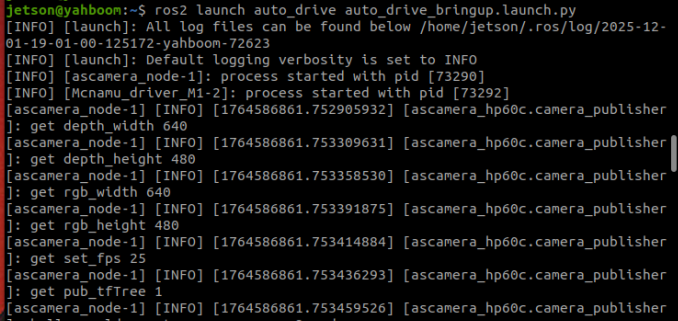
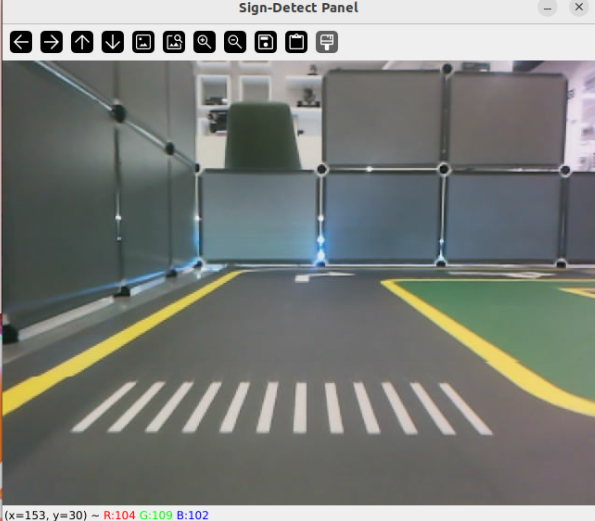
After the program runs, a YOLO recognition screen will be displayed. The car will move centered within the lane and perform corresponding actions based on the road signs it detects during its journey. (If the terminal does not report any errors after starting the program, but the car does not move, you can run the following program to check the parameters.)
- Start the dynamic parameter configuration node
xxxxxxxxxxros2 run rqt_reconfigure rqt_reconfigure
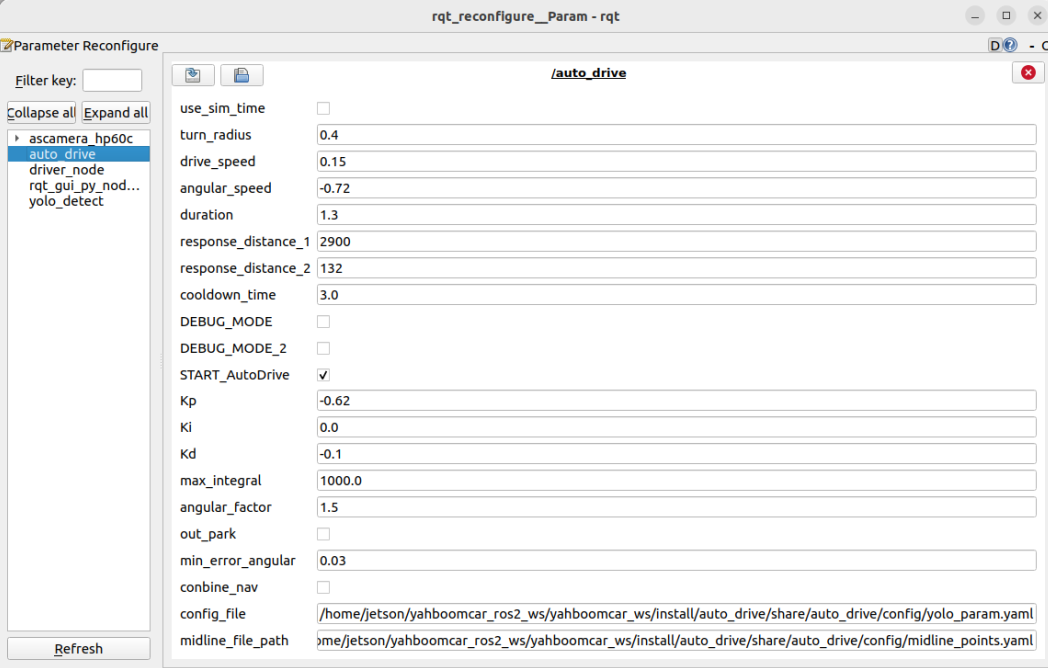
If the car doesn't move, check two parameters: whether START_AutoDrive is checked and whether conbine_nav is false.
☑️ After modifying the parameters, click in the blank area of the GUI to enter the parameter values. Note that this only applies to the current startup; for permanent effects, the parameters need to be modified in the source code.
🛠 Parameter Explanation:
【turn_radius】: Turning radius. Normally, this parameter does not need to be changed.
【drive_speed】: Linear velocity. The car's speed. The factory default is 0.15. If you modify this parameter, you need to adjust other parameters accordingly.
【angular_speed】: Turning angular velocity.
【duration】: Right turn time for recognizing right turn signs.
【cooldown_time】: Road sign recognition cooldown time.
【DEBUG_MODE】: Visual debug parameter. Enabling this may affect centering.
【START_AutoDrive】: Controls car movement parameters. True means the car can move.
【kp, ki, kd】: Car centering PID parameters.
【turn_radius】: Turning radius. Normally, this parameter does not need to be changed.
【conbine_nav】: Required only when road network navigation is enabled and YOLO is activated. Enabling this will stop the car.
3.2 Car Movement After Recognizing Road Signs
Straight ahead
- Drive at the set speed, or stop and resume driving after encountering a parking sign
Right turn
- Trigger the fixed right turn action
Horn
- Trigger car horn sound effect
Pedestrian crossing
- Trigger car horn sound effect and reduce speed for 1 second
Speed limit
- Reduce car speed for 3 seconds, then return to normal speed
School zone
- Trigger car horn sound effect and reduce speed for 1 second
Parking lots A and B
- Trigger preset fixed parking action
Traffic lights
Red light
- Without road network planning, triggers disengagement of lane keeping assist.
- With road network planning, cancels the current navigation task.
Green light
- Without road network planning, triggers activation of lane keeping assist.
- With road network planning, resumes the previous navigation task.
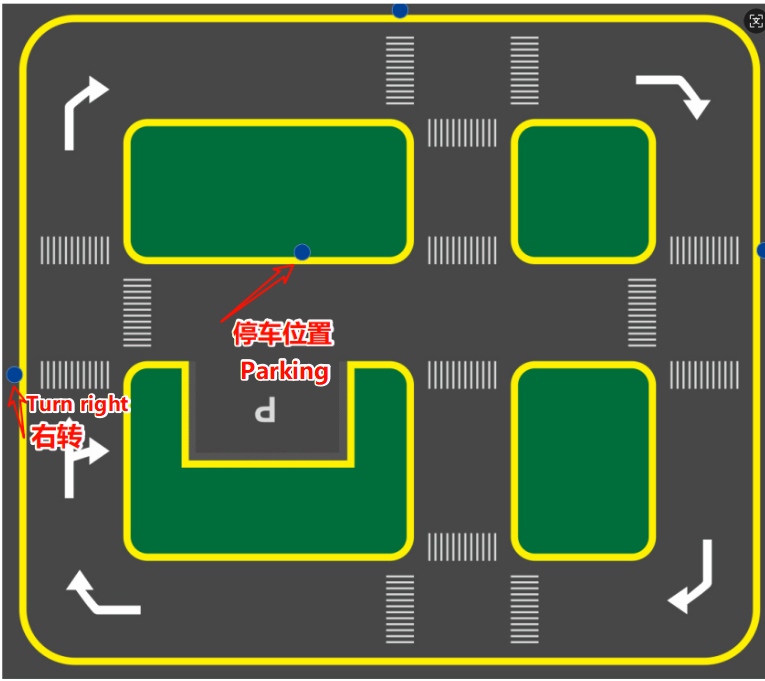
The right turn and parking positions are fixed. Since the program uses fixed actions, for better results, it is recommended to place them at these positions. If you need to place them elsewhere, you will need to readjust the fixed action timing.
3.3 Debugging Parameters
There are two methods for debugging parameters: temporary real-time debugging and permanent parameter modification debugging.
- Temporary Real-Time Debugging
After running the program, run the dynamic parameter tuning command to debug:
xxxxxxxxxxros2 run rqt_reconfigure rqt_reconfigure
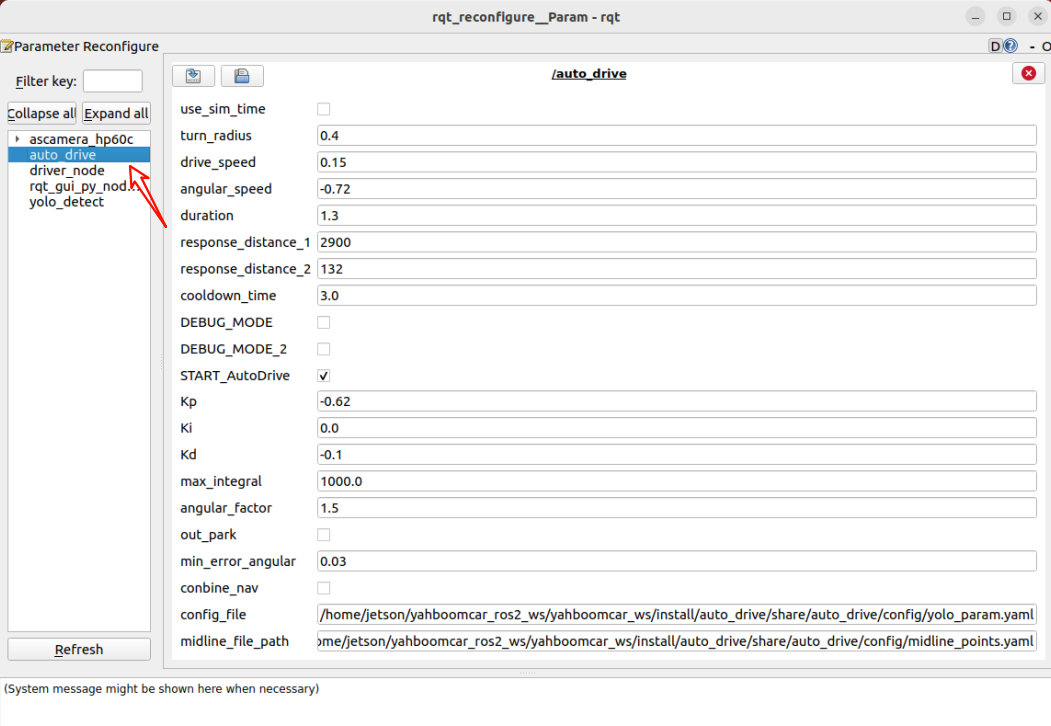
Debugging Experience:
- If lane centering is unstable, refer to the chapter "4. Lane Keeping in Autonomous Driving".
- For right turn recognition, if the turn is insufficient or excessive, adjust the
durationparameter to control the right turn time. - To prevent frequent road sign recognition, modify
cooldown_time, which represents the cooldown time between road sign recognitions. - If lane centering adjustment is too slow, increase
kp.
- Permanently Modify Parameters for Debugging
By modifying parameter files to achieve permanent parameter changes, the parameter paths are:
/home/jetson/yahboomcar_ros2_ws/yahboomcar_ws/src/auto_drive/config/auto_drive_node.yaml
/home/jetson/yahboomcar_ros2_ws/yahboomcar_ws/src/auto_drive/config/yolo_param.yaml
/home/jetson/yahboomcar_ros2_ws/yahboomcar_ws/src/auto_drive/config/midline_points.yaml
Three parameters represent: autonomous driving parameters, traffic sign recognition parameters, and lane centering parameters
Autonomous Driving Parameters:
xxxxxxxxxxauto_drive: ros__parameters: turn_radius: 0.4 drive_speed: 0.15 angular_speed: -0.72 duration: 1.3 response_distance_1: 2900 response_distance_2: 132 cooldown_time: 3.0 DEBUG_MODE: False START_AutoDrive: True conbine_nav: False Kp: -0.62 Ki: 0.0 Kd: -0.1 max_integral: 1000.0 image_size: [640, 480]The parameters above have the same meaning as the dynamically adjusted parameters. After modification, the program here will be called by default on the next run. Note the following during startup: START_AutoDrive: True and conbine_nav: False. These two parameters determine whether the car can run. conbine_nav: False is only required if road network navigation + autonomous driving is used.
Road Sign Recognition Parameters:
x#Road Sign Detection Inference Parameterssign_detection: model_path: '/home/jetson/yahboomcar_ros2_ws/yahboomcar_ws/src/auto_drive/tools/sign_model.engine' conf: 0.92 # Sets the minimum confidence threshold for detection. Detected objects with confidence levels below this threshold will be ignored. Adjusting this value helps reduce false positives. iou: 0.7 # The overlap threshold used for non-maximum suppression (NMS). Lower values ••reduce detections by eliminating overlapping boxes. rect: True # If enabled, performs minimum padding on the shorter side of the image until it is divisible by the stride, improving inference speed. half: True # If enabled, uses half-precision inference, which speeds up model inference on supported GPUs with minimal impact on accuracy. device: "cuda:0" # Inference device batch: 50 # Batch size. Larger batch sizes provide higher throughput, thus reducing the total time required for inference. max_det: 4 # Maximum number of objects to detect augment: False # Enables Test-Time Augmentation (TTA) for prediction, which may improve detection robustness but slows down inference. verbose : False # Whether to output detailed inference information in the terminal. classes : [0, 1, 2, 3, 4, 5, 6, 8, 9, 10, 11, 12, 13]line_detection:# Lane detection inference parameters model_path: '/home/jetson/yahboomcar_ros2_ws/yahboomcar_ws/src/auto_drive/tools/lane_V6.engine' conf: 0.5 # Sets the minimum confidence threshold for detection. Detected objects with a confidence level below this threshold will be ignored. Adjusting this value helps reduce false positives. iou: 0.6 # Overlap threshold for non-maximum suppression (NMS). Lower values ••reduce detections by eliminating overlapping boxes. rect: True # If enabled, performs minimum padding on the shorter side of the image until it is divisible by the stride, improving inference speed. half: True # If enabled, uses half-precision inference, which speeds up model inference on supported GPUs with minimal impact on accuracy. device: "cuda:0" # Inference device batch: 50 # Batch size. Larger batch sizes provide higher throughput, thus reducing the total time required for inference. max_det: 4 # Maximum number of objects to detect augment: False # Enables test-time augmentation (TTA) for prediction, which may improve detection robustness but slow down inference. verbose: False # Whether to output detailed inference information to the terminal. The above parameters can be used at the factory default settings and generally do not need to be modified.
Lane line centering parameters
xxxxxxxxxxmidline_points: start_point: x: 360 y: 477 end_point: x: 355 y: 424 midline_length: 120 mid_distance: [200,40]The start_point and end_point parameters are used to calibrate the car's center point; see the course on centerline calibration for details. The midline_length parameter adjusts the car's turning timing on the sandbox map; a shorter value results in slower turns, and vice versa.
4. Source Code Analysis
4.1 auto_drive.py
Program source code path:
/home/jetson/yahboomcar_ros2_ws/yahboomcar_ws/src/auto_drive/auto_drive/auto_drive.py
Control Flow consists of:
- Receiving and processing image data
- Detecting lane lines and traffic signs
- Determining control strategy based on detection results
- Issuing control commands (speed, direction)
- Repeating the above steps
- Processing lane detection results
xxxxxxxxxxdef __handle_lane_detect_result(self,left_box,right_box,frame): '''Processing lane detection results''' self.error_mode = 99 error_angular = [0.0, 0.0] # Default angle deviation if left_box is not None and right_box is not None and left_box[0]<right_box[0] : # If both left and right lane lines exist, draw them and their intersection self.error_mode=0 #Marking error modes: Centering mode: 0, Left-skewed mode: 1, Right-skewed mode: 2 frame=self.lane_detect.draw_left_line(frame, left_box)# Draw left lane line frame=self.lane_detect.draw_right_line(frame, right_box)# Draw right lane line frame,x_center,y_center=self.lane_detect.draw_center_point(frame,left_box,right_box)# Draw estimated center point of the lane left_lane_offset,right_lane_offset=self.lane_detect.cal_lane_lateral_offset(left_box,right_box) # self.get_logger().info(f"left_lane_offset: {left_lane_offset:.2f} , right_lane_offset: {right_lane_offset:.2f} ") error_angular=self.lane_detect.cal_error_angular(x_center,y_center)# Calculate angular error between vehicle and center point elif left_box is not None and right_box is None and left_box[0]<320: self.error_mode=1 self.lane_detect.prev_center=None frame=self.lane_detect.draw_left_line(frame, left_box) elif right_box is not None and left_box is None : self.error_mode=2 self.lane_detect.prev_center=None frame=self.lane_detect.draw_right_line(frame, right_box) else: self.lane_detect.prev_center=None # When turn action is activated, temporarily suspend lane line speed control if self.turn_action_active: return frame if self.error_mode==0 : # Centering if error_angular[1]>=0.03 or error_angular[1]<=-0.03: if abs(error_angular[1])<0.3: angular_z=self.pid_controller.pid_control(error_angular[1]) angular_z=min(angular_z,0.3) angular_z=max(angular_z,-0.3) self.__set_current_speed(linear_x=self.drive_speed,angular_z=angular_z) elif self.error_mode==1: # Only left lane line exists if_infer=self.lane_detect.IF_lane_intersection(left_box) if if_infer is not None: self.__set_current_speed(linear_x=self.drive_speed,angular_z=self.angular_speed) else: self.__set_current_speed(linear_x=self.drive_speed,angular_z=0.0) else: self.__set_current_speed(linear_x=self.drive_speed,angular_z=0.0) # Display angular deviation on the image cv2.putText(frame, f"Angle Dev: {error_angular[1]:.2f} rad", (10, 90), cv2.FONT_HERSHEY_SIMPLEX, 0.8, (255, 0, 255), 2) frame=self.lane_detect.draw_midline(frame) return frameauto_drivenode'ssign_callbackcallback function subscribes to the/sign_detecttopic, then executes actions corresponding to traffic signs in the handle_events thread.
xxxxxxxxxx def handle_events(self): '''Handling target recognition events''' while True: try: object:Object=self.event_queue.get(timeout=0.2) except queue.Empty: continue if self.__check_cooldown(object.class_name): continue # self.get_logger().info(f'{object.class_name} handle') if object.class_name=="straight" and self.sign_enable_list[10]: self.go_straight() elif object.class_name=="turnright" and self.sign_enable_list[11]: self.turn('right') elif object.class_name=="turnright_ground": pass elif object.class_name=="honking" and self.sign_enable_list[1]: self.car_horn() elif object.class_name== "sidewalk" and self.sign_enable_list[6]: self.sidewalk() elif object.class_name=="sidewalk_ground" and self.sign_enable_list[7]: pass elif object.class_name=="speedlimit" and self.sign_enable_list[8]: self.speedlimit() elif object.class_name=="stop" and self.sign_enable_list[9]: self.stop() elif object.class_name=="school" and self.sign_enable_list[5]: self.school() elif object.class_name=="parkA" and self.sign_enable_list[2]: self.parking_A() elif object.class_name=="parkB" and self.sign_enable_list[3]: self.parking_A() elif object.class_name=="greenlight" and self.sign_enable_list[0]: self.greenlight() elif object.class_name =="redlight" and self.sign_enable_list[4]: self.redlight() elif object.class_name=="yellowlight" and self.sign_enable_list[13]: pass elif object.class_name=="out_park" : self.out_parking()4.2、yolo_detect.py
Program source code is located at /home/jetson/yahboomcar_ros2_ws/yahboomcar_ws/src/auto_drive/auto_drive/yolo_detect.py
Control Flow
Image Callback (image_callback):
- Convert ROS image message to OpenCV format
- Put image into processing queue
Sign Detection Processing (handle_sign):
Get image frame from queue
Perform object detection using YOLO model
Process detection results:
- Filter out ignored signs (e.g., "turnright_ground", "sidewalk_ground")
- Publish detected sign information
- Display FPS and inference time in debug mode
- Show detection results in real-time
xxxxxxxxxxdef handle_sign(self): '''Process road sign detection results in the image''' while True: try: frame = self.sign_detect.image_queue.get(timeout=0.01) except queue.Empty: continue infer_start = time.time() results=self.sign_detect.get_infer_result(frame,True) for res in results: if res.boxes is not None: annotated_frame = res.plot() boxes = res.boxes for i in range(len(boxes)): box_coords = boxes.xyxy[i].tolist()# Get bounding box coordinates (xyxy format: xmin, ymin, xmax, ymax) class_name = res.names[int(boxes.cls[i].item())]# Get object name confidence = boxes.conf[i].item()# Get confidence score # Check if it's an ignored sign if class_name in self.ignored_signs: # rospy.loginfo(f"Ignoring sign: {class_name}") continue # Skip ignored signs # Publish detection results if self.sign_pub_counter % 5 == 0: self.sign_publisher.publish(DetectionObject( class_name=class_name, confidence=confidence, xmin=float(box_coords[0]), ymin=float(box_coords[1]), xmax=float(box_coords[2]), ymax=float(box_coords[3]) )) self.sign_pub_counter += 1 if self.DEBUG_MODE: infer_end = time.time() # Update FPS self.frame_count += 1 curr_time = time.time() time_diff = curr_time - self.prev_time if time_diff >= 1.0: self.fps = self.frame_count / time_diff self.frame_count = 0 self.prev_time = curr_time # Display FPS on the image cv2.putText(annotated_frame,f"FPS: {self.fps:.2f}",(10, 25),cv2.FONT_HERSHEY_SIMPLEX,0.6,(0, 255, 0),1,) # Display inference time infer_time = (infer_end - infer_start) * 1000 cv2.putText(annotated_frame, f"Infer: {infer_time:.1f} ms", (10, 45),cv2.FONT_HERSHEY_SIMPLEX, 0.6, (0, 255, 255), 1) cv2.imshow("Sign-Detect Panel", annotated_frame) cv2.waitKey(1)The main thread is responsible for receiving images, while worker threads are responsible for processing images and performing detection tasks. Inter-thread communication is achieved through a queue.
4.2、yolov11_infer.py
The program's source code is located at /home/jetson/yahboomcar_ros2_ws/yahboomcar_ws/src/auto_drive/auto_drive/utils/yolov11_infer.py
Control Flow
Sign_Detect class:
When creating a Sign_Detect instance, load and parse the configuration file.
Call the init_yolo_engine() method:
- Initialize the image queue (maximum capacity 10)
- Set model inference parameters (confidence, IOU threshold, etc.)
- Load the YOLO model
Add the image to the processing queue using the put_image method
Obtain the inference result using the get_infer_result method
Perform object detection using the YOLO model
Lane_Detect class:
- Lane line detection: Detects lane lines in the image using the YOLO model.
- Lane center point calculation: Calculates the center points of the left and right lane lines.
- Lane departure detection: Calculates the vehicle's offset angle and distance relative to the lane.
- Visualization: Provides various plotting methods for displaying detection results.
xxxxxxxxxxclass Sign_Detect(YOLO_MODEL): """Road sign detection""" def __init__(self,config_file_path): with open(config_file_path, "r") as file: full_config = yaml.safe_load(file) self.config_param = full_config.get("sign_detection", {})...class Lane_Detect(YOLO_MODEL): """Lane detection model""" def __init__(self,config_file_path:str, midline_file_path:str): with open(config_file_path, "r") as file: full_config = yaml.safe_load(file) self.config_param = full_config.get("line_detection", {}) with open(midline_file_path, "r") as file: self.point_config = yaml.safe_load(file)...