Welcome to ROSMASTER M1 repository
3.Object Detection
Object Detection
This section primarily addresses how to use the DNN module in OpenCV to import a trained object detection network. However, this requires a specific version of OpenCV.
Currently, there are three main approaches to object detection using deep learning:
- Faster R-CNNs
- You Only Look Once (YOLO)
- Single Shot Detectors (SSDs)
Faster R-CNNs is the most commonly heard of deep learning-based neural networks. However, this approach is technically difficult to understand (especially for deep learning novices), difficult to implement, and challenging to train.
Furthermore, even when implementing R-CNNs using the "Faster" approach (where "R" stands for Region Proposal), the algorithm is still relatively slow, at approximately 7 FPS.
If speed is a priority, we can turn to YOLO, which is very fast, achieving 40-90 FPS on a TianX GPU, with the fastest version potentially reaching 155 FPS. However, YOLO's accuracy still needs improvement.
SSDs, originally developed by Google, offer a balance between the two approaches. Compared to Faster R-CNN, its algorithm is more straightforward. Compared to YOLO, it is also more accurate.
1. Model Architecture
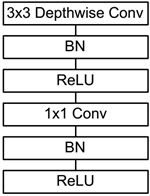
MobileNet's primary focus is to replace standard convolutions with depthwise separable convolutions to address the computational efficiency and parameter count issues of convolutional networks. The MobileNet model is based on depthwise separable convolutions, which decompose standard convolutions into a depthwise convolution and a pointwise convolution (1×1 convolution kernel). The depthwise convolution applies each kernel to each channel, while the 1×1 convolution combines the outputs of the channel-wise convolutions.
MobileNet's fundamental components incorporate Batch Normalization (BN). This involves normalizing the output signal (across all dimensions) to a mean of 0 and a variance of 1 during each SGD (stochastic gradient descent) run. BN is often used to address slow convergence or exploding gradients during neural network training, making it difficult to train. In general, batch normalization can also be added to speed up training and improve model accuracy.
In addition, the model uses the ReLU activation function, so the basic structure of the depthwise separable convolution is shown below:
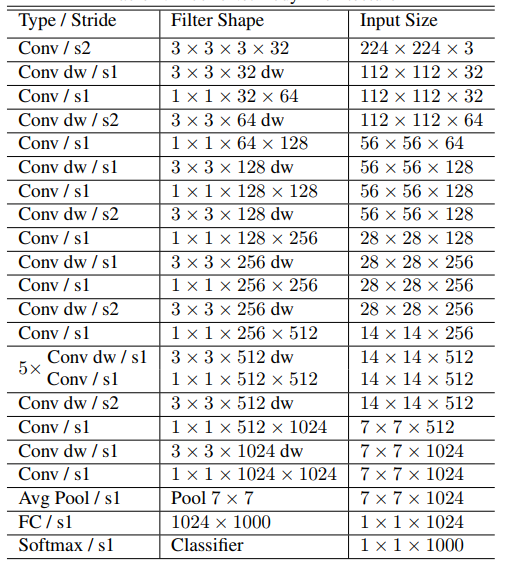
The MobileNets network is composed of many depthwise separable convolutions shown in the figure above. Its specific network structure is shown below:
2. Code Analysis
List of Recognizable Objects
[person, bicycle, car, motorcycle, airplane, bus, train, truck, boat, traffic light, fire hydrant, street sign, stop sign, parking meter, bench, bird, cat, dog, horse, sheep, cow, elephant, bear, zebra, giraffe, hat, backpack, umbrella, shoe, eye glasses, handbag, tie, suitcase, frisbee, skis, snowboard, sports ball, kite, baseball bat, baseball glove, skateboard, surfboard, tennis racket, bottle, plate, wine glass, cup, fork, knife, spoon, bowl, banana, apple, sandwich, orange, broccoli, carrot, hot dog, pizza, donut, cake, chair, couch, potted plant, bed, mirror, dining table, window, desk, toilet, door, tv, laptop, mouse, remote, keyboard, cell phone, microwave, oven, toaster, sink, refrigerator, blender, book, clock, vase, scissors, teddy bear, hair drier, toothbrush]Load the category [object_detection_coco.txt], import the model [frozen_inference_graph.pb], and specify the deep learning framework [TensorFlow]
xxxxxxxxxx# Load COCO class namewith open('/home/jetson/yahboomcar_ros2_ws/yahboomcar_ws/src/yahboomcar_vision/config/object_detection_coco.txt', 'r') as f: self.class_names = f.read().split('\n')# Display different colors for different targetsself.COLORS = np.random.uniform(0, 255, size=(len(self.class_names), 3))# Loading the DNN image modelself.model = cv.dnn.readNet(model='/home/jetson/yahboomcar_ros2_ws/yahboomcar_ws/src/yahboomcar_vision/config/frozen_inference_graph.pb', config='/home/jetson/yahboomcar_ros2_ws/yahboomcar_ws/src/yahboomcar_vision/config/ssd_mobilenet_v2_coco.txt', framework='TensorFlow')Import the image, extract the height and width, calculate the 300x300 pixel blob, and pass this blob into the neural network
xxxxxxxxxxdef Target_Detection(image): image_height, image_width, _ = image.shape # Creating a blob from an image blob = cv.dnn.blobFromImage(image=image, size=(300, 300), mean=(104, 117, 123), swapRB=True) model.setInput(blob) output = model.forward() # Iterate through each detection for detection in output[0, 0, :, :]: # Extracting detection confidence confidence = detection[2] # Draw the bounding box only if the detection confidence is above a certain threshold, otherwise skip if confidence > .4: # Get the class ID class_id = detection[1] # Map class id to class class_name = class_names[int(class_id) - 1] color = COLORS[int(class_id)] # Get bounding box coordinates box_x = detection[3] * image_width box_y = detection[4] * image_height # Get the width and height of the bounding box box_width = detection[5] * image_width box_height = detection[6] * image_height # Draw a rectangle around each detected object cv.rectangle(image, (int(box_x), int(box_y)), (int(box_width), int(box_height)), color, thickness=2) # Write the class name text on the detected object cv.putText(image, class_name, (int(box_x), int(box_y - 5)), cv.FONT_HERSHEY_SIMPLEX, 1, color, 2) return image3. Startup
For PI5/JETSON NANO controllers, you must first enter the Docker container. For RDKX5 and Orin boards, this is not necessary.
Start the camera.
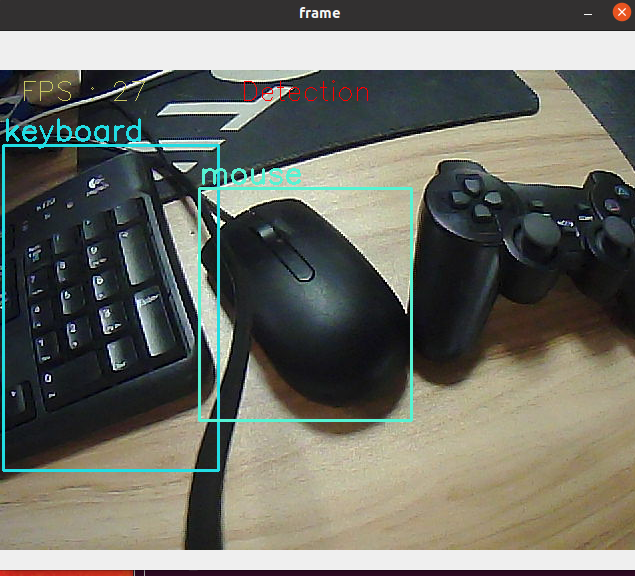
xxxxxxxxxx#USB cameraros2 launch usb_cam camera.launch.py#NUWA cameraros2 launch ascamera hp60c.launch.pyxxxxxxxxxxros2 run yahboomcar_vision detect_object
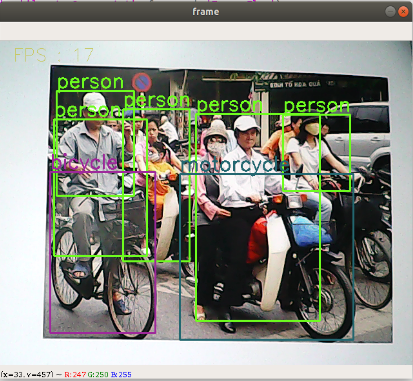
Camera display: