yahboom
HomeLearn
Solution
Blog
Online Store
About Us
EN/中文
ROSMASTER M3 PRO📖
0.Configuration and Operation Guide
  • 1. Quick start handle to control the car
  • 2. Log in to the car and view the code
  • 3. Robotic Arm Calibration
  • 4. Enter the Docker (Jetson-Nano and Raspberry Pi 5 users, see here)
  • 5. Assembly video
  • 6. Modify the firmware parameters of the car control board
  • 7. Frequently Asked Questions and Precautions
  • 8. Precautions for DIY Robotic Arm
1.Chassis Control Course
  • 1.ROS control
  • 2.Handle control
  • 3.Keyboard control
  • 4.Angular velocity calibration
  • 5.Line velocity calibration
  • 6.Line patrol automatic driving
  • 7.Patrol
2.Lidar Course
  • 1.Lidar introduction and use
  • 2.Dual Lidar fusion
  • 3.Lidar obstacle avoidance
  • 4.Lidar tracking
  • 5.Lidar guard
  • 6.Gmapping-SLAM mapping
  • 7.Cartographer-SLAM mapping
  • 8.slam_toolbox mapping
  • 9.Navigation2 single-point navigation avoid
  • 10.Navigation2 multi-point navigation avoid
  • 11.Repositioning navigation
  • 12.RTAB-Map mapping
  • 13.RTAB-Map navigation
  • 14.APP mapping navigation
  • 15.Machine code handling
  • 16.Color block transport
  • 17.Navigation via Pose-Constrained Visual Relocalizationnew
3.Depth Camera Course
  • 1.Dabai_DCW2 camera introduction
  • 2.Depth pseudo-color image
  • 3.Depth camera distance measurement
  • 4.Wood block volume measurement
  • 5.Mediapipe gesture recognition
  • 6.Edge detection
  • 7.YOLOv8 object detection
  • 8.Deep learning object tracking
  • 9. Transformer Model Tracking Algorithmnew
4.Robotic Arm and 3D Space Gripping Course
  • 1.Robotic arm solution
  • 2.Robotic arm chassis linkage control
  • 3.Machine code ID sorting
  • 4.Sorting height abnormality machine code
  • 5.Tracking and gripping machine code
  • 6.Color block color sorting
  • 7.Sorting height abnormality color block
  • 8.Tracking and gripping color block
  • 9.Wood block shape sorting
  • 10.KCF tracking and gripping objects
  • 11.Medipipe gesture ID sorting machine code
  • 12.Mediapipe gesture height sorting machine code
  • 13.Desktop tracking and gripping machine code
  • 14.3D tracking machine code
  • 15.Line patrol and obstacle removal
5.Road network planning and navigationnew
  • 1. Introduction To Road Network Planning
  • 2. Build A Pose Map
  • 3. Road Network Annotation
  • 4. Planning And Navigation Between Waypoints
  • 5. Road Network Navigation In Any Pose
  • 6. Path Re-planning
6.OpenClaw Basic Coursenew
  • 1. Introduction to OpenClaw
  • 2. OpenClaw Core Concepts
  • 3. OpenClaw API-KEY Configuration
  • 4. OpenClaw Switch Models
  • 5. OpenClaw System Prompt Words
  • 6. OpenClaw Common CLI Commands
7.OpenClaw Interaction Methodnew
  • 1. OpenClaw Webchat Interaction
  • 2. OpenClaw Tui Interaction
  • 3. OpenClaw Voice Dialogue Interaction
  • 4. OpenClaw WhatsApp Interaction
8.OpenClaw Developmentnew
  • 1. OpenClaw connects to the MCP interface of the robot
  • 2. Robot CLI Command Tool
  • 3. Robot control plugin tool
  • 4. Reply bridge plugin tool
  • 5. OpenClaw multimodal vision
  • 6. OpenClaw chassis control
  • 7. OpenClaw robotic arm control
  • 8. OpenClaw skills development
  • 9. OpenClaw timed tasks
  • 10. OpenClaw multi-agent intelligent agent
  • 11. OpenClaw active interaction
  • 12. OpenClaw vector memory
9.OpenClaw Embodied intelligent applicationnew
  • 1. OpenClaw target tracking
  • 2. OpenClaw robotic arm tracking and grasping
  • 3. OpenClaw robotic arm fixed-point placement
  • 4. OpenClaw garbage sorting
  • 5. OpenClaw slam mapping and navigation
  • 6. OpenClaw navigation transfer
  • 7. OpenClaw machine code clip
  • 8. OpenClaw color line patrol
  • 9. OpenClaw visual distance measurement
10.OpenClaw scenario sandboxnew
  • 1. Map description and prop placement
  • 2. Build sand table map
  • 3. Visual relocation markers
  • 4. Map mapping markers
  • 5. OpenClaw scenario sandbox comprehensive case
11.AI Model Basics
  • 1.AI large model types and principles
  • 2.RAG retrieval enhancement and model training samples
  • 3.Embodied intelligent robot system architecture
  • 4.Embodied intelligent functions core source code
12.AI Model Development
  • 01.Register a model service provider account
  • 02. Configuring API-KEY
  • 03. Introduction to Dify
  • 04. Basic Dify Features
  • 05. AI Large Model Development - chatbot
  • 06. Deploy the RAG knowledge base
  • 07. RAG knowledge base + chatbot
  • 08. AI agent workflow
  • 09. Custom wake-up response
  • 10. Core module testing tools
13.AI Large Model (Text Version)
  • 1.Semantic understand instruction following
  • 2.Multimodal visual understand
  • 3.Multimodal visual understand+robotic arm grab
  • 4.Multimodal visual understand+SLAM navigation
  • 5.Robotic arm grab+Multimodal visual understand+SLAM navigation
  • 6.Intention estimation
14.AI Large Model(Voice Version)
  • 1.Semantic understand instruction following
  • 2.Multimodal visual understand
  • 3.Multimodal visual understand+robotic arm grab
  • 4.Multimodal visual understand+SLAM navigation
  • 5.Robotic arm grab+Multimodal visual understand+SLAM navigation
  • 6.Intention estimation
15.Mediapipe Visual Course
  • 1.Hand detection
  • 2.Posture detection
  • 3.Overall detection
  • 4.Facial Landmark Detection
  • 5.Face detection
  • 6.Face special effects
  • 7.3D object recognition
  • 8.Brush
  • 9.Finger control
  • 10.Palm target positioning
  • 11.Fingertip trajectory recognition
  • 12.Fingertip gesture control robotic arm
  • 13.Gesture grabbing and releasing objects
  • 14.Finger control robotic arm
  • 15.Medipipe gesture control robotic arm action group
16.MoveIt2 Simulation Course
  • 1.MovelT2 configuration
  • 2.MovelT2 simulation-reality linkage
  • 3.Random movement
  • 4.Forward kinematics design
  • 5.Inverse kinematics design
  • 6.Cartesian path
  • 7.Trajectory planning
  • 8.Collision detection
  • 9.Scene design
17.Multi-vehicle Course
  • 1.Multi-vehicle chassis control
  • 2.Multi-vehicle robotic arm control
  • 3.Multi-vehicle navigation
  • 4.Multi-vehicle formation
18.Control Board Course
  • 1.Development environment setup
  • 2.Control board STM32 basic routine
  • 3.Control board micro_ros basic routine
19.Docker Course
  • 1、Docker overview and docker installation
  • 2、Common commands for docker image containers
  • 3、Docker images deeply understand and publish images
  • 4、Docker hardware interaction and data processing
  • 5、Enter the bot's docker container
  • 6、Robot development environment construction in Docker
20.Image Processing Basics Course
  • 1. Introduction to Open Source CV
  • 2. Image reading and display
  • 3. Image writing
  • 4. Image quality
  • 5. Pixel Operation
  • 6. Image zoom
  • 7. Image cutting
  • 8. Image translation
  • 9. Image Mirroring
  • 10. Affine Transformation
  • 11. Image Rotation
  • 12. Perspective Transformation
  • 13. Grayscale processing
  • 14. Image Binarization
  • 15. Edge Detection
  • 16. Line drawing
  • 17. Rectangle and circle drawing
  • 18. Drawing text and pictures
21.Main Control Course
Jetson Nano B01
  • 1. Introduction to the Jetson Nano B01 SUB Board
  • 2. Burn the system image
  • 3. Re-read the memory card or USB drive that has been burned
  • 4. Startup system
  • 5. Jetson Nano B01 System and Desktop Introduction
  • 6. Memory card or USB flash drive expansion
  • 7. Network Configuration
  • 8. SSH remote login & file transfer
  • 9. VNC Remote Login
  • 10. Jetson Nano B01 system backup
  • 11. Jetson Nano Swap space increased
  • 12. Installation and use of Jtop
Jetson Orin Nano_NX
  • 1.Jetson Orin board introduction
  • 2.Restore the factory image system
  • 3.Backup SSD system
  • 4.SSD expansion
  • 5.Network configuration
  • 6.SSH remote login
  • 7.VNC remote control
  • 8.Remote file transfer
  • 9.Jtop tool
  • 10.Exchange space expansion
Raspberry Pi
  • 1. Introduction to Raspberry PI 5
  • 2. Raspberry PI system installation and backup
  • 3. Powering the Raspberry PI 5
  • 4. Startup of Raspberry PI 5
  • 5. Update and upgrade operating system
  • 6. Introduction to raspi-config tool
  • 7. config.txt file description
  • 8. Network Configuration
  • 9. remote access
  • 10. Transfer files remotely
  • 11. Set display resolution and rotation
  • 12. Set screen to sleep
  • 13. Play audio and video
  • 14. Using USB camera
  • 15. Using MIPI camera
  • 16. Get real-time temperature of Raspberry Pi
22.Linux System Course
  • 1.Introduction to Linux system
  • 2.Ubuntu file system
  • 3.Ubuntu common commands
  • 4.Ubuntu common editors
  • 5.Ubuntu software operation commands
  • 6.Virtual machine installation
  • 7.SSH remote control
  • 8.VNC remote control
  • 9.Transfer files remotely
  • 10.Driver library and communication
  • 11.Static IP and hotspot mode
  • 12.Bind device ID
  • 13.Capacity expansion and resource allocation
  • 14.Update system software sources
  • 15.Set root user password
  • 16.sudo free password
  • 17.Connect to WiFi network
  • 18.View system version
  • 19.Customized service management
  • 20.Back up system image
23.ROS2 Basic Course
  • 1.Introduction to ROS2
  • 2.ROS2 install Humble
  • 3.ROS2 development environment
  • 4.ROS2 workspace
  • 5.ROS2 function package
  • 6.ROS2 node
  • 7.ROS2 topic communication
  • 8.ROS2 service communication
  • 9.ROS2 action communication
  • 10.ROS2 custom interface message
  • 11.ROS2 parameter service case
  • 12.ROS2 meta-function package
  • 13.ROS2 distributed communication
  • 14.ROS2 DDS
  • 15.ROS2 time related API
  • 16.ROS2 common command tools
  • 17.ROS2 rviz2 use
  • 18.ROS2 rqt toolbox
  • 19.ROS2 Launch startup file configuration
  • 20.ROS2 recording and playback tool
  • 21.ROS2 URDF model
  • 22.ROS2 Gazebo simulation platform
  • 23.ROS2 TF2 coordinate transformation
Download
  • Mapping_APP(iOS_Android)
  • Robot_Image_System_File
  • Code-Firmware
  • Instruction_Manual
  • VM_File
  • Software_Tools
  • Firmware_DriverFile
  • 3D_Model_File
  • ROS2_Basic_VM
  • Other_Annex
Download ZIP

Welcome to ROSMASTER M3 PRO repository

5.Mediapipe gesture recognition

Mediapipe gesture recognition

1. Content Description

This lesson explains how to subscribe to an image topic to retrieve images and use MediaPipe for gesture recognition.

This section requires entering commands in the terminal. The terminal you open depends on your motherboard type. This lesson uses the Raspberry Pi 5 as an example. For Raspberry Pi and Jetson-Nano boards, you need to open a terminal on the host computer and enter the command to enter the Docker container. Once inside the Docker container, enter the commands mentioned in this section in the terminal. For instructions on entering the Docker container from the host computer, refer to this product tutorial [Configuration and Operation Guide]--[Enter the Docker (Jetson Nano and Raspberry Pi 5 users, see here)].

About Mediapipe:

MediaPipe is a data stream processing and machine learning application development framework developed and open-sourced by Google. It is a graph-based data processing pipeline used to build applications that utilize a variety of data sources, such as video, audio, sensor data, and any time series data. MediaPipe is cross-platform and can run on embedded platforms (such as the Raspberry Pi), mobile devices (iOS and Android), workstations, and servers, and supports mobile GPU acceleration. MediaPipe provides a cross-platform, customizable ML solution for real-time and streaming media. The core framework of MediaPipe is implemented in C++, with support for languages such as Java and Objective C. Key concepts in MediaPipe include packets, streams, calculators, graphs, and subgraphs.

Mediapipe Hands

MediaPipe Hands is a high-fidelity hand and finger tracking solution. It uses machine learning (ML) to infer 21

After palm detection in the entire image, the 21 3D hand joint coordinates in the detected hand region are accurately located by regression based on the hand landmark model, i.e. direct coordinate prediction. The model learns a consistent internal hand pose representation, even for partially visible hands and

It is also robust to occlusion. To obtain ground truth data, we manually annotated approximately 30K real-world images with 21 3D coordinates, as shown below. To better cover possible hand poses and provide additional supervision on the properties of hand geometry, we also rendered high-quality synthetic hand models against various backgrounds and mapped them to corresponding 3D coordinates.
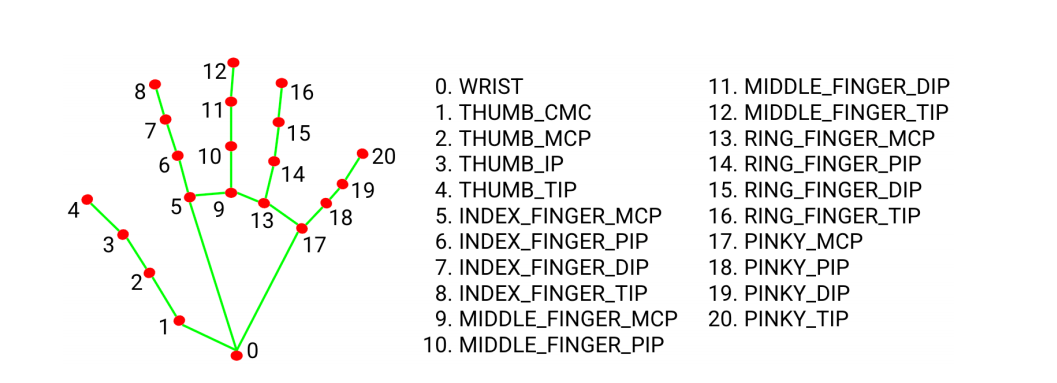
image-20250616111416584

Therefore, as long as we can obtain the coordinate value of each joint, we can perform gesture recognition through calculation.

2. Program startup

First, in the terminal, enter the following command to start the camera,

xxxxxxxxxx
ros2 launch orbbec_camera dabai_dcw2.launch.py

After successfully starting the camera, open another terminal and enter the following command in the terminal to start the mediapipe gesture recognition program.

xxxxxxxxxx
ros2 run M3Pro_demo mediapipe_gesture

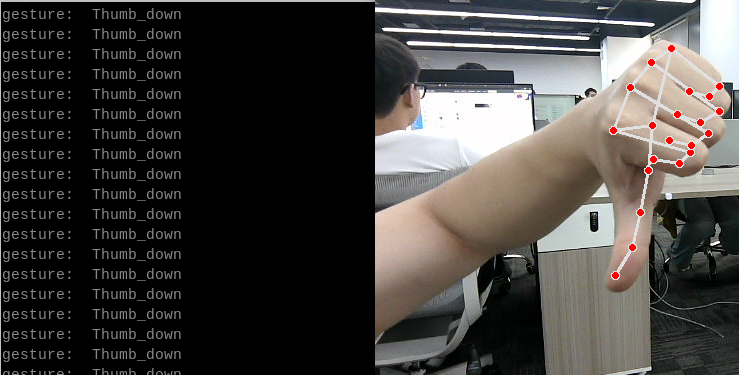
After the program is started, as shown in the figure below, it can recognize three gestures: [OK], [Yes] and [Thumb_down].
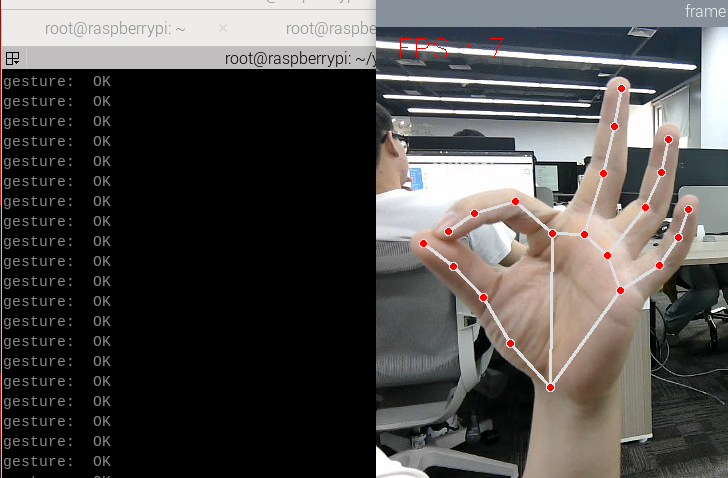
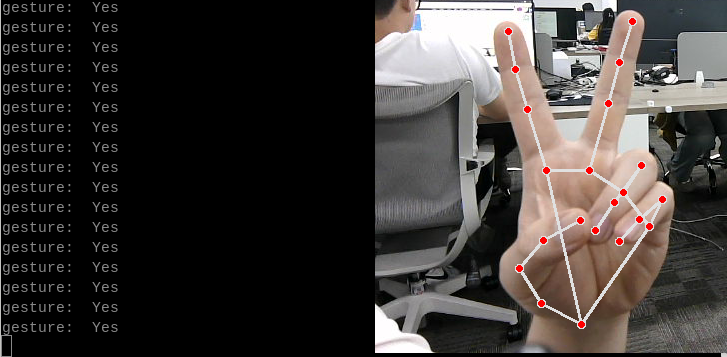
image-20250616103433133

image-20250616103452982

image-20250616103630765

3. Core code analysis

Program code path:

  • Raspberry Pi 5 and Jetson-Nano board

    The path in docker is/root/yahboomcar_ws/src/M3Pro_demo/M3Pro_demo/mediapipe_gesture.py

  • Orin Motherboard

    The program code path is/home/jetson/yahboomcar_ws/src/M3Pro_demo/M3Pro_demo/mediapipe_gesture.py

Import the necessary library files,

xxxxxxxxxx
import cv2
import os
from sensor_msgs.msg import Image
import message_filters
from cv_bridge import CvBridge
import cv2 as cv
from arm_msgs.msg import ArmJoints
import time
from M3Pro_demo.media_library import *
from rclpy.node import Node
import rclpy
from message_filters import Subscriber, TimeSynchronizer,ApproximateTimeSynchronizer
from sensor_msgs.msg import Image
import threading

Initialize some variables and create subscribers and publishers,

x
def __init__(self, name):
    super().__init__(name)
    self.init_joints = [90, 150, 12, 20, 90, 0]
    self.rgb_bridge = CvBridge()
    #Create an object recognized by Medipipe
    self.hand_detector = HandDetector()
    self.pr_time = time.time()
    self.pTime = self.cTime = 0
    #Subscribe to the publisher, publish the initial position of the robotic arm, and control the movement of the robotic arm to the posture of the recognized gesture
    self.TargetAngle_pub = self.create_publisher(ArmJoints, "arm6_joints", 10)
    #Create a color image topic subscriber
    self.rgb_image_sub = Subscriber(self, Image, '/camera/color/image_raw')
    #Publish initial recognition posture
    self.pubSix_Arm(self.init_joints)
    self.ts = ApproximateTimeSynchronizer([self.rgb_image_sub], 1, 0.5)
    self.ts.registerCallback(self.callback)
    time.sleep(2)
    self.start_time = 0.0

Color image callback function and image processing,

def callback(self,color_msg):
    rgb_image = self.rgb_bridge.imgmsg_to_cv2(color_msg, "bgr8")
    self.process(rgb_image)
    
def process(self, frame):
     #Call the function to find the palm in the Medipipe recognition class
    frame, lmList, bbox = self.hand_detector.findHands(frame)
    #Judge the length of lmList. If it is greater than 0, it means the palm is found.
    if len(lmList) != 0:
        # Enter the thread to process the gesture recognition function, the parameter passed in is lmList
        gesture = threading.Thread(target=self.Gesture_Detect_threading, args=(lmList,bbox))
        gesture.start()
        gesture.join()
        self.cTime = time.time()
        fps = 1 / (self.cTime - self.pTime)
        self.pTime = self.cTime
        text = "FPS : " + str(int(fps))
        cv.putText(frame, text, (20, 30), cv.FONT_HERSHEY_SIMPLEX, 0.9, (0, 0, 255), 1)
        if cv.waitKey(1) & 0xFF == ord('q'):
            cv.destroyAllWindows()
        cv.imshow('frame', frame)
​
def Gesture_Detect_threading(self, lmList,bbox):
    #Call the function to get gesture in Medipipe recognition class
    gesture = self.hand_detector.get_gesture(lmList)
    print("gesture: ",gesture)

The definition of the Medipipe recognition class can be found in the media_library library, which is located in the directory of the M3Pro_demo function package.

  • Raspberry Pi 5 and Jetson-Nano board

    The path in docker is/root/yahboomcar_ws/src/M3Pro_demo/M3Pro_demo/media_library.py

  • Orin Motherboard

    The program code path is/home/jetson/yahboomcar_ws/src/M3Pro_demo/M3Pro_demo/media_library.py

In this library, we use the native library of meidiapipe to expand and define many classes. Each class defines different functions. When we need them, we can pass the parameters into them. For example, we define the following function in the HandDetector class.

  • findHands: Find hands
  • fingersUp: fingers extended straight down
  • ThumbTOforefinger: Detects the angle between the thumb and index finger
  • get_gesture: Detect gestures
Wood block volume measurement
Edge detection

COMPANY

  • About us
  • Team Style
  • Blog

LEARNING & EXPLORATION

  • Tutorials
  • Edge AI hardware
  • Educational robots
  • Embedded intelligent hardware

WHERE TO BUY

  • Yahboom Online Store
  • Amazon
  • Alibaba
  • AliExpress
  • Mercado

TECHNOLOGY SUPPORT

  • Email: support@yahboom.com

BE A DISTRIBUTOR

  • Email: sales@yahboom.com
QR Code

Copyright © 2017-2026 Yahboom. All Rights Reserved.

EN/中文