yahboom
HomeLearn
Solution
Blog
Online Store
About Us
EN/中文
ROSMASTER M3 PRO📖
0.Configuration and Operation Guide
  • 1. Quick start handle to control the car
  • 2. Log in to the car and view the code
  • 3. Robotic Arm Calibration
  • 4. Enter the Docker (Jetson-Nano and Raspberry Pi 5 users, see here)
  • 5. Assembly video
  • 6. Modify the firmware parameters of the car control board
  • 7. Frequently Asked Questions and Precautions
  • 8. Precautions for DIY Robotic Arm
1.Chassis Control Course
  • 1.ROS control
  • 2.Handle control
  • 3.Keyboard control
  • 4.Angular velocity calibration
  • 5.Line velocity calibration
  • 6.Line patrol automatic driving
  • 7.Patrol
2.Lidar Course
  • 1.Lidar introduction and use
  • 2.Dual Lidar fusion
  • 3.Lidar obstacle avoidance
  • 4.Lidar tracking
  • 5.Lidar guard
  • 6.Gmapping-SLAM mapping
  • 7.Cartographer-SLAM mapping
  • 8.slam_toolbox mapping
  • 9.Navigation2 single-point navigation avoid
  • 10.Navigation2 multi-point navigation avoid
  • 11.Repositioning navigation
  • 12.RTAB-Map mapping
  • 13.RTAB-Map navigation
  • 14.APP mapping navigation
  • 15.Machine code handling
  • 16.Color block transport
  • 17.Navigation via Pose-Constrained Visual Relocalizationnew
3.Depth Camera Course
  • 1.Dabai_DCW2 camera introduction
  • 2.Depth pseudo-color image
  • 3.Depth camera distance measurement
  • 4.Wood block volume measurement
  • 5.Mediapipe gesture recognition
  • 6.Edge detection
  • 7.YOLOv8 object detection
  • 8.Deep learning object tracking
  • 9. Transformer Model Tracking Algorithmnew
4.Robotic Arm and 3D Space Gripping Course
  • 1.Robotic arm solution
  • 2.Robotic arm chassis linkage control
  • 3.Machine code ID sorting
  • 4.Sorting height abnormality machine code
  • 5.Tracking and gripping machine code
  • 6.Color block color sorting
  • 7.Sorting height abnormality color block
  • 8.Tracking and gripping color block
  • 9.Wood block shape sorting
  • 10.KCF tracking and gripping objects
  • 11.Medipipe gesture ID sorting machine code
  • 12.Mediapipe gesture height sorting machine code
  • 13.Desktop tracking and gripping machine code
  • 14.3D tracking machine code
  • 15.Line patrol and obstacle removal
5.Road network planning and navigationnew
  • 1. Introduction To Road Network Planning
  • 2. Build A Pose Map
  • 3. Road Network Annotation
  • 4. Planning And Navigation Between Waypoints
  • 5. Road Network Navigation In Any Pose
  • 6. Path Re-planning
6.OpenClaw Basic Coursenew
  • 1. Introduction to OpenClaw
  • 2. OpenClaw Core Concepts
  • 3. OpenClaw API-KEY Configuration
  • 4. OpenClaw Switch Models
  • 5. OpenClaw System Prompt Words
  • 6. OpenClaw Common CLI Commands
7.OpenClaw Interaction Methodnew
  • 1. OpenClaw Webchat Interaction
  • 2. OpenClaw Tui Interaction
  • 3. OpenClaw Voice Dialogue Interaction
  • 4. OpenClaw WhatsApp Interaction
8.OpenClaw Developmentnew
  • 1. OpenClaw connects to the MCP interface of the robot
  • 2. Robot CLI Command Tool
  • 3. Robot control plugin tool
  • 4. Reply bridge plugin tool
  • 5. OpenClaw multimodal vision
  • 6. OpenClaw chassis control
  • 7. OpenClaw robotic arm control
  • 8. OpenClaw skills development
  • 9. OpenClaw timed tasks
  • 10. OpenClaw multi-agent intelligent agent
  • 11. OpenClaw active interaction
  • 12. OpenClaw vector memory
9.OpenClaw Embodied intelligent applicationnew
  • 1. OpenClaw target tracking
  • 2. OpenClaw robotic arm tracking and grasping
  • 3. OpenClaw robotic arm fixed-point placement
  • 4. OpenClaw garbage sorting
  • 5. OpenClaw slam mapping and navigation
  • 6. OpenClaw navigation transfer
  • 7. OpenClaw machine code clip
  • 8. OpenClaw color line patrol
  • 9. OpenClaw visual distance measurement
10.OpenClaw scenario sandboxnew
  • 1. Map description and prop placement
  • 2. Build sand table map
  • 3. Visual relocation markers
  • 4. Map mapping markers
  • 5. OpenClaw scenario sandbox comprehensive case
11.AI Model Basics
  • 1.AI large model types and principles
  • 2.RAG retrieval enhancement and model training samples
  • 3.Embodied intelligent robot system architecture
  • 4.Embodied intelligent functions core source code
12.AI Model Development
  • 01.Register a model service provider account
  • 02. Configuring API-KEY
  • 03. Introduction to Dify
  • 04. Basic Dify Features
  • 05. AI Large Model Development - chatbot
  • 06. Deploy the RAG knowledge base
  • 07. RAG knowledge base + chatbot
  • 08. AI agent workflow
  • 09. Custom wake-up response
  • 10. Core module testing tools
13.AI Large Model (Text Version)
  • 1.Semantic understand instruction following
  • 2.Multimodal visual understand
  • 3.Multimodal visual understand+robotic arm grab
  • 4.Multimodal visual understand+SLAM navigation
  • 5.Robotic arm grab+Multimodal visual understand+SLAM navigation
  • 6.Intention estimation
14.AI Large Model(Voice Version)
  • 1.Semantic understand instruction following
  • 2.Multimodal visual understand
  • 3.Multimodal visual understand+robotic arm grab
  • 4.Multimodal visual understand+SLAM navigation
  • 5.Robotic arm grab+Multimodal visual understand+SLAM navigation
  • 6.Intention estimation
15.Mediapipe Visual Course
  • 1.Hand detection
  • 2.Posture detection
  • 3.Overall detection
  • 4.Facial Landmark Detection
  • 5.Face detection
  • 6.Face special effects
  • 7.3D object recognition
  • 8.Brush
  • 9.Finger control
  • 10.Palm target positioning
  • 11.Fingertip trajectory recognition
  • 12.Fingertip gesture control robotic arm
  • 13.Gesture grabbing and releasing objects
  • 14.Finger control robotic arm
  • 15.Medipipe gesture control robotic arm action group
16.MoveIt2 Simulation Course
  • 1.MovelT2 configuration
  • 2.MovelT2 simulation-reality linkage
  • 3.Random movement
  • 4.Forward kinematics design
  • 5.Inverse kinematics design
  • 6.Cartesian path
  • 7.Trajectory planning
  • 8.Collision detection
  • 9.Scene design
17.Multi-vehicle Course
  • 1.Multi-vehicle chassis control
  • 2.Multi-vehicle robotic arm control
  • 3.Multi-vehicle navigation
  • 4.Multi-vehicle formation
18.Control Board Course
  • 1.Development environment setup
  • 2.Control board STM32 basic routine
  • 3.Control board micro_ros basic routine
19.Docker Course
  • 1、Docker overview and docker installation
  • 2、Common commands for docker image containers
  • 3、Docker images deeply understand and publish images
  • 4、Docker hardware interaction and data processing
  • 5、Enter the bot's docker container
  • 6、Robot development environment construction in Docker
20.Image Processing Basics Course
  • 1. Introduction to Open Source CV
  • 2. Image reading and display
  • 3. Image writing
  • 4. Image quality
  • 5. Pixel Operation
  • 6. Image zoom
  • 7. Image cutting
  • 8. Image translation
  • 9. Image Mirroring
  • 10. Affine Transformation
  • 11. Image Rotation
  • 12. Perspective Transformation
  • 13. Grayscale processing
  • 14. Image Binarization
  • 15. Edge Detection
  • 16. Line drawing
  • 17. Rectangle and circle drawing
  • 18. Drawing text and pictures
21.Main Control Course
Jetson Nano B01
  • 1. Introduction to the Jetson Nano B01 SUB Board
  • 2. Burn the system image
  • 3. Re-read the memory card or USB drive that has been burned
  • 4. Startup system
  • 5. Jetson Nano B01 System and Desktop Introduction
  • 6. Memory card or USB flash drive expansion
  • 7. Network Configuration
  • 8. SSH remote login & file transfer
  • 9. VNC Remote Login
  • 10. Jetson Nano B01 system backup
  • 11. Jetson Nano Swap space increased
  • 12. Installation and use of Jtop
Jetson Orin Nano_NX
  • 1.Jetson Orin board introduction
  • 2.Restore the factory image system
  • 3.Backup SSD system
  • 4.SSD expansion
  • 5.Network configuration
  • 6.SSH remote login
  • 7.VNC remote control
  • 8.Remote file transfer
  • 9.Jtop tool
  • 10.Exchange space expansion
Raspberry Pi
  • 1. Introduction to Raspberry PI 5
  • 2. Raspberry PI system installation and backup
  • 3. Powering the Raspberry PI 5
  • 4. Startup of Raspberry PI 5
  • 5. Update and upgrade operating system
  • 6. Introduction to raspi-config tool
  • 7. config.txt file description
  • 8. Network Configuration
  • 9. remote access
  • 10. Transfer files remotely
  • 11. Set display resolution and rotation
  • 12. Set screen to sleep
  • 13. Play audio and video
  • 14. Using USB camera
  • 15. Using MIPI camera
  • 16. Get real-time temperature of Raspberry Pi
22.Linux System Course
  • 1.Introduction to Linux system
  • 2.Ubuntu file system
  • 3.Ubuntu common commands
  • 4.Ubuntu common editors
  • 5.Ubuntu software operation commands
  • 6.Virtual machine installation
  • 7.SSH remote control
  • 8.VNC remote control
  • 9.Transfer files remotely
  • 10.Driver library and communication
  • 11.Static IP and hotspot mode
  • 12.Bind device ID
  • 13.Capacity expansion and resource allocation
  • 14.Update system software sources
  • 15.Set root user password
  • 16.sudo free password
  • 17.Connect to WiFi network
  • 18.View system version
  • 19.Customized service management
  • 20.Back up system image
23.ROS2 Basic Course
  • 1.Introduction to ROS2
  • 2.ROS2 install Humble
  • 3.ROS2 development environment
  • 4.ROS2 workspace
  • 5.ROS2 function package
  • 6.ROS2 node
  • 7.ROS2 topic communication
  • 8.ROS2 service communication
  • 9.ROS2 action communication
  • 10.ROS2 custom interface message
  • 11.ROS2 parameter service case
  • 12.ROS2 meta-function package
  • 13.ROS2 distributed communication
  • 14.ROS2 DDS
  • 15.ROS2 time related API
  • 16.ROS2 common command tools
  • 17.ROS2 rviz2 use
  • 18.ROS2 rqt toolbox
  • 19.ROS2 Launch startup file configuration
  • 20.ROS2 recording and playback tool
  • 21.ROS2 URDF model
  • 22.ROS2 Gazebo simulation platform
  • 23.ROS2 TF2 coordinate transformation
Download
  • Mapping_APP(iOS_Android)
  • Robot_Image_System_File
  • Code-Firmware
  • Instruction_Manual
  • VM_File
  • Software_Tools
  • Firmware_DriverFile
  • 3D_Model_File
  • ROS2_Basic_VM
  • Other_Annex
Download ZIP

Welcome to ROSMASTER M3 PRO repository

2. OpenClaw Core Concepts

OpenClaw Core Concepts

OpenClaw Core Concepts2. Course Content3. Core Concepts3.1 Chat Channels3.2 Agent3.3 Sessions and Memory3.4 Tools3.5 Skills3.6 Models3.7 Gateway Architecture4. Core Concepts Relationship Diagram5. Chapter Summary

2. Course Content

This chapter will systematically explain the seven core concepts of OpenClaw:

  1. Chat Channels - The platform for communication between AI and users

  2. Agent - The core brain of the AI agent

  3. Sessions and Memory - Context management capabilities

  4. Tools - The hands and feet that execute specific operations

  5. Skills - Encapsulated functional modules

  6. Models - The engine that drives AI thinking

  7. Gateway - The nervous system hub of the system


3. Core Concepts

3.1 Chat Channels

What are chat channels?

Chat channels are communication platforms for user interaction with AI Agents. You can think of them as the AI employee's "desk" or "workplace".

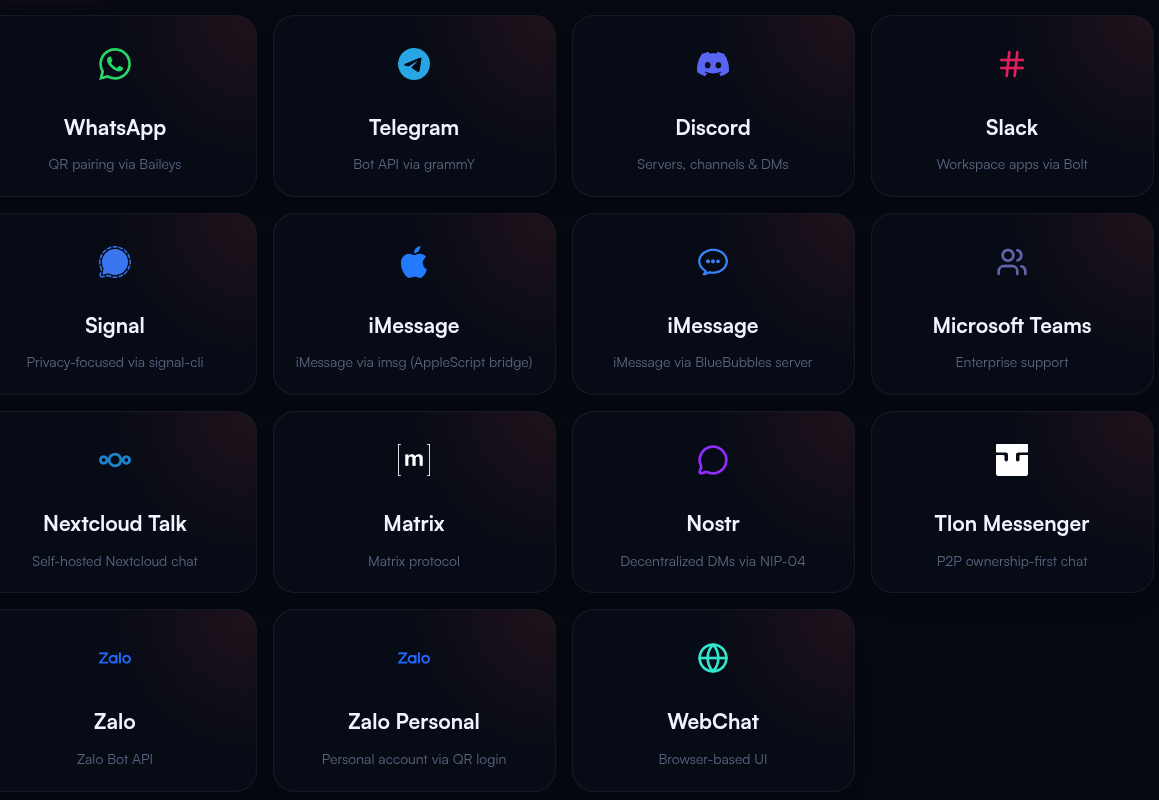
Supported channel types:

Channel TypeRepresentative Platforms
Instant MessagingSlack、Discord、Microsoft Teams
Social AppsTelegram、WhatsApp、Signal
Web InterfaceWebChat、REST API

image-20260427160539251


Core characteristics of channels:

  • Plug and Play - Enable required channels without redeployment

  • Many-to-Many Binding - One channel can connect to multiple Agents, and one Agent can serve multiple channels


3.2 Agent

The Agent is the core decision-making unit of OpenClaw. You can think of it as your "virtual employee" or "brain". Each Agent has independent:

  • Persona Prompt - Defines the AI's behavioral style and role positioning

  • Model Selection - Determines which LLM to use (such as GPT-4, Claude, etc.)

  • Channel Binding - Specifies which platforms to work on

Key Features:

  • Multi-Agent Parallel - A single OpenClaw instance can run multiple Agents

  • Role Isolation - Different Agents do not interfere with each other, with independent configuration


3.3 Sessions and Memory

Why is memory needed?

The session and memory system allows AI to remember context and provide coherent conversational experiences.

OpenClaw's three-tier memory architecture:

Short-term Memory

  • Storage format: Daily log files (memory/yyyy-mm-dd.md)

  • Retention period: Recent 1-2 days of conversation

  • Use: Processing context of current tasks

Near-term Memory

  • Storage location: sessions/ directory

  • Management method: Sliding window compression, preserving complete session archives

  • Use: Multi-round conversation context tracking

Long-term Memory

  • Storage content: User preferences, important decisions, historical experiences

  • Loading method: Automatically loads memory.md at each conversation start

  • Use: Achieving personalized intelligence and continuous learning


3.4 Tools

What are tools?

Tools are the "hands, feet, and senses" through which Agents interact with the external world, enabling AI to execute actual operations. If the LLM is the brain, then tools are the limbs attached to that brain.

Built-in OpenClaw tools:

Tool TypeFunction DescriptionUse Cases
File SystemRead/write files, create directories, search contentDocument processing, data organization
Network RequestsHTTP API calls, Webhook triggersThird-party service integration
Shell CommandsExecute system commands, run scriptsAutomated operations, batch processing
Scheduled TasksCron scheduling, periodic executionScheduled backups, daily report sending

Tool execution flow:

User Instruction → Agent Understands Intent → Select Appropriate Tool → Execute Operation → Return Result

3.5 Skills

Skills vs Tools: What's the difference?

  • Tools (Tool) are basic capabilities, such as "open file", "click mouse"

  • Skills are encapsulated business logic, such as "robotic arm grasping objects", "navigating to a certain location"

Analogy for Skills:

If we compare an Agent to a robot:

  • Agent = Robot's brain (responsible for thinking and decision-making)

  • Tools = Robot's hands and feet (responsible for executing basic actions)

  • Skills = Robot's training manual (tells the robot how to complete specific work)
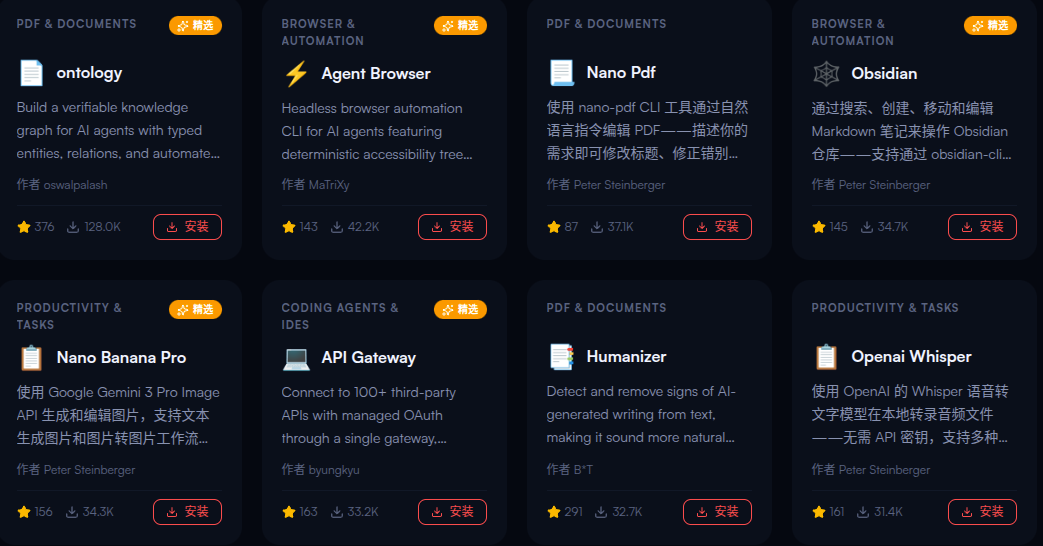
image-20260427161352056

Core characteristics of Skills:

  • Atomicity - A skill does only one thing (e.g., "grasp object")

  • Non-decision - Skills execute passively, without deciding "whether to do"

  • Standardization - Follows OpenClaw specifications, can be reused across scenarios

  • Pluggable - Install/uninstall at any time

Skill Sources:

  • ClawHub - Community-maintained skill marketplace

  • Custom Skills - Developer-written (Markdown or TypeScript)


3.6 Models

What are connected models?

Models are large language models (LLMs) that drive Agent thinking. They are the "intelligence engine" of AI. OpenClaw itself does not train models but serves as an "intermediate layer" connecting various LLM providers.

Model roles:

  • Understanding Intent - Parse natural language user input

  • Task Planning - Break down complex goals into executable steps

  • Tool Selection - Decide which tool or skill to invoke

  • Self-correction - Adjust strategy based on execution results

Supported model providers:

ProviderRepresentative ModelsCharacteristics
OpenAIGPT-4o、GPT-4 TurboStrong comprehensive ability, complete ecosystem
AnthropicClaude 3.5、Claude SonnetExcellent long-text processing, high security
GoogleGemini Pro、Gemini UltraStrong multimodal capability
MistralMistral Large、MixtralOpen-source models, high cost-effectiveness
OllamaLlama 3、Qwen, etc.Local deployment, privacy protection
OthersAny OpenAI-compatible interfaceCustom model integration

3.7 Gateway Architecture

What is the Gateway?

The Gateway is OpenClaw's "nervous system hub" and "commander", a long-running background service. It uniformly manages connections of all communication channels and coordinates communication between Agents, clients, and nodes.

Core responsibilities of the Gateway:

Message Routing

  • Receives messages from 50+ channels (WhatsApp, Telegram, Slack, etc.)

  • Verifies user identity and permissions

  • Distributes to corresponding Agents based on session ID

Session Management

  • Maintains the state of all sessions

  • Supports "explicitly parallel, default serial" processing

  • Heartbeat detection and automatic retry

Task Scheduling

  • Scheduled task triggers (Cron)

  • Load balancing and failover

  • Performance monitoring and logging

Gateway workflow:

xxxxxxxxxx
┌─────────────┐
│  User Message   │
│ (Telegram)  │
└──────┬──────┘
       ▼
┌─────────────────────────┐
│      Gateway       │
│  - Identity Verification           │
│  - Session Lookup/Creation        │
│  - Message Routing             │
└──────┬──────────────────┘
       ▼
┌─────────────┐
│ Agent Processing  │
│ (Thinking + Execution)│
└──────┬──────┘
       ▼
┌─────────────┐
│  Return Result   │
│ (Reply via Original Channel)│
└─────────────┘


4. Core Concepts Relationship Diagram

One-sentence summary of each concept's positioning:

ConceptAnalogyCore Function
Chat ChannelsOffice/DeskUser interaction entry
AgentVirtual Employee/BrainDecision and planning
Sessions and MemoryWork notes/ExperienceContext management
ToolsHands, feet, and sensesBasic execution capability
SkillsTraining manualEncapsulated business logic and processes
ModelsIntelligence engineThinking and reasoning
GatewayNervous system hubScheduling and coordination

5. Chapter Summary

  • OpenClaw is a local-first AI Agent operating system, not a simple chatbot

  • The role positioning and relationships of the seven core concepts

  • Hierarchical architecture design of channels, Agents, skills, and tools

  • Supported model providers and selection strategies

  • The key role of Gateway as the system hub

Introduction to OpenClaw
OpenClaw API-KEY Configuration

COMPANY

  • About us
  • Team Style
  • Blog

LEARNING & EXPLORATION

  • Tutorials
  • Edge AI hardware
  • Educational robots
  • Embedded intelligent hardware

WHERE TO BUY

  • Yahboom Online Store
  • Amazon
  • Alibaba
  • AliExpress
  • Mercado

TECHNOLOGY SUPPORT

  • Email: support@yahboom.com

BE A DISTRIBUTOR

  • Email: sales@yahboom.com
QR Code

Copyright © 2017-2026 Yahboom. All Rights Reserved.

EN/中文