Welcome to ROSMASTER M3 PRO repository
7.YOLOv8 object detection
Yolov8 Object Detection
1. Content Description
This section is exclusive to the Orin motherboard and primarily introduces the YOLOv8 framework and its use for object detection.
1.1 Introduction to YOLOv8
YOLOv8 is an object detection model launched by Ultralytics in 2023. Compared to previous versions (such as YOLOv5), it offers significant improvements in accuracy, speed, and ease of use. It is widely used in computer vision tasks such as object detection, image segmentation, and pose estimation.
YOLOv8 Features:
- Architecture Upgrade: Using CSPDarknet53 as the underlying backbone network, combined with an improved feature fusion network (PAN-FPN), it enhances the ability to extract multi-scale features.
- Detection Head Optimization: Adopting an Anchor-Free design, it directly predicts the center point, width, and height of the object, avoiding the limitations of the pre-set anchor box size in traditional anchor-based methods. This simplifies model design and improves small object detection accuracy.
- Loss Function Improvement: The classification loss uses Varifocal Loss (optimized for class imbalance), and the localization loss combines CIoU Loss and **DFL (Distribution Focal Loss) to improve the accuracy of bounding box prediction.
- Multi-Task Support: In addition to object detection, it also supports Instance Segmentation (mask-based object segmentation) and Pose Estimation (human keypoint detection), while maintaining a unified model architecture.
- Engineering Optimization: Provides a concise Python API and command-line tools, and supports export to formats such as ONNX and TensorRT, facilitating deployment on edge devices or the cloud.
YOLOv application scenarios:
- Real-time monitoring (such as pedestrian and vehicle detection)
- Autonomous driving (obstacle recognition)
- Robotic vision (object grasping)
- Industrial quality inspection (defect detection), etc.
Visit the official website Explore Ultralytics YOLOv8 - Ultralytics YOLO Docs to download the trained model and learn more about using YOLOv8.
2. Program Startup
Enter the following command in the terminal to start the camera:
xxxxxxxxxxros2 launch orbbec_camera dabai_dcw2.launch.pyNext, open another terminal and enter the following command to start Yolov8 object detection:
xxxxxxxxxxros2 run yahboom_yolov8 yolov8_detectThen open a third terminal and enter the following command to start rqt_image_view to view the image:
xxxxxxxxxxros2 run rqt_image_view rqt_image_viewSelect the topic /detect_image in the upper left corner and click the refresh button on the right to view the detected image, as shown below.
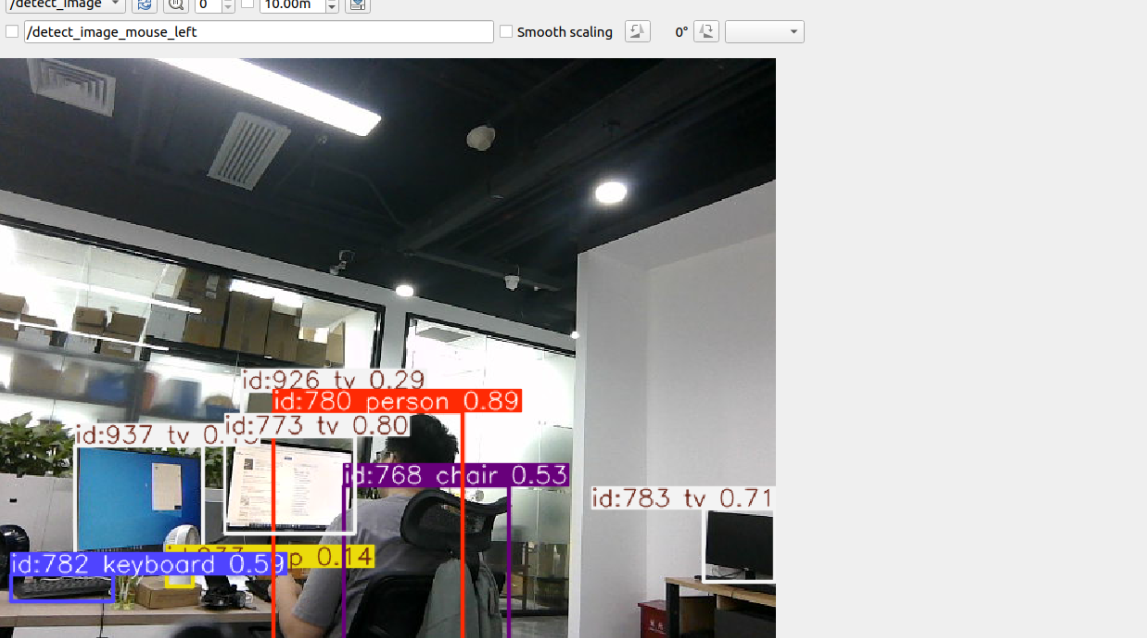
3. Core Code Analysis
Code Path: /home/jetson/yahboomcar_ws/src/yahboom_yolov8/yahboom_yolov8/yolov8_track.py
Import necessary library files:
xxxxxxxxxximport cv2import numpy as npfrom collections import OrderedDict, namedtupleimport timeimport torchimport syssys.path.append('/home/jetson/yahboomcar_ws/src/yahboom_yolov8/yahboom_yolov8/yolov8')from ultralytics.utils.ops import non_max_suppression, scale_boxesfrom ultralytics import YOLOimport rclpyfrom rclpy.node import Nodefrom sensor_msgs.msg import Imagefrom cv_bridge import CvBridge#Created a YOLO model instancemodel = YOLO('/home/jetson/yahboomcar_ws/src/yahboom_yolov8/yahboom_yolov8/yolov8/weights/yolov8n.pt')Program initialization, definition of publishers and subscribers,
xxxxxxxxxxdef __init__(self,name): super().__init__(name) self.rgb_bridge = CvBridge() self.msg2img_bridge = CvBridge() self.yolov8_img_pub = self.create_publisher(Image,"detect_image",1) self.sub_rgb = self.create_subscription(Image,"/camera/color/image_raw",self.get_RGBImageCallBack,100)Color topic callback function get_RGBImageCallBack,
xxxxxxxxxxdef get_RGBImageCallBack(self,rgb_msg): rgb_image = self.msg2img_bridge.imgmsg_to_cv2(rgb_msg, "rgb8") self.process(rgb_image)Image processing function process,
x
def process(self,frame): #The loaded YOLOv8 model tracks the target for a single input frame and returns an object containing the tracking results. This object contains not only the conventional detection results (target category, confidence, bounding box coordinates), but also the track_id of each target (a unique identifier used to distinguish different targets). results = model.track(frame, persist=True) #Overlay detection/tracking information (such as bounding boxes, category labels, confidence levels, tracking IDs, etc.) on the original image to generate a new annotated image. results[0] represents the processing result of the first frame. annotated_frame = results[0].plot() ros_image = self.rgb_bridge.cv2_to_imgmsg(annotated_frame, encoding='rgb8') self.yolov8_img_pub.publish(ros_image)