Welcome to ROSMASTER M3 PRO repository
11.Fingertip trajectory recognition
11.Fingertip trajectory recognition
1. Content Description
This course implements color image acquisition and fingertip detection using the MediaPipe framework. Gestures are used to start and stop recording fingertip trajectories within the image. After recording is complete, a fingertip trajectory map is generated and the trajectory is recognized.
This section requires entering commands in the terminal. The terminal you open depends on your motherboard type. This lesson uses the Raspberry Pi 5 as an example. For Raspberry Pi and Jetson-Nano boards, you need to open a terminal on the host computer and enter the command to enter the Docker container. Once inside the Docker container, enter the commands mentioned in this section in the terminal. For instructions on entering the Docker container from the host computer, refer to this product tutorial [Configuration and Operation Guide]--[Enter the Docker (Jetson Nano and Raspberry Pi 5 users, see here)].
Simply open the terminal on the Orin motherboard and enter the commands mentioned in this section.
2. Program startup
First, in the terminal, enter the following command to start the camera,
xxxxxxxxxxros2 launch orbbec_camera dabai_dcw2.launch.py
After successfully starting the camera, open another terminal and enter the following command in the terminal to start the fingertip trajectory recognition program:
xxxxxxxxxxros2 run yahboomcar_mediapipe 15_ FingerTrajectory
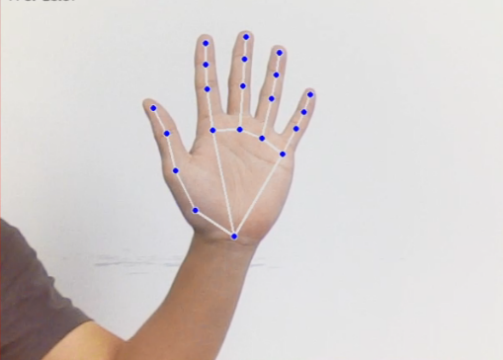
After the program is run, as shown in the figure below, place your palm flat on the camera screen, open your fingers, and face the camera with your palm, similar to the number 5 gesture. The image will draw the joints on the entire palm. Adjust the position of your palm and try to keep it in the upper middle part of the screen.
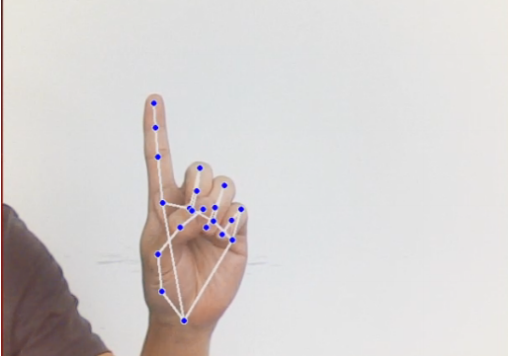
At this time, the index finger remains unchanged and the other fingers are retracted, similar to the gesture of the number 1.
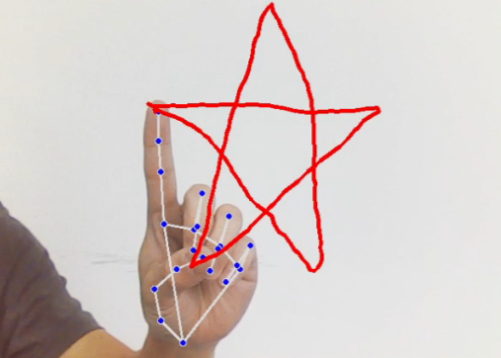
While holding gesture 1, move the position of your finger and a red line will appear on the screen, drawing the path of your index finger.
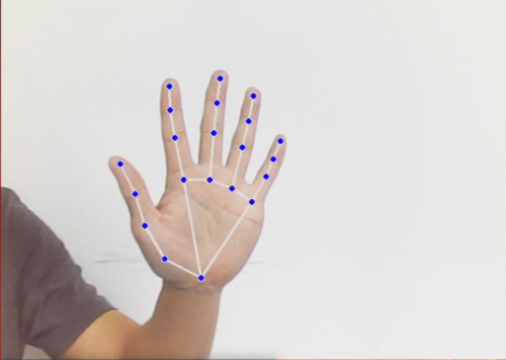
After the graphic is drawn, open all your fingers and make a gesture similar to the number 5, and the drawn graphic will be generated below.
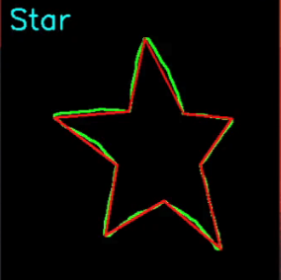
Note: The drawn graphics need to be closed, otherwise some content may be missing.
There are currently four trajectory shapes that can be recognized, namely: triangle, rectangle, circle, and five-pointed star
3. Core code analysis
Program code path:
Raspberry Pi 5 and Jetson-Nano board
The program code is in the running docker. The path in docker is
/root/yahboomcar_ws/src/yahboomcar_mediapipe/yahboomcar_mediapipe/15_FingerTrajectory.pyOrin Motherboard
The program code path is
/home/jetson/yahboomcar_ws/src/yahboomcar_mediapipe/yahboomcar_mediapipe/15_FingerTrajectory.py
Import the library files used,
xxxxxxxxxximport mathimport timeimport cv2 as cvimport numpy as npimport mediapipe as mpimport rclpyfrom rclpy.node import Nodefrom cv_bridge import CvBridgefrom sensor_msgs.msg import Imagefrom arm_msgs.msg import ArmJoints,ArmJointimport cv2import gcimport threadingimport enumInitialize data and define publishers and subscribers,
x
def __init__(self,name): super().__init__(name) self.drawing = mp.solutions.drawing_utils self.timer = time.time() self.move_state = False self.state = State.NULL self.points = [] self.start_count = 0 self.no_finger_timestamp = time.time() self.gc_stamp = time.time() self.hand_detector = mp.solutions.hands.Hands( static_image_mode=False, max_num_hands=1, min_tracking_confidence=0.05, min_detection_confidence=0.6 ) self.rgb_bridge = CvBridge() #Define the topic for controlling 6 servos and publish the detected posture self.TargetAngle_pub = self.create_publisher(ArmJoints, "arm6_joints", 10) self.init_joints = [90, 164, 18, 0, 90, 30] self.pubSix_Arm(self.init_joints) #Define subscribers for the color image topic self.sub_rgb = self.create_subscription(Image,"/camera/color/image_raw",self.get_RGBImageCallBack,100)Color image callback function,
x
def get_RGBImageCallBack(self,msg): rgb_image = self.rgb_bridge.imgmsg_to_cv2(msg, "bgr8") rgb_image = cv2.flip(rgb_image, 1) # 水平翻转 result_image = np.copy(rgb_image) if self.timer <= time.time() and self.state == State.RUNNING: self.state = State.NULL try: #Call the process function to detect the palm results = self.hand_detector.process(rgb_image) if self.state != State.RUNNING else None #Judge whether the palm is detected. If results is not 0, it means that the palm is detected. if results is not None and results.multi_hand_landmarks: gesture = "none" index_finger_tip = [0, 0] #Record the current time for timeout processing self.no_finger_timestamp = time.time() #Traverse the test results for hand_landmarks in results.multi_hand_landmarks: self.drawing.draw_landmarks( result_image, hand_landmarks, mp.solutions.hands.HAND_CONNECTIONS) landmarks = get_hand_landmarks(rgb_image, hand_landmarks.landmark) #Call hand_angle to calculate the bending angle of each finger angle_list = (hand_angle(landmarks)) #Call the h_gesture function to determine the gesture made by the finger gesture = (h_gesture(angle_list)) index_finger_tip = landmarks[8].tolist() if self.state == State.NULL: # Detect that only the index finger is extended and the other fingers are clenched into a fist if gesture == "one": self.start_count += 1 if self.start_count > 20: self.state = State.TRACKING self.points = [] else: self.start_count = 0 elif self.state == State.TRACKING: # Stretch out five fingers to end drawing if gesture == "five": self.state = State.NULL # Generate black and white trajectory map track_img = get_track_img(self.points) contours = cv2.findContours(track_img, cv2.RETR_EXTERNAL, cv2.CHAIN_APPROX_NONE)[-2] contour = get_area_max_contour(contours, 300) contour = contour[0] # Identify the drawn graphics according to the trajectory graph # cv2.fillPoly draws and fills polygons on the image track_img = cv2.fillPoly(track_img, [contour,], (255, 255, 255)) for _ in range(3): # Corrosion function track_img = cv2.erode(track_img, cv2.getStructuringElement(cv2.MORPH_RECT, (5, 5))) # Expansion function track_img = cv2.dilate(track_img, cv2.getStructuringElement(cv2.MORPH_RECT, (5, 5))) contours = cv2.findContours(track_img, cv2.RETR_EXTERNAL, cv2.CHAIN_APPROX_NONE)[-2] contour = get_area_max_contour(contours, 300) contour = contour[0] h, w = track_img.shape[:2] track_img = np.full([h, w, 3], 0, dtype=np.uint8) track_img = cv2.drawContours(track_img, [contour, ], -1, (0, 255, 0), 2) # Perform polygon fitting on image contour points approx = cv2.approxPolyDP(contour, 0.026 * cv2.arcLength(contour, True), True) track_img = cv2.drawContours(track_img, [approx, ], -1, (0, 0, 255), 2) graph_name = 'unknown' # Determine the shape based on the number of vertices of the outline if len(approx) == 3: graph_name = 'Triangle' if len(approx) == 4 or len(approx) == 5: graph_name = 'Square' if 5 < len(approx) < 10: graph_name = 'Circle' if len(approx) == 10: graph_name = 'Star' cv2.putText(track_img, graph_name, (10, 40),cv2.FONT_HERSHEY_SIMPLEX, 1.2, (255, 255, 0), 2) cv2.imshow('track', track_img) else: if len(self.points) > 0: if distance(self.points[-1], index_finger_tip) > 5: self.points.append(index_finger_tip) else: self.points.append(index_finger_tip) draw_points(result_image, self.points) else: pass else: if self.state == State.TRACKING: if time.time() - self.no_finger_timestamp > 2: self.state = State.NULL self.points = [] except BaseException as e: print(e) #result_image = cv2.cvtColor(result_image, cv2.COLOR_RGB2BGR) cv2.imshow('image', result_image) key = cv2.waitKey(1) # Press the spacebar to clear the recorded tracks if key == ord(' '): self.points = [] if time.time() > self.gc_stamp: self.gc_stamp = time.time() + 1 gc.collect()hand_angle function, calculates the bending angle of each finger
xxxxxxxxxxdef hand_angle(landmarks): angle_list = [] # thumb 大拇指 angle_ = vector_2d_angle(landmarks[3] - landmarks[4], landmarks[0] - landmarks[2]) angle_list.append(angle_) # index 食指 angle_ = vector_2d_angle(landmarks[0] - landmarks[6], landmarks[7] - landmarks[8]) angle_list.append(angle_) # middle 中指 angle_ = vector_2d_angle(landmarks[0] - landmarks[10], landmarks[11] - landmarks[12]) angle_list.append(angle_) # ring 无名指 angle_ = vector_2d_angle(landmarks[0] - landmarks[14], landmarks[15] - landmarks[16]) angle_list.append(angle_) # pink 小拇指 angle_ = vector_2d_angle(landmarks[0] - landmarks[18], landmarks[19] - landmarks[20]) angle_list.append(angle_) angle_list = [abs(a) for a in angle_list] return angle_listh_gesture function, which determines the gesture of the finger through two-dimensional features
xxxxxxxxxxdef h_gesture(angle_list): thr_angle, thr_angle_thumb, thr_angle_s = 65.0, 53.0, 49.0 if (angle_list[0] < thr_angle_s) and (angle_list[1] < thr_angle_s) and (angle_list[2] < thr_angle_s) and ( angle_list[3] < thr_angle_s) and (angle_list[4] < thr_angle_s): gesture_str = "five" elif (angle_list[0] > 5) and (angle_list[1] < thr_angle_s) and (angle_list[2] > thr_angle) and ( angle_list[3] > thr_angle) and (angle_list[4] > thr_angle): gesture_str = "one" else: gesture_str = "none" return gesture_strget_track_img function, generates the track map,
xxxxxxxxxxdef get_track_img(points): points = np.array(points).astype(dtype=np.int32) x_min, y_min = np.min(points, axis=0).tolist() x_max, y_max = np.max(points, axis=0).tolist() track_img = np.full([y_max - y_min + 100, x_max - x_min + 100, 1], 0, dtype=np.uint8) points = points - [x_min, y_min] points = points + [50, 50] draw_points(track_img, points, 1, (255, 255, 255)) return track_img