Welcome to ROSMASTER M3 PRO repository
2.Posture detection
Posture Detection
1. Content Description
This course implements color image acquisition and gesture detection using the MediaPipe framework.
This section requires entering commands in the terminal. The terminal you open depends on your motherboard type. This lesson uses the Raspberry Pi 5 as an example. For Raspberry Pi and Jetson-Nano boards, you need to open a terminal on the host computer and enter the command to enter the Docker container. Once inside the Docker container, enter the commands mentioned in this section in the terminal. For instructions on entering the Docker container from the host computer, refer to this product tutorial [Configuration and Operation Guide]--[Enter the Docker (Jetson Nano and Raspberry Pi 5 users, see here)].
Simply open the terminal on the Orin motherboard and enter the commands mentioned in this section.
2. Program startup
First, in the terminal, enter the following command to start the camera,
xxxxxxxxxxros2 launch orbbec_camera dabai_dcw2.launch.py
After successfully starting the camera, open another terminal and enter the following command in the terminal to start the posture detection program.
xxxxxxxxxxros2 run yahboomcar_mediapipe 02_PoseDetector
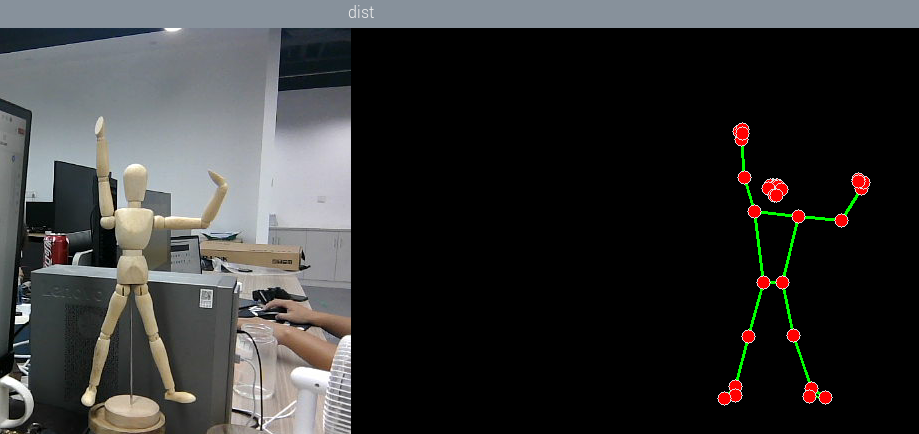
After the program is run, the following figure will be shown. The joint points of the detected posture will be displayed on the right side of the image.
3. Core code analysis
Program code path:
Raspberry Pi 5 and Jetson-Nano board
The program code is in the running docker. The path in docker is
/root/yahboomcar_ws/src/yahboomcar_mediapipe/yahboomcar_mediapipe/02_PoseDetector.pyOrin Motherboard
The program code path is /home/jetson/yahboomcar_ws/src/yahboomcar_mediapipe/yahboomcar_mediapipe/02_PoseDetector.py
Import the library files used,
xxxxxxxxxximport rclpyfrom rclpy.node import Node#导入mediapipe库import mediapipe as mpimport cv2 as cvimport numpy as npimport timeimport osfrom cv_bridge import CvBridgefrom sensor_msgs.msg import Imagefrom arm_msgs.msg import ArmJointsimport cv2print("import done")Initialize data and define publishers and subscribers,
x
def __init__(self, name,mode=False, smooth=True, detectionCon=0.5, trackCon=0.5): super().__init__(name) #Use the class in the mediapipe library to define a posture object self.mpPose = mp.solutions.pose self.mpDraw = mp.solutions.drawing_utils self.pose = self.mpPose.Pose( static_image_mode=mode, smooth_landmarks=smooth, min_detection_confidence=detectionCon, min_tracking_confidence=trackCon ) #Define the properties of the joint connection line, which will be used in the subsequent joint point connection function self.lmDrawSpec = mp.solutions.drawing_utils.DrawingSpec(color=(0, 0, 255), thickness=-1, circle_radius=6) self.drawSpec = mp.solutions.drawing_utils.DrawingSpec(color=(0, 255, 0), thickness=2, circle_radius=2) #create a publisher self.rgb_bridge = CvBridge() #Define the topic for controlling 6 servos and publish the detected posture self.TargetAngle_pub = self.create_publisher(ArmJoints, "arm6_joints", 10) self.init_joints = [90, 150, 10, 20, 90, 90] self.pubSix_Arm(self.init_joints) #Define subscribers for the color image topic self.sub_rgb = self.create_subscription(Image,"/camera/color/image_raw",self.get_RGBImageCallBack,100)Color image callback function,
x
def get_RGBImageCallBack(self,msg): #Use CvBridge to convert color image message data into image data rgb_image = self.rgb_bridge.imgmsg_to_cv2(msg, "bgr8") #Put the obtained image into the defined pubPosePoint function, draw=False means not to draw the joint points on the original color image frame, img = self.pubPosePoint(rgb_image, draw=False) #Merge two images dist = self.frame_combine(frame, img) key = cv2.waitKey(1) cv.imshow('dist', dist) pubPosePoint function,
x
def pubPosePoint(self, frame, draw=True): #Create a new image based on the incoming image size. The image data type is uint8 img = np.zeros(frame.shape, np.uint8) #Convert the color space of the incoming image from BGR to RGB to facilitate subsequent image processing img_RGB = cv.cvtColor(frame, cv.COLOR_BGR2RGB) #Call the process function in the mediapipe library to process the image. During init, the self.pose object is created and initialized. self.results = self.pose.process(img_RGB) #Judge whether self.results.multi_hand_landmarks exists, that is, whether the posture is recognized if self.results.pose_landmarks: if draw: self.mpDraw.draw_landmarks(frame, self.results.pose_landmarks, self.mpPose.POSE_CONNECTIONS, self.lmDrawSpec, self.drawSpec) #Connect each joint point on the blank image created previously self.mpDraw.draw_landmarks(img, self.results.pose_landmarks, self.mpPose.POSE_CONNECTIONS, self.lmDrawSpec, self.drawSpec) return frame, imgThe frame_combine image merging function was mentioned in the first lesson of this chapter. Please refer to [Meediapipe Visual Fun Game] - [1. Hand Detection] for an analysis of this function.