yahboom
HomeLearn
Solution
Blog
Online Store
About Us
EN/中文
DOGZILLA-Lite📖
1. Get started quickly
  • 0. Notes (Must Read)new
  • 1. Main interface function experience (cm5)new
  • 1. Main interface function experience(cm4)
  • 2. APP control experience
  • 3. Web page image transmission control
  • 4. LLM-Embodied Intelligence Capabilities
  • 5. LLM-Smart Dog Capabilities
2. Basic operations of Raspberry Pi system
  • 1.SSH remote login
  • 2.VNC remote login desktop
  • 3.Remote file transfer
  • 4.JupyterLab environment construction and use
  • 5.Burn the system image
  • 6.Connect to WiFi
  • 7.Close large programs
  • 8.Raspberry Pi system expansion
3. Basic control of the dogzilla
  • 0. Introduction to DOGZILLA-Lite
  • 1. Screen display control
  • 2. Record Audio
  • 3. Play Audio
  • 4. Text to audio
  • 5. Voice to text
  • 6. Record Video
  • 7. Play Video
  • 8. Video recording function
  • 9. Read the posture angle
  • 10. Battery level reading
  • 11. Read the servo angle
  • 12. Screen display of expressions
  • 13. Calibration of the robot dog
  • 14. Burn the firmware
  • 15. Analysis of common problems
4. Motion control of the dogzilla
  • 1. The dog's forward, backward, left, and right movements and gait
  • 2. Dog Spin
  • 3. The dog adjusts its height and posture
  • 4. Dog periodic translation and rotation
  • 5. Self-balancing mode
  • 6. The dog performs preset actions
  • 7. Single Leg Control
  • 8. Robotic arm control
  • 9. Teaching mode
  • 10. Group Control Performance
  • 11. Teaching demonstration onlinenew
5. Open Source CV
A. Getting started with OpenCV
  • 1. Introduction to OpenCV
  • 2. OpenCV image reading and display
  • 3. OpenCV image writing
  • 4. OpenCV Image Quality
  • 5.OpenCV pixel operations
B. OpenCV geometric transformation
  • 1. Image scaling
  • 2. Image cutting
  • 3. Image translation
  • 4. Image mirroring
  • 5. Affine Transformation
  • 6. Image Rotation
  • 7. Perspective Transformation
C. OpenCV image processing and drawing text segments
  • 1. Grayscale processing
  • 2. Image Binarization
  • 3. Edge Detection
  • 4. Line drawing
  • 5. Rectangle and circle drawing
  • 6. Text and picture drawing
D. Image beautification
  • 1. Color Image Histogram
  • 2. Histogram Equalization
  • 3. Image repair
  • 4. Brightness enhancement
  • 5. Skin whitening
  • 6. Gaussian mean filtering
  • 7. Median Filter
6. AI recognition of the dogzilla
  • 1. Camera driver tutorial
  • 2. Color recognition
  • 3. HSV value test
  • 4. Object Recognition
  • 5. QR code recognition
  • 6. License Plate Recognition
  • 7. Human Pose Estimation
  • 8. Yolo detection
  • 9. Face Detection
  • 10. Human face mask
  • 11. Face effects
  • 12. 3D Object Recognition
  • 13. Paintbrush
  • 14. Finger recognition
  • 15. Gesture Recognition
  • 16. Age and gender identification
  • 17. Background Segmentation
  • 18. Facial Recognitionnew
  • 19. Emotion Recognitionnew
  • 20. Motion Detectionnew
7. Dogzilla AI Interaction
  • 1. Color patrol
  • 2. Line patrol and obstacle removal
  • 3. Color tracking
  • 4. Ball tracking
  • 5. The ball follows
  • 6. QR code recognition exercise
  • 7. Face tracking
  • 8. Remote control
  • 9. Gesture tracking
  • 10. Gesture-controlled movement
  • 11. You Drop, I Pick
  • 12. Independent football exercise
  • 13. Human Body Followingnew
8. AI large model interaction
  • 0.AI large model principle foundation
  • 1.Large model premise use configuration
  • 2.Q&A
  • 3.Embodied intelligence
  • 4.Smart dog
  • 5.Picture to text
  • 6.Intelligent interaction
  • 7.Voice intelligent vision
  • 8.Playing football
  • 9.Block gripping
  • 10.Line tracking and obstacle removal
  • 11.Control object tracking
Download
  • System_File
  • Code
  • Firmware
  • Communication interface
  • Instruction Manual
  • Appendix
Download ZIP

Welcome to DOGZILLA-Lite repository

9. Teaching mode

Teaching mode

1. Purpose

Understanding the robot dog's self-stabilization mode

2. Experimental path source code

Enter the robot dog system, end the robot dog program, enter "ip (ip is the robot dog's ip): 8888" in the browser, and enter the password "yahboom" image-2024112100001
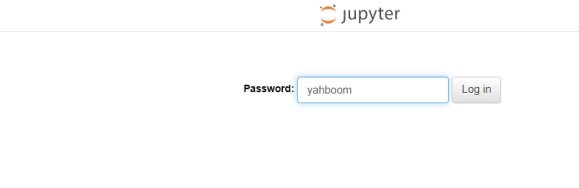
Then log in and go to cd ~/DOGZILLA_Lite_class/3.Dog Base Control/09.Puppy Teaching Mode and run teach_by_demon.ipynb .

3. Experimental Phenomenon

After running the program, press the buttons according to the prompts on the screen. The screen prompts are in English by default. If you want to change to Chinese, you need to change False to true, as shown in the figure:

image-2025031100001

the screen prompts will become Chinese.

Buttons on the left and right sides of the screen A: Record button B: Stop recording button C: Exit button D: Execute the recorded action group (up to 12 action groups can be stored)

4. Main source code analysis

try:
    while True:    
        
        if button.press_c():#这个是A键 A Key
            lcd_rect(0,0,320,240,color=color_black,thickness=-1)
            dog.unload_allmotor()
            data[n] = dog.read_motor()
            print(data)
            lcd_draw_string(draw,110,100, show_body['ACTION'][g_ENABLE_CHINESE]+(str(n+1)), color=(255,255,255), scale=font2, mono_space=False)
            lcd_draw_string(draw,20,150,show_body['MAX'][g_ENABLE_CHINESE], color=(255,255,255), scale=font2, mono_space=False)
            display.ShowImage(splash)
            time.sleep(0.02)
            lcd_rect(0,0,320,240,color=color_black,thickness=-1)
            n = n + 1
            print(n)
            if n > 12:
                    break                
        if button.press_d():#这个是B键 B Key
            lcd_rect(0,0,320,240,color=color_black,thickness=-1)
            dog.load_allmotor()
            lcd_draw_string(draw,40,100, show_body['READY'][g_ENABLE_CHINESE], color=(255,255,255), scale=font2, mono_space=False)
            display.ShowImage(splash)
            time.sleep(0.02)
            lcd_rect(0,0,320,240,color=color_black,thickness=-1)
        if button.press_a(): #这个是D键 D Key
            lcd_rect(0,0,320,240,color=color_black,thickness=-1)
            lcd_draw_string(draw,66,100, show_body['EXECUTING'][g_ENABLE_CHINESE], color=(255,255,255), scale=font2, mono_space=False)
            display.ShowImage(splash)
            time.sleep(0.02)
            lcd_rect(0,0,320,240,color=color_black,thickness=-1)  
            for d in data:
                if d!=[]:
                    dog.motor(servo,d)
                    print(d)
                    time.sleep(0.8)
            print('action done!')
            lcd_draw_string(draw,100,100, show_body['DONE'][g_ENABLE_CHINESE], color=(255,255,255), scale=font2, mono_space=False)
            display.ShowImage(splash)
        if button.press_b():#这个是C键 C Key
            dog.load_allmotor()
            dog.reset()
            break
except:
    dog.reset()

The key description of the experimental phenomenon is the code above. By writing and analyzing the code, we can get the function that executes the action group: motor function. The function to unload the servo is: unload_allmotor (this is a function interface that does not pass parameters and unloads all servos at one time). The function to load the servo is: load_allmotor (this is a function interface that does not pass parameters and loads all servos at one time). The function to read the servo is: read_motor (this is a function that reads the current angles of all servos at one time).

Conclusion: The process of this mode is roughly as follows: Unload the servo -> read the servo angle and save it (up to 12 groups) -> load the servo -> execute the saved action group. Note: After unloading the servo, if you want the robot dog to stay standing, remember to have something to support its body.

Robotic arm control
Group Control Performance

COMPANY

  • About us
  • Team Style
  • Blog

LEARNING & EXPLORATION

  • Tutorials
  • Edge AI hardware
  • Educational robots
  • Embedded intelligent hardware

WHERE TO BUY

  • Yahboom Online Store
  • Amazon
  • Alibaba
  • AliExpress
  • Mercado

TECHNOLOGY SUPPORT

  • Email: support@yahboom.com

BE A DISTRIBUTOR

  • Email: sales@yahboom.com
QR Code

Copyright © 2017-2026 Yahboom. All Rights Reserved.

EN/中文