Welcome to DOGZILLA-Lite repository
9. Face Detection
Face Detection
1. Purpose of the experiment
Drive the robot dog's face detection, mark the recognized face and display the recognition degree
2. Experimental path source code
Enter the robot dog system, end the robot dog program, enter "ip (ip is the robot dog's ip): 8888" in the browser, enter the password "yahboom" and log in. Enter the path of cd ~/DOGZILLA_Lite_class/5.AI Visual Recognition Course/09. Face detection and run Face_detection.ipynb .
Or enter the command in the terminal to directly start the Python script
xxxxxxxxxxcd /home/pi/DOGZILLA_Lite_class/5.AI Visual Recognition Course/09. Face detectionpython3 FaceDetection_USB.py
3. Experimental Phenomenon
After running the source code, you can see that the robot dog can detect faces and select them.
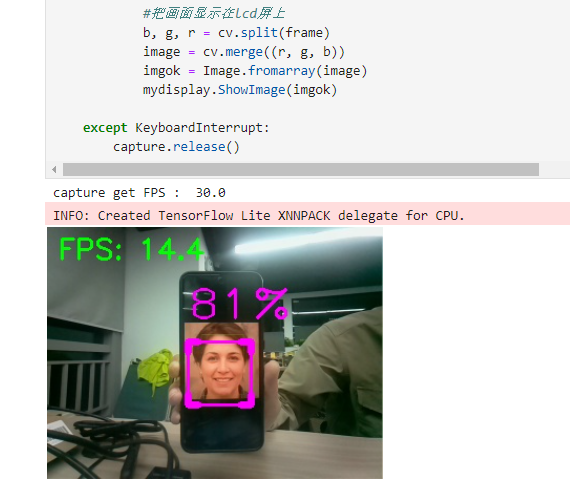
4. Main source code analysis
xxxxxxxxxxif __name__ == '__main__': capture = cv.VideoCapture(0) # capture.set(0, cv.VideoWriter.fourcc('M', 'J', 'P', 'G')) capture.set(cv.CAP_PROP_FRAME_WIDTH, 320) capture.set(cv.CAP_PROP_FRAME_HEIGHT, 240) print("capture get FPS : ", capture.get(cv.CAP_PROP_FPS)) pTime, cTime = 0, 0 face_detector = FaceDetector(0.75) display(image_widget) try: while capture.isOpened(): ret, frame = capture.read() # frame = cv.flip(frame, 1) frame,_ = face_detector.findFaces(frame) if cv.waitKey(1) & 0xFF == ord('q'): break cTime = time.time() fps = 1 / (cTime - pTime) pTime = cTime text = "FPS : " + str(int(fps)) cv.putText(frame, f"FPS: {fps:.1f}", (10, 30), cv.FONT_HERSHEY_SIMPLEX, 0.9, (0, 255, 0), 2) image_widget.value = bgr8_to_jpeg(frame) #把画面显示在lcd屏上 Display the image on the LCD screen b, g, r = cv.split(frame) image = cv.merge((r, g, b)) imgok = Image.fromarray(image) mydisplay.ShowImage(imgok) except KeyboardInterrupt: capture.release()The robot dog calls the detected face model, selects the recognized face results, and displays the recognition rate.