Welcome to DOGZILLA-Lite repository
2. Line patrol and obstacle removal
Color patrol
1. Purpose of the experiment
This tutorial will guide you on how to program and control the robot dog so that it can automatically identify and follow the colored patrol lines on the ground (only four colors: red, green, blue, and yellow), detect obstacles during the journey, and perform grabbing and obstacle removal operations. First, the robot dog camera identifies the patrol line color (red RGB≈255,0,0; green≈0,255,0; blue≈0,0,255; yellow≈255,255,0), and adjusts the motor speed through the PID control algorithm to ensure stable walking along the line. At the same time, the robot dog detects obstacles ahead based on color judgment. When an obstacle is detected, the robot dog will pause patrolling, start the robotic arm or gripper to grab it, and continue patrolling after moving the obstacle out of the path. This tutorial is only applicable to patrol lines in red, green, blue, and yellow. Other colors require additional model training or adjustment of sensor parameters. It is recommended to test in an environment with stable light to ensure the accuracy of color recognition and obstacle detection.
2. Experimental path source code
First, enter the robot dog system, end the robot dog program, and then enter the path of cd ~/DOGZILLA_Lite_class/6.AI Visual Interaction Course/02.color_line_caw in the terminal and run color_line_caw.py .
3. Experimental Phenomenon
xxxxxxxxxxpython3 color_line_caw.py
After executing the above commands, the robot dog will start patrolling the line in color. When it encounters an obstacle, it will clear the default blue line. You can switch the patrol color by pressing the button in the upper right corner of the screen or the lowercase 'k' key on the keyboard. When it encounters an obstacle of other colors except blue (here refers to yellow, red and green), the robot dog will walk to the obstacle, clear it with its claws, and then continue patrolling the line. In this case, it can only patrol straight lines.
As shown in the figure:
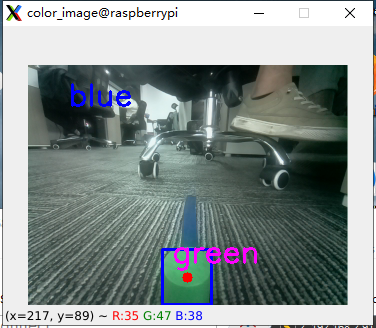
After clearing the green obstacles
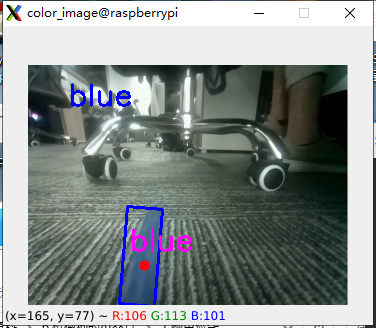
Press the button in the lower left corner of the screen to exit this program.
4. Main source code analysis
#初始化pid init pidPx_line = 0.25 # move:0.25 trun 0.15Ix_line = 0Dx_line = 0.0001X_line_Middle_error = 160 #图像X轴中心 #Image X-axis centerX_line_track_PID = PID.PositionalPID(Px_line, Ix_line, Dx_line) #识别障碍物pid Identify obstacle PIDPx_food = 0.25 # move:0.25 trun 0.15Ix_food = 0Dx_food = 0.0001X_food_Middle_error = 160 #图像X轴中心 #Image X-axis centerX_food_track_PID = PID.PositionalPID(Px_food, Ix_food, Dx_food) food_error = 15 #允许的误差 Permissible errorg_mode = 1pos = 220- If you want to change the line patrol speed and PID value, just change these parameters in the source code.
- pos: is the size of the obstacle, which can be adjusted according to the size of your own obstacle.
xxxxxxxxxx#要识别的颜色阈值 Color threshold to be recognizedcolor_hsv = {"red" : ((0, 70, 72), (7, 255, 255)), "green" : ((54, 109, 78), (77, 255, 255)), "blue" : ((92, 100, 62), (121, 251, 255)), "yellow": ((26, 100, 91), (32, 255, 255))}Here are the hsv parameters of the color. If you want to add a color, you can add one here. Then combine the ability to understand the code to add your own color switching function
xxxxxxxxxxdef Caw_sport(): g_dog.claw(0) time.sleep(1) g_dog.arm(133,-44) time.sleep(3) g_dog.claw(pos) time.sleep(1.5) g_dog.arm(133,100) time.sleep(1) g_dog.arm(55,100) time.sleep(0.5) g_dog.attitude(['p'],[0]) #让狗站立 Make the dog stand up #旋转约70度 Rotate about 70 degrees time.sleep(0.5) g_dog.turn(10) time.sleep(7) g_dog.stop() g_dog.move('x',20) time.sleep(1) g_dog.stop() time.sleep(1.5) g_dog.claw(0)#松开夹取物 Release the clamp to retrieve the item time.sleep(1) g_dog.claw(127) time.sleep(0.5) g_dog.turn(-10) time.sleep(7) g_dog.stop()Here is an action of grabbing an obstacle, which can be rewritten according to your own environment.