Welcome to DOGZILLA-Lite repository
11. You Drop, I Pick
You Drop, I Pick
1. Purpose of the experiment
Learn to use the opencv visual recognition on the robot dog and the robotic arm to pick up the building blocks on the ground
2. Main source code path
First end the large program and then enter the terminal
cd ~/home/pi/DOGZILLA_Lite_class/6.AI Visual Interaction Course/11.pick it uppython3 pick_it_up.py3. Experimental Phenomenon
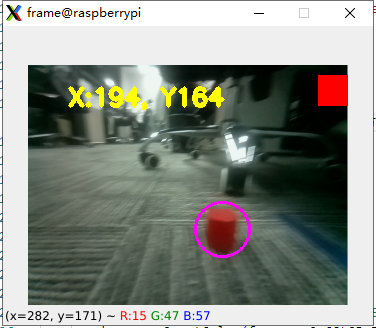
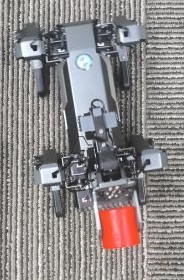
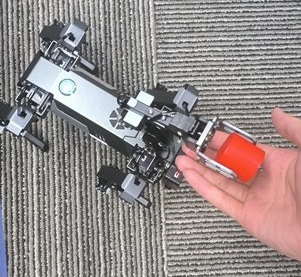
After running the source code, by placing the wooden block within the range that the robot dog can recognize, you can let the robot dog track the building block and then pick up the wooden block. The red building block is recognized by default, and you can switch the color of the building block by pressing the button in the upper right corner of the screen.
Identification:
Gripping:
place:
4. Main source code analysis
x
pos = 210 #小球夹取角度,夹取木块角度参数改为260,根据夹取的木块大小调节 0:完全打开 #Adjust the size of the clamped wooden block to 0: fully opentry: while 1: ret, frame = cap.read() frame_ = cv2.GaussianBlur(frame,(5,5),0) hsv = cv2.cvtColor(frame,cv2.COLOR_BGR2HSV) mask = cv2.inRange(hsv,color_lower,color_upper) mask = cv2.erode(mask,None,iterations=2) mask = cv2.dilate(mask,None,iterations=2) mask = cv2.GaussianBlur(mask,(3,3),0) cnts = cv2.findContours(mask.copy(),cv2.RETR_EXTERNAL,cv2.CHAIN_APPROX_SIMPLE)[-2] if g_mode == 1: if len(cnts) > 0: cnt = max (cnts, key = cv2.contourArea) (color_x,color_y),color_radius = cv2.minEnclosingCircle(cnt) if color_radius > 10: cv2.circle(frame,(int(color_x),int(color_y)),int(color_radius),(255,0,255),2) X_track_PID.SystemOutput = color_x #X X_track_PID.SetStepSignal(X_Middle_error) X_track_PID.SetInertiaTime(0.01, 0.1) x_real_value = int(X_track_PID.SystemOutput) x_real_value = limit_fun(x_real_value ,-18,18) g_dog.move('y',x_real_value) if color_y > 205 or color_y ==0 : g_dog.move('x',0) else : g_dog.move('x',10) #停止追踪,使用夹爪夹取 Stop tracking and use the gripper to pick it up if color_y > 205 : if abs(color_x-160)<15:###6 step = step+1 else : step = 0 if step > 5: g_dog.stop() g_mode = 2 #进入夹爪夹取 Enter the gripper for retrieval else: color_x = 0 color_y = 0 g_dog.stop() #print([color_x,color_y]) cv2.putText(frame, "X:%d, Y%d" % (int(color_x), int(color_y)), (40,40), cv2.FONT_HERSHEY_SIMPLEX, 0.8, (0,255,255), 3) t_start = time.time() fps = 0#重要夹取参数 Important gripping parameters elif g_mode == 2: #夹取运动,夹取不到调整对应舵机ID的角度 Pinching motion,The angle corresponding to the servo ID cannot be adjusted g_dog.claw(0) time.sleep(1) g_dog.motor([52,53],[19,6]) #夹取重要参数,舵机ID+舵机对应角度 Clip important parameters, servo ID + servo corresponding angle time.sleep(0.5) g_dog.motor([52,53],[-10,80]) #夹取重要参数,舵机ID+舵机对应角度 Clip important parameters, servo ID + servo corresponding angle time.sleep(2) g_dog.claw(pos) time.sleep(1.5) g_dog.motor([52,53],[20,-20]) #g_dog.arm(armx,100) time.sleep(0.5) g_dog.attitude(['p'],[0]) #让狗站立 Make the dog stand up time.sleep(0.5) g_dog.motor([52,53],[-13,-20]) #g_dog.arm(armx,100) time.sleep(0.5) time.sleep(0.5) g_dog.turn(10) time.sleep(6) g_dog.stop() else: fps = fps + 1 mfps = fps / (time.time() - t_start) cv2.putText(frame, "FPS " + str(int(mfps)), (40,40), cv2.FONT_HERSHEY_SIMPLEX, 0.8, (0,255,255), 3) if (cv2.waitKey(1)) == ord('q'): break if button.press_b(): g_dog.stop() break if button.press_d(): change_color()except: g_dog.stop() cap.release() cv2.destroyAllWindows() The above code is to identify the color block of the target color and perform a main process of clamping. If the clamping is not in place, the most likely reason is that the robot dog is not placed flat on the ground when it is turned on.