Welcome to DOGZILLA-Lite repository
5. QR code recognition
QR code recognition
1. Purpose of the experiment
Drive the robot dog to recognize the QR code
2. Experimental path source code
Enter the robot dog system, end the robot dog program, enter "ip (ip is the robot dog's ip): 8888" in the browser, enter the password "yahboom"
and log in. Enter the path of cd ~/DOGZILLA_Lite_class/5.AI Visual Recognition Course/05. QR code recognition and run qrcode.ipynb .
3. Experimental Phenomenon
After running the source code, you can see that the robot dog can recognize the information of the QR code and display the result of the QR code.
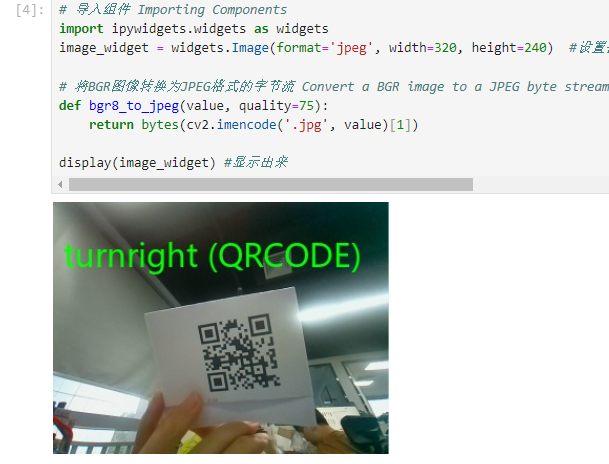
4. Main source code analysis
while(True): ret, img = cap.read() img_ROI_gray = cv2.cvtColor(img, cv2.COLOR_BGR2GRAY) barcodes = pyzbar.decode(img_ROI_gray) for barcode in barcodes: barcodeData = barcode.data.decode("utf-8") barcodeType = barcode.type text = "{} ({})".format(barcodeData, barcodeType) img=cv2AddChineseText(img,text, (10, 30),(0, 255, 0), 30) print("[INFO] Found {} barcode: {}".format(barcodeType, barcodeData)) b,g,r = cv2.split(img) img = cv2.merge((r,g,b)) imgok = Image.fromarray(img) mydisplay.ShowImage(imgok) r,g,b = cv2.split(img) img1 = cv2.merge((b,g,r)) image_widget.value = bgr8_to_jpeg(img1) if (cv2.waitKey(1)) == ord('q'): break if button.press_b(): breakThrough the source code, we can get that the robot dog uses the camera for recognition and displays the recognized QR code results on the robot dog's screen and the computer's screen.