yahboom
HomeLearn
Solution
Blog
Online Store
About Us
EN/中文
Muto RS Robot📖
01.Introduction to Muto Robot
  • 1.Accessories introduction
  • 2.Precautions for battery
  • 3.FAQ
  • 4.MutoRS Study Guide
  • 5.Quick Start Guide
02.Assembly and write system
  • 1.Raspberry Pi write system
  • 2.Assembly video
03.Remote control course
  • 1.Open and Close APP Control Program
  • 2.Mobile APP Remote Control
  • 3.USB Wireless Controller Remote Control
  • 4.Web Host Computer Remote Control
04.Remote login operation
  • 1.SSH and VNC remote login
  • 2.Jupyter Lab login and running example code
05.AI Large Model Basicsnew
  • 1.AI Large Model Types and Principles
  • 2.RAG Retrieval Enhancement and Model Training Samples
  • 3.Embodied Intelligent Robot System Architecture
  • 4.Embodied Intelligent Functions Core Source Code
06.AI Large Model Developmentnew
  • 1.Register a model service provider account
  • 2.Configure API-KEY
  • 3.Introduction to Dify
  • 4.Dify Basic function
  • 5.AI large model development - Chatbot
  • 6.Deploy the RAG knowledge base
  • 7.RAG knowledge base + Chatbot
  • 8.AI agent workflow
  • 9.Custom wake-up response
  • 10.Core module testing tools
07.AI Large Model (Text Version)new
  • 0.MutoRS Model Setup & Details
  • 1.Semantic Understanding, Instruction Following
  • 2.Multimodal Visual Understanding
  • 3.Multimodal Visual Understanding + Depth Camera Distance Q&A
  • 4.Multimodal Visual Understanding + Visual Line Following
  • 5.Multimodal Visual Understanding + Visual Following
  • 6.Multimodal Visual Understanding + SLAM Navigation
  • 7.Multimodal Visual Understanding + SLAM Navigation + Visual Line Following
  • 8.Intention Estimation + Multimodal Visual Understanding + SLAM Navigation + Visual Functions
08.AI Large Model (Voice Version)new
  • 0.MutoRS Model Setup & Details
  • 1.Semantic Understanding, Instruction Following
  • 2.Multimodal Visual Understanding
  • 3.Multimodal Visual Understanding + Depth Camera Distance Q&A
  • 4.Multimodal Visual Understanding + Visual Line Following
  • 5.Multimodal Visual Understanding + Visual Following
  • 6.Multimodal Visual Understanding + SLAM Navigation
  • 7.Multimodal Visual Understanding + SLAM Navigation + Visual Line Following
  • 8.Intention Estimation + Multimodal Visual Understanding + SLAM Navigation + Visual Functions
09.AI Large Model (Fun Applications)new
  • 1.Versatile performer
  • 2.Action Imitation
  • 3.Problem Solving Expert
  • 4.Exploring Unfamiliar Environments
10.Robot basic course
  • 1)Control buzzer
  • 2)Control PWM servo
  • 3)Control bus servo
  • 4)Robot forward and backward
  • 5)Robot move left and right
  • 6)Robot rotate left and right
  • 7)Control height
  • 8)Control head
  • 9)Action group performance
  • 10)Read data
  • 11)Host computer control
  • 12)Camera driver
11.Voice control coursenew
  • 1.Control Muto motion
  • 2.Control Muto tracking
  • 3.Control Muto color recognition
  • 4.Control Muto color tracking
  • 5.Control multi-point navigation
12.AI vision course
  • 0)Color HSV Calibration
  • 1)Color recognition
  • 2)Color following
  • 3)Color recognition action group
  • 4)Face detection
  • 5)QR code recognition
  • 6)QR code instructions
  • 7)Visual line following
  • 8)Motion learning
  • 9)Synchronous action teaching
13.Mediapipe course
  • 1)Hand detection
  • 2)Attitude detection
  • 3)Overall inspection
  • 4)Face detection
  • 5)Face recognition
  • 6)Face effects
  • 7)Face detection
  • 8)3D object recognition
  • 9)Brush
  • 10)Finger control
  • 11)Gesture recognition
14.Depth camera course
  • 1)Depth camera use
  • 2)Internal reference calibration
  • 3)Web page real-time monitoring
  • 4)ROS+opencv application
  • 5)QR code creation and recognition
  • 6)AR vision
  • 7)Tracking
  • 8)Obstacle recognition
  • 9)Color tracking
  • 10)KCF object tracking
  • 11)RTAB-Map 3D mapping navigation
15.Lidar course
  • 1)About lidar
  • 2)Lidar obstacle avoidance
  • 3)Lidar tracking
  • 4)Lidar guard
  • 5)Patrol
  • 6)SLAM overview
  • 7)ROS2_Gmapping mapping algorithm
  • 8)ROS2_Cartographer mapping algorithm
  • 9)About ROS2 Navigation
  • 10)ROS2 navigation and avoid
  • 11) APP mapping
  • 12)APP navigation
16.Road network navigationnew
  • 1.Road network planning and navigation environment deployment
  • 2.Constructing pose maps
  • 3.Road network annotation
  • 4.Inter-road network planning and navigation
  • 5.Road network navigation under arbitrary poses
  • 6.Path replanning
17.Multi-machine control course
  • 1)Multi-vehicle control
  • 2)Multi-vehicle navigation
18.Robot chassis control
  • 1)Hexapod gait and kinematics
  • 2)Robot information release
  • 3)Robot control
  • 4)URDF model
19.Raspberry Pi course
  • 1)Python usage
  • 2)Use APT to install Python packages
  • 3)Python virtual environment
  • 4)GPIO Zero
  • 5)Pin output high and low levels
  • 6)Pin reads high and low levels
  • 7)Pin output PWM
  • 8)Serial communication
  • 9)I2C communication
20.OpenCV course
  • 1)Introduction to Open Source CV
  • 2)Image reading and display
  • 3)Picture writing
  • 4)Image Quality
  • 5)Pixel operations
  • 6)Image zoom
  • 7)Picture cut
  • 8)Picture pan
  • 9)Picture mirroring
  • 10)Affine transformation
  • 11)Picture rotation
  • 12)perspective transformation
  • 13)Grayscale processing
  • 14)Binary image
  • 15)Edge green detection
  • 16)Line segment drawing
  • 17)Rectangular circle drawing
  • 18)Text and picture drawing
21.Docker course
  • 1)Overview and installation
  • 2)Common commands
  • 3)Deeply understand and publish images
  • 4)Hardware interaction and data processing
  • 5)Enter docker container
  • 6)Robot development environment construction
  • 7)Update docker images
22.ROS2 basic course
  • 1) Introduction to ROS2
  • 2)ROS2 install Humble
  • 3)ROS2 development environment
  • 4)ROS2 workspace
  • 5)ROS2 function package
  • 6)ROS2 node
  • 7)ROS2 topic communication
  • 8)ROS2 service communication
  • 9)ROS2 action communication
  • 10)ROS2 custom interface message
  • 11)ROS2 parameter service case
  • 12)ROS2 meta-function package
  • 13)ROS2 distributed communication
  • 14)ROS2 DDS
  • 15)ROS2 time related API
  • 16)ROS2 common command tools
  • 17)ROS2 rviz2 use
  • 18)ROS2 rqt toolbox
  • 19)ROS2 Launch startup file configuration
  • 20)ROS2 recording and playback tool
  • 21)ROS2 URDF model
  • 22)ROS2 Gazebo simulation platform
  • 23)ROS2 TF2 coordinate transformation
23.Linux basic course
  • 1)Introduction to Linux system
  • 2)Ubuntu file system
  • 3)Ubuntu common commands
  • 4)Ubuntu common editors
  • 5)Ubuntu software operation commands
  • 6)Virtual machine installation
  • 7)SSH remote control
  • 8)VNC remote control
  • 9)Driver library and communication
  • 10)Static IP and hotspot mode
  • 11)Bind device ID
  • 12)Capacity expansion and resource allocation
  • 13)Back up system image
  • 14)Update system software sources
  • 15)Set root user password
  • 16)sudo free password
  • 17)Connect to WiFi network
  • 18)View system version
  • 19)Customized service management
  • 20.Back up system image
24.Mainboard Large Model Course
Offline large model (Text Interaction)
  • 0. AI large model image description
  • 1. Deployment of large AI model environments
  • 2. Installation of large model dialogue platform
  • 3. Meta AI Llama 3.2 model
  • 4. Alibaba Cloud Qwen3 Model
  • 5. Microsoft Phi-4-mini model
  • 6. DeepSeek DeepSeek-R1 model
  • 7. Alibaba Cloud Qwen2.5vl Visual Multimodal Large Model
  • 8. Google Gemma3 Visual Multimodal Large Model
  • 9. Llava Visual Multimodal Large Model
  • 10. MiniCPM-V Visual Multimodal Large Model
  • 11. Multimodal Visual Understanding Applications
  • 12. Multimodal Text-Based Image Application
  • 13. Multimodal Video Analysis Application
  • 14. Multimodal visual positioning applications
  • 15. Multimodal table scanning application
  • 16. Multimodal Autonomous Agent Application
Offline large model (Voice Interaction)
  • 0. Voice Interaction Hardware Connection (Must Read)
  • 1. Offline speech-to-text (ASR)
  • 2. Offline Text-to-Speech (TTS)
  • 3. AI large model voice interaction
  • 4. Multimodal visual understanding and voice interaction
  • 5. Multimodal Text-Based Image Application
  • 6. Multimodal Video Analysis Application
  • 7. Multimodal visual positioning applications
  • 8. Multimodal table scanning application
  • 9. Multimodal Autonomous Agent Applications
  • 10. AI large model offline voice assistant
Online large model (text interaction)
  • 1.OpenRouter Large Model API Aggregation Platform
  • 2. Multimodal Visual Understanding Applications
  • 3. Multimodal visual positioning applications
  • 4. Multimodal table scanning application
  • 5. Multimodal Autonomous Agent Applications
Online large model (voice interaction)
  • 0. Voice Interaction Hardware Connection (Must Read)
  • 1. Online speech-to-text (ASR)
  • 2. Online Text-to-Speech (TTS)
  • 3. AI large model voice interaction
  • 4. Multimodal visual and voice interaction
  • 5. Multimodal visual positioning applications
  • 6. Multimodal table scanning application
  • 7. Multimodal Autonomous Agent Applications
  • 8. AI large model online voice assistant
Download
  • RemoteCtrl_APP(iOS/Android)
  • Mapping_APP(iOS_Android)
  • SystemFile_For_RPi5
  • SystemFile_Jetson
  • SystemFile_RPi
  • Code
  • VM File
  • Hardware Info
  • Instruction Manual
  • Jetson_Boot_USB.tar.gz
  • ROS2_Basic_VM
Download ZIP

Welcome to Muto RS Robot repository

1. Deployment of large AI model environments

Ollama

Ollama1. Large Language Models (LLMs)2. Ollama InstallationScript Installation3. Using Ollama4. Uninstall OllamaReferences

Demo Environment

Development Board: Raspberry Pi 5

SD (TF) Card: 64GB (16GB or more; the larger the capacity, the more models you can try)

​x
Raspberry Pi 5 (16GB RAM): Runs models with 14B parameters or less
Raspberry Pi 5 (8GB RAM): Runs models with 8B parameters or less
Raspberry Pi 5 (4GB RAM): Runs models with 3B parameters or less
Raspberry Pi 5 (2GB RAM): Runs models with 1B parameters or less
Raspberry Pi 5 (1G RAM): Cannot run offline large models. Please refer to the online large model routines.

Ollama is an open-source tool designed to simplify the deployment and operation of large language models, allowing users to use high-quality language models in local environments.

1. Large Language Models (LLMs)

Large language models (LLMs) are a type of advanced text generation system based on artificial intelligence technology. Their main feature is their ability to learn and understand human language using large amounts of training data and generate natural and fluent text.

2. Ollama Installation

Note: Failure to pull the Ollama package is normal. You can try multiple times or use a proxy to pull the package. You will need to search online for proxy installation instructions.

Script Installation

xxxxxxxxxx
sudo apt install curl -y
sudo curl -fsSL https://ollama.com/install.sh | sh
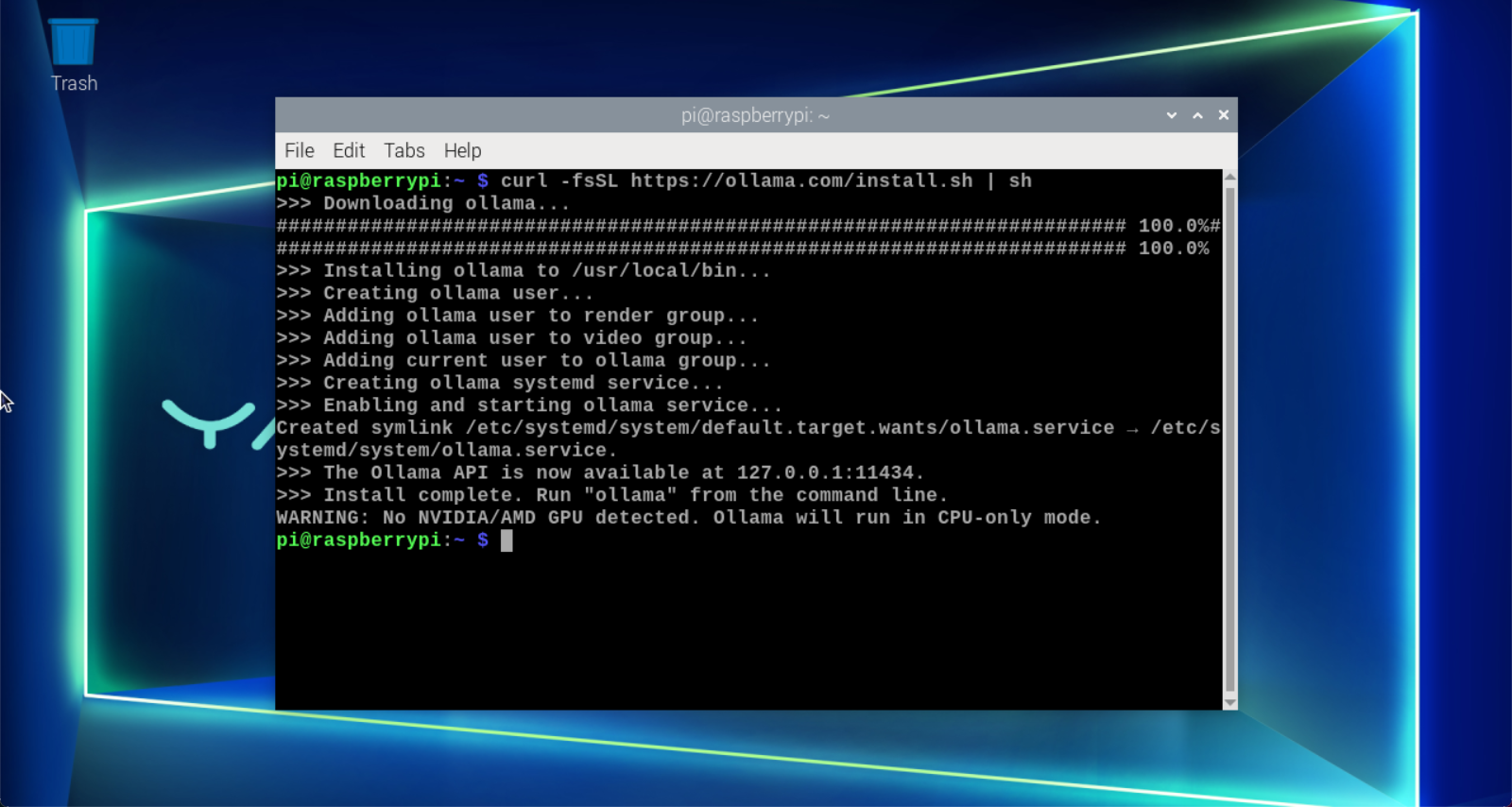
image-20240625122656248

The entire installation process takes a while, so be patient. When the Raspberry Pi terminal displays "Install complete," Ollama has been successfully installed!

xxxxxxxxxx
The warning indicates that no NVIDIA/AMD GPU was detected, and Ollama will run in CPU mode. We can ignore this prompt.

3. Using Ollama

Type "ollama" in the terminal to see the prompt:
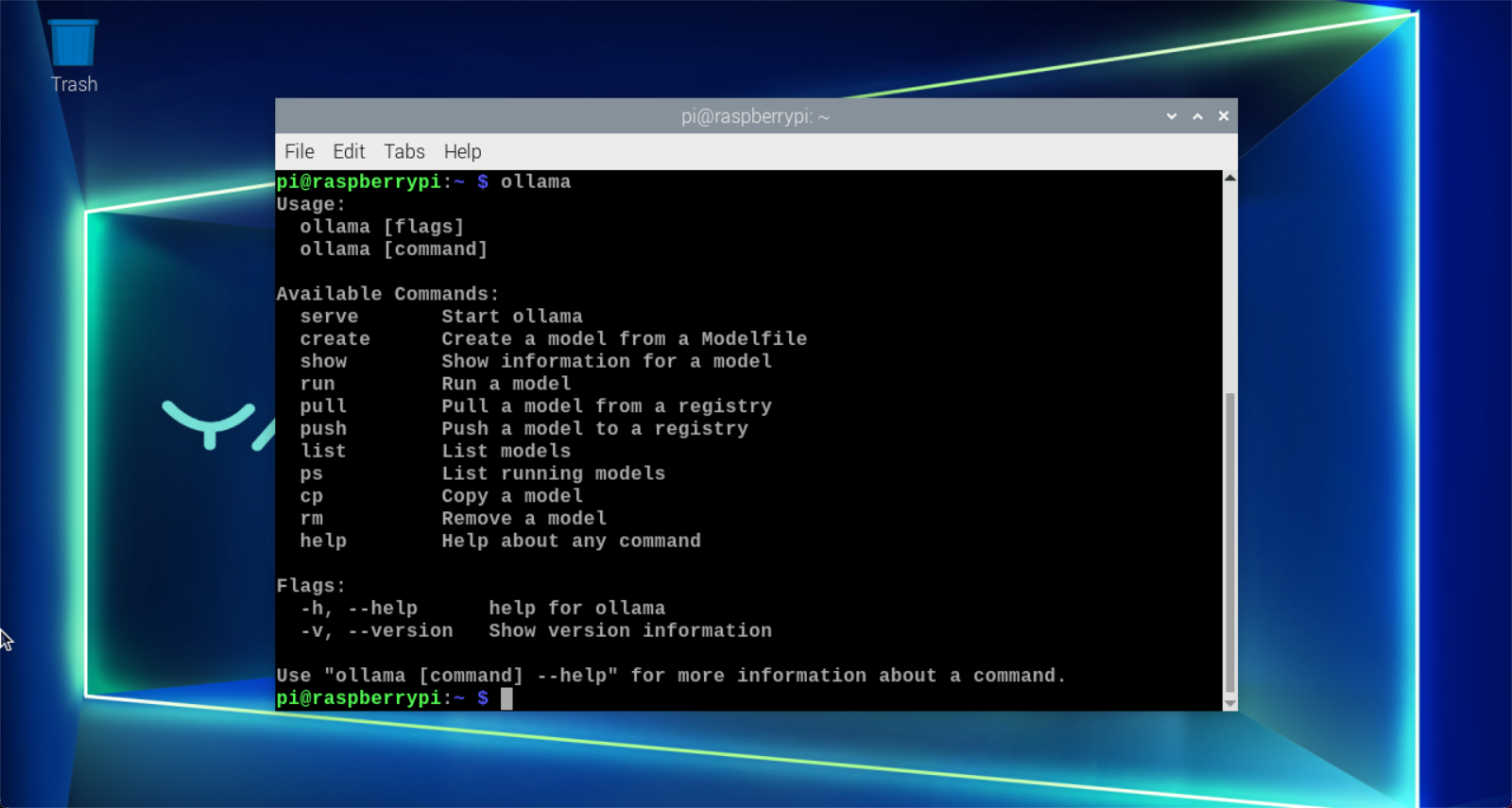
image-20240625122715489

CommandFunction
ollama serveStarts ollama
ollama createCreates a model from a model file
ollama showDisplays model information
ollama runRuns a model
ollama pullPulls a model from the registry
ollama pushPushes a model to the registry
ollama listLists models
ollama psLists running models
ollama cpCopys a model
ollama rmDeletes a model
ollama helpGet help on any command

4. Uninstall Ollama

  • Deleting a service

xxxxxxxxxx
sudo systemctl stop ollama
sudo systemctl disable ollama
sudo rm /etc/systemd/system/ollama.service
  • Deleting files

xxxxxxxxxx
sudo rm $(which ollama)
  • Deleting model and service users and groups

xxxxxxxxxx
sudo rm -r /usr/share/ollama
sudo userdel ollama
sudo groupdel ollama

References

Ollama

Official website:https://ollama.com/

GitHub:https://github.com/ollama/ollama

AI large model image description
Installation of large model dialogue platform

COMPANY

  • About us
  • Team Style
  • Blog

LEARNING & EXPLORATION

  • Tutorials
  • Edge AI hardware
  • Educational robots
  • Embedded intelligent hardware

WHERE TO BUY

  • Yahboom Online Store
  • Amazon
  • Alibaba
  • AliExpress
  • Mercado

TECHNOLOGY SUPPORT

  • Email: support@yahboom.com

BE A DISTRIBUTOR

  • Email: sales@yahboom.com
QR Code
QR Code

Copyright © 2017-2026 Yahboom. All Rights Reserved.

EN/中文