yahboom
HomeLearn
Solution
Blog
Online Store
About Us
EN/中文
Muto RS Robot📖
01.Introduction to Muto Robot
  • 1.Accessories introduction
  • 2.Precautions for battery
  • 3.FAQ
  • 4.MutoRS Study Guide
  • 5.Quick Start Guide
02.Assembly and write system
  • 1.Raspberry Pi write system
  • 2.Assembly video
03.Remote control course
  • 1.Open and Close APP Control Program
  • 2.Mobile APP Remote Control
  • 3.USB Wireless Controller Remote Control
  • 4.Web Host Computer Remote Control
04.Remote login operation
  • 1.SSH and VNC remote login
  • 2.Jupyter Lab login and running example code
05.AI Large Model Basicsnew
  • 1.AI Large Model Types and Principles
  • 2.RAG Retrieval Enhancement and Model Training Samples
  • 3.Embodied Intelligent Robot System Architecture
  • 4.Embodied Intelligent Functions Core Source Code
06.AI Large Model Developmentnew
  • 1.Register a model service provider account
  • 2.Configure API-KEY
  • 3.Introduction to Dify
  • 4.Dify Basic function
  • 5.AI large model development - Chatbot
  • 6.Deploy the RAG knowledge base
  • 7.RAG knowledge base + Chatbot
  • 8.AI agent workflow
  • 9.Custom wake-up response
  • 10.Core module testing tools
07.AI Large Model (Text Version)new
  • 0.MutoRS Model Setup & Details
  • 1.Semantic Understanding, Instruction Following
  • 2.Multimodal Visual Understanding
  • 3.Multimodal Visual Understanding + Depth Camera Distance Q&A
  • 4.Multimodal Visual Understanding + Visual Line Following
  • 5.Multimodal Visual Understanding + Visual Following
  • 6.Multimodal Visual Understanding + SLAM Navigation
  • 7.Multimodal Visual Understanding + SLAM Navigation + Visual Line Following
  • 8.Intention Estimation + Multimodal Visual Understanding + SLAM Navigation + Visual Functions
08.AI Large Model (Voice Version)new
  • 0.MutoRS Model Setup & Details
  • 1.Semantic Understanding, Instruction Following
  • 2.Multimodal Visual Understanding
  • 3.Multimodal Visual Understanding + Depth Camera Distance Q&A
  • 4.Multimodal Visual Understanding + Visual Line Following
  • 5.Multimodal Visual Understanding + Visual Following
  • 6.Multimodal Visual Understanding + SLAM Navigation
  • 7.Multimodal Visual Understanding + SLAM Navigation + Visual Line Following
  • 8.Intention Estimation + Multimodal Visual Understanding + SLAM Navigation + Visual Functions
09.AI Large Model (Fun Applications)new
  • 1.Versatile performer
  • 2.Action Imitation
  • 3.Problem Solving Expert
  • 4.Exploring Unfamiliar Environments
10.Robot basic course
  • 1)Control buzzer
  • 2)Control PWM servo
  • 3)Control bus servo
  • 4)Robot forward and backward
  • 5)Robot move left and right
  • 6)Robot rotate left and right
  • 7)Control height
  • 8)Control head
  • 9)Action group performance
  • 10)Read data
  • 11)Host computer control
  • 12)Camera driver
11.Voice control coursenew
  • 1.Control Muto motion
  • 2.Control Muto tracking
  • 3.Control Muto color recognition
  • 4.Control Muto color tracking
  • 5.Control multi-point navigation
12.AI vision course
  • 0)Color HSV Calibration
  • 1)Color recognition
  • 2)Color following
  • 3)Color recognition action group
  • 4)Face detection
  • 5)QR code recognition
  • 6)QR code instructions
  • 7)Visual line following
  • 8)Motion learning
  • 9)Synchronous action teaching
13.Mediapipe course
  • 1)Hand detection
  • 2)Attitude detection
  • 3)Overall inspection
  • 4)Face detection
  • 5)Face recognition
  • 6)Face effects
  • 7)Face detection
  • 8)3D object recognition
  • 9)Brush
  • 10)Finger control
  • 11)Gesture recognition
14.Depth camera course
  • 1)Depth camera use
  • 2)Internal reference calibration
  • 3)Web page real-time monitoring
  • 4)ROS+opencv application
  • 5)QR code creation and recognition
  • 6)AR vision
  • 7)Tracking
  • 8)Obstacle recognition
  • 9)Color tracking
  • 10)KCF object tracking
  • 11)RTAB-Map 3D mapping navigation
15.Lidar course
  • 1)About lidar
  • 2)Lidar obstacle avoidance
  • 3)Lidar tracking
  • 4)Lidar guard
  • 5)Patrol
  • 6)SLAM overview
  • 7)ROS2_Gmapping mapping algorithm
  • 8)ROS2_Cartographer mapping algorithm
  • 9)About ROS2 Navigation
  • 10)ROS2 navigation and avoid
  • 11) APP mapping
  • 12)APP navigation
16.Road network navigationnew
  • 1.Road network planning and navigation environment deployment
  • 2.Constructing pose maps
  • 3.Road network annotation
  • 4.Inter-road network planning and navigation
  • 5.Road network navigation under arbitrary poses
  • 6.Path replanning
17.Multi-machine control course
  • 1)Multi-vehicle control
  • 2)Multi-vehicle navigation
18.Robot chassis control
  • 1)Hexapod gait and kinematics
  • 2)Robot information release
  • 3)Robot control
  • 4)URDF model
19.Raspberry Pi course
  • 1)Python usage
  • 2)Use APT to install Python packages
  • 3)Python virtual environment
  • 4)GPIO Zero
  • 5)Pin output high and low levels
  • 6)Pin reads high and low levels
  • 7)Pin output PWM
  • 8)Serial communication
  • 9)I2C communication
20.OpenCV course
  • 1)Introduction to Open Source CV
  • 2)Image reading and display
  • 3)Picture writing
  • 4)Image Quality
  • 5)Pixel operations
  • 6)Image zoom
  • 7)Picture cut
  • 8)Picture pan
  • 9)Picture mirroring
  • 10)Affine transformation
  • 11)Picture rotation
  • 12)perspective transformation
  • 13)Grayscale processing
  • 14)Binary image
  • 15)Edge green detection
  • 16)Line segment drawing
  • 17)Rectangular circle drawing
  • 18)Text and picture drawing
21.Docker course
  • 1)Overview and installation
  • 2)Common commands
  • 3)Deeply understand and publish images
  • 4)Hardware interaction and data processing
  • 5)Enter docker container
  • 6)Robot development environment construction
  • 7)Update docker images
22.ROS2 basic course
  • 1) Introduction to ROS2
  • 2)ROS2 install Humble
  • 3)ROS2 development environment
  • 4)ROS2 workspace
  • 5)ROS2 function package
  • 6)ROS2 node
  • 7)ROS2 topic communication
  • 8)ROS2 service communication
  • 9)ROS2 action communication
  • 10)ROS2 custom interface message
  • 11)ROS2 parameter service case
  • 12)ROS2 meta-function package
  • 13)ROS2 distributed communication
  • 14)ROS2 DDS
  • 15)ROS2 time related API
  • 16)ROS2 common command tools
  • 17)ROS2 rviz2 use
  • 18)ROS2 rqt toolbox
  • 19)ROS2 Launch startup file configuration
  • 20)ROS2 recording and playback tool
  • 21)ROS2 URDF model
  • 22)ROS2 Gazebo simulation platform
  • 23)ROS2 TF2 coordinate transformation
23.Linux basic course
  • 1)Introduction to Linux system
  • 2)Ubuntu file system
  • 3)Ubuntu common commands
  • 4)Ubuntu common editors
  • 5)Ubuntu software operation commands
  • 6)Virtual machine installation
  • 7)SSH remote control
  • 8)VNC remote control
  • 9)Driver library and communication
  • 10)Static IP and hotspot mode
  • 11)Bind device ID
  • 12)Capacity expansion and resource allocation
  • 13)Back up system image
  • 14)Update system software sources
  • 15)Set root user password
  • 16)sudo free password
  • 17)Connect to WiFi network
  • 18)View system version
  • 19)Customized service management
  • 20.Back up system image
24.Mainboard Large Model Course
Offline large model (Text Interaction)
  • 0. AI large model image description
  • 1. Deployment of large AI model environments
  • 2. Installation of large model dialogue platform
  • 3. Meta AI Llama 3.2 model
  • 4. Alibaba Cloud Qwen3 Model
  • 5. Microsoft Phi-4-mini model
  • 6. DeepSeek DeepSeek-R1 model
  • 7. Alibaba Cloud Qwen2.5vl Visual Multimodal Large Model
  • 8. Google Gemma3 Visual Multimodal Large Model
  • 9. Llava Visual Multimodal Large Model
  • 10. MiniCPM-V Visual Multimodal Large Model
  • 11. Multimodal Visual Understanding Applications
  • 12. Multimodal Text-Based Image Application
  • 13. Multimodal Video Analysis Application
  • 14. Multimodal visual positioning applications
  • 15. Multimodal table scanning application
  • 16. Multimodal Autonomous Agent Application
Offline large model (Voice Interaction)
  • 0. Voice Interaction Hardware Connection (Must Read)
  • 1. Offline speech-to-text (ASR)
  • 2. Offline Text-to-Speech (TTS)
  • 3. AI large model voice interaction
  • 4. Multimodal visual understanding and voice interaction
  • 5. Multimodal Text-Based Image Application
  • 6. Multimodal Video Analysis Application
  • 7. Multimodal visual positioning applications
  • 8. Multimodal table scanning application
  • 9. Multimodal Autonomous Agent Applications
  • 10. AI large model offline voice assistant
Online large model (text interaction)
  • 1.OpenRouter Large Model API Aggregation Platform
  • 2. Multimodal Visual Understanding Applications
  • 3. Multimodal visual positioning applications
  • 4. Multimodal table scanning application
  • 5. Multimodal Autonomous Agent Applications
Online large model (voice interaction)
  • 0. Voice Interaction Hardware Connection (Must Read)
  • 1. Online speech-to-text (ASR)
  • 2. Online Text-to-Speech (TTS)
  • 3. AI large model voice interaction
  • 4. Multimodal visual and voice interaction
  • 5. Multimodal visual positioning applications
  • 6. Multimodal table scanning application
  • 7. Multimodal Autonomous Agent Applications
  • 8. AI large model online voice assistant
Download
  • RemoteCtrl_APP(iOS/Android)
  • Mapping_APP(iOS_Android)
  • SystemFile_For_RPi5
  • SystemFile_Jetson
  • SystemFile_RPi
  • Code
  • VM File
  • Hardware Info
  • Instruction Manual
  • Jetson_Boot_USB.tar.gz
  • ROS2_Basic_VM
Download ZIP

Welcome to Muto RS Robot repository

2)Control PWM servo

2.Control PWM servo

2.Control PWM servo2.1 Experimental purpose2.2 Experimental preparation2.3 Experimental process2.4 Experiment summary

2.1 Experimental purpose

This course mainly learns how to control the functions of the robot servo gimbal.

Note: Since the RS version robot does not come with a servo gimbal by default, the RS version robot needs to bring its own PWM servo gimbal to proceed with this tutorial.


2.2 Experimental preparation

The functions of the Muto hexapod robot Python library involved in this course are:

Gimbal_1_2(S1, S2): Controls the servo gimbal. The parameters S1/S2 represent the angle value of the PWM servo S1/S2. The valid value range of S1 is [0, 180], and the valid value range of S2 is [0, 115].

When a certain value in S1/S2 is -1, it means that the PWM servo is not operated. If you only need to control the S1 servo and do not need to change the position of the S2 servo, just pass S2 to -1.

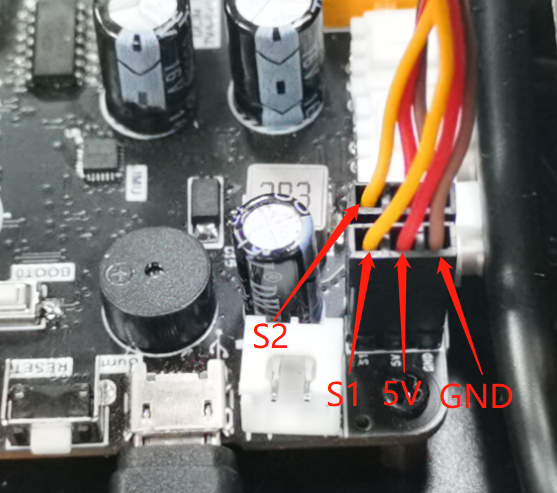
PWM servo gimbal wiring situation:

The lower servo is connected to S1

The upper servo is connected to S2

Black plugs into GND

Red plugs into 5V

Orange insert S1/S2
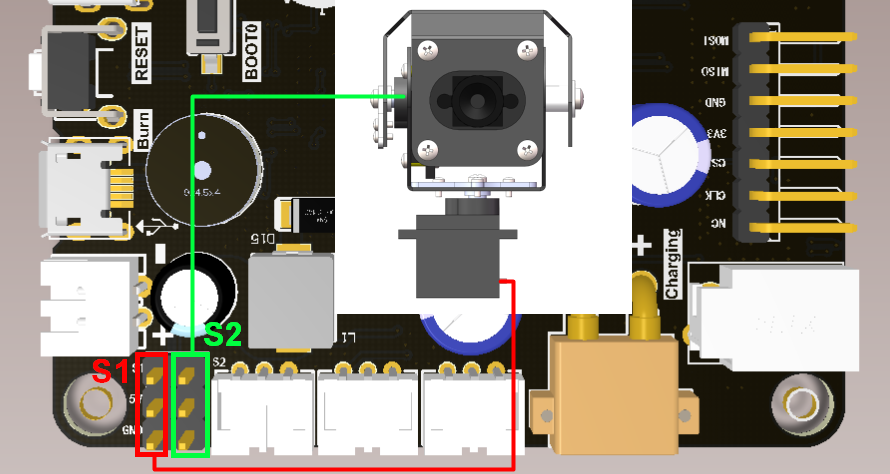
image-20230805180150535

image-20230823152117360

2.3 Experimental process

Open the jupyterLab client and find the code path:

muto/Samples/Control/2.pwm_servo.ipynb

By default g_ENABLE_CHINESE=False, if you need to display Chinese, please set g_ENABLE_CHINESE=True.

xxxxxxxxxx
# 中文开关,默认为英文 Chinese switch. The default value is English
g_ENABLE_CHINESE = False

Name_widgets = {
    'End': ("End", "结束")
}

Click to run all cells, and then scroll to the bottom to see the generated controls.

image-20220810163917767

You can control different functions by operating different controls separately.
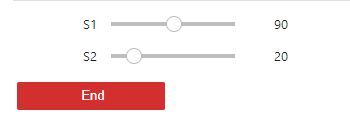
image-20230805172548680

Each time you slide the S1 slider, the angle of the robot's S1 servo will be immediately changed, thereby controlling the left and right rotation of the camera on the servo gimbal.

In the same way, every time you slide the S2 slider, the angle of the robot's S2 servo will be immediately changed, thereby controlling the up and down rotation of the camera on the servo platform.

xxxxxxxxxx
def pwm_servo(S1, S2):
    g_bot.Gimbal_1_2(S1, S2)
    return S1, S2


2.4 Experiment summary

This time, the JupyterLab control is used to control the hexapod's servo platform. You only need to drag the slider of S1/S2 to easily adjust the area where the camera on the servo platform collects images.
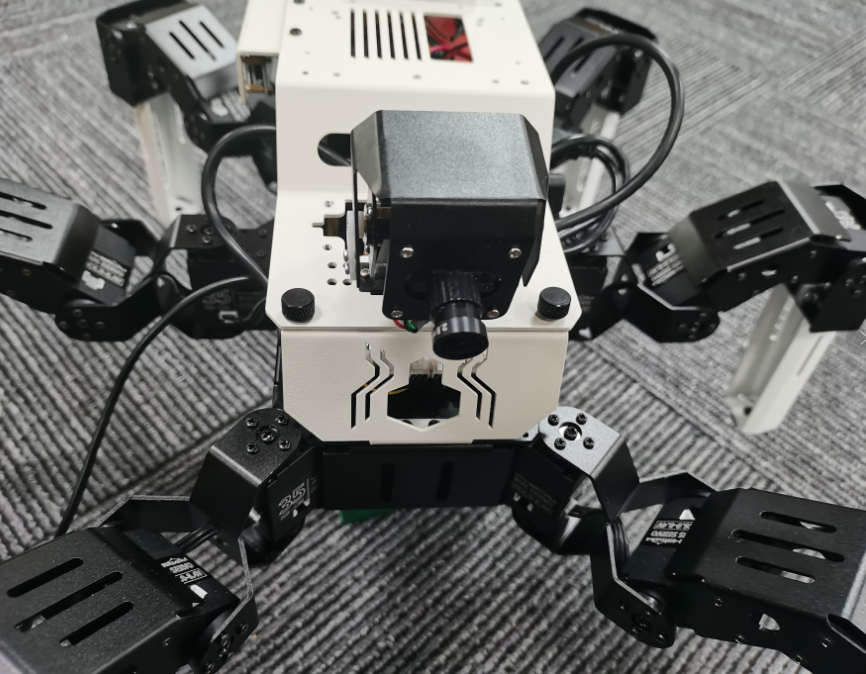
image-20230823151239866

If you need to exit the program, please press the End button to exit the program. The program will automatically reset the servo gimbal to its initial position.

Note: Although the camera is mentioned in this routine, it does not drive the camera in the program. It is only used as a functional explanation. There will be routines related to the practical application of driving the servo + camera in subsequent courses.


Control buzzer
Control bus servo

COMPANY

  • About us
  • Team Style
  • Blog

LEARNING & EXPLORATION

  • Tutorials
  • Edge AI hardware
  • Educational robots
  • Embedded intelligent hardware

WHERE TO BUY

  • Yahboom Online Store
  • Amazon
  • Alibaba
  • AliExpress
  • Mercado

TECHNOLOGY SUPPORT

  • Email: support@yahboom.com

BE A DISTRIBUTOR

  • Email: sales@yahboom.com
QR Code

Copyright © 2017-2026 Yahboom. All Rights Reserved.

EN/中文