Welcome to Muto RS Robot repository
4)URDF model
6. Robot URDF Model
1. Program Function Description
After the program starts, it will display the URDF model file of the vehicle model in rviz. There will also be a GUI debugging tool window; by sliding the progress bar, the model file can be animated.
2. Program Code Reference Path
The source code for this function is located at:
xxxxxxxxxx/root/yahboomcar_ros2_ws/yahboomcar_ws/src/yahboomcar_description/yahboomcar_description/launch/display.launch.py #docker container/home/yahboom/yahboomcar_ws/src/yahboomcar_description/launch/display.launch.py #Virtual MachineThe path to the URDF model file is::
xxxxxxxxxx/root/yahboomcar_ros2_ws/yahboomcar_ws/src/yahboomcar_description/yahboomcar_description/urdf/muto_des.urdf #docker container/home/yahboom/yahboomcar_ws/src/yahboomcar_description/urdf/muto_des.urdf #Virtual Machine
3. Program Startup
After entering the Docker container, enter the following in the terminal, depending on the actual car model:
xxxxxxxxxxros2 launch yahboomcar_description display.launch.pyAlternatively, you can choose to start the program on a virtual machine; the command is the same as above.
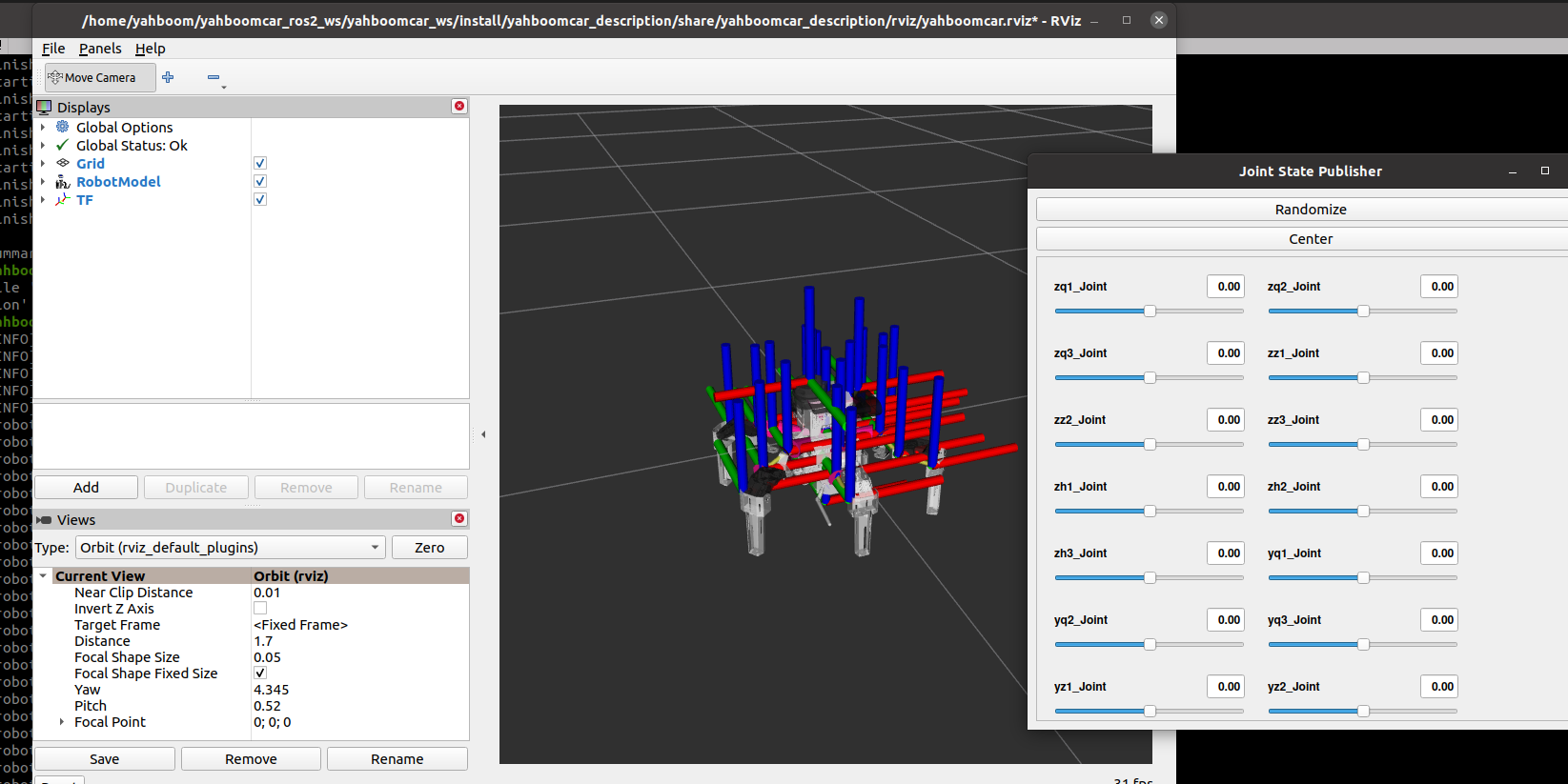
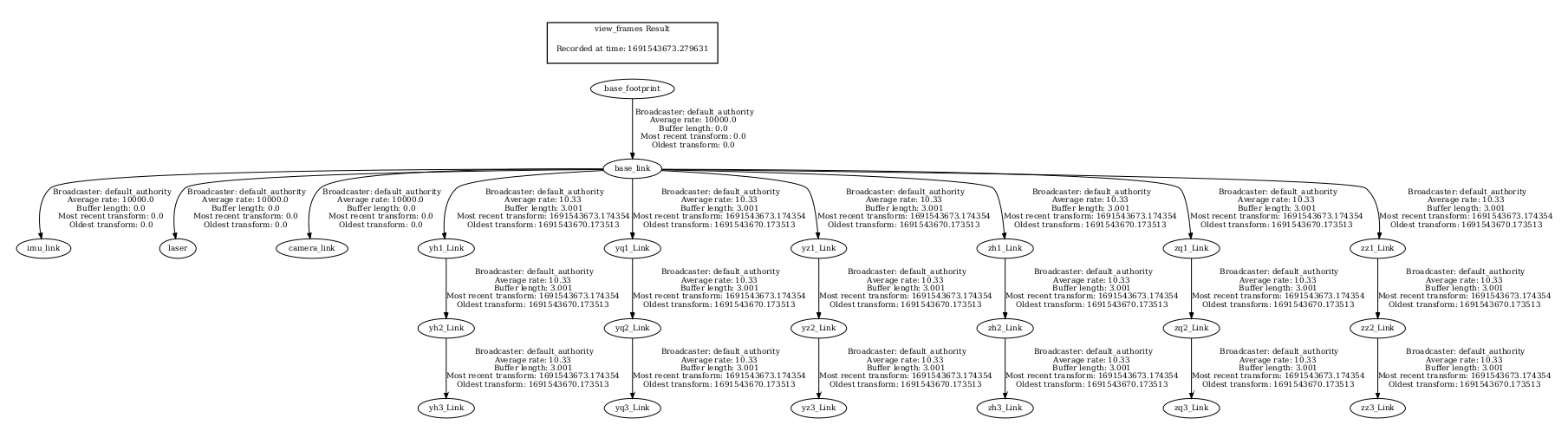
You can view the TF tree by entering the following in the Docker terminal:
xxxxxxxxxxros2 run tf2_tools view_frames
After execution, a timestamped PDF file will be generated in the mounted shared directory, for example, frames_2026-08-18_04.12.39.pdf.
The host machine can directly access this file by executing the following command in the host machine terminal to open and view it:
xxxxxxxxxxevince frames_2026-08-18_04.12.39.pdf
4. Introduction to URDF
URDF, short for Unified Robot Description Format, is a robot model file described in XML format, similar to D-H parameters.
xxxxxxxxxx <robot name="yahboomcar"></robot>The first line is a required field for the XML file, describing the XML version information.
The second line describes the current robot name; all information about the current robot is contained within the robot tag.
4.1 Components
Link, a connecting rod, can be imagined as a human arm.
Joint, a joint, can be imagined as a human elbow joint.
Relationship between link and joint: Two links are connected by a joint, like an arm with a forearm (link) and upper arm (link) connected by an elbow joint (joint).
4.1.1 Link
Introduction
In the URDF descriptive language, a link is used to describe physical properties:
Describes visual display,
<visual>tag.Describes collision properties,
<collision>tag.Describes physical inertia,
<inertial>tag is less commonly used.
Links can also describe link dimensions, color, shape, inertial matrix, collision properties, etc. Each link becomes a coordinate system.
Example Code
xxxxxxxxxx <link name="base_link"> <inertial> <origin xyz="-0.00848711599566719 0.000523834964811633 -0.00410168576849108" rpy="0 0 0" /> <mass value="0.53214037432126" /> <inertia ixx="0.000304665507474336" ixy="7.99736134132429E-07" ixz="8.57646538118724E-06" iyy="0.000837714471641479" iyz="-9.52196363004723E-07" izz="0.00102369759156651" /> </inertial> <visual> <origin xyz="0 0 0" rpy="0 0 0" /> <geometry> <mesh filename="package://yahboomcar_description/meshes/base_link.STL" /> </geometry> <material name=""> <color rgba="1 1 1 1" /> </material> </visual> <collision> <origin xyz="0 0 0" rpy="0 0 0" /> <geometry> <mesh filename="package://yahboomcar_description/meshes/base_link.STL" /> </geometry> </collision> </link>Tag Descriptions
origin Describes pose information; the xyz attribute describes the coordinates in the environment, and the rpy attribute describes the pose itself.
mess Describes the quality of the link.
inertia Inertial frame of reference. Due to the symmetry of the rotational inertia matrix, only six upper triangular elements ixx, ixy, ixz, iyy, iyz, and izz are needed as attributes.
geometry The tag describes the shape; the mesh attribute is mainly used to load texture files, and the filename attribute is the file path to the texture.
xxxxxxxxxx<box size="1 2 3"/> #The box is a container whose length, width, and height are described by the size attribute.<cylinder length="1.6" radius="0.5"/> #The cylinder is cylindrical, with its height described by the `length` property and its radius described by the `radius` property.<sphere radius="1"/> #The sphere is spherical, and its radius is described by the `radius` property.material
The <material> tag describes the material; the name attribute is required, can be empty, and can be repeated. The rgba attribute in the <color> tag describes red, green, blue, and transparency, separated by spaces. The color range is [0-1].
4.1.2 Joints
Introduction
Describes the relationship between two joints, their movement position and velocity limitations, and kinematic and dynamic properties.
Joint Types:
fixed: Fixed joint. Movement is not allowed; it serves as a connection.
continuous: Rotational joint. Can rotate continuously without rotation angle limitations.
revolute: Rotational joint. Similar to continuous, but with rotation angle limitations.
prismatic: Sliding joint. Moves along a certain axis; position is limited.
floating: Floating joint. Has six degrees of freedom (3T3R).
planar: Planar joint. Allows translation or rotation above a plane.
Example Code
xxxxxxxxxx <joint name="camera_Joint" type="fixed"> <origin xyz="0.0710921136864663 0 0.095735206628551" rpy="0 0 0" /> <parent link="base_link" /> <child link="camera_link" /> <axis xyz="0 0 0" /> </joint>In the joint tag, the name attribute is required, describing the name of the joint and ensuring it is unique.
In the joint tag, the type attribute corresponds to one of the six major joint types.
Tag Descriptions
originThis sub-tag indicates the relative position of the rotational joint to the coordinate system of theparent.parent,childTheparentandchildsub-tags represent two links to be connected; theparentis the reference point, and thechildrotates around theparent.axisThis sub-tag indicates the axis (xyz) around which the link corresponding to thechildrotates and the amount of rotation around a fixed axis.limitThis sub-tag primarily restricts thechild. Thelowerandupperattributes limit the range of radians of rotation, theeffortattribute limits the range of forces applied during rotation (positive or negative values in Newtons or N), and thevelocityattribute limits the speed of rotation in meters per second or m/s.mimicDescribes the relationship between this joint and existing joints.safety_controllerDescribes the safety controller parameters. Protecting the movement of robot joints.