yahboom
HomeLearn
Solution
Blog
Online Store
About Us
EN/中文
Muto RS Robot📖
01.Introduction to Muto Robot
  • 1.Accessories introduction
  • 2.Precautions for battery
  • 3.FAQ
  • 4.MutoRS Study Guide
  • 5.Quick Start Guide
02.Assembly and write system
  • 1.Raspberry Pi write system
  • 2.Assembly video
03.Remote control course
  • 1.Open and Close APP Control Program
  • 2.Mobile APP Remote Control
  • 3.USB Wireless Controller Remote Control
  • 4.Web Host Computer Remote Control
04.Remote login operation
  • 1.SSH and VNC remote login
  • 2.Jupyter Lab login and running example code
05.AI Large Model Basicsnew
  • 1.AI Large Model Types and Principles
  • 2.RAG Retrieval Enhancement and Model Training Samples
  • 3.Embodied Intelligent Robot System Architecture
  • 4.Embodied Intelligent Functions Core Source Code
06.AI Large Model Developmentnew
  • 1.Register a model service provider account
  • 2.Configure API-KEY
  • 3.Introduction to Dify
  • 4.Dify Basic function
  • 5.AI large model development - Chatbot
  • 6.Deploy the RAG knowledge base
  • 7.RAG knowledge base + Chatbot
  • 8.AI agent workflow
  • 9.Custom wake-up response
  • 10.Core module testing tools
07.AI Large Model (Text Version)new
  • 0.MutoRS Model Setup & Details
  • 1.Semantic Understanding, Instruction Following
  • 2.Multimodal Visual Understanding
  • 3.Multimodal Visual Understanding + Depth Camera Distance Q&A
  • 4.Multimodal Visual Understanding + Visual Line Following
  • 5.Multimodal Visual Understanding + Visual Following
  • 6.Multimodal Visual Understanding + SLAM Navigation
  • 7.Multimodal Visual Understanding + SLAM Navigation + Visual Line Following
  • 8.Intention Estimation + Multimodal Visual Understanding + SLAM Navigation + Visual Functions
08.AI Large Model (Voice Version)new
  • 0.MutoRS Model Setup & Details
  • 1.Semantic Understanding, Instruction Following
  • 2.Multimodal Visual Understanding
  • 3.Multimodal Visual Understanding + Depth Camera Distance Q&A
  • 4.Multimodal Visual Understanding + Visual Line Following
  • 5.Multimodal Visual Understanding + Visual Following
  • 6.Multimodal Visual Understanding + SLAM Navigation
  • 7.Multimodal Visual Understanding + SLAM Navigation + Visual Line Following
  • 8.Intention Estimation + Multimodal Visual Understanding + SLAM Navigation + Visual Functions
09.AI Large Model (Fun Applications)new
  • 1.Versatile performer
  • 2.Action Imitation
  • 3.Problem Solving Expert
  • 4.Exploring Unfamiliar Environments
10.Robot basic course
  • 1)Control buzzer
  • 2)Control PWM servo
  • 3)Control bus servo
  • 4)Robot forward and backward
  • 5)Robot move left and right
  • 6)Robot rotate left and right
  • 7)Control height
  • 8)Control head
  • 9)Action group performance
  • 10)Read data
  • 11)Host computer control
  • 12)Camera driver
11.Voice control coursenew
  • 1.Control Muto motion
  • 2.Control Muto tracking
  • 3.Control Muto color recognition
  • 4.Control Muto color tracking
  • 5.Control multi-point navigation
12.AI vision course
  • 0)Color HSV Calibration
  • 1)Color recognition
  • 2)Color following
  • 3)Color recognition action group
  • 4)Face detection
  • 5)QR code recognition
  • 6)QR code instructions
  • 7)Visual line following
  • 8)Motion learning
  • 9)Synchronous action teaching
13.Mediapipe course
  • 1)Hand detection
  • 2)Attitude detection
  • 3)Overall inspection
  • 4)Face detection
  • 5)Face recognition
  • 6)Face effects
  • 7)Face detection
  • 8)3D object recognition
  • 9)Brush
  • 10)Finger control
  • 11)Gesture recognition
14.Depth camera course
  • 1)Depth camera use
  • 2)Internal reference calibration
  • 3)Web page real-time monitoring
  • 4)ROS+opencv application
  • 5)QR code creation and recognition
  • 6)AR vision
  • 7)Tracking
  • 8)Obstacle recognition
  • 9)Color tracking
  • 10)KCF object tracking
  • 11)RTAB-Map 3D mapping navigation
15.Lidar course
  • 1)About lidar
  • 2)Lidar obstacle avoidance
  • 3)Lidar tracking
  • 4)Lidar guard
  • 5)Patrol
  • 6)SLAM overview
  • 7)ROS2_Gmapping mapping algorithm
  • 8)ROS2_Cartographer mapping algorithm
  • 9)About ROS2 Navigation
  • 10)ROS2 navigation and avoid
  • 11) APP mapping
  • 12)APP navigation
16.Road network navigationnew
  • 1.Road network planning and navigation environment deployment
  • 2.Constructing pose maps
  • 3.Road network annotation
  • 4.Inter-road network planning and navigation
  • 5.Road network navigation under arbitrary poses
  • 6.Path replanning
17.Multi-machine control course
  • 1)Multi-vehicle control
  • 2)Multi-vehicle navigation
18.Robot chassis control
  • 1)Hexapod gait and kinematics
  • 2)Robot information release
  • 3)Robot control
  • 4)URDF model
19.Raspberry Pi course
  • 1)Python usage
  • 2)Use APT to install Python packages
  • 3)Python virtual environment
  • 4)GPIO Zero
  • 5)Pin output high and low levels
  • 6)Pin reads high and low levels
  • 7)Pin output PWM
  • 8)Serial communication
  • 9)I2C communication
20.OpenCV course
  • 1)Introduction to Open Source CV
  • 2)Image reading and display
  • 3)Picture writing
  • 4)Image Quality
  • 5)Pixel operations
  • 6)Image zoom
  • 7)Picture cut
  • 8)Picture pan
  • 9)Picture mirroring
  • 10)Affine transformation
  • 11)Picture rotation
  • 12)perspective transformation
  • 13)Grayscale processing
  • 14)Binary image
  • 15)Edge green detection
  • 16)Line segment drawing
  • 17)Rectangular circle drawing
  • 18)Text and picture drawing
21.Docker course
  • 1)Overview and installation
  • 2)Common commands
  • 3)Deeply understand and publish images
  • 4)Hardware interaction and data processing
  • 5)Enter docker container
  • 6)Robot development environment construction
  • 7)Update docker images
22.ROS2 basic course
  • 1) Introduction to ROS2
  • 2)ROS2 install Humble
  • 3)ROS2 development environment
  • 4)ROS2 workspace
  • 5)ROS2 function package
  • 6)ROS2 node
  • 7)ROS2 topic communication
  • 8)ROS2 service communication
  • 9)ROS2 action communication
  • 10)ROS2 custom interface message
  • 11)ROS2 parameter service case
  • 12)ROS2 meta-function package
  • 13)ROS2 distributed communication
  • 14)ROS2 DDS
  • 15)ROS2 time related API
  • 16)ROS2 common command tools
  • 17)ROS2 rviz2 use
  • 18)ROS2 rqt toolbox
  • 19)ROS2 Launch startup file configuration
  • 20)ROS2 recording and playback tool
  • 21)ROS2 URDF model
  • 22)ROS2 Gazebo simulation platform
  • 23)ROS2 TF2 coordinate transformation
23.Linux basic course
  • 1)Introduction to Linux system
  • 2)Ubuntu file system
  • 3)Ubuntu common commands
  • 4)Ubuntu common editors
  • 5)Ubuntu software operation commands
  • 6)Virtual machine installation
  • 7)SSH remote control
  • 8)VNC remote control
  • 9)Driver library and communication
  • 10)Static IP and hotspot mode
  • 11)Bind device ID
  • 12)Capacity expansion and resource allocation
  • 13)Back up system image
  • 14)Update system software sources
  • 15)Set root user password
  • 16)sudo free password
  • 17)Connect to WiFi network
  • 18)View system version
  • 19)Customized service management
  • 20.Back up system image
24.Mainboard Large Model Course
Offline large model (Text Interaction)
  • 0. AI large model image description
  • 1. Deployment of large AI model environments
  • 2. Installation of large model dialogue platform
  • 3. Meta AI Llama 3.2 model
  • 4. Alibaba Cloud Qwen3 Model
  • 5. Microsoft Phi-4-mini model
  • 6. DeepSeek DeepSeek-R1 model
  • 7. Alibaba Cloud Qwen2.5vl Visual Multimodal Large Model
  • 8. Google Gemma3 Visual Multimodal Large Model
  • 9. Llava Visual Multimodal Large Model
  • 10. MiniCPM-V Visual Multimodal Large Model
  • 11. Multimodal Visual Understanding Applications
  • 12. Multimodal Text-Based Image Application
  • 13. Multimodal Video Analysis Application
  • 14. Multimodal visual positioning applications
  • 15. Multimodal table scanning application
  • 16. Multimodal Autonomous Agent Application
Offline large model (Voice Interaction)
  • 0. Voice Interaction Hardware Connection (Must Read)
  • 1. Offline speech-to-text (ASR)
  • 2. Offline Text-to-Speech (TTS)
  • 3. AI large model voice interaction
  • 4. Multimodal visual understanding and voice interaction
  • 5. Multimodal Text-Based Image Application
  • 6. Multimodal Video Analysis Application
  • 7. Multimodal visual positioning applications
  • 8. Multimodal table scanning application
  • 9. Multimodal Autonomous Agent Applications
  • 10. AI large model offline voice assistant
Online large model (text interaction)
  • 1.OpenRouter Large Model API Aggregation Platform
  • 2. Multimodal Visual Understanding Applications
  • 3. Multimodal visual positioning applications
  • 4. Multimodal table scanning application
  • 5. Multimodal Autonomous Agent Applications
Online large model (voice interaction)
  • 0. Voice Interaction Hardware Connection (Must Read)
  • 1. Online speech-to-text (ASR)
  • 2. Online Text-to-Speech (TTS)
  • 3. AI large model voice interaction
  • 4. Multimodal visual and voice interaction
  • 5. Multimodal visual positioning applications
  • 6. Multimodal table scanning application
  • 7. Multimodal Autonomous Agent Applications
  • 8. AI large model online voice assistant
Download
  • RemoteCtrl_APP(iOS/Android)
  • Mapping_APP(iOS_Android)
  • SystemFile_For_RPi5
  • SystemFile_Jetson
  • SystemFile_RPi
  • Code
  • VM File
  • Hardware Info
  • Instruction Manual
  • Jetson_Boot_USB.tar.gz
  • ROS2_Basic_VM
Download ZIP

Welcome to Muto RS Robot repository

14)ROS2 DDS

14. ROS2 DDS

1. Introduction to DDS

DDS stands for Data Distribution Service. Published and maintained by the Object Management Group (OMG) in 2004, it is a data distribution/subscription standard designed specifically for real-time systems. It was first adopted by the US Navy to address compatibility issues with large-scale software upgrades within the complex network environments of ships. It has now become a mandatory standard.

DDS emphasizes data-centricity and provides a rich set of quality-of-service policies to ensure real-time, efficient, and flexible data distribution, meeting the needs of various distributed real-time communication applications.

References

  • Fast DDS Official Documentation: 3.3.0
  • ROS2 official document DDS advanced functions: Using Fast DDS Discovery Server as discovery protocol community-contributed] — ROS 2 Documentation: Humble documentation

2. Communication Model

The topics, services, and actions we learned about in the previous course all rely on DDS for their underlying communication implementation. DDS is equivalent to the neural network in the ROS robot system.

The core of DDS is communication. Numerous models and software frameworks exist to implement this communication. Here we list four commonly used models.
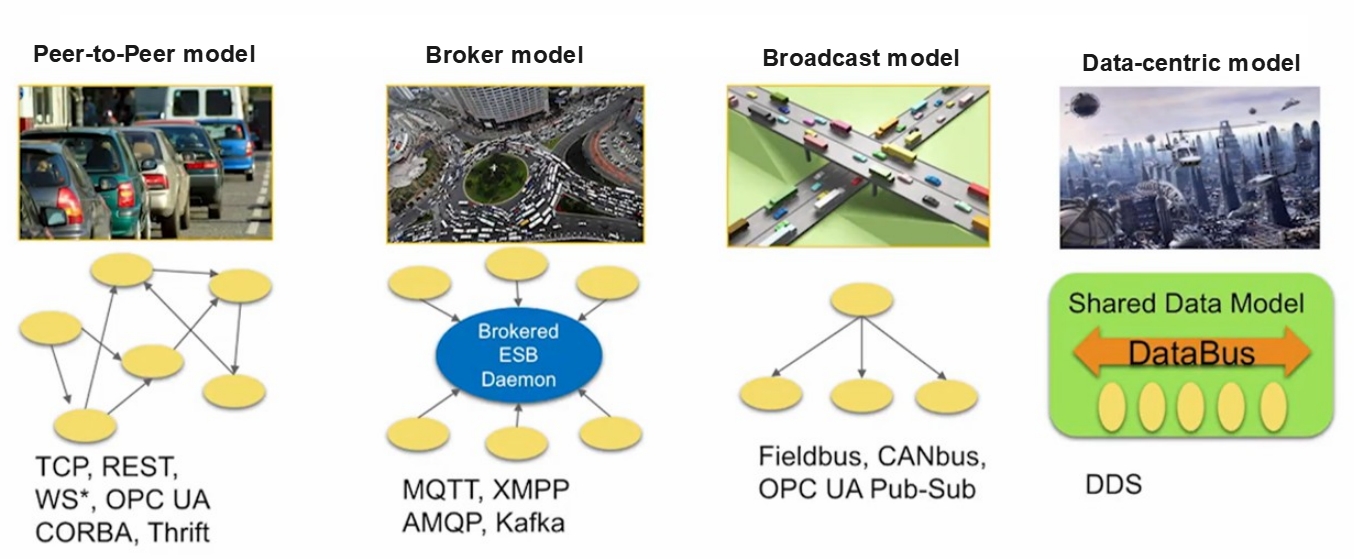
image-20220528020740057

  • The first, the Peer-to-Peer model, involves many clients connecting to a single server. Each communication requires a connection between the two parties. As the number of communicating nodes increases, the number of connections also increases. Furthermore, each client needs to know the server's specific address and the services it provides. If the server's address changes, all clients are affected.
  • The second, the Broker model, optimizes the peer-to-peer model. The broker centrally processes all requests and then identifies the roles that can truly respond to the service. This eliminates the need for clients to worry about the server's specific address. However, the problem is obvious: as the core, the broker's processing speed affects the efficiency of all nodes. Once the system scales to a certain level, the broker can become a performance bottleneck for the entire system. Furthermore, if the broker fails, the entire system can cease to function properly. The previous ROS1 system used a similar architecture.
  • The third model is the Broadcast model, in which all nodes can broadcast messages on a channel and receive them. This model solves the server address problem and eliminates the need for separate connections between communicating parties. However, the sheer number of messages on the broadcast channel forces all nodes to pay attention to every message, many of which are irrelevant to them.
  • The fourth model is the data-centric DDS model. This model is somewhat similar to the broadcast model, in which all nodes can publish and subscribe to messages on the DataBus. However, its advantage lies in the fact that communication involves multiple parallel pathways, allowing each node to focus only on messages of interest and ignore those it doesn't. It's a bit like a rotating hot pot, with all the delicious food being transferred across the DataBus. Each node only needs to take what it wants; the rest is irrelevant to it.

Of these communication models, DDS has a clear advantage.

3. Application of DDS in ROS2

DDS plays a crucial role in the ROS2 system. All upper-layer infrastructure is built on DDS. In this ROS2 architecture diagram, the blue and red components represent DDS.
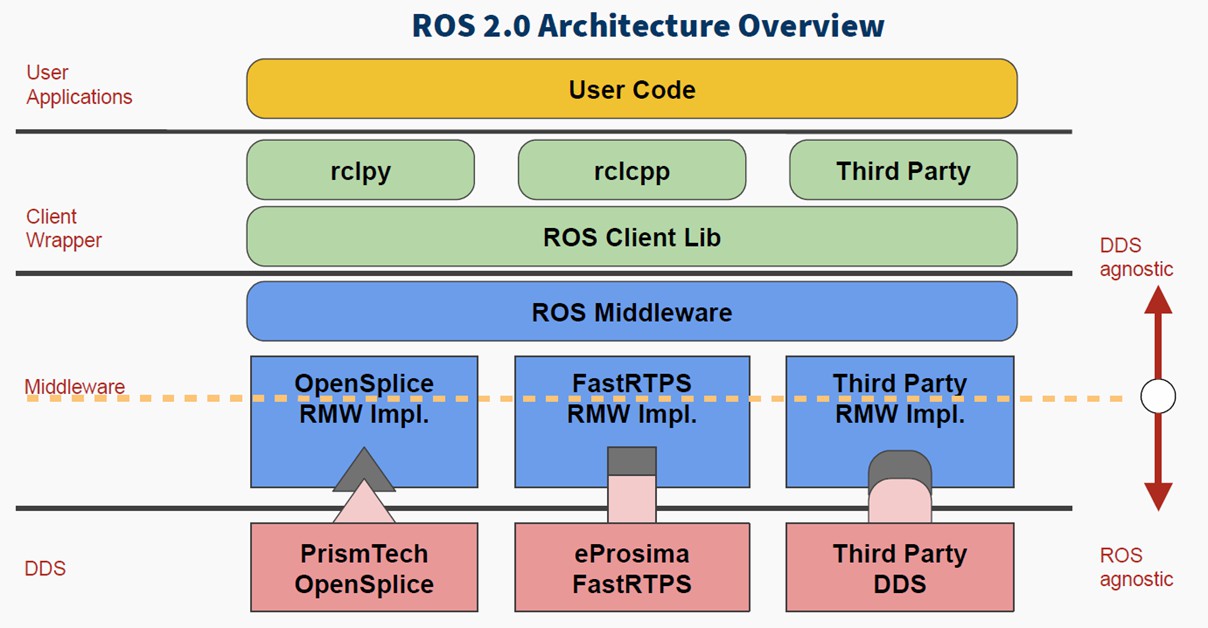
image-20220528020937717

Among the four major components of ROS, the addition of DDS greatly enhances the comprehensive capabilities of the distributed communication system. This allows us to avoid worrying about communication issues during robot development and focus more time on other application development components.

4. Quality of Service (QoS)

The basic structure in DDS is the domain. A domain binds applications together for communication. Recall that when we configured communication between the Raspberry Pi and the computer, the domain ID we configured earlier defines the grouping of the global data space. Only nodes within the same domain group can communicate with each other. This prevents useless data from occupying resources.

Another important feature of DDS is the quality of service (QoS).

QoS is a network transmission policy. Applications specify the desired network transmission quality behavior, and the QoS service implements this behavior to meet the client's communication quality requirements as much as possible. It can be thought of as a contract between data providers and receivers.

The policies are as follows:

  • DEADLINE policy: This policy requires data to be transmitted within a certain deadline.
  • HISTORY policy: This policy specifies the cache size for historical data.
  • RELIABILITY policy: This policy specifies the data communication mode. Configuring BEST_EFFORT ensures smooth data transmission even when network conditions are poor, which may result in data loss. Configuring RELIABLE ensures reliable communication and maximizes image integrity. We can choose the appropriate communication mode based on the application scenario.
  • DURABILITY policy: This policy ensures that a certain amount of historical data is sent to late-joining nodes, allowing new nodes to quickly adapt to the system.

5. Test Cases

5.1 Case 1—Configuring DDS via the Command Line

  • Open the first terminal and publish the topic using the following command:
xxxxxxxxxx
ros2 topic pub /chatter std_msgs/msg/Int32 "data: 66" --qos-reliability best_effort

image-20250827115245194

  • Open another terminal and print the topic using a different QoS. If the QoS policy used differs from the publisher's, a warning message will appear indicating that the topic data cannot be received properly:
xxxxxxxxxx
ros2 topic echo /chatter --qos-reliability reliable

image-20250827115358309

  • We can receive topic data using the same QoS policy as the topic publisher.
xxxxxxxxxx
ros2 topic echo /chatter --qos-reliability best_effort

image-20250827120250112

5.2 Example 2—Configuring QoS Service Policies for Topic Nodes

  • Create a new function package using the following command
xxxxxxxxxx
ros2 pkg create learning_dds --build-type ament_python --dependencies rclpy std_msgs
  • Create a new file, dds_controller_pub.py, as the publisher for topic communication. Fill in the following content:
xxxxxxxxxx
import rclpy
from rclpy.node import Node
from std_msgs.msg import String
# Import QoS related classes
from rclpy.qos import QoSProfile, QoSReliabilityPolicy, QoSHistoryPolicy
​
class ControllerPublisher(Node):
    def __init__(self, name):
        super().__init__(name)
        #1. Configure QoS policy: reliable transmission, retain the last historical data
        self.qos_profile = QoSProfile(
            reliability=QoSReliabilityPolicy.RELIABLE,  # Reliable transmission (retransmission of lost data)
            history=QoSHistoryPolicy.KEEP_LAST,         # Keep the last N pieces of data
            depth=1                                     # Keep 1 historical data
        )
        # 2. Create a publisher: topic name /robot_cmd, message type String, QoS policy
        self.publisher = self.create_publisher(
            String, 
            "/robot_cmd", 
            self.qos_profile
        )
        # 3. Create a timer: send a command once per second
        self.timer = self.create_timer(1.0, self.timer_callback)
        self.cmd_list = ["forward", "backward", "stop"]  # Instruction List
        self.cmd_index = 0  #Instruction index, loop switching
​
​
    def timer_callback(self):
        # Cycle switching instructions (forward → backward → stop → forward...)
        current_cmd = self.cmd_list[self.cmd_index % 3]
        # Create a message and fill it with data
        msg = String()
        msg.data = current_cmd
        # Publish a message
        self.publisher.publish(msg)
        # Print log (shows issued commands)
        self.get_logger().info(f"发布控制指令:{msg.data}")
        # Update command index
        self.cmd_index += 1
​
​
def main(args=None):
    # Initializing ROS2
    rclpy.init(args=args)
    # Create a publisher node
    node = ControllerPublisher("robot_controller_pub")
    # Looping nodes
    rclpy.spin(node)
    # Destroy the node and shut down ROS2
    node.destroy_node()
    rclpy.shutdown()
​
​
if __name__ == "__main__":
    main()


  • To implement the subscriber code, create a new dds_robot_sub.py file and fill in the following subscriber implementation code
xxxxxxxxxx
import rclpy
from rclpy.node import Node
from std_msgs.msg import String
from rclpy.qos import QoSProfile, QoSReliabilityPolicy, QoSHistoryPolicy
​
class RobotSubscriber(Node):
    def __init__(self, name):
        super().__init__(name)
        # 1. Configure a QoS policy compatible with the publisher
        self.qos_profile = QoSProfile(
            reliability=QoSReliabilityPolicy.BEST_EFFORT,
            history=QoSHistoryPolicy.KEEP_LAST,
            depth=1
        )
        # 2. Create a subscriber: topic name/robot_cmd, callback function, QoS policy
        self.subscription = self.create_subscription(
            String,
            "/robot_cmd",
            self.cmd_callback,  # Callback function executed after receiving data
            self.qos_profile
        )
​
    def cmd_callback(self, msg):
        # Callback function: Processes received instructions
        self.get_logger().info(f"接收控制指令:{msg.data} → 执行对应动作")
​
​
def main(args=None):
    rclpy.init(args=args)
    node = RobotSubscriber("robot_subscriber")
    rclpy.spin(node)
    node.destroy_node()
    rclpy.shutdown()
​
​
if __name__ == "__main__":
    main()
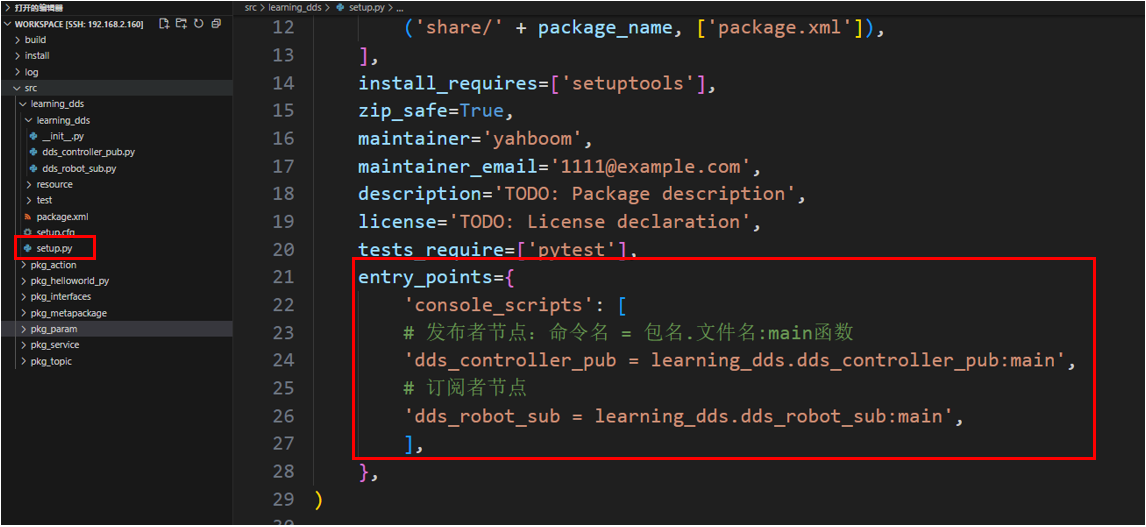
  • Configure the compilation file (setup.py)
xxxxxxxxxx
entry_points={
    'console_scripts': [
        # Publisher node: command name = package name. file name: main function
        'dds_controller_pub = learning_dds.dds_controller_pub:main',
        # Subscriber Node
        'dds_robot_sub = learning_dds.dds_robot_sub:main',
    ],
},

image-20250905153513257


  • Open the terminal in the workspace directory and compile the function package
xxxxxxxxxx
colcon build --packages-select learning_dds
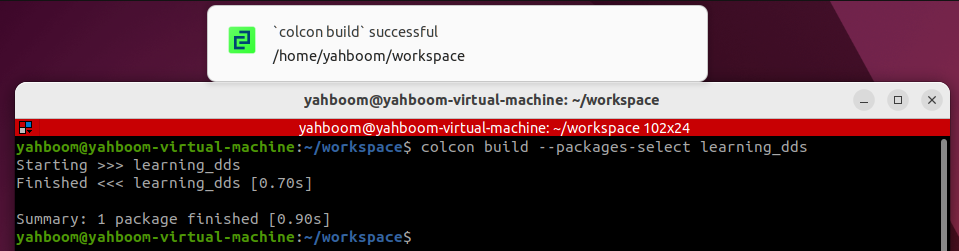
image-20250905153611086


  • Set environment variables. You need to set environment variables every time you recompile.
xxxxxxxxxx
source install/setup.bash
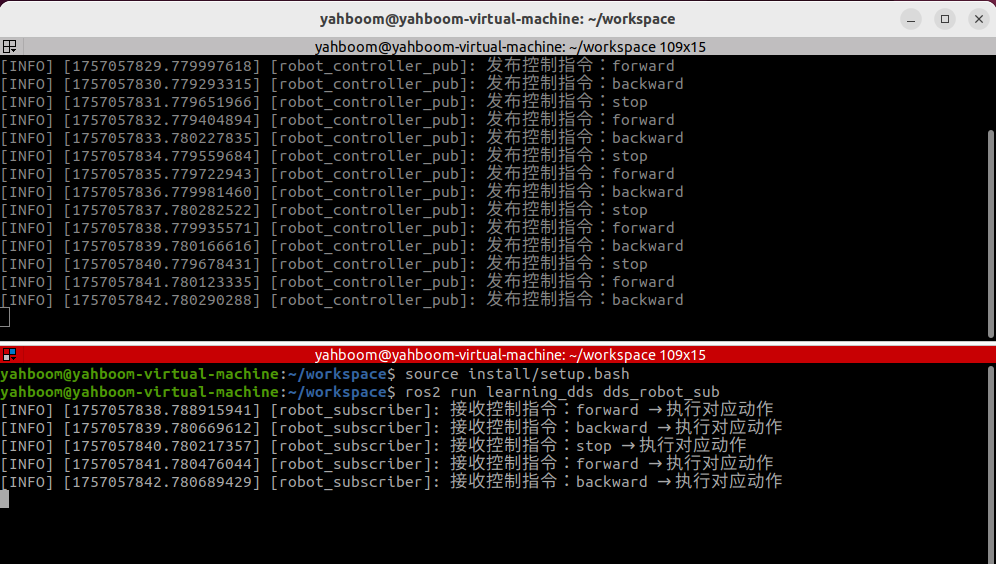
  • Running publisher and subscriber nodes
xxxxxxxxxx
ros2 run learning_dds dds_controller_pub
xxxxxxxxxx
ros2 run learning_dds dds_robot_sub

image-20250905153734043


Advanced Robot Development:

  • Typically, publishers and subscribers of topic communications should maintain the same QoS communication strategy to avoid potential communication layer issues.
  • QoS communication strategy settings should be selected based on the specific application scenario.
  • If the application scenario involves drone communication, encrypted communication, real-time communication, or other scenarios with special communication layer requirements, the official Fast-DDS manual is included in the tutorial introduction for a more detailed description of DDS features.
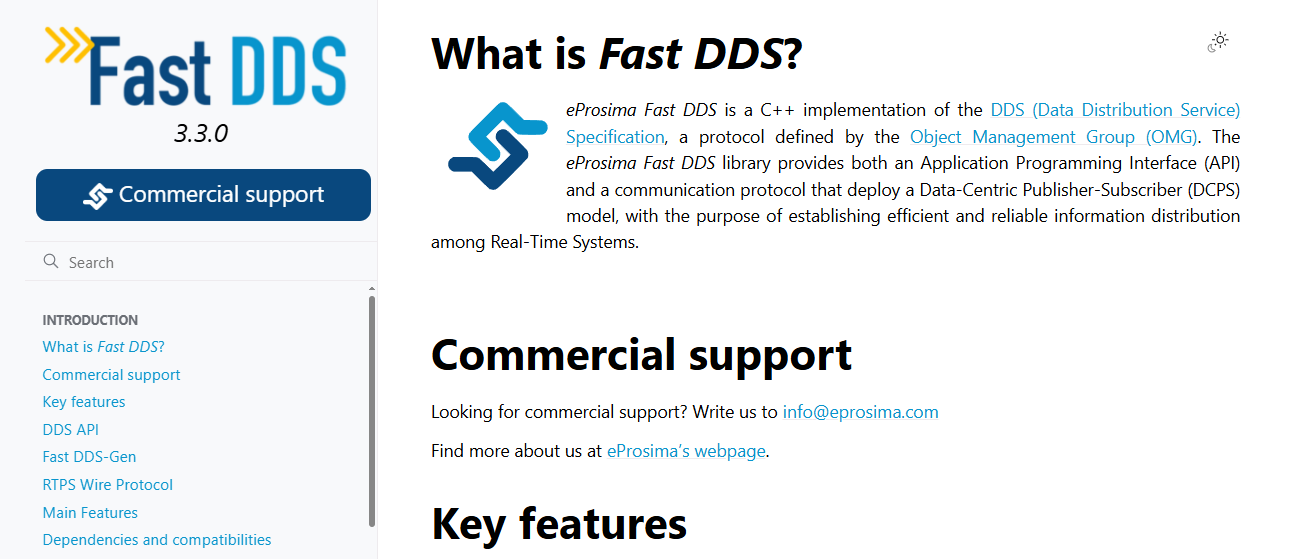
image-20250905155146210

ROS2 distributed communication
ROS2 time related API

COMPANY

  • About us
  • Team Style
  • Blog

LEARNING & EXPLORATION

  • Tutorials
  • Edge AI hardware
  • Educational robots
  • Embedded intelligent hardware

WHERE TO BUY

  • Yahboom Online Store
  • Amazon
  • Alibaba
  • AliExpress
  • Mercado

TECHNOLOGY SUPPORT

  • Email: support@yahboom.com

BE A DISTRIBUTOR

  • Email: sales@yahboom.com
QR Code

Copyright © 2017-2026 Yahboom. All Rights Reserved.

EN/中文