Welcome to Muto RS Robot repository
8)Obstacle recognition
8.Obstacle recognition
1. Program function description
After the program is started, Muto will move forward. When an obstacle appears within the detection range of the depth camera, it will adjust its posture to avoid the obstacle, and then continue to move forward. If the controller node is activated, the R2 key of the controller can pause/enable this function.
Note: The pitch angle of the depth camera will affect the experimental results of this case. Please adjust the pitch angle of the depth camera to be parallel to the ground for better results.
2. Program code reference path
After entering the docker container, the source code of this function is located at
xxxxxxxxxx/root/yahboomcar_ros2_ws/yahboomcar_ws/src/yahboomcar_astra/yahboomcar_astra/camera_avoidance.py/root/yahboomcar_ros2_ws/yahboomcar_ws/src/yahboomcar_astra/launch/camera_avoidance_launch.py
3. Program startup
3.1. Start command
After entering the docker container, run in a terminal:
xxxxxxxxxx# Start astro_pro_plus depth cameraros2 launch astra_camera astro_pro_plus.launch.xml# Start the depth camera obstacle recognition noderos2 launch yahboomcar_astra camera_avoidance_launch.py3.2. View topic communication node graph
docker terminal input
xxxxxxxxxxros2 run rqt_graph rqt_graph
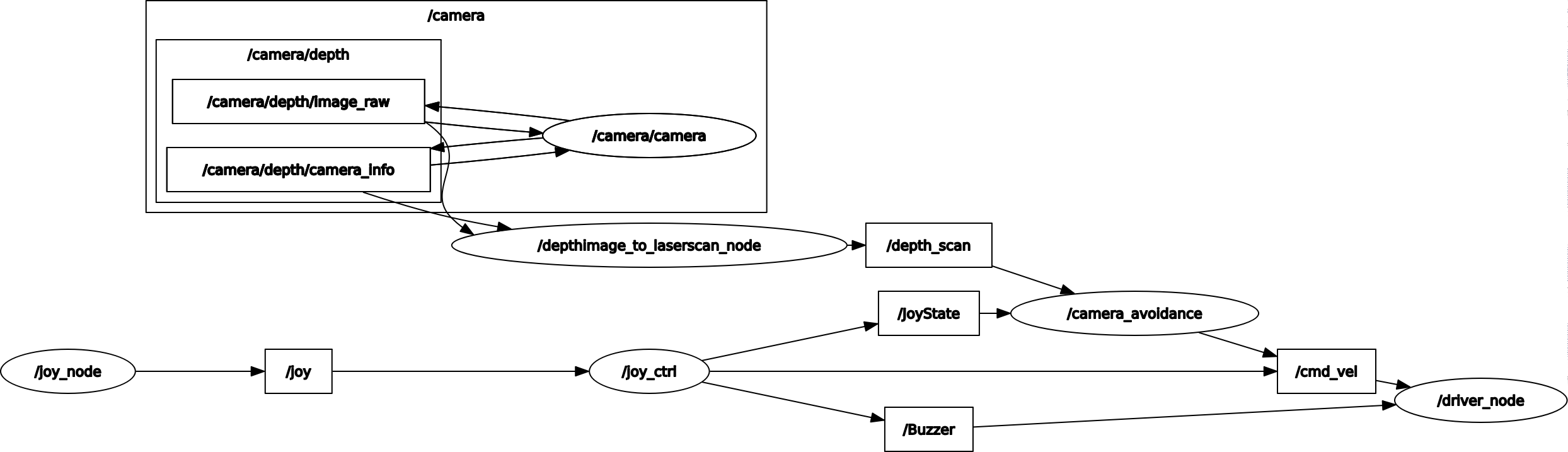
You can also set the parameter size through the dynamic parameter adjuster, terminal input,
xxxxxxxxxxros2 run rqt_reconfigure rqt_reconfigure
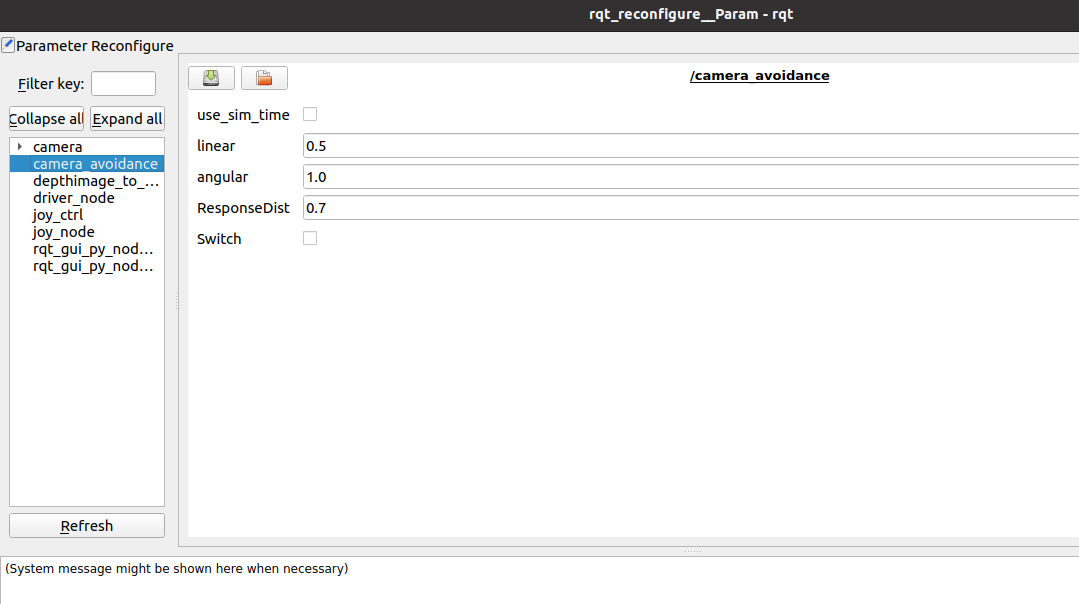
The meaning of each parameter is as follows:
| Parameter name | Parameter meaning |
|---|---|
| linear | Line speed |
| angular | angular speed |
| ResponseDist | Obstacle detection distance |
| Switch | Game switch |
The above parameters are all adjustable. Except for Switch, the other four parameters need to be set to decimals. After modification, click on the blank space to write.
4. Core source code analysis
The core point of this case is to obtain the depth information of the depth camera to calculate the distance to the obstacle in front. The depthimage_to_laserscan function package will subscribe to the depth information of the depth camera and output the radar information of /depth_scan to facilitate the calculation of the distance of the entire camera image. Add corresponding logic processing to avoid obstacles. Since the angle of view of the depth camera is relatively small and there are reflections, the obstacle avoidance effect will be slightly worse than using radar.
depthimage_to_laserscan node:
xxxxxxxxxxdef generate_launch_description(): param_config = os.path.join( get_package_share_directory('depthimage_to_laserscan'), 'cfg', 'param.yaml') return LaunchDescription([ Node( package='depthimage_to_laserscan', executable='depthimage_to_laserscan_node', name='depthimage_to_laserscan', remappings=[('depth', '/camera/depth/image_raw'), ('depth_camera_info', '/camera/depth/camera_info')], parameters=[param_config]) ]) Process the converted depth data:
self.Right_warning = 0 self.Left_warning = 0 self.front_warning = 0 for i in range(len(ranges)): angle = (scan_data.angle_min + scan_data.angle_increment * i) * RAD2DEG if -30 < angle < -10: if 0 < ranges[i] < self.ResponseDist: self.Right_warning += 1 if 10 < angle < 30: if 0 < ranges[i] < self.ResponseDist: self.Left_warning += 1 if abs(angle) <= 10: if 0 < ranges[i] < self.ResponseDist: self.front_warning += 1