yahboom
HomeLearn
Solution
Blog
Online Store
About Us
EN/中文
ROSMASTER X3 Plus📖
1.Preparation and First Trial
  • 1.1 Wiring Introduction
  • 1.2 Precautions for battery
  • 1.3 First Trial
  • 1.4 Precautions for DIY Robotic Arm
2. Assembly steps
  • Installation Video
3.Remote control course
  • 3.1 APP remote control
  • 3.2 Model aircraft remote control
  • 3.3 Handle remote control
4.Hardware course
  • 4.1 About expansion board_V3.0
  • 4.1 About expansion board_V1.0
  • 4.2 STM32 Development
  • 4.3 Button to control the buzzer
  • 4.4 FreeRTOS application
  • 4.5 Serial communication
  • 4.6 SBUS model aircraft remote control
  • 4.7 CAN bus communication
  • 4.8 RGB colorful light bar
  • 4.9 Timer interrupt to control
  • 4.10 Control serial port servos
  • 4.11 Nine-axis attitude sensor
  • 4.12 Control motor
  • 4.13 Timer captures the encoder data
  • 4.14 Kinematic Analysis
  • 4.15 PID control robot movement
5.Basic course
  • 5.1 Update the firmware
  • 5.2 Turn off the self-starting process
  • 5.3 Install the Rosmaster driver
  • 5.4 Buzzer whistle
  • 5.5 Control PWM servo
  • 5.6 RGB colorful light bar
  • 5.7 Control motor
  • 5.8 Control robot movement
  • 5.9 Control Serial Servo
6.Linux operating system
  • 6.1 Virtual machine installation
  • 6.2 Linux basics
  • 6.3 Remote control
  • 6.4 Multi-machine communication
  • 6.5 Static IP and hotspot mode
  • 6.6 Bind the device ID
  • 6.7 Web page real-time monitor
  • 6.8 Expansion tutorial
  • 6.9.1 Jetson Nano write sytem
  • 6.9.2 Jetson Xavier NX write system
  • 6.9.3 Jetson TX2 NX write system
  • 6.9.4 Raspberry Pi write system
7.Docker-Just for pi5
  • 7.1 Docker overview and docker installation
  • 7.2 Common commands for docker image containers
  • 7.3 Docker images deeply understand and publish images
  • 7.4 Docker hardware interaction and data processing
  • 7.5 Enter the bot's docker container
  • 7.6 Robot development environment construction in Docker
  • 7.7 How customers can update docker images in the future
8.ROS basic course
  • 8.1 ROS introduction
  • 8.2 ROS installation
  • 8.3 ROS common command tools
  • 8.4 ROS workspace
  • 8.5 ROS function package
  • 8.6 ROS node
  • 8.7 ROS topic publisher
  • 8.8 ROS topic subscribers
  • 8.9 ROS service client
  • 8.10 ROS service server
  • 8.11 ROS action client
  • 8.12 ROS action server
  • 8.13 ROS custom message reception
  • 8.14 ROS-launch file
  • 8.15 ROS-TF transformation
  • 8.16 ROS parameter service
  • 8.17 ROS-rviz use
  • 8.18 ROS-rqt tool usage
  • 8.19 Topic message recording and playback
  • 8.20 urdf model introduction
  • 8.21 gazebo introduction
  • 8.22 ROS distributed communication
9.OpenCV courses
  • 9.1 Getting started with Open Source CV
  • 9.2 Geometric transformation
  • 9.3 Image processing and draw
  • 9.4 Image beautification
  • 9.5 Opencv application
  • 9.6 AR vision
  • 9.7 AR QR code
  • 9.8 ROS+Opencv foundation
  • 9.9 ROS+Opencv application
  • 9.10 Data transformation
  • 9.11 MediaPipe development
10.Robot control course
  • 10.1 PID algorithm theory
  • 10.2 Robot PID debugging
  • 10.3 Robot information release
  • 10.4 Robot keyboard control
  • 10.5 Robot handle control
  • 10.6 Robot state estimation
  • 10.7 Robot calibration
  • 10.8 Robot URDF model
11.Depth camera course
  • 11.1 How to use the Astra camera
  • 11.2 Astra camera calibration
  • 11.3 Astra Color Tracking
  • 11.4 Astra Object Tracking
  • 11.5 Visual tracking autopilot
  • 11.6 Pure visual 2D mapping
  • 11.7 RTAB-Map 3D mapping
  • 11.8 ORB_SLAM2 basics
  • 11.9 ORB_SLAM2_Octomap
12.Lidar course
  • 12.1 Lidar basic-SLAM
  • 12.1 Lidar basic-EAI
  • 12.2 Lidar avoiding
  • 12.3 Lidar guard
  • 12.4 Lidar follow
  • 12.5 Patrol game
  • 12.6 gmapping mapping algoritm
  • 12.7 hector mapping algorithm
  • 12.8 karto mapping algorithm
  • 12.9 cartographer mapping
  • 12.10 rrt_exploration mapping
  • 12.11 AMCL
  • 12.12 Navigation and avoiding
  • 12.13 APP mapping and navigation
13.Multi-robot control course
  • 13.1 Multi-machine handle control
  • 13.2 Multi-machine navigation
  • 13.3 Multi-machine formation
  • 13.4 Multi-machine surround
14.Deep learning courses
  • 14.1 KNN recognizes handwritten
  • 14.2 Basic use of TensorFlow
  • 14.3 Basic use of PyTorch(jetson)
  • 14.4 yolov5 model training(jetson)
  • 14.5 yolov5+tensorrt acceleration
  • 14.6 yolov4-tiny
15.Voice control courses
  • 0. How to use old voice module in new image
  • 15.1 Introduction of voice control-new
  • 15.2 Voice control module port-new
  • 15.3.Introduction of voice module-old
  • 15.4.Voice control module port binding-old
  • 15.5 Voice control car movement
  • 15.6 Voice control Autopilot
  • 15.7 Voice control color recogzition
  • 15.8 Voice control color tracking
  • 15.9 Voice control multi-point nagavation
16.Robotic arm control course
  • 16.1 MoveIt configuration
  • 16.2 MoveIt control the real machine
  • 16.3 MoveIt moves randomly
  • 16.4 MoveIt kinematics design
  • 16.5 MoveIt cartesian path
  • 16.6 MoveIt avoiding
  • 16.7 MoveIt scene design
  • 16.8 MoveIt trajectory planning
  • 16.9 Mediapipe palm control car
  • 16.10 Mediapipe gesture control robotic arm
  • 16.11 Mediapipe gesture control car
  • 16.12 Mediapipe arm attitude control robotic arm
  • 16.13 Mediapipe recognizes and tracks palm control robotic arm
  • 16.14 Recognizes color block and handling
  • 16.15 Autopilot to clear obstacles
17.Voice control robotic arm course
  • 17.1 Voice control robotic arm movement
  • 17.2 Voice control robotic arm learning
  • 17.3 Voice control color block transport
  • 17.4 Voice control robotic arm grip objects
  • 17.5 Voice control robotic arm garbage sorting
18.Model training Autopilot
  • 18.0 ReadMe
  • 18.1 yolov5 to train traffic signs
  • 18.2 TensorRt acceleration identification mark
  • 18.3 Road sign indication function description
  • 18.4 Collect data
  • 18.5 Training model
  • 18.6 Model transformation and application
  • 18.7 AI Autopilot
19.For Orin-Remote control course
1. APP control
  • 1. APP control
  • 2. Model aircraft control
  • 3. Handle control
2. Model aircraft control
3. Handle control
20.Orin-Hardware course
  • 1. About expansion board_V1.0
  • 1. About expansion board_V2.0
  • 2. STM32 Development environment
  • 3. Button control
  • 4. FreeRTOS application
  • 5. Serial communication
  • 6. SBUS model aircraft remote control
  • 7. CAN bus communication
  • 8. RGB colorful light bar
  • 9. Timer interrupt to control PWM servo
  • 10. Control serial port servos
  • 11. Nine-axis attitude sensor to obtain data
  • 12. Control motor
  • 13. Timer captures the encoder data
  • 14. Robot kinematics analysis theory
  • 15. PID control robot movement
21.Orin-Basic course
  • 1. Update the firmware
  • 2. Turn off the self-starting process at startup
  • 3. Install the Rosmaster driver library
  • 4. Buzzer whistle
  • 5. Control PWM servo
  • 6. RGB colorful light bar special effects display
  • 7. Control motor
  • 8. Control robot movement
  • 9. Control Serial Servo
22.Orin-Linux operating systemnew
  • 1. Virtual machine installation and use
  • 2. Linux basics
  • 3. Remote control
  • 4. Multi-machine communication configuration
  • 5. Static IP and hotspot mode
  • 6. Bind the device ID
  • 7. Web page real-time monitoring
  • 8. Expansion tutorial
  • 9.1 Jetson Nano write sytem
  • 9.2 Jetson Xavier NX write system
  • 9.3 Jetson TX2 NX-Orin series write system
  • 9.4 Raspberry Pi write system
  • 10.Jetpack old system upgraded to SUPER system
23.Orin-Dockernew
SUPER image uses ros environment in docker
  • 1、Docker overview and docker installationnew
  • 2、Common commands for docker image containersnew
  • 3、Docker images deeply understand and publish imagesnew
  • 4、Docker hardware interaction and data processingnew
  • 5、Enter the bot's docker containernew
  • 6、Robot development environment construction in Dockernew
23.Orin-ROS basic course
  • 1.ROS introduction
  • 2.Project file structure
  • 3.Common commands and tools
  • 4.Publisher
  • 5.Subscribers
  • 6.Customize topic messages and use
  • 7.Client
  • 8.Server
  • 9.Custom service messages and usage
  • 10.TF release and monitoring
24.Orin-OpenCV courses
  • 1. Getting started with Open Source CV
  • 2. Open Source CV geometric transformation
  • 3. Open Source CV image processing and drawing text line segments
  • 4. Open Source CV image beautification
  • 5. Opencv application
  • 6. AR vision
  • 7. AR QR code
  • 8. ROS+Opencv foundation
  • 9. ROS+Opencv application
  • 10. Data transformation and point cloud
  • 11. MediaPipe development
25.Orin-Robot control course
  • 1.PID algorithm theory
  • 2.Robot PID debugging
  • 3.Robot information release
  • 4.Robot keyboard control
  • 5.Robot handle control
  • 6.Robot state estimation
  • 7.Robot calibration
  • 8.Robot URDF model
26.Orin-Depth camera course
  • 01.How to use the Astra camera
  • 02.Astra camera calibration
  • 03.Astra Color Tracking
  • 04.Astra Object Tracking
  • 05.Visual tracking autopilot
  • 06.Pure visual 2D mapping and navigation
  • 07.RTAB-Map 3D mapping navigation
  • 08.ORB_SLAM2 basics
  • 09.ORB_SLAM2_Octomap
27.Orin-Lidar course
  • 1.Lidar basic-4ROS-EAI
  • 1.Lidar basic-SLAM
  • 2.Lidar avoiding
  • 3.Lidar guard
  • 4.Lidar follow
  • 5.Patrol game
  • 6.gmapping mapping algorithm
  • 7.hector mapping algorithm
  • 8.karto mapping algorithm
  • 9.cartographer mapping algorithm
  • 10.rrt_exploration mapping algorithm
  • 11.AMCL
  • 12.Navigation and avoiding
  • 13.APP mapping and navigation
28.Orin-Multi-robot control course
  • 1.Multi-machine handle control
  • 2.Multi-machine navigation
  • 3.Multi-machine formation
  • 4.Multi-machine surround
29.Orin-Deep learning courses
  • 1.KNN recognizes handwritten digits
  • 2.Basic use of TensorFlow
  • 3.Basic use of PyTorch(jetson)
  • 4.YOLOv11Model conversion(SUPER)new
  • 5.YOLOv11Dataset annotation(SUPER)new
  • 6.YOLOv11Model conversion + tensorrt acceleration(SUPER)new
  • 7.YOLOv11Object recognition(SUPER)new
30.Orin-Voice control courses
  • 0. How to use old voice module in new image
  • 1.1 Introduction of voice module-new
  • 1.2 Introduction of voice module-old
  • 2.1 Voice control module port binding-new
  • 2.2 Voice control module port binding-old
  • 3. Voice control car movement
  • 4. Voice control Autopilot
  • 5. Voice control color recognition
  • 6. Voice control color tracking
  • 7. Voice control multi-point navigation
31.Orin-Robotic arm control course
  • 1.MoveIt configuration(VM)
  • 2.MoveIt control the real machine(VM)
  • 3.MoveIt moves randomly(VM)
  • 4.MoveIt kinematics design(VM)
  • 5.MoveIt cartesian path(VM)
  • 6.MoveIt avoiding(VM)
  • 7.MoveIt scene design(VM)
  • 8.MoveIt trajectory planning(VM)
  • 9.Mediapipe palm control car
  • 10.Mediapipe gesture control robotic arm
  • 11.Mediapipe gesture control car
  • 12.Mediapipe arm attitude control robotic arm
  • 13.Mediapipe recognizes and tracks palm control robotic arm
  • 14.Recognizes color block and handling
  • 15.Autopilot to clear obstacles
32.Orin-Voice control robotic arm course
  • 1.Voice control robotic arm movement
  • 2.Voice control robotic arm learning
  • 3.Voice control color block transport
  • 4.Voice control robotic arm grip objects
  • 5.Voice control robotic arm garbage sorting
LLM tutorial
1.Development environment
  • 0. Model usage instructions
  • 1.Environments deployment
  • 2.Dialogue platform installation
2.Jetson Nano B01
  • 1.Qwen2 model
  • 2.TinyLlama model
  • 3.Phi-3 model
  • 4.Gemma model
  • 5.Orca Mini model
  • 6.StarCoder2 model
  • 7.DeepSeek-R1 model
  • 8.Expand LLaVA-Phi3
3.Jetson Orin NXNANO
  • 1.Llama3 model
  • 2.Qwen2 model
  • 3.Phi-3 model
  • 4.Gemma model
  • 5.WizardLM2 model
  • 6.Codellama model
  • 7.DeepSeek-R1 model
  • 8.Orca Mini model
  • 9.StarCoder2 model
  • 10.TinyLlama model
  • 11.Expand LLaVA
  • 12.Expand LLaVA-Phi3
4.Raspberry Pi 5B
  • 1.Meta AI Llama3 model
  • 2.Qwen2 model
  • 3.Phi-3 model
  • 4.Gemma model
  • 5.WizardLM2 model
  • 6.Meta AI Codellama model
  • 7.DeepSeek-R1 model
  • 8.Expand LLaVA
FAQ
  • Using your own Jetson board, car cannot start normally
Download
  • RemoteCtrl_APP(iOS/Android)
  • Mapping_APP(iOS_Android)
  • SystemFile_OrinNANOSUPER
  • SystemFile_OrinNXSUPER
  • SystemFile_RPi_NANO
  • Instruction Manual
  • Code
  • Autopilot Annex
  • VM software
  • Jetson_Boot_USB.tar.gz
  • Other_Annex_File
Download ZIP
FAQ
  • 1、How to connect OLED?
  • 2、Precautions for DIY Robotic Arm

Welcome to ROSMASTER X3 Plus repository

8.1 ROS introduction

1.ROS introduction

1.ROS introduction1.1 Main features of ROS1.2 Overall architecture of ROS1.2.1 Calculation graph level1.2.2 File system level1.2.3 Open source community level1.3 Communication mechanism1.3.1、Topic1.3.2、Service1.3.3、Action1.4 Common components1.5 Release version

ROS wiki : http://wiki.ros.org/

ROS (Robot Operating System, referred to as "ROS") is an open source operating system suitable for robots. It provides the services that an operating system should have, including hardware abstraction, low-level device control, implementation of common functions, inter-process message passing, and package management. It also provides the tools and library functions needed to obtain, compile, write, and run code across computers.

The main goal of ROS is to provide support for code reuse for robotics research and development. ROS is a framework of distributed processes (also known as "nodes") that are encapsulated in packages and function packages that are easy to share and publish. ROS also supports a federated system similar to a code repository, which can also enable project collaboration and release. This design allows the development and implementation of a project to be completely independent from the file system to the user interface (not restricted by ROS). At the same time, all projects can be integrated by ROS basic tools.

1.1 Main features of ROS

(1) Distributed architecture (each working process is regarded as a node and is managed uniformly using the node manager),

(2) Multi-language support (such as C++, Python, etc.),

(3) Good scalability (you can write one node, or organize many nodes into a larger project through roslaunch),

(4) Open source code (ROS follows the BSD protocol and is completely free for individual and commercial applications and modifications).

1.2 Overall architecture of ROS

Open source community level: mainly includes developer knowledge, code, and algorithm sharing.

File system level: used to describe the code and executable programs that can be found on the hard disk.

Computational graph level: reflects the communication between processes and processes and systems.

1.2.1 Calculation graph level

  • Node

    Nodes are the main computing execution processes. ROS is composed of many nodes. After multiple nodes are started, you can use the following command to view the topic communication between each node.

rqt_graph
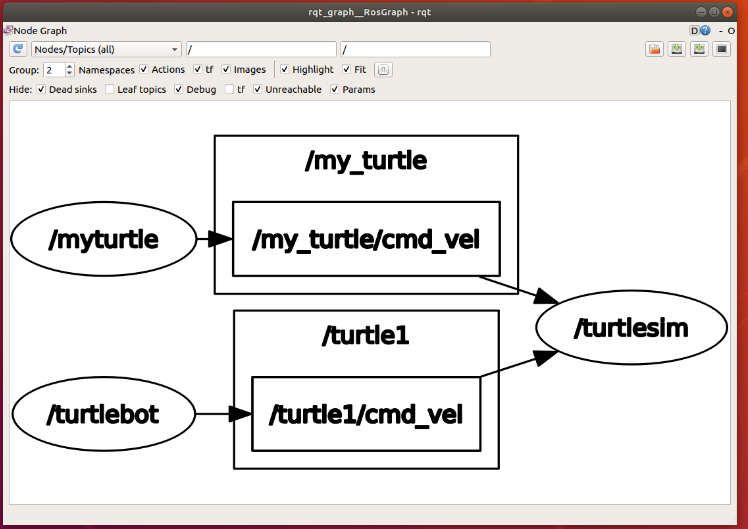
image-20210827145606482

  • Information

    Nodes realize logical connections and data exchange with each other through messages.

  • Topic (theme)

    Topics are a way of delivering messages (publish/subscribe). Each message must be published to the corresponding topic, and each topic is strongly typed. ROS topic messages can be transmitted using TCP/IP or UDP. The default transmission method used by ROS is TCP/IP. Transmission based on TCP is called TCPROS, which is a long connection method; transmission based on UDP is called UDPROS, which is a low-latency, high-efficiency transmission method, but it is easy to lose data and is suitable for remote operations.

  • Services

    Services are used in the request-reply model and must also have a unique name. When a node provides a service, all nodes can communicate with it through code written using ROS clients.

  • Message record package

    Message recording package is a file format used to save and playback ROS message data, which is saved in .bag file. It is an important mechanism for storing data.

  • Parameter server

    The parameter server is a shared multi-variable dictionary accessible over the network, stored by key on the node manager.

  • Node Manager (Master)

    The node manager is used for registration and search of topics and service names, etc. If there is no node manager in the entire ROS system, there will be no communication between nodes.

1.2.2 File system level

File system level
Comprehensive functional package
Functional package
Function package list
Message
Service
Code
Others

Dependencies can be configured between function packages. If function package A depends on function package B, then when building the system in ROS, B must be built earlier than A, and A can use the header files and library files in B.

The file system level concepts are as follows:

  • Function pack list:

    This list indicates the dependencies of the function package, source file compilation flag information, etc. The package.xml file in the function package is a function package list.

  • Function pack:

    Function packages are the basic form of software organization in the ROS system, including running nodes and configuration files.

  • Comprehensive feature package

    Several functional packages are organized together to form a comprehensive functional package.

  • Message type

    When sending messages between nodes in ROS, a message description is required in advance. ROS provides standard types of messages, which can also be defined by yourself. The description of the message type is stored in the msg file under the function package.

  • Service type

    Defines the data structure provided by each process in the ROS system regarding service requests and responses.

1.2.3 Open source community level

  • Distribution: ROS distribution is a series of comprehensive function packages that can be installed independently and have version numbers. ROS distributions serve a similar role as Linux distributions. This makes it easier to install ROS software and maintain consistent versions through a collection of software.
  • Software repository (Repository): ROS relies on websites or hosting services that share open source code and software libraries, where different organizations can publish and share their own robot software and programs.
  • ROS Wiki: The ROS Wiki is the primary forum for recording information about the ROS system. Anyone can register an account, contribute their own files, provide corrections or updates, write tutorials, and other actions.
  • Bug Ticket System: If you find a problem or want to propose a new feature, ROS provides this resource to do this.
  • Mailing list: The ROS user mailing list is the main communication channel about ROS. It can exchange various questions or information from ROS software updates to ROS software use like a forum.
  • ROS Answer: Users can use this resource to ask questions

1.3 Communication mechanism

1.3.1、Topic

The asynchronous publish-subscribe communication mode is widely used in ros. Topic is generally used for one-way, message flow communication. Topics generally have strong type definitions: a topic of one type can only accept/send messages of a specific data type (message type). Publisher is not required to have type consistency, but when accepting, subscriber will check the md5 of the type and report an error.
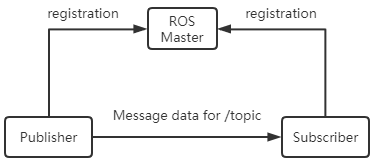
image-20210831162509791

1.3.2、Service

Service is used to handle synchronous communication in ros communication, using server/client semantics. Each service type has two parts: request and response. For the server in the service, ros will not check the name conflict. Only the last registered server will take effect and establish a connection with the client.
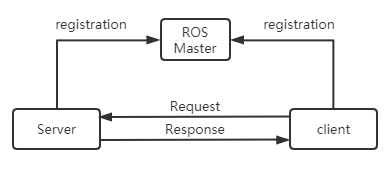
image-20210831163032489

1.3.3、Action

Actions are composed of multiple topics and are used to define tasks. Task definitions include goals (Goal), task execution process status feedback (Feedback), and results (Result). Compiling action will automatically generate 7 structures: Action, ActionGoal, ActionFeedback, ActionResult, Goal, Feedback, and Result structures.
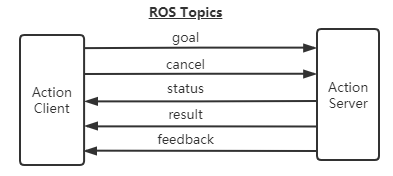
image-20210830102834443

Features of Action:

  • A question and answer communication mechanism
  • With continuous feedback
  • Can be terminated during a mission
  • Implementation of message mechanism based on ROS

Action interface:

  • goal: publish task goal
  • cancel: Request to cancel the task
  • status: Notify the client of the current status
  • feedback: Monitoring data for periodic feedback task running
  • result: Send the execution result of the task to the client and only publish it once.

Comparison of communication mode features

FeaturesTopicServiceAction
Response mechanismNoneResult responseProgress response, result response
SynchronicityAsynchronousSynchronousAsynchronous
Communication modelPublisher,SubscriberClient,ServerClient,Server
Node correspondenceMany to manyMany(Client)to one(Server)Many(Client)to one(Server)

1.4 Common components

launch startup file; TF coordinate transformation; Rviz; Gazebo; QT toolbox; Navigation; MoveIt!

launch:Launch File is a way to start multiple nodes at the same time in ROS.It can also automatically start the ROS Master node manager, and can implement various configurations of each node, providing great convenience for the operation of multiple nodes.

TF coordinate transformation: There are often a large number of component elements in the robot body and the robot's working environment. The positions and postures of different components are involved in robot design and robot applications. TF is a function package that allows users to track multiple coordinate systems over time , which uses a tree data structure to buffer and maintain coordinate transformation relationships between multiple coordinate systems based on time, which can help developers complete coordinate transformations such as points and vectors between coordinate systems at any time.

QT toolbox: In order to facilitate visual debugging and display, ROS provides a Qt-based background graphics tool suite - rqt_common_plugins,It contains many practical tools: log output tool (rqt_console), calculation graph visualization tool (rqt_graph), data drawing tool (rqt_plot), parameter dynamic configuration tool (rqt_reconfigure)

Rviz: rviz is a 3D visualization tool that is well compatible with various robot platforms based on the ROS software framework. In rviz, you can use XML to describe the size, quality, position, material, joints and other attributes of any physical objects such as robots and surrounding objects, and present them in the interface. At the same time, rviz can also display robot sensor information, robot motion status, changes in the surrounding environment, etc. in a graphical manner in real time.

Gazebo: Gazebo is a powerful three-dimensional physics simulation platform with a powerful physics engine, high-quality graphics rendering, convenient programming and graphics interfaces, and most importantly, it is open source and free. Although the robot model in Gazebo is the same as the model used by rviz, the physical properties of the robot and the surrounding environment, such as mass, friction coefficient, elastic coefficient, etc., need to be added to the model. The robot's sensor information can also be added to the simulation environment in the form of plug-ins and displayed in a visual manner.

Navigation: Navigation is a two-dimensional navigation function package of ROS. Simply put, it calculates safe and reliable robot speed control instructions through the navigation algorithm based on the information flow of the input odometer and other sensors and the global position of the robot.

Moveit:Moveit!Function package is the most commonly used tool package, mainly used for trajectory planning. Move it! The configuration assistant is used to configure some files that need to be used in planning, which is very important.

1.5 Release version

Reference link:http://wiki.ros.org/Distributions
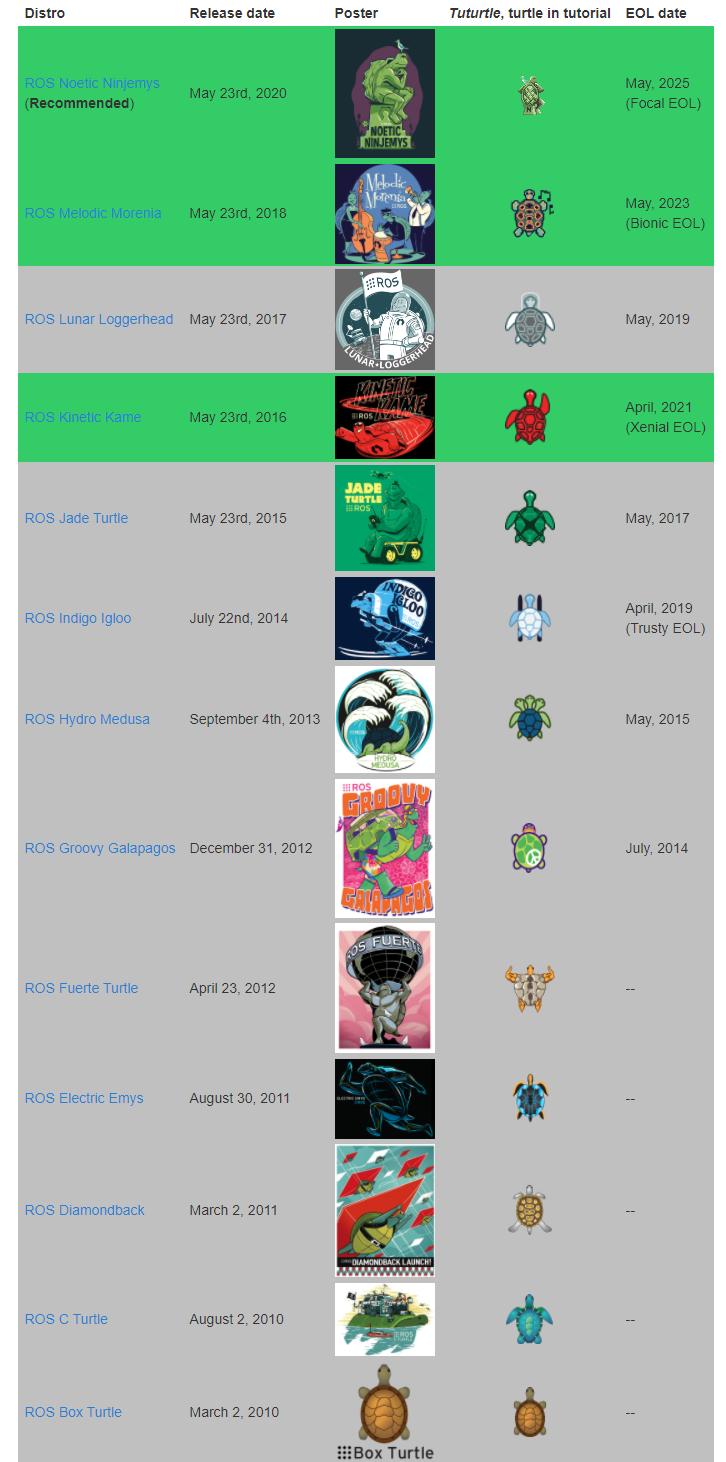
ROS 1 Distribution

ROS distribution refers to the version of the ROS software package.The concept of it and Linux distribution version (such as Ubuntu) similar.The purpose of a ROS distribution is to allow developers to work with a relatively stable codebase until they are ready to upgrade everything.Therefore, after each release version is launched, ROS developers usually only fix the bugs in this version and provide a small number of improvements to the core software package.As of October 2019, the version names, release times and version life cycles of major ROS releases are as shown in the following table:

Version nameRelease dateVersion lifecycleOperating system platform
ROS Noetic NinjemysMay 2020May 2023Ubuntu 20.04
ROS Melodic MoreniaMay 23, 2018May 2023Ubuntu 17.10, Ubuntu 18.04, Debian 9, Windows 10
ROS Lunar LoggerheadMay 23, 2017May 2019Ubuntu 16.04, Ubuntu 16.10, Ubuntu 17.04,Debian 9
ROS Kinetic KameMay 23, 2016April 2021Ubuntu 15.10, Ubuntu 16.04, Debian 8
ROS Jade TurtleMay 23, 2015May 2017Ubuntu 14.04, Ubuntu 14.10, Ubuntu 15.04
ROS Indigo IglooJuly 22, 2014April 2019Ubuntu 13.04, Ubuntu 14.04
ROS Hydro MedusaSeptember 4, 2013May 2015Ubuntu 12.04, Ubuntu 12.10, Ubuntu 13.04
ROS Groovy GalapagosDecember 31, 2012July 2014Ubuntu 11.10, Ubuntu 12.04, Ubuntu 12.10
ROS Fuerte TurtleApril 23, 2012--Ubuntu 10.04, Ubuntu 11.10, Ubuntu 12.04
ROS Electric EmysAugust 30, 2011--Ubuntu 10.04, Ubuntu 10.10, Ubuntu 11.04, Ubuntu 11.10
ROS DiamondbackMarch 2, 2011--Ubuntu 10.04, Ubuntu 10.10, Ubuntu 11.04
ROS C TurtleAugust 2, 2010--Ubuntu 9.04, Ubuntu 9.10, Ubuntu 10.04, Ubuntu 10.10
ROS Box TurtleMarch 2, 2010--Ubuntu 8.04, Ubuntu 9.04, Ubuntu 9.10, Ubuntu 10.04


How customers can update docker images in the future
ROS installation

COMPANY

  • About us
  • Team Style
  • Blog

LEARNING & EXPLORATION

  • Tutorials
  • Edge AI hardware
  • Educational robots
  • Embedded intelligent hardware

WHERE TO BUY

  • Yahboom Online Store
  • Amazon
  • Alibaba
  • AliExpress
  • Mercado

TECHNOLOGY SUPPORT

  • Email: support@yahboom.com

BE A DISTRIBUTOR

  • Email: sales@yahboom.com
QR Code

Copyright © 2017-2026 Yahboom. All Rights Reserved.

EN/中文