Welcome to ROSMASTER X3 Plus repository
17.2 Voice control robotic arm learning
2. Voice control robotic arm memory learning
2.1. Function description
The robotic arm is controlled through the voice module to record the position and posture of the robotic arm that we set manually, and the movements learned and recorded can be controlled through voice control.
2.2. Start
xxxxxxxxxx#Raspberry Pi 5 master needs to enter docker first, please perform this step#If running the script into docker fails, please refer to ROS/07, Docker tutorial~/run_docker.sh2.2.1. Function package path
xxxxxxxxxx~/yahboomcar_ws/src/yahboomcar_voice_ctrl/scripts
2.2.2. Start
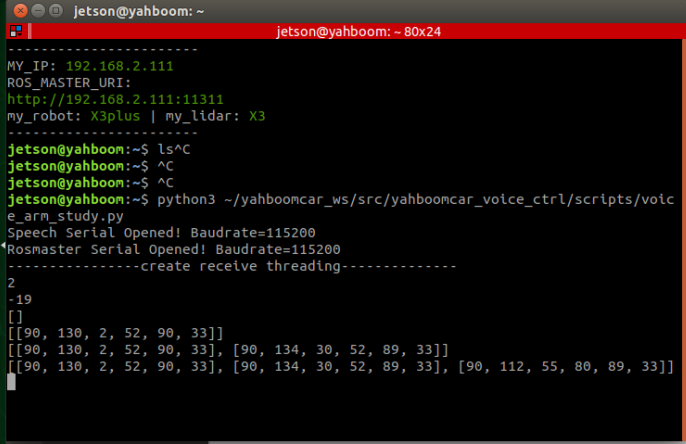
xxxxxxxxxxpython3 ~/yahboomcar_ws/src/yahboomcar_voice_ctrl/scripts/voice_arm_study.py
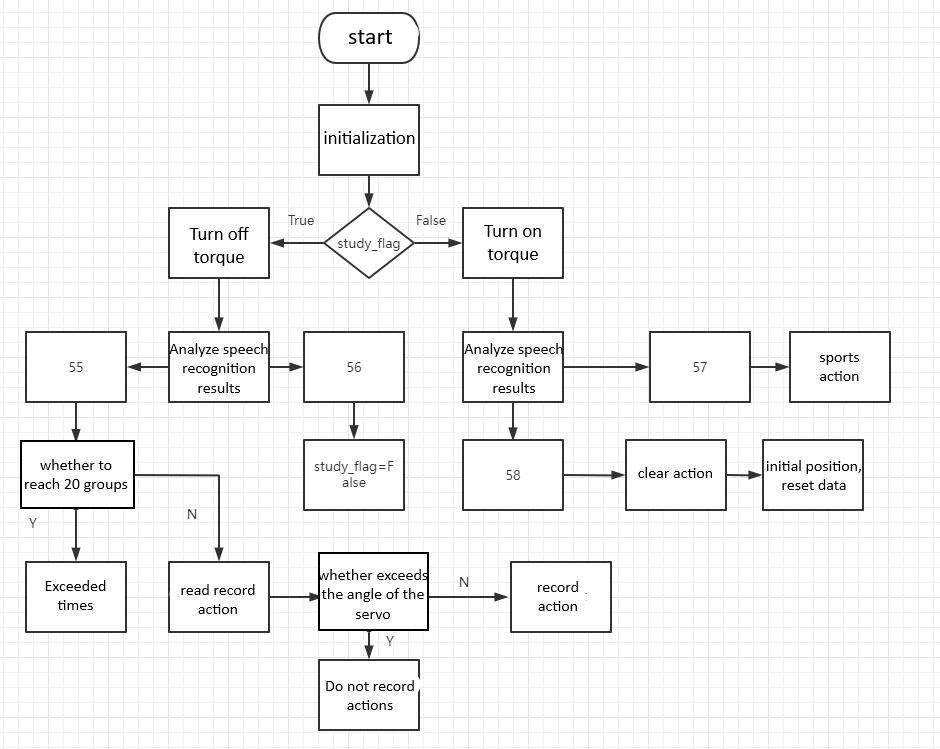
When the program starts, when you hear "I can start the action input", the robotic arm will turn off the torque. At this time, we can manually move each servo. After turning it to the angle we need, pass "Hello, Xiaoya "wakes up the module, and after hearing "in", we can continue to say "input completed". At this time, the robotic arm will record the current action, and the voice module will also reply "Okay, please enter the next set of actions." ", the terminal will print out the currently learned pose (here are some tips, Each servo has a limit. When the limit is exceeded, the actions of this group will not be recorded, and the buzzer will beep once. Print on the terminal which servo exceeds the limit value. The value exceeding the limit value will be displayed as a negative number) Up to 20 groups of actions can be recorded**. Say to the module "stop recording when the input is completed";
After we finish recording the action group, say "Input Ended" to the module and reply "Okay. Ended". At this time, we can say "Movement Action" through voice to make the robot arm move the action just recorded;
If you need to re-learn the recording action group, then say "clear action" to it, the module will reply "action has been cleared", and then return to the initial position. After a beep, it will announce "I can input actions", and you can start at this time Let the robot arm record the action group again.
2.2.3. Core file voice_arm_study.py
code path
xxxxxxxxxx~/yahboomcar/src/yahboomcar_voice_ctrl/scriptsCore code analysis
Turn off/on the servo torque. Only when the servo torque is turned off can each servo be manually turned.
xxxxxxxxxxdriver.car.set_uart_servo_torque(0) #Turn off torquedriver.car.set_uart_servo_torque(1) #Turn on torque2), two important lists
xxxxxxxxxxcurrent_joints[] #The current list of each servo data, that is, the data that needs to be recordedstudy_joints[] #Study action group data3), read each angle value function of the current steering gear
xxxxxxxxxxget_uart_servo_angle_array()4), study status flag study_flag
xxxxxxxxxxstudy_flag = True #Study, record statusstudy_flag = False #Motion status2.3. Program flow chart