Welcome to ROSMASTER X3 Plus repository
11.Mediapipe gesture control car
11. Mediapipe gesture recognition to control car movement
11. Mediapipe gesture recognition to control car movement11.1. Using11.2. Core code analysis HandCtrl.py11.3.Flowchart
11.1. Using
After the function is turned on, the camera captures the image and recognizes the gesture to control the movement of the car.
Note: [R2] of the remote controller has the function of [pause/on] for this gameplay.
Start command (robot side)
x#You need to enter docker first, perform this step more#If running the script to enter docker fails, please refer to 07.Docker-orin/05, Enter the robot's docker container~/run_docker.shroslaunch arm_mediapipe mediaArm.launchstart command (virtual machine)
xxxxxxxxxxrosrun arm_mediapipe HandCtrl.py
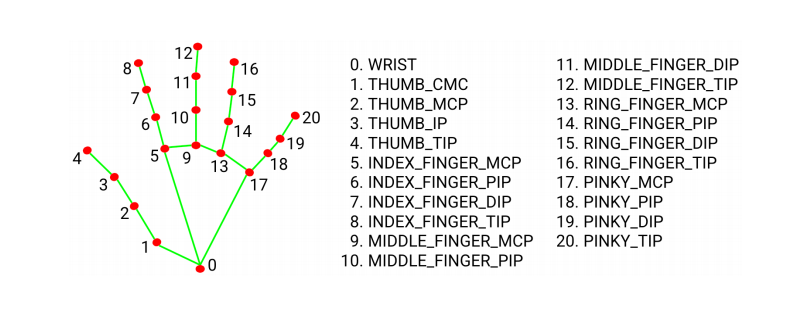
After the program starts, press the R2 key on the handle to turn on the function, then put your hand in front of the camera, the screen will draw the shape of your finger, and after the program recognizes the gesture, it will send the speed to the chassis, and then control the movement of the car.
Gesture number 1: the car moves left
Gesture number 2: the car moves right
Gesture number 3: the car rotates left
Gesture number 4: the car rotates right
Gesture number 5: the car moves forward
Gesture fist: the car moves back
Gesture rock (the index finger and the little finger are straight, the others are bent): the buzzer sounds
MediaPipe Hands infers 3D coordinates of 21 hand-valued joints from one frame
11.2. Core code analysis HandCtrl.py
Code reference path:~/yahboomcar_ws/src/arm_mediapipe/scripts
Import critical libraries