Welcome to ROSMASTER X3 Plus repository
4.MoveIt kinematics design(VM)
4. MoveIt kinematics design
4. MoveIt kinematics design4.1. Position description in three-dimensional space4.2. Start up4.3. Reverse the key code4.3.1.C++ code4.4. Positive solution key code4.4.1. C++ code4.5. MoveIT kinematics plug-in
This lesson takes MoveIT simulation as an example. If you need to set up the real machine and simulation to be synchronized, please see the lesson [02, MoveIt Precautions and Controlling the Real Machine]. ! ! ! be safe! ! !
The effect demonstration is a virtual machine and other main control running conditions (related to the main control performance, depending on the actual situation).
4.1. Position description in three-dimensional space
First, a coordinate system is specified. Relative to the coordinate system, the position of the point can be represented by a 3-dimensional column vector; the orientation of the rigid body can be represented by a 3×3 rotation matrix. The 4×4 homogeneous transformation matrix can unify the description of rigid body position and attitude (pose). It has the following advantages:
(1) It can describe the pose of the rigid body and the relative pose (description) of the coordinate system.
(2) It can represent the transformation (mapping) of a point from the description of one coordinate system to the description of another coordinate system.
(3) It can represent the transformation (operator) of the pose description before and after the rigid body motion.
- Location description - location vector
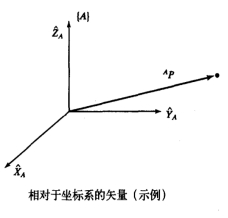
A coordinate system {A} is represented by three mutually orthogonal unit vectors with arrows. Then the spatial position of point p in the coordinate system {A} is expressed as: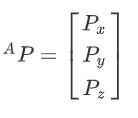
- Description of orientation - rotation matrix
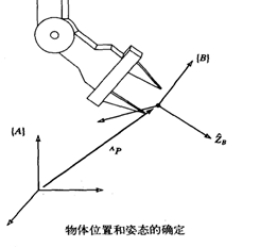
Commonly used rotation transformation matrices are to rotate an angle around the X-axis, around the Y-axis, or around the Z-axis. they are respectively

- Non-homogeneous representation
- After the vector a undergoes one rotation R and one translation t, we get $a': a'=R*a+t$
- Homogeneous expression

The common rotation matrix R is:
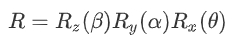
The rotation matrix rotation process here first rotates the θ angle around the X-axis, then rotates the α angle around the Y-axis, and finally rotates the β angle around the Z-axis.
- Right hand rule
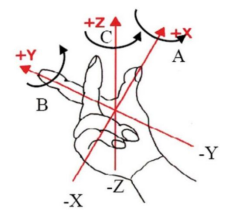
The thumb points to X, the index finger reaches Y, and the middle finger is in the direction of Z.
- RPY and Euler angles
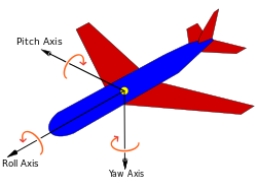
The rotation order according to its own coordinate system is Z-->Y-->X, which is called eulerYPR (Yaw Pitch Roll);
The rotation sequence according to the external coordinate system (reference coordinate system) is x-->y-->z, which is called RPY (Roll Pitch Yaw);
When describing the same posture, the above two expressions are equivalent, that is, the angle value of Yaw Pitch Roll is the same.
Definition: Yaw yaw angle ϒ; Pitch pitch angle β; Roll roll angle α
- Quaternion method
The rough definition is that a vector is represented by a scalar and three imaginary axes, which is called a quaternion. The range of each data [x, y, z, w] is [-1,1].
4.2. Start up
Correct solution: In a robotic arm, each joint angle is known and the end pose is solved.
Inverse solution: In a robotic arm, with the end position (except the gripper) known, find the angle of each joint.
Start MoveIT
roslaunch arm_moveit_demo x3plus_moveit_demo.launch sim:=true Start the anti-solution node
xxxxxxxxxxrosrun arm_moveit_demo 02_set_pose_plan Start the correct solution node
xxxxxxxxxxrosrun arm_moveit_demo 03_set_joint_plan 4.3. Reverse the key code
Note: Due to the range limitation of the manipulator, it is possible that the specified target pose cannot be reached. Repeated execution of the cycle can only slightly improve the planning success rate. Not only the position must be considered, but also the attitude of the end. We can view the pose of each link through rviz, as shown below,
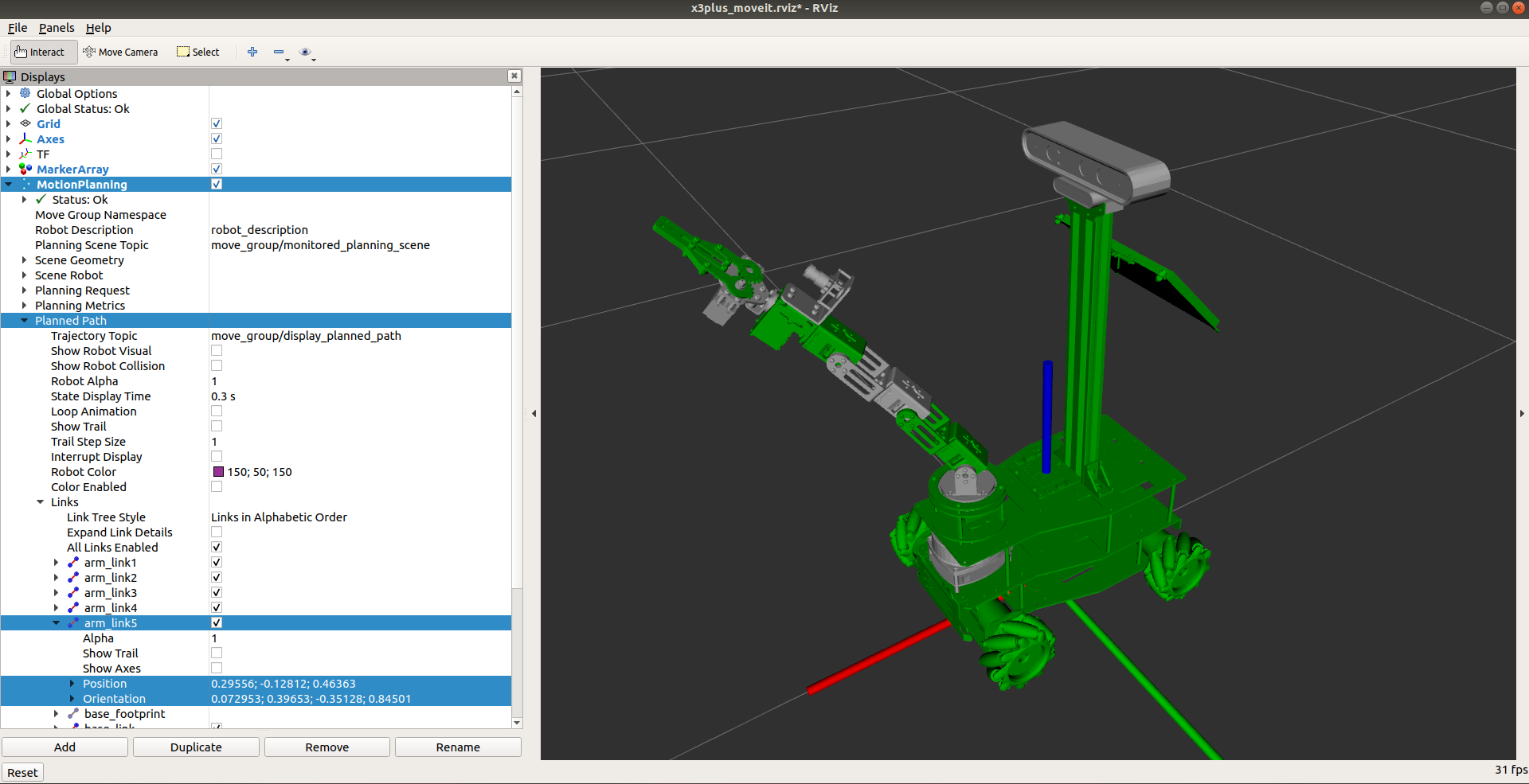
[Position] and [Orientation] in [arm_link5] in the above figure are the end poses. When using the inverse solution, you can also directly set the position and orientation quaternions of the target point.
4.3.1.C++ code
Set target pose
xxxxxxxxxx //Set specific location geometry_msgs::Pose pose; pose.position.x = 0.18721125717113798; pose.position.y = -0.008718652395814977; pose.position.z = 0.4787351295417709; // Set target posture tf::Quaternion quaternion; //The unit of RPY is the angle value //double Roll = -180; //double Pitch = 45; //double Yaw = -180; // RPY to quaternion //quaternion.setRPY(Roll * DE2RA, Pitch * DE2RA, Yaw * DE2RA); pose.orientation.x = 0.08637313729188083; pose.orientation.y = 0.40819551903689105; pose.orientation.z = 0.10050372779920543; pose.orientation.w = 0.9032248336328139; yahboomcar.setPoseTarget(pose);Loop execution path planning
xxxxxxxxxx int index = 0; //Execute multiple times to improve success rate while (index <= 10) { moveit::planning_interface::MoveGroupInterface::Plan plan; // Movement planning const moveit::planning_interface::MoveItErrorCode &code = yahboomcar.plan(plan); if (code == code.SUCCESS) { ROS_INFO_STREAM("plan success"); yahboomcar.execute(plan); break; } else { ROS_INFO_STREAM("plan error"); } index++; }4.4. Positive solution key code
4.4.1. C++ code
Set target point
xxxxxxxxxx //Set specific location vector<double> pose{0, 0.79, -1.57, -1.57, 0}; yahboomcar.setJointValueTarget(pose);Loop execution path planning
xxxxxxxxxx moveit::planning_interface::MoveGroupInterface::Plan plan; const moveit::planning_interface::MoveItErrorCode &code = yahboomcar.plan(plan); if (code == code.SUCCESS) { ROS_INFO_STREAM("plan success"); // show trajectory string frame = yahboomcar.getPlanningFrame(); moveit_visual_tools::MoveItVisualTools tool(frame); tool.deleteAllMarkers(); tool.publishTrajectoryLine(plan.trajectory_, yahboomcar.getCurrentState()->getJointModelGroup("arm_group")); tool.trigger(); yahboomcar.execute(plan); } else { ROS_INFO_STREAM("plan error"); }4.5. MoveIT kinematics plug-in
The MoveIT kinematics plug-in is the file [kinematics.yaml]
If you need to replace or modify, just modify the [kinematics.yaml] file directly.
xxxxxxxxxxroscd x3plus_moveit_config/configsudo vim kinematics.yaml
- kdl
xxxxxxxxxxarm_group:kinematics_solver: kdl_kinematics_plugin/KDLKinematicsPluginkinematics_solver_search_resolution: 0.005kinematics_solver_timeout: 0.005
- trac_ik
xxxxxxxxxxarm_group:kinematics_solver: trac_ik_kinematics_plugin/TRAC_IKKinematicsPluginkinematics_solver_search_resolution: 0.005kinematics_solver_timeout: 0.005