Welcome to ROSMASTER X3 Plus repository
16.9 Mediapipe palm control car
9. Mediapipe palm controls car movement
9. Mediapipe palm controls car movement9.1. Introduction9.2. Use9.3、MediaPipe Hands9.4. Core files9.4.1、mediaArm.launch9.4.2, RobotCtrl.py9.5. Flowchart
9.1. Introduction
MediaPipe is a data stream processing machine learning application development framework developed by Google and open source. It is a graph-based data processing pipeline for building data sources using many forms, such as video, audio, sensor data, and any time series data. MediaPipe is cross-platform and can run on embedded platforms (Raspberry Pi, etc.), mobile devices (iOS and Android), workstations and servers, and supports mobile GPU acceleration. MediaPipe provides cross-platform, customizable ML solutions for live and streaming media.
9.2. Use
Note: [R2] on the remote control handle has the [pause/start] function for this gameplay.
The case in this section may run very slowly on the robot main control. It is recommended to connect the camera to the virtual machine and run the [01_HandCtrlArm.launch] file. The NX main control effect will be better. You can try it.
xxxxxxxxxx#Raspberry Pi 5 master needs to enter docker first, please perform this step#If running the script into docker fails, please refer to ROS/07, Docker tutorial~/run_docker.shxxxxxxxxxxroslaunch arm_mediapipe mediaArm.launch # robot<PI5 needs to open another terminal to enter the same docker container
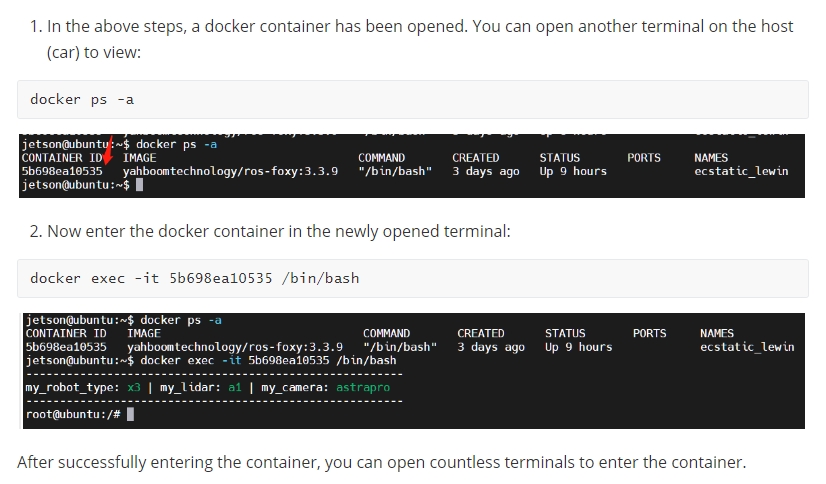
xxxxxxxxxxrosrun arm_mediapipe RobotCtrl.py # Recommended virtual machine (equipped with camera)After startup, press R2 on the handle to turn on the function, and you can use the web page to view the screen.
The car will control the movement of the chassis based on the position of the palm of the hand in the screen.
Palm is at the top of the screen -> the car moves forward
The palm is at the bottom of the screen -> the car moves backwards
The palm is on the left side of the screen -> the car moves to the left
The palm is at the bottom of the screen -> the car moves to the right
9.3、MediaPipe Hands
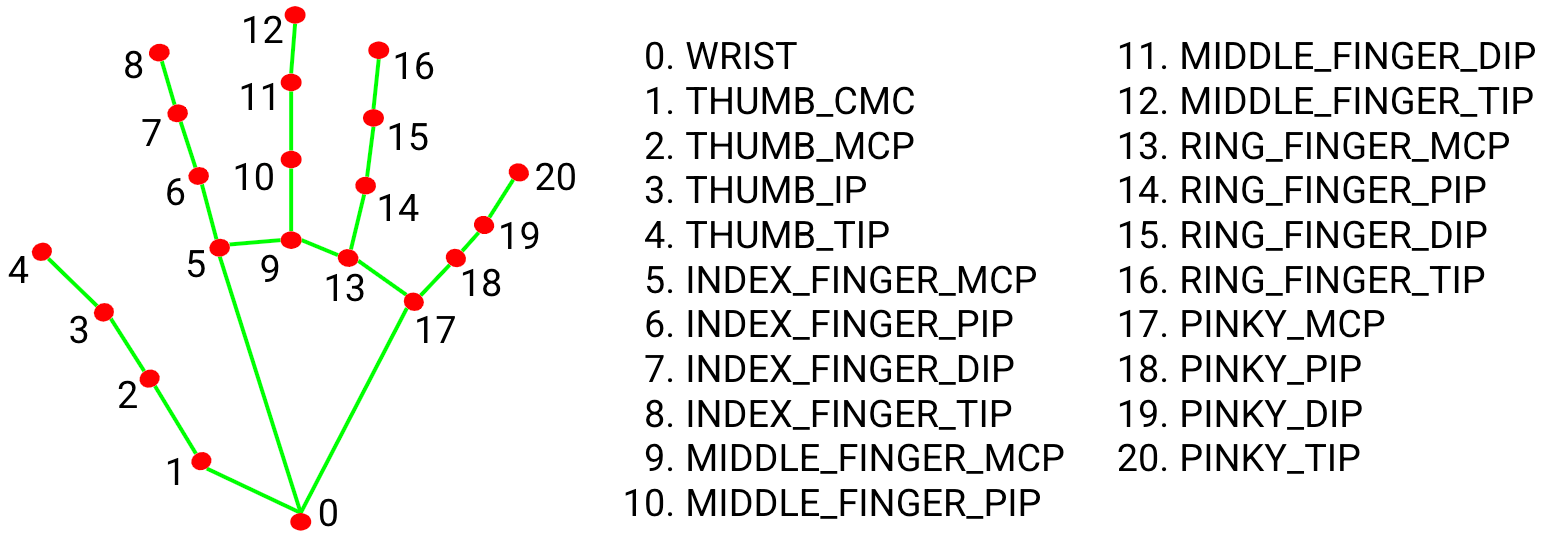
MediaPipe Hands is a high-fidelity hand and finger tracking solution. It uses machine learning (ML) to infer the 3D coordinates of 21 hands from a frame.
After palm detection on the entire image, the 21 3D hand joint coordinates in the detected hand area are accurately positioned by regression according to the hand marking model, that is, direct coordinate prediction. The model learns a consistent internal hand pose representation that is robust even to partially visible hands and self-occlusion.
In order to obtain ground truth data, about 30K real-world images were manually annotated with 21 3D coordinates, as shown below (get the Z value from the image depth map, if there is a Z value for each corresponding coordinate). To better cover possible hand poses and provide additional supervision over the nature of the hand geometry, high-quality synthetic hand models in various backgrounds are also drawn and mapped to corresponding 3D coordinates.
9.4. Core files
9.4.1、mediaArm.launch
xxxxxxxxxx<launch> <include file="$(find yahboomcar_ctrl)/launch/yahboom_joy.launch"/> <include file="$(find yahboomcar_bringup)/launch/yahboomcar.launch"/> <node pkg="web_video_server" type="web_video_server" name="web_video_server" output="screen"/> <node name="msgToimg" pkg="arm_mediapipe" type="msgToimg.py" output="screen" required="true"/></launch>9.4.2, RobotCtrl.py
Code reference location
xxxxxxxxxx~/yahboomcar_ws/src/arm_mediapipe/scriptsCode analysis
1). Import the corresponding library file
xxxxxxxxxxfrom media_library import *This library file mainly includes detecting palms, fingers and obtaining the coordinates of each finger joint.
Detect the palm and obtain the finger coordinates
xxxxxxxxxxfingers = self.hand_detector.fingersUp(lmList)point_x = lmList[9][1] #x valuepoint_y = lmList[9][2] #Y valueCombining the picture of 9.3, we can know that what is actually obtained is the coordinate of the first joint of the middle finger of our palm. By judging the position of this coordinate in the picture, the speed in the xy direction of the chassis can be sent. Achieve control.
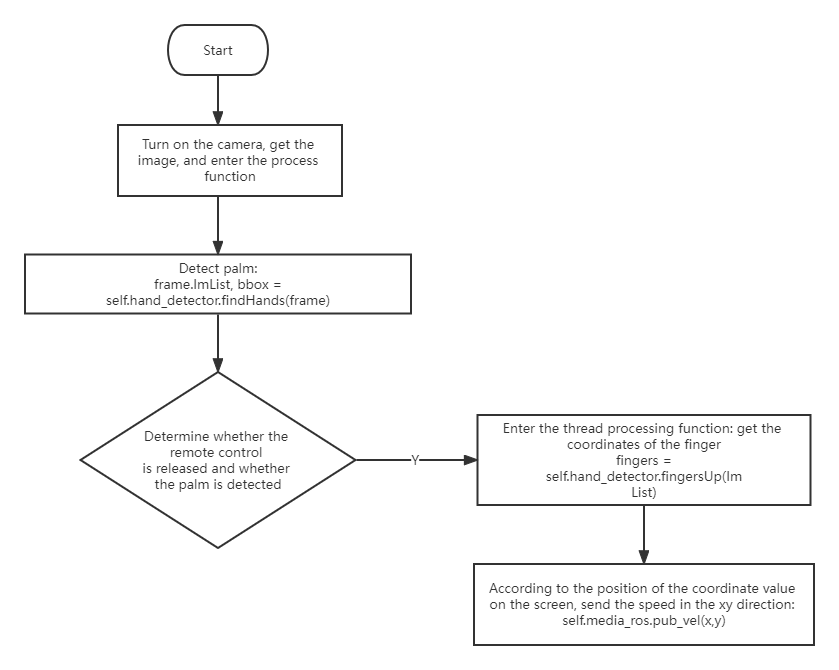
9.5. Flowchart