Welcome to ROSMASTER X3 Plus repository
13.Mediapipe recognizes and tracks palm control robotic arm
13. Mediapipe recognizes and tracks palm-controlled robotic arms
13.1. Introduction
MediaPipe is a data stream processing machine learning application development framework developed and open sourced by Google. It is a graph-based data processing pipeline for building data sources that use many forms, such as video, audio, sensor data, and any time series data.
MediaPipe is cross-platform and can run on embedded platforms (Raspberry Pi, etc.), mobile devices (iOS and Android), workstations and servers, and supports mobile GPU acceleration.
MediaPipe provides cross-platform, customizable ML solutions for real-time and streaming.
13.2. Using
After the program starts, after the camera captures the image, the robotic arm will follow the movement of the palm in the screen. The movement speed of the palm movement here should not be too fast, otherwise the image processing will not be able to keep up, which will cause stuttering.
#You need to enter docker first, perform this step more#If running the script to enter docker fails, please refer to 07.Docker-orin/05, Enter the robot's docker container~/run_docker.shroslaunch arm_mediapipe mediaArm.launch # Robotsrosrun arm_mediapipe ArmCtrl.py #RobotsAfter startup, press R2 of the handle to turn on the function.
After the function is turned on, the robotic arm will move with the palm, and at the same time, the end gripper will also change with the opening and closing of the palm.
13.3. Core code parsing ArmCtrl.py
Code reference location
xxxxxxxxxx~/yahboomcar_ws/src/arm_mediapipe/scriptsCode analysis
1)、Import important library files
xxxxxxxxxxfrom media_library import *2)、Detect hand, get finger information
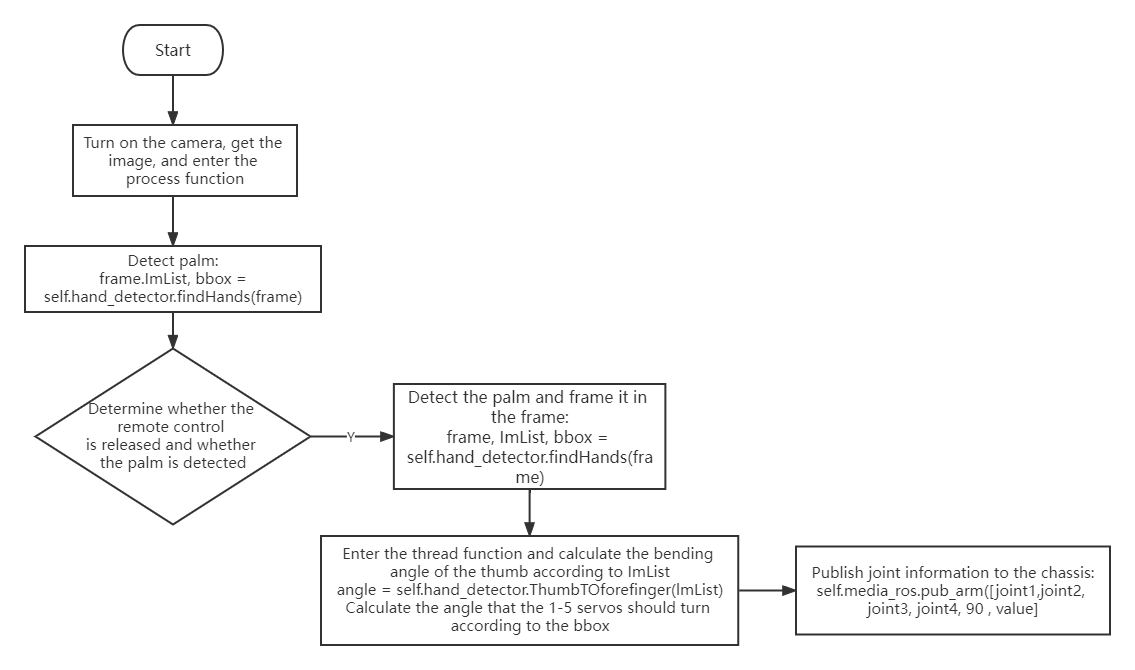
xxxxxxxxxxframe, lmList, bbox = self.hand_detector.findHands(frame)#bbox is the minimum and maximum xy value of the frame that frames the detected hand. This value is very important. By calculating the center coordinates, the position of the palm on the screen can be determined. The source code is in media_library.pyangle = self.hand_detector.ThumbTOforefinger(lmList)#Here you can calculate the bending angle of the thumb to control the opening and closing of the jaws3)、Calculate the angle of each servo
xxxxxxxxxxindexX = (bbox[0] + bbox[2]) / 2indexY = (bbox[1] + bbox[3]) / 2if indexY > 400: indexY = 400elif indexY < 200: indexY = 200joint2 = -0.4 * indexY + 170joint3 = 0.05 * indexY + 25joint4 = -0.125 * indexY + 85if 300 < indexX < 340: joint1 = 90else: joint1 = -0.3 * indexX + 186It can be seen that indexX and indexY are the coordinates of the center point of the picture frame. Through judgment, the angle that the servos 1-5 should be rotated is calculated.The parameters of the calculation method of each angle are calibrated according to the actual angle that can be rotated and the visual range of the camera.
13.4. Flowchart