Welcome to ROSMASTER X3 Plus repository
2、Common commands for docker image containers
2. Common commands for docker image containers
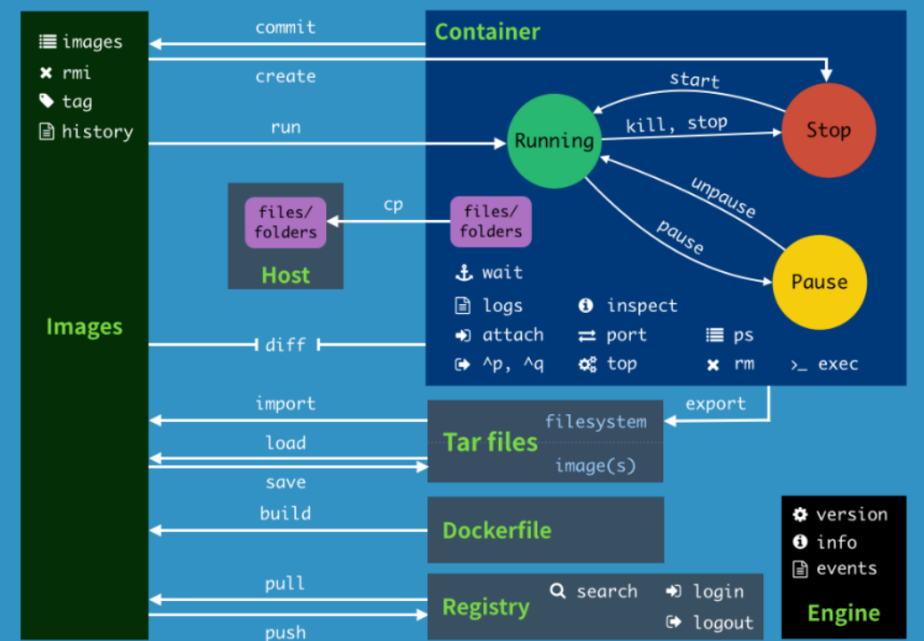
2. Common commands for docker image containers2.1. Do not use sudo commands2.2. Help command2.3. Image command2.4. Container commands2.5. Other commonly used commands2.6. Command Summary
The operating environment and reference hardware and software configurations are as follows:
Reference vehicle: ROSMASTER X3PLUS
Robot hardware configuration: Arm series controller, EAI 4ROS LiDAR, AstraPro Plus depth camera
Robot system: Ubuntu (no version requirement) + Docker (20.10.21 and above)
PC virtual machine: Ubuntu (20.04) + ROS (Noetic)
Usage scenario: Use on a relatively clean 2D plane
2.1. Do not use sudo commands
Usually, when operating docker commands, you need to add the prefix sudo, as follows:
sudo docker versionHowever, after adding the docker user group, you do not need to add the sudo prefix. How to add the docker user group (run the command in the host running docker):
x
sudo groupadd docker # Add the docker user groupsudo gpasswd -a $USER docker # Add the current user to the docker user group, where $USER can be automatically resolved to the currently logged in usernewgrp docker # Update the docker user groupAfter adding the above command, use the [docker images] command to test. If there is no error, it means that the sudo command can no longer be used. If the following error is reported:
xxxxxxxxxxpi@ubuntu:~$ docker imagesWARNING: Error loading config file: /home/pi/.docker/config.json: open /home/pi/.docker/config.json: permission deniedThen execute the following command in the host to solve the problem:
xxxxxxxxxxsudo chown "$USER":"$USER" /home/"$USER"/.docker -Rsudo chmod g+rwx "/home/$USER/.docker" -R2.2. Help command
xxxxxxxxxxdocker info # Display Docker system information, including the number of images and containers. 。docker --help # Help2.3. Image command
1, docker pull download image
xxxxxxxxxx# Download imagejetson@ubuntu:~$ docker pull ubuntuUsing default tag: latest # No tag, default is latestlatest: Pulling from library/ubuntucd741b12a7ea: Pull complete # Layered downloadDigest: sha256:67211c14fa74f070d27cc59d69a7fa9aeff8e28ea118ef3babc295a0428a6d21Status: Downloaded newer image for ubuntu:latestdocker.io/library/ubuntu:latest # Real location2, docker images list images
x
# List images on the local hostjetson@ubuntu:~$ docker imagesREPOSITORY TAG IMAGE ID CREATED SIZEyahboomtechnology/ros-melodic 1.4.1 f8c914ba3cff 7 weeks ago 23.1GBhello-world latest 46331d942d63 13 months ago 9.14kB
# ExplanationREPOSITORY The repository source of the imageTAG The tag of the imageIMAGE ID The ID of the imageCREATED The image creation timeSIZE The image size
# The same repository source can have multiple TAGs, representing different versions of this repository source. We use REPOSITORY:TAG to define different images. If you do not define the tag version of the image, docker will use the lastest image by default!
# Optional-a: List all local images-q: Display only image ID--digests: Display image summary informationdocker search Search image
x
# Search imagejetson@ubuntu:~$ docker search ros2NAME DESCRIPTION STARS OFFICIAL AUTOMATEDosrf/ros2 **Experimental** Docker Images for ROS2 deve… 60 [OK]tiryoh/ros2-desktop-vnc A Docker image to provide HTML5 VNC interfac… 11althack/ros2 An assortment of development containers for … 7tiryoh/ros2 unofficial ROS2 image 6athackst/ros2 [Deprecated-> use althack/ros2] 5uobflightlabstarling/starling-mavros2 ROS2 version of MAVROS 2theosakamg7/ros2_java_docker Image base 1 [OK]
# docker search The name of a certain image corresponds to the image in the DockerHub repository# Optional--filter=stars=50: List images with a collection count not less than the specified value.Docker rmi deletes images
xxxxxxxxxx# Delete imagesdocker rmi -f image id # Delete a single onedocker rmi -f image name: tag image name: tag # Delete multipledocker rmi -f $(docker images -qa) # Delete all2.4. Container commands
You can only create a container if you have an image. Here we use the ubuntu image to test. Download the image:
xxxxxxxxxxdocker pull ubuntu
Docker run runs the image to start the container
x
# Commanddocker run [OPTIONS] IMAGE [COMMAND][ARG...]# Common parameter description--name="Name" # Assign a name to the container-d # Run the container in the background and return the container id!-i # Run the container in interactive mode, used with -t-t # Reassign a terminal to the container, usually used with -i-P # Random port mapping (uppercase)-p # Specify port mapping (summary), generally there are four ways to writeip:hostPort:containerPortip::containerPorthostPort:containerPort (common)containerPort
#testjetson@ubuntu:~$ docker imagesREPOSITORY TAG IMAGE ID CREATED SIZEyahboomtechnology/ros-melodic 1.4.1 f8c914ba3cff 7 weeks ago 23.1GBubuntu latest bab8ce5c00ca 6 weeks ago 69.2MBhello-world latest 46331d942d63 13 months ago 9.14kB
#Use ubuntu to start the container in interactive mode and execute the /bin/bash command in the container!jetson@ubuntu:~$ docker run -it ubuntu:latest /bin/bashroot@c54bf9efae47:/# lsbin boot dev etc home lib media mnt opt proc root run sbin srv sys tmp usr varroot@c54bf9efae47:/# exit # Use exit to exit the container and return to the hostexitjetson@ubuntu:~$docker ps lists all running containers
x
# Commanddocker ps [OPTIONS]# Common parameter description-a # List all currently running containers + historically run containers-l # Display the most recently created container-n=? # Display the most recently created n containers-q # Silent mode, only display the container number.
#Testjetson@ubuntu:~$ docker ps -aCONTAINER ID IMAGE COMMAND CREATED STATUS PORTS NAMESc54bf9efae47 ubuntu:latest "/bin/bash" 2 hours ago Up 4 seconds funny_hugle3b9c01839579 hello-world "/hello" 3 hours ago Exited (0) 3 hours ago jovial_brownExit the container
xxxxxxxxxxexit # Container stops exitingctrl+P+Q # Container does not stop exitingMultiple terminals enter the running container
# Command 1docker exec -it container id bashShell
# Testjetson@ubuntu:~$ docker ps -aCONTAINER ID   IMAGE           COMMAND       CREATED       STATUS                   PORTS     NAMESc54bf9efae47   ubuntu:latest   "/bin/bash"   2 hours ago   Up 4 seconds                       funny_hugle3b9c01839579   hello-world     "/hello"      3 hours ago   Exited (0) 3 hours ago             jovial_brownjetson@ubuntu:~$ docker exec -it c5 /bin/bash # The container ID can be abbreviated as long as it can uniquely identify the containerroot@c54bf9efae47:/#
# Command 2docker attach container ID
# Testjetson@ubuntu:~$ docker ps -aCONTAINER ID   IMAGE           COMMAND       CREATED       STATUS                   PORTS     NAMESc54bf9efae47   ubuntu:latest   "/bin/bash"   2 hours ago   Up 35 seconds                      funny_hugle3b9c01839579   hello-world     "/hello"      3 hours ago   Exited (0) 3 hours ago             jovial_brownjetson@ubuntu:~$ docker attach c5 # The container ID can be abbreviated as long as it can uniquely identify the containerroot@c54bf9efae47:/#
# Difference# exec is to open a new terminal in the container and start a new process# attach directly enters the terminal of the container start command, and will not start a new process
Start and stop containers
xxxxxxxxxxdocker start (container id or container name) # Start the containerdocker restart (container id or container name) # Restart the containerdocker stop (container id or container name) # Stop the containerdocker kill (container id or container name) # Force stop the containerDelete the container
xxxxxxxxxxdocker rm container id # Delete the specified containerdocker rm -f $(docker ps -a -q) # Delete all containersdocker ps -a -q|xargs docker rm # Delete all containers2.5. Other commonly used commands
View the process information running in the container, supporting ps command parameters.
xxxxxxxxxx# Commanddocker top container id
# Testjetson@ubuntu:~$ docker ps -aCONTAINER ID   IMAGE           COMMAND       CREATED       STATUS                   PORTS     NAMESc54bf9efae47   ubuntu:latest   "/bin/bash"   2 hours ago   Up 2 minutes                       funny_hugle3b9c01839579   hello-world     "/hello"      3 hours ago   Exited (0) 3 hours ago             jovial_brown
jetson@ubuntu:~$ docker top c5UID                 PID                 PPID                C                   STIME               TTY                 TIME                CMDroot                9667                9647                0                   14:20               pts/0               00:00:00            /bin/bash
View the metadata of the container/image
xxxxxxxxxx# Commanddocker inspect container id
# Test to view container metadatajetson@ubuntu:~$ docker ps -aCONTAINER ID   IMAGE           COMMAND       CREATED       STATUS                   PORTS     NAMESc54bf9efae47   ubuntu:latest   "/bin/bash"   2 hours ago   Up 4 minutes                       funny_hugle3b9c01839579   hello-world     "/hello"      3 hours ago   Exited (0) 3 hours ago             jovial_brown
jetson@ubuntu:~$ docker inspect c54bf9efae47[    {        # Complete ID, the container ID above is the first few digits of this ID        "Id": "c54bf9efae471071391202a8718b346d9af76cb1ff17741e206280603d6f0056",        "Created": "2023-04-24T04:19:46.232822024Z",        "Path": "/bin/bash",        "Args": [],        "State": {            "Status": "running",            "Running": true,            "Paused": false,            "Restarting": false,            "OOMKilled": false,            "Dead": false,            "Pid": 9667,            "ExitCode": 0,            "Error": "",            "StartedAt": "2023-04-24T06:20:58.508213216Z",            "FinishedAt": "2023-04-24T06:19:45.096483592Z"        },    .....

# Test to view image metadatajetson@ubuntu:~$ docker imagesREPOSITORY                   TAG       IMAGE ID       CREATED         SIZEubuntu                       latest    bab8ce5c00ca   6 weeks ago     69.2MBhello-world                  latest    46331d942d63   13 months ago   9.14kB
jetson@ubuntu:~$ docker inspect bab8ce5c00ca[    {        "Id": "sha256:bab8ce5c00ca3ef91e0d3eb4c6e6d6ec7cffa9574c447fd8d54a8d96e7c1c80e",        "RepoTags": [            "ubuntu:latest"        ],        "RepoDigests": [            "ubuntu@sha256:67211c14fa74f070d27cc59d69a7fa9aeff8e28ea118ef3babc295a0428a6d21"        ],        "Parent": "",        "Comment": "",        "Created": "2023-03-08T04:32:41.063980445Z",        "Container": "094fd0c521be8c84d81524e4a5e814e88a2839899c56f654484d32d171c7195b",        "ContainerConfig": {            "Hostname": "094fd0c521be",            .............            "Labels": {                "org.opencontainers.image.ref.name": "ubuntu",                "org.opencontainers.image.version": "22.04"            }        },        "DockerVersion": "20.10.12",        "Author": "",        "Config": {            "Hostname": "",            .........            "Labels": {                "org.opencontainers.image.ref.name": "ubuntu",                "org.opencontainers.image.version": "22.04"            }        },        "Architecture": "arm64",        "Variant": "v8",        "Os": "linux",        "Size": 69212233,        "VirtualSize": 69212233,        "GraphDriver": {            "Data": {                "MergedDir": "/var/lib/docker/overlay2/8418b919a02d38a64ab86060969b37b435977e9bbdeb6b0840d4eb698280e796/merged",                "UpperDir": "/var/lib/docker/overlay2/8418b919a02d38a64ab86060969b37b435977e9bbdeb6b0840d4eb698280e796/diff",                "WorkDir": "/var/lib/docker/overlay2/8418b919a02d38a64ab86060969b37b435977e9bbdeb6b0840d4eb698280e796/work"            },            "Name": "overlay2"        },        "RootFS": {            "Type": "layers",            "Layers": [                "sha256:874b048c963ab55b06939c39d59303fb975d323822a4ea48a02ac8dc635ea371"            ]        },        "Metadata": {            "LastTagTime": "0001-01-01T00:00:00Z"        }    }]
2.6. Command Summary