Welcome to ROSMASTER X3 Plus repository
6. Voice control color tracking
6. Voice control color tracking
6. Voice control color tracking6.1. Function description 6.2. Steps6.2.1. Function package path 6.2.2. Start 6.2.3. Color calibration 6.3. Code analysis voice_Ctrl_color_tracker.py 6.3.1. Flowchart 6.4. Voice module communication protocol
6.1. Function description
Voice control robot open and close tracking red/blue/green/yellow color function. The R2 button on the handle can cancel/enable this function at any time.
6.2. Steps
6.2.1. Function package path
xxxxxxxxxx~/yahboomcar/src/yahboomcar_voice_ctrl/ 6.2.2. Start
xxxxxxxxxx#You need to enter docker first, perform this step more#If running the script to enter docker fails, please refer to 07.Docker-orin/05, Enter the robot's docker container~/run_docker.shroslaunch yahboomcar_voice_ctrl voice_ctrl_colorTracker.launch <Open another terminal and enter the same docker container
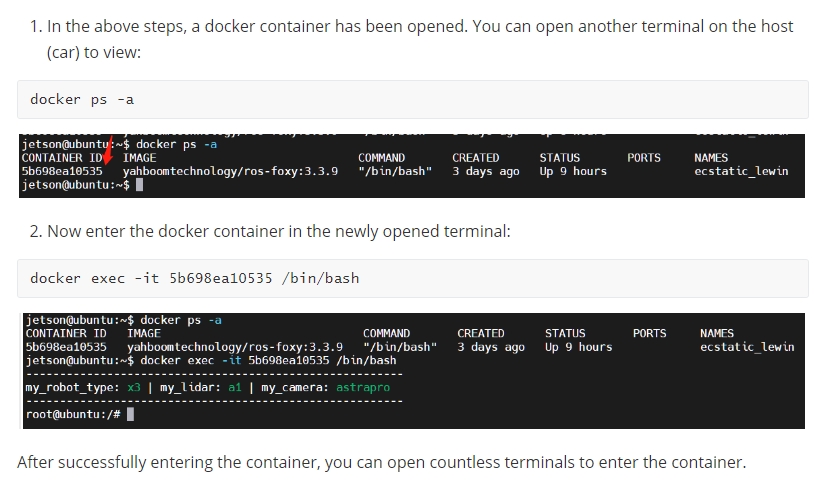
xxxxxxxxxxpython ~/yahboomcar_ws/src/yahboomcar_voice_ctrl/scripts/voice_Ctrl_color_tracker.py (Take tracking red for example)
1) After the above program is run, we say "Hi Yahboom" to wake up the voice module, until it replies "Hi, i'm here", indicating that the module has been woken up.
2) We can say "red following" and it will reply "OK, I found the red ".
- Next, we press the R2 key on handle, then ROSMASTER starts following red object.
If you don't use handle, you can also start ROSMASTER by inputting the following command through the terminal.
xxxxxxxxxxrostopic pub /JoyState std_msgs/Bool False If you want to cancel this color tracking function, say "stop following", it replies "OK, it has been stoped". ROSMASTER will cancel this function.
When the robot is moving, you can pause the robot by pressing the R2 key on handle again. Or input the following command to temporarily stop the robot.
xxxxxxxxxxrostopic pub /JoyState std_msgs/Bool True
6.2.3. Color calibration
The camera is very sensitive to light, and if it is in a different lighting environment, it will cause inaccurate color recognition.
So we need to re-calibrate the colors for red, green, yellow, and blue according to the current lighting environment.
Enter the following command in the terminal.
xxxxxxxxxxrosrun rqt_reconfigure rqt_reconfigure Find the 【colorHSV】 column, drag the slider to modify the HSV value.
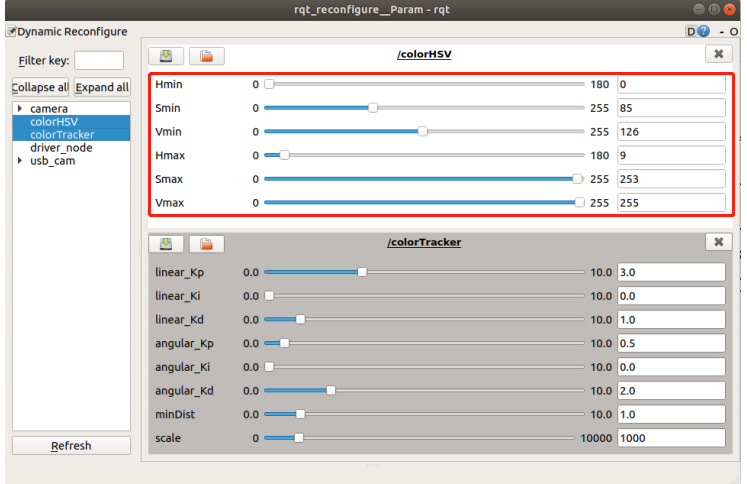
Open the voice_Ctrl_color_tracker.py program and find the following section.
xxxxxxxxxxif command_result == 73 : self.model = "color_follow_line" print("tracker red") self.hsv_range = [(0, 185, 175), (180, 253, 255)]elif command_result == 74 : self.model = "color_follow_line" print("tracker green") self.hsv_range = [(54, 92, 75), (125, 255, 255)]elif command_result == 75 : self.model = "color_follow_line" print("tracker bule") self.hsv_range = [(55, 204, 177), (125, 253, 255)] elif command_result == 72 : self.model = "color_follow_line" print("tracker yellow") self.hsv_range = [(18, 128, 168), (125, 253, 255)]Modify the HSV value recorded in the previous step to the position of the corresponding color in this program, save it, and use the calibrated value the next time it is started.
6.3. Code analysis voice_Ctrl_color_tracker.py
xxxxxxxxxx command_result = self.spe.speech_read() self.spe.void_write(command_result) if command_result == 73 : self.model = "color_follow_line" print("tracker red") self.hsv_range = [(20, 215, 111), (180, 253, 255)] self.dyn_update = True elif command_result == 74 : self.model = "color_follow_line" print("tracker green") self.hsv_range = [(44, 138, 91), (84, 255, 255)] self.dyn_update = True elif command_result == 75 : self.model = "color_follow_line" print("tracker bule") self.hsv_range = [(83, 217, 196), (141, 253, 255)] self.dyn_update = True elif command_result == 72 : self.model = "color_follow_line" print("tracker yellow") self.hsv_range = [(18, 55, 187), (81, 253, 255)] self.dyn_update = True elif command_result == 76 : self.model = "Stop" #self.ros_ctrl.Joy_active == False #self.ros_ctrl.pub_cmdVel.publish(Twist()) self.command_result = 999 if self.dyn_update == True : params = {'Hmin': self.hsv_range[0][0], 'Hmax': self.hsv_range[1][0], 'Smin': self.hsv_range[0][1], 'Smax': self.hsv_range[1][1], 'Vmin': self.hsv_range[0][2], 'Vmax': self.hsv_range[1][2]} self.dyn_client.update_configuration(params) self.dyn_update = False if self.model == "color_follow_line": self.ros_ctrl.Joy_active == False #self.model == "General" rgb_img, binary, self.circle = self.color.object_follow(rgb_img, self.hsv_range) if self.ros_ctrl.Joy_active == False : if self.circle[2] != 0: threading.Thread( target=self.execute, args=(self.circle[0], self.circle[1], self.circle[2])).start() if self.point_pose[0] != 0 and self.point_pose[1] != 0: threading.Thread( target=self.execute, args=(self.point_pose[0], self.point_pose[1], self.point_pose[2])).start() #threading.Thread(target=self.execute, args=(self.circle[0], self.circle[2])).start() return rgb_img, binary def execute(self, x, y, z): position = Position() position.angleX = x position.angleY = y position.distance = z self.pub_position.publish(position)6.3.1. Flowchart
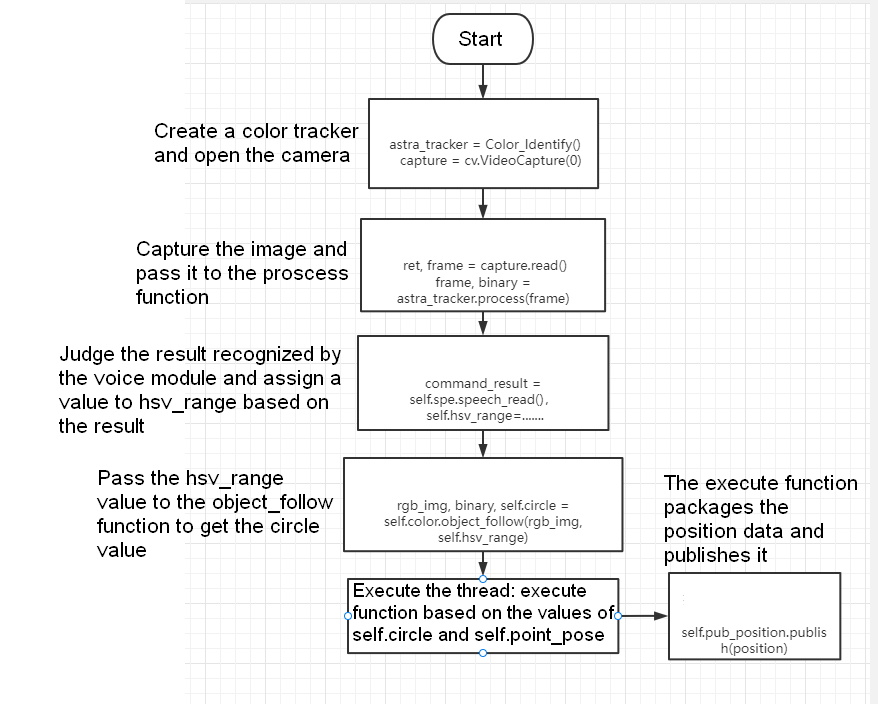
Code path:
xxxxxxxxxx~/yahboomcar/src/yahboomcar_voice_ctrl/scripts/voice_Ctrl_color_tracker.py 6.4. Voice module communication protocol
| function word | Speech Recognition Module Results | Voice broadcast content |
|---|---|---|
| yellow following | 72 | OK, I found the yellow |
| red following | 73 | OK, I found the red |
| green following | 74 | OK, I found the green |
| follow this color | 75 | OK, I found this color |
| stop following | 76 | OK, it has been stoped |