Welcome to ROSMASTER X3 Plus repository
3.Lidar guard
3 Lidar guard
Lidar guard gameplay introduction:
- Set the lidar detection angle and response distance.
- After turning on the car, the car faces the target closest to the car.
- When the distance between the target and the car is less than the response distance, the buzzer keeps ringing until there is no target within the response distance.
- The PID of the angular velocity of the trolley can be adjusted to make the rotation of the trolley the best.
3.1 How to use
Note: The [R2] of the remote control handle has the function of [pause/open] for this gameplay. Due to the problem of the moving method, the case in this section does not support the Ackerman model. Different models, the parameter range will change, the principle is the same; take the X3 wheat wheel car as an example.
One key to start, after executing the command, the car starts to move.
#You need to enter docker first, perform this step more#If running the script to enter docker fails, please refer to 07.Docker-orin/05, Enter the robot's docker container~/run_docker.shroslaunch yahboomcar_laser laser_Warning.launch Dynamic debugging parameters
xxxxxxxxxxrosrun rqt_reconfigure rqt_reconfigure
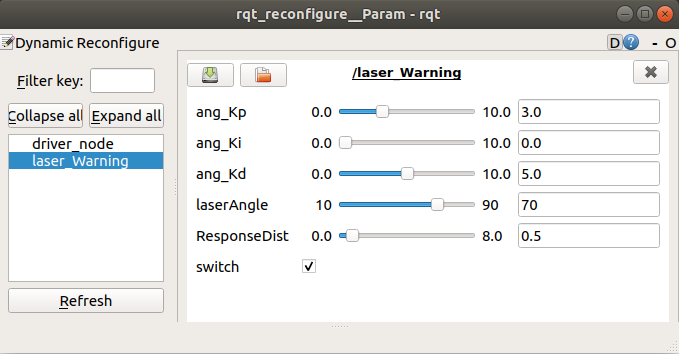
Parameter parsing:
| parameter | scope | Parse |
|---|---|---|
| [LaserAngle] | [10, 90] | Lidar detection angle(left and right side angle) |
| [ResponseDist] | [0.0, 8.0] | car response distance |
| [switch] | [False,True] | Car movement [start/pause] |
[ang_Kp], [ang_Ki], [ang_Kd]: PID debugging of car angular velocity.
In the box in front of [switch], click the value of [switch] to be True, and the car stops. [switch] The default is False, the car moves.
- parameter modification
When the parameters are adjusted to the optimal state, modify the corresponding parameters to the file, and there is no need to adjust them when using them again.
According to the optimal parameters of the [rqt_reconfigure] debugging tool, enter the [scripts] folder of the [yahboomcar_laser] function package, and modify the parameters corresponding to the [laser_Warning.py] file, as shown below
xxxxxxxxxxclass laserWarning : def __init__(self): rospy.on_shutdown(self.cancel) … self.ang_pid = SinglePID(3.0, 0.0, 5.0) Server(laserWarningPIDConfig, self.dynamic_reconfigure_callback) self.laserAngle = 70 self.ResponseDist = 0.5 [rqt_reconfigure] Modify the initial value of the debugging tool
xxxxxxxxxxgen.add("ang_Kp", double_t, 0, "Kp in PID", 3.0, 0, 10) gen.add("ang_Ki", double_t, 0, "Ki in PID", 0.0, 0, 10) gen.add("ang_Kd", double_t, 0, "Kd in PID", 5.0, 0, 10) gen.add("laserAngle", int_t, 0, "laserAngle", 70, 10, 90) gen.add("ResponseDist", double_t, 0, "ResponseDist", 0.5, 0, 8) gen.add("switch", bool_t, 0, "switch in rosbot", False) Enter the [cfg] folder of the [yahboomcar_laser] function package, and modify the initial values of the parameters corresponding to the [laserWarningPID.cfg] file.
xxxxxxxxxxgen.add("linear", double_t, 0, "linear in robot", 0.5, 0, 1.0)
Analysis of the above one as an example
| parameter | Parse | Corresponding parameters |
|---|---|---|
| name | the name of the parameter | "linear" |
| type | parameter data type | double_t |
| level | a bitmask passed to the callback | 0 |
| description | a description parameter | "linear in robot" |
| default | Initial value for node startup | 0.5 |
| min | parameter minimum | 0 |
| max | parameter maximum | 1.0 |
Note: After modification, the update environment must be recompiled to be effective.
xxxxxxxxxxcd ~/yahboomcar_wscatkin_makesource devel/setup.bash
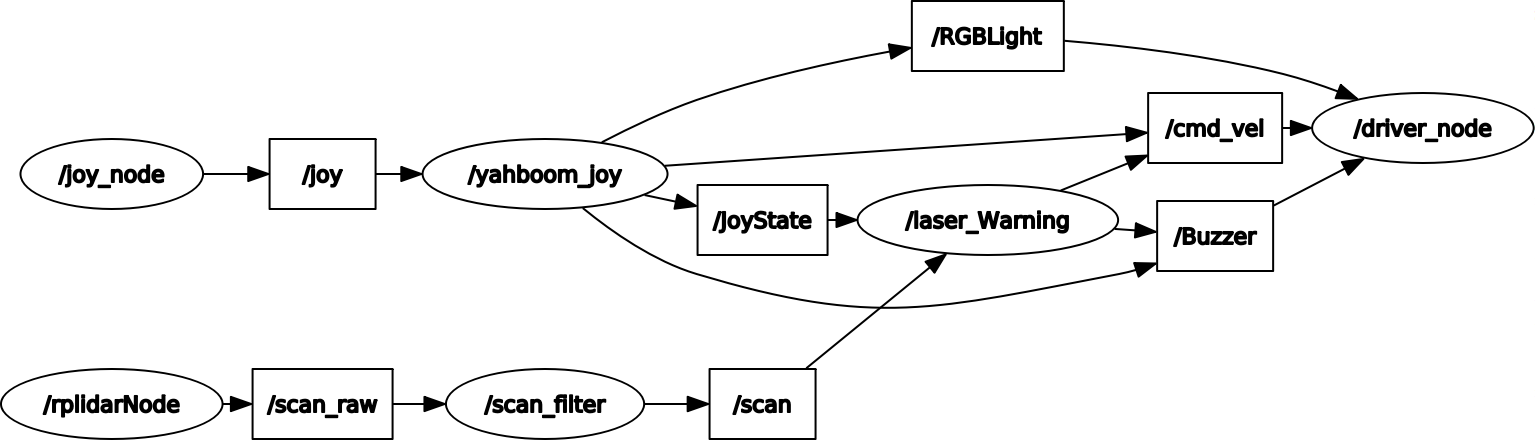
Node view
xxxxxxxxxxrqt_graph
3.2 source code analysis
launch file
- base.launch
xxxxxxxxxx< launch ><!-- start lidar node--><!-- Activate the lidar node -->< include file = "$(find rplidar_ros)/launch/rplidar.launch" /><!-- Start the car chassis drive node--><!-- Start the car chassis drive node -->< include file = "$(find yahboomcar_bringup)/launch/yahboomcar.launch" /><!-- handle control node --><!-- Handle control node -->< include file = "$(find yahboomcar_ctrl)/launch/yahboom_joy.launch" /></ launch >
- laser_Warning.launch
xxxxxxxxxx< launch ><!-- start the base.launch file--><!-- Launch the base.launch file -->< include file = "$(find yahboomcar_laser)/launch/base.launch" /><!-- start lidar guard node --><!-- Activate the Lidar guard node -->< node name = 'laser_Warning' pkg = "yahboomcar_laser" type = "laser_Warning.py" required = "true" output = "screen" /></ launch >
laser_Warning.py source code flow chart:
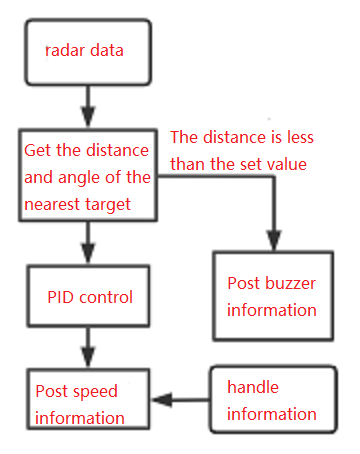
According to the position of the target, the trolley rotates autonomously to face the target; when the target is close to a certain distance, the buzzer alarms.