Welcome to ROSMASTER X3 Plus repository
17.3 Voice control color block transport
3. Voice control color block transportation
3.1. Function Description
Through interaction with the voice module, the camera can recognize the color of the color block, accurately identify it, pick it up, and autonomously navigate to the point marked on the map, put down the color block, and finally autonomously navigate back to the origin for the next recognition.
3.2. Start
xxxxxxxxxx#Raspberry Pi 5 master needs to enter docker first, please perform this step#If running the script into docker fails, please refer to ROS/07, Docker tutorial~/run_docker.sh3.2.1. Function package path
xxxxxxxxxx~/yahboomcar_ws/src/yahboomcar_voice_ctrl/
3.2.2. Start
Note: Multi-machine communication configuration needs to be implemented between rosmaster X3Plus and the virtual machine. You can view the content of "yahboomcar Course\06, Linux Operating System\04. Multi-machine Communication Configuration" for configuration.
xxxxxxxxxx#rosmaster X3Plus launchroslaunch yahboomcar_voice_ctrl voice_transport_base.launch<PI5 needs to open another terminal to enter the same docker container
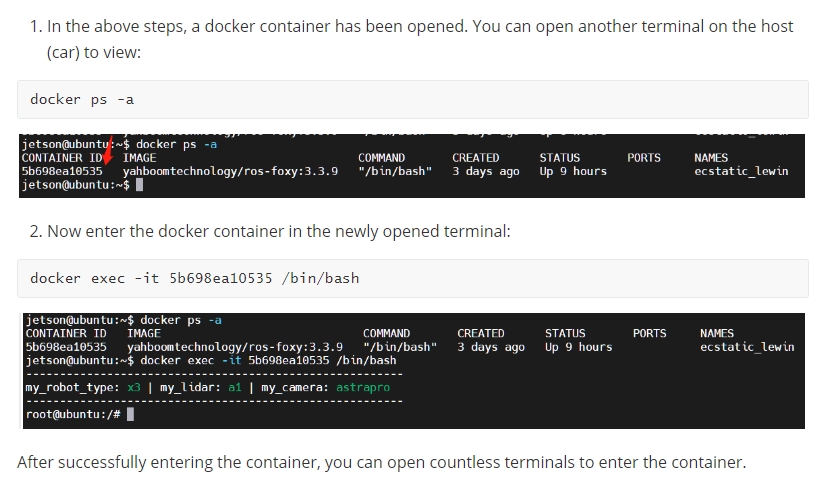
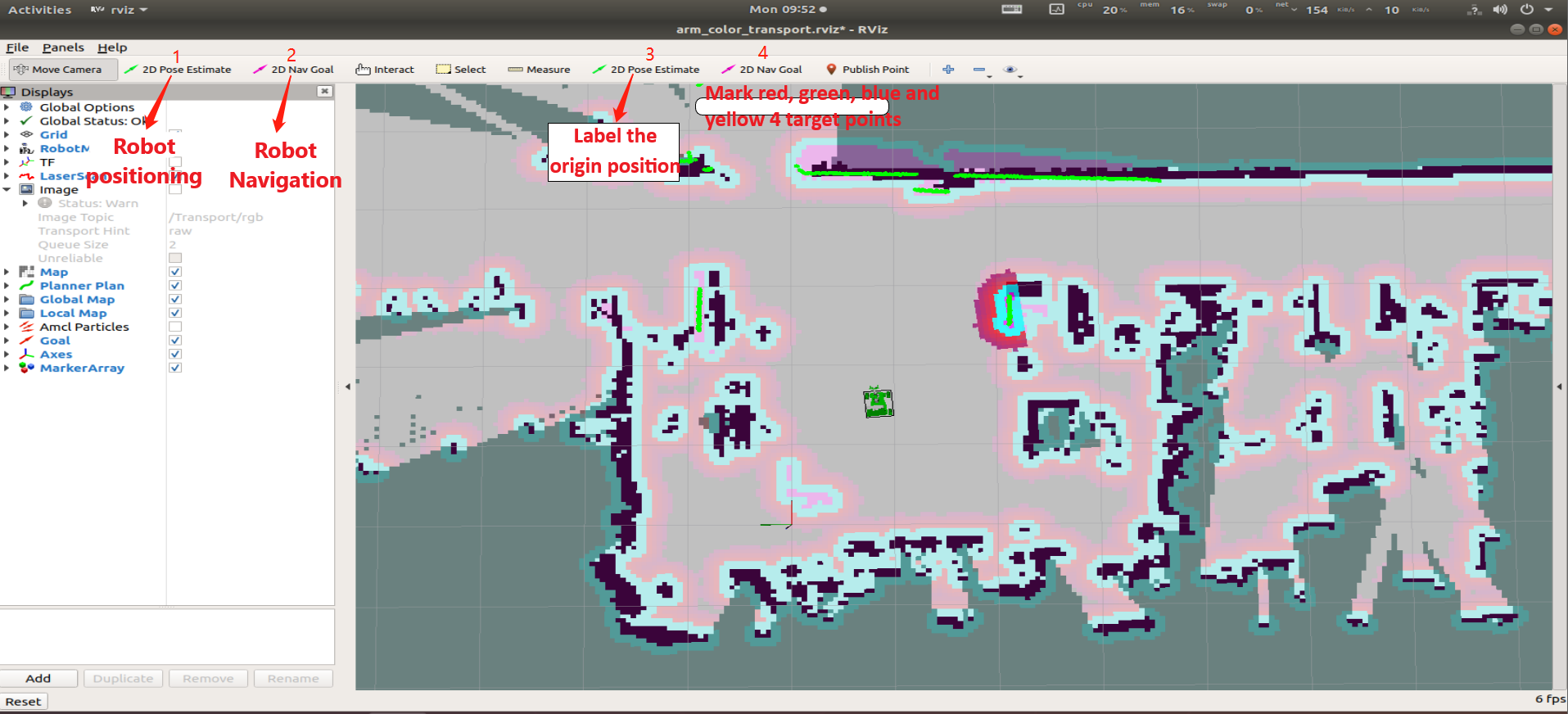
xxxxxxxxxxpython3 ~/yahboomcar_ws/src/yahboomcar_voice_ctrl/scripts/voice_color_transport.py#Virtual machine startuproslaunch arm_color_transport transport_rviz.launchEach tool annotation on the virtual machine rviz is as shown in the figure below,
step 1
In rviz, use tool 1 to calibrate and position the rosmaster
Step 2
In rviz, use 3 tools to mark the origin of rosmaster. This origin is the position where the car automatically returns after putting down the color block.
Step 3
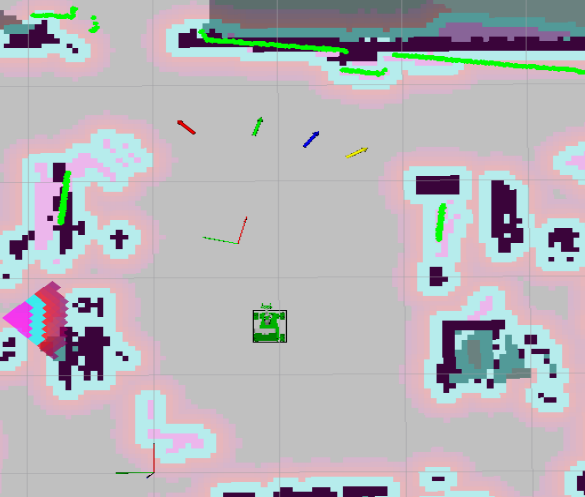
In rviz, use the 4 tools to mark red, green, blue and yellow destinations on the map in sequence. After the rosmaster's robotic arm gripper picks up the color block, it will navigate to the destination corresponding to the color of the color block. It is best to put the four The points are marked in a row, and the front and back distance cannot be too far apart. Otherwise, when planning the path, you may hit the color block.
Step 4
Say "Hello, Xiaoya" to rosmaster, wake up the voice module, and then tell it to sort the colors, and then place the color block on the camera on the robotic arm, about 5-7cm away. After the camera recognizes the color block, it will After a beep, the recognition result will be broadcast; pass the color block to the gripper, and after another beep, the gripper will tighten the color block; then it will autonomously navigate to the position of the corresponding color, put down the color block, and finally return to the marked origin.
3.2.3. Launch file analysis
voice_transport_base.launch
xxxxxxxxxx <!-- Load map || Load map --> <node name="map_server" pkg="map_server" type="map_server" args="$(find yahboomcar_nav)/maps/$(arg map).yaml"/> <include file="$(find yahboomcar_nav)/launch/laser_bringup.launch"/> <!-- AMCL adaptive Monte Carlo positioning --> <include file="$(find yahboomcar_nav)/launch/library/amcl.launch"/> <!-- Navigation core component move_base --> <include file="$(find yahboomcar_nav)/launch/library/move_base.launch"/> <!-- web_video_server --> <node pkg="web_video_server" type="web_video_server" name="web_video_server" output="screen"/> <node pkg="arm_color_transport" type="DrawMarker.py" name="draw_marker" required="true" output="screen"/>3.2.4. Core code voice_color_transport.py
code path
xxxxxxxxxx~/yahboomcar/src/yahboomcar_voice_ctrl/scriptsCore code analysis
1). Import the corresponding library file
xxxxxxxxxxfrom transport_common import ROSNav #Navigation-related librariesfrom Speech_Lib import Speech #Libraries related to speech recognition broadcasting2), several important states
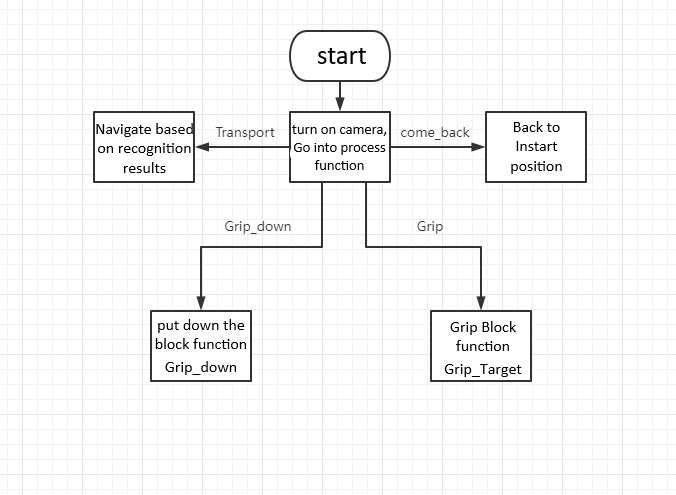
xxxxxxxxxxself.model = "Grip": After recognizing "color sorting", the init state changes to the ready-to-catch stateself.model = "Grip_Target": Gripping state, after executing the gripping state, it changes to Transport stateself.model = "Transport" state: transport color block state, it will change to Grip_down state after reaching the destinationself.model = "Grip_down": Lower the paw and put down the color block. After the action is completed, it will enter the comeback function, and then the state will change to come_backself.model = "come_back": Return to the original state. After returning, reset all data and states.3), several important functions
xxxxxxxxxxget_color: Identify colors and increase the accuracy of color recognition by adjusting HSVGrip_Target: clip color block functioncomeback: Return to origin functionGrip_down: lower claw functionbuzzer_loop: prompter, buzzer functionProgram Description
In the main function, after opening the camera and obtaining the camera data, the image data is passed into the process function, and then the mode status is judged in the process function, and then the corresponding function execution program is entered.
3.3. Program flow chart